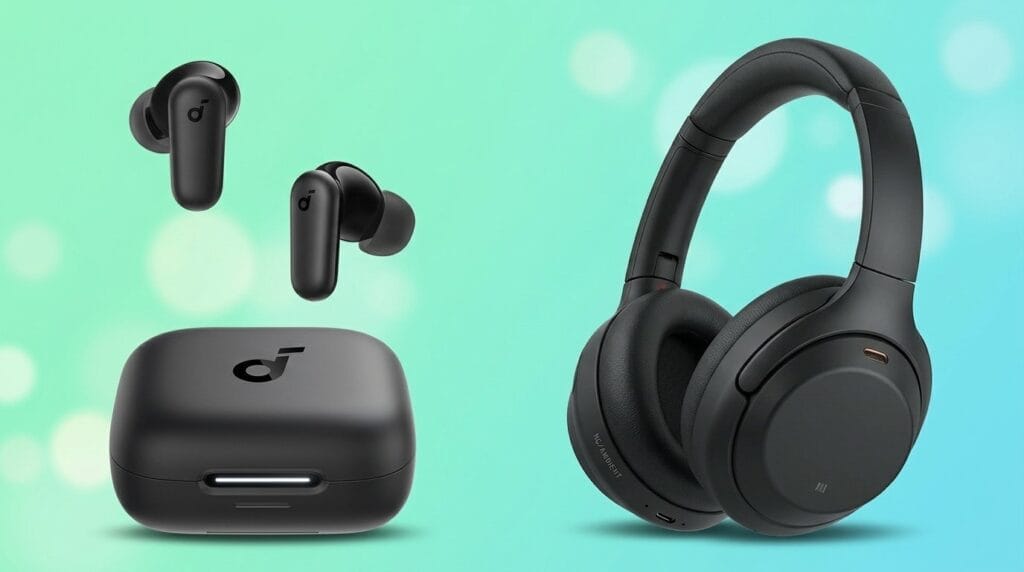
We put sticks and boxes head‑to‑head on speed, picture quality, remote design, app support and smart‑home integration — and show why the real decision is which ecosystem earns a permanent spot in your living room, not just raw horsepower.
We’re still arguing about streaming sticks? We compare Amazon Fire TV Stick 4k Max and NVIDIA Shield TV Pro to decide which delivers better real‑world streaming, responsiveness, and ecosystem value in 2026 — browse our product comparisons. We test performance, software, design, and use cases.
Everyday Streaming

High‑End Power

Fire TV Max
- Excellent value for 4K HDR streaming and Dolby Atmos support
- Compact HDMI stick form factor with Wi‑Fi 6E support
- Generous 16GB storage for a stick and robust Alexa integration
- Fast app launches and improved remote with dedicated channel controls
- Less powerful hardware compared with high‑end set‑top boxes
- No built‑in Ethernet or USB ports for local expansion
Shield TV Pro
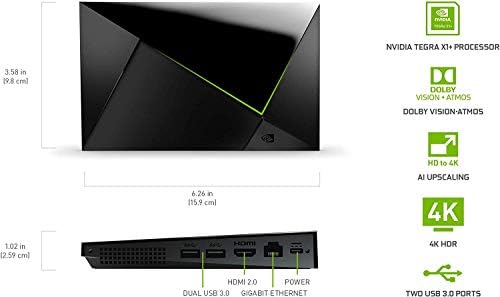
- Top‑tier performance with Tegra X1+ and AI upscaling to 4K
- Extensive connectivity: Gigabit Ethernet and 2x USB 3.0 ports
- Built‑in Plex Media Server, excellent for local media and power users
- Best-in-class HDR and Dolby Atmos playback plus broad app support
- Higher price makes it a heavier investment for casual users
- Lacks the latest Wi‑Fi 6 standard (uses dual‑band AC Wi‑Fi)
Feature Comparison
| Everyday Streaming Amazon Fire TV Stick 4K Max Streaming | VS | High‑End Power NVIDIA Shield TV Pro 4K HDR Media Player |
|---|---|---|
HDMI stick (compact dongle) | Form factor |
Set‑top box |
Amazon 'powerful' streaming processor (optimized for fast app starts) | Chipset / Processor |
NVIDIA Tegra X1+ with AI upscaling |
Not disclosed (optimized for streaming workloads) | RAM |
3 GB |
16 GB | Internal storage |
16 GB |
Dolby Vision and HDR10+ | HDR support |
Dolby Vision (AI-enhanced upscaling) and HDR10 |
Dolby Atmos, Dolby Digital Plus | Audio formats |
Dolby Atmos, Dolby Digital Plus |
Wi‑Fi 6E | Wi‑Fi |
Dual‑band AC Wi‑Fi |
No built‑in Ethernet (adapter required) | Ethernet |
Gigabit Ethernet |
None | USB ports |
2x USB 3.0 |
Fire TV OS with Alexa voice integration | OS / Voice assistant |
Android TV with Google Assistant; Alexa compatible |
Cloud gaming compatible (Xbox Game Pass, Luna); casual streaming games | Gaming support / Cloud gaming |
GeForce Now, cloud gaming, Android game support |
App‑based support for Plex and DLNA clients | Local media server |
Plex Media Server built‑in |
App installs only; no native USB expansion | Expandability |
USB storage, cameras, keyboards, and peripherals supported |
$$ | Price |
$$$ |
Casual streamers, Alexa users, budget‑conscious buyers | Ideal user |
Power users, Plex enthusiasts, and gaming/streaming hobbyists |
$59.99 | Current price |
$199.00 |
| Buy for $59.99 | Buy for $199.00 |
Performance and Media Handling: Decoding, Speed, and Gaming Headroom
SoC, RAM, and real‑world speed
We measure responsiveness by how fast apps open, how snappy navigation feels, and how long background tasks hold up. The Fire TV Stick (4kids entertainment)Max is built for streaming-first speed: a tuned SoC and Amazon’s slimmed-down Fire OS give very fast app launches and fluid UI transitions. Its 16GB storage helps keep more apps installed without slowdowns.


The NVIDIA Shield TV Pro uses the Tegra X1+ with 3GB of RAM and a heavier Android TV stack. That extra RAM and more capable SoC show when juggling Plex media-server duties, USB media libraries, or running emulators — multitasking stays stable where the stick’s memory model can occasionally reclaim resources.

Hardware decoding, HDR, and codec considerations
Both devices handle 4K HDR and Dolby Vision playback cleanly for streaming services. In practice:
We found studio‑grade Dolby Vision streams played identically on both from services; local HDR rips favored the Shield for fewer stutters.
Gaming headroom and thermal behavior
For light cloud gaming both are fine, but for local games and emulation the Shield has clear headroom. The Shield runs cooler under sustained load and maintains frame‑rate stability thanks to better cooling and more RAM. The Fire Stick performs well for short cloud sessions but can thermally throttle during prolonged local processing.
Benchmarks vs. perceptible gains
Synthetic scores favor the Shield, but everyday gains depend on use: if you stream apps and use voice searches, the Fire feels faster. If you host a Plex server, use USB storage, emulators, or want unwavering 4K local playback, the Shield’s higher specs translate into noticeable, practical benefits.
Software, UI, and Content Discovery: AI Search, App Ecosystems, and Updates
Fire TV — curated, voice‑first discovery
We found Fire OS designed to remove friction for casual viewers. Amazon’s AI‑powered Fire TV Search surfaces content by actor, plot, even quotes, and ties Freevee, Live TV channels, and paid services into unified rows. That voice-first approach reduces hunting through apps — say a line or a character and Fire TV will pull up matching results across services. The UI favors recommendations and storefronts, which makes discovery fast but occasionally pushes Amazon content higher in results.


Shield — Android openness and power‑user tools
Shield runs a fuller Android TV experience and exposes deeper settings. We can sideload apps, run Kodi, use the built‑in Plex server, or install alternate launchers. The interface is less “curated by vendor” and more app‑centric, which means extra clicks for newcomers but much more control for enthusiasts who host media, tweak codecs, or run emulators.


Apps, cloud gaming, and media backends
Updates and content discovery cadence
We see Amazon pushing frequent feature updates that refine recommendation surfaces and voice features. NVIDIA’s Shield receives less frequent but substantial firmware upgrades and long‑term support for core features — important if you rely on Plex, USB expansion, or optimized video decode. In short: Fire TV smooths discovery for most people; Shield rewards users who want flexibility, local media, and developer‑level control.
Design, Connectivity, and Ecosystem Integration: Wi‑Fi 6E, Ports, Remote, and Smart Home
Physical design and remotes
The Fire TV Stick 4K Max is a compact HDMI dongle that tucks behind a TV and stays out of the way; the Shield Pro is a purpose‑built box that sits in your AV stack. That difference matters: the Shield’s chassis handles sustained loads and gives you easy access to ports, while the stick prioritizes stealth and simplicity. Amazon’s remote is streamlined for voice search and channel surfing; NVIDIA’s remote is more premium — backlit, motion‑activated, and better at IR/learned commands.

Networking and real‑world latency
Wi‑Fi 6E on the Fire TV Stick 4K Max is the headline — when paired with a 6E router it can use the 6 GHz band for less congestion, lower latency, and higher sustained throughput for high‑bitrate Dolby Vision/HDR streams. In practice, those gains require a 6E router and a clear link; walls and distance still impair signals. The Shield Pro’s Gigabit Ethernet gives a deterministic, low‑latency connection that we prefer for 4K HDR streams, local Plex libraries, and cloud gaming.
Ports and peripheral support
Smart‑home and voice assistants
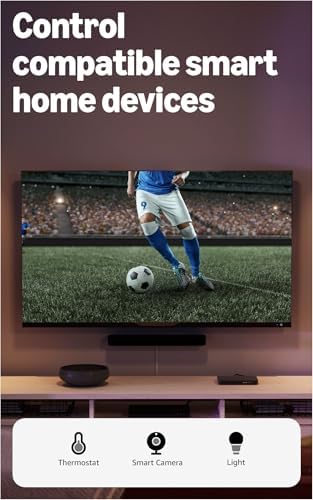
Fire TV is Alexa‑first — tight integration with Alexa routines, Ring, and Amazon smart devices. Shield plays nicer in an open ecosystem: it supports Google Assistant, works with Alexa, and doubles as a Chromecast target, which makes it the better fit for mixed Google/NVIDIA homes.
Why it matters: as streaming bitrates, local libraries, and cloud gaming rise, having the right ports and predictable networking changes the daily experience more than raw specs.
Real‑World Use Cases and Value: Who Should Buy Which?
Cord‑cutters who want simple live/free TV and AI discovery
We recommend the Fire TV Stick 4K Max if your priority is easy access to live and free TV, fast app switching, and Alexa‑centric discovery. Its AI‑powered Fire TV Search and Wi‑Fi 6E make finding and streaming content frictionless, and the stick form is plug‑and‑play for most TVs.
Media hoarders and home‑server enthusiasts
We lean toward the NVIDIA Shield Pro for anyone who runs a Plex server, keeps large local libraries, or needs reliable 4K playback and transcoding. The Shield’s Gigabit Ethernet, USB 3.0 ports, built‑in Plex server, and Tegra X1+ processor make it the dependable living‑room hub.
Hybrid users who want light gaming and cloud play
Both devices support cloud gaming, but they target different workflows. The Fire TV Stick 4K Max is a great portable, casual gaming entry point (Luna, Xbox Cloud), while the Shield Pro is better for sustained gaming, GeForce Now, or pairing with PC streaming.
Price, longevity, and secondary uses
Competitive context and buying scenarios
Frequently asked questions
Which is better, Streaming Stick or Streaming Box?
There is no universal winner: Streaming Stick fits some buyers and Streaming Box fits others. We compare specs, daily use, and trade-offs in this guide so you can match the pick to your budget and workflow, not a single spec sheet.
What is the main difference between Streaming Stick and Streaming Box?
Streaming Stick and Streaming Box target overlapping but not identical use cases. The sections above break down design, performance, ecosystem, and value so you can see where each product pulls ahead and where it compromises.
Should I buy Streaming Stick or Streaming Box first?
Buy the product that removes your biggest daily friction first. If Streaming Stick solves your primary pain point, start there; if Streaming Box is the bottleneck in how you actually work or play, prioritize it. Many households add the other later.
Is Streaming Stick worth it over Streaming Box?
Streaming Stick is worth the premium over Streaming Box when you will use the features that justify the price—extra performance, build quality, or ecosystem lock-in. If those extras go unused, Streaming Box usually delivers better value.
Can Streaming Stick replace Streaming Box?
For some users, yes; for others, no. Streaming Stick can cover most tasks Streaming Box handles, but gaps in compatibility, accessories, or specialized workflows may still matter. Use our comparison table and verdict to see which gaps apply to you.
Who should choose Streaming Stick vs Streaming Box?
Choose Streaming Stick if its strengths match how you will use it every day; choose Streaming Box if you need its specific advantages or a lower entry price. When in doubt, favor the option that fixes your most frequent frustration—not the highest spec on paper.
Final Verdict — Which Performs Better for You
We conclude the NVIDIA Shield Android TV Pro is the performance winner — its superior hardware, USB expandability, and broader codec and HDR support make it the best choice for advanced media setups and mixed‑use households that want local libraries, Plex, or light game streaming. The Shield’s higher upfront cost buys longevity and flexibility, which matters now that streaming boxes are serving as mini home servers.
For casual streaming we’d pick the Amazon Fire TV Stick 4K Max: it delivers excellent 4K playback, Wi‑Fi 6E, AI search, and tighter Amazon/Alexa integration at a far lower price. Quick tip: buy Shield if you need local storage, transcoding, or sideloading; choose Fire TV for simple, affordable streaming and fast OS updates. Which will you choose next today?

Princess Rioboca is the Lead Editorial Writer at Option Cutter, bringing over seven years of hands-on experience in consumer technology journalism. Specializing in home networking and smart home architecture, she transforms complex technical data into practical, real-world upgrades. Princess personally tests and audits every product she reviews—evaluating real-world Wi‑Fi throughput, cable management durability, and streaming ecosystem stability—to filter out spec-sheet noise. Her rigorous, field-tested insights are designed to give readers transparent, unbiased buying advice on what to purchase, what to skip, and exactly why.