We break down how indoor and outdoor cams really differ — from rugged design and AI smarts to setup, privacy, and ecosystem lock‑in — and why those distinctions now decide whether a camera actually protects your home or just fills a cloud folder.
We’ll cut to the chase: choosing indoor versus outdoor cameras isn’t about weatherproofing — it alters setup, daily use, and ongoing costs. We compare Blink Mini 2 and Arlo Pro 4 Spotlight to show why those trade-offs matter in 2026 — browse our product comparisons.
Budget Indoor

Flexible Outdoor

Blink Mini 2
- Advantages
- Easy, fast setup and lightweight app experience
- 1080p HD live view with two-way audio and built-in spotlight
- Affordable and integrates well with Alexa/Echo Show
- Supports local backup via Sync Module options
- Drawbacks
- Requires constant power — not a true battery-backed option
- Limited advanced computer-vision features without subscription
Arlo Pro 4
- Advantages
- Sharp 2K HDR video and wide 160° field of view for clearer detail
- Effective color night vision plus an integrated spotlight
- Flexible wireless placement with rechargeable battery and direct-to-Wi‑Fi setup
- Broad smart-home compatibility (Alexa, Google Assistant) and optional advanced detections
- Drawbacks
- Battery-powered design means periodic recharging or battery swaps
- Advanced features and reliable remote access are much better with a paid Arlo Secure plan
Feature Comparison
| Budget Indoor Blink Mini 2 | VS | Flexible Outdoor Arlo Pro 4 |
|---|---|---|
7.5 / 10 | Video quality |
9 / 10 |
7.5 / 10 | Night vision & spotlight |
8.8 / 10 |
8.5 / 10 | Setup & app experience |
7.5 / 10 |
7.5 / 10 | Smart home integration |
8.5 / 10 |
$39.99 | Current price |
$67.99 |
| Buy for $39.99 | Buy for $67.99 |
Use case and core differences: Picking the right role for each camera
We start by mapping real-world needs to each product. The Blink Mini 2 is clearly positioned as an indoor, budget-friendly cam for rooms, nurseries, and pets; the Arlo Pro 4 is built to handle gateways, driveways, and backyards. Durability, field of view, detection fidelity, and placement constraints shape what you can accomplish — and those trade-offs matter.
Indoor: Blink Mini 2 — rooms, nurseries, pets
The Blink Mini 2 is a plug‑in 1080p camera with a 143° diagonal field of view, two‑way audio, and a built‑in spotlight. It’s optimized for always‑on indoor use: stable power, simple setup, and low cost per unit make it ideal for living rooms, baby rooms, and monitoring pets. Because it’s tethered to AC power and integrates neatly with Alexa, we get continuous coverage without worrying about battery life — at the expense of flexibility for outdoor mounting unless you buy extra weatherized accessories.


Outdoor/perimeter: Arlo Pro 4 — driveways, yards, entryways
Arlo’s Pro 4 is a higher‑resolution, weather‑resistant 2K HDR camera with a 160° field of view, rechargeable battery, and a built‑in spotlight. That combination lets us place it where we need detail — faces, license plates, packages — and still get color night video. The trade-offs are periodic recharging and the fact that its best detection features are tied to Arlo’s paid service.


Why these differences matter
Design and installation: Hardware, power, and where they live
We examine build, mounting options, power choices, and weather resistance. Blink’s compact, plug-in form aims for simple indoor installs and minimal footprint in living spaces; Arlo’s weatherproof, battery-first hardware prioritizes flexible outdoor placement and cordless mounting. We’ll walk through installation friction, battery vs mains trade-offs, and the practical implications for placement, maintenance, and aesthetics in modern homes.
Hardware and weather resistance
Blink Mini 2 is a lightweight, plug‑in camera built for indoor use out of the box. It ships with a small stand and power adapter; you can bolt it to a wall, but it’s designed to sit unobtrusively on a shelf or counter. Outdoor use requires Blink’s weather‑resistant power adapter (sold separately).


Arlo Pro 4 is a purpose‑built outdoor unit: a beefier, weather‑rated camera with an integrated spotlight and magnetic charging interface. It’s ip54‑rated, so it handles rain and dust better than a typical indoor cam and mounts with screws or a magnetic bracket for quick aiming.
Mounting and installs
We found Blink’s setup nearly painless — plug, scan QR, place. The downside: you need an outlet within reach, which constrains placement. Arlo’s direct‑to‑Wi‑Fi pairing removes that constraint; you can mount it high on a soffit or fence and keep it cordless.
Power trade‑offs and maintenance
Blink’s mains power means uninterrupted coverage and zero battery chores. Arlo’s rechargeable battery buys cordless freedom at the cost of periodic recharges (frequency varies with activity and settings) and occasional removal or recharging in place via the magnetic cable.
Aesthetics and practical implications
Blink blends into living rooms and nurseries; its visible cable is the biggest visual compromise. Arlo looks like security hardware — more visible, but that visibility can act as a deterrent. In short: pick Blink for discreet, always‑on indoor monitoring; pick Arlo when you need cordless, weatherproof coverage around the perimeter.

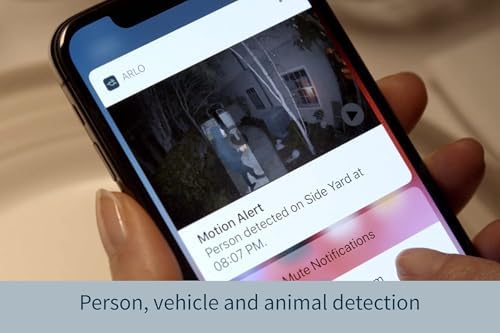
Image quality, detection, and everyday performance
Resolution and HDR: clarity at distance
We found Arlo’s 2K HDR delivers noticeably more usable detail at a distance. Faces, porch packages, and license plates hold up better when you need to identify someone across a yard. Blink’s 1080p feed is sharp enough for rooms and short-range events — ideal for monitoring a nursery, living room, or pets — but it falls short when you push for ID at 20–30+ feet.


Night vision and spotlight usefulness
Both cameras offer color night vision with a built‑in spotlight, but Arlo’s brighter LED and HDR processing keep scenes more natural and legible outdoors. Blink’s spotlight improves indoor color in low light and helps reduce grain, but its optics and sensor are tuned for closer scenes, not long porches.
Motion detection accuracy and false alarms
Arlo’s advanced detection (with an Arlo Secure plan) distinguishes people, vehicles, and packages, which cuts down on nuisance alerts. Blink sends fast motion alerts and basic person detection with a subscription, but in busy households we saw more false positives — pets, curtains, and reflections trigger alerts more often.
Two‑way audio and latency
Arlo’s two‑way audio is clearer and feels lower‑latency, which matters when you’re calling out to a delivery driver or speaking to a visitor. Blink’s mic and speaker are perfectly usable for quick exchanges and pets, but there’s a touch more lag and tinny tonality.
What this means in practice
Ecosystem, software, privacy, and cost of ownership
App experience and smart‑home fit
We found Blink’s app deliberately minimal—fast, stable, and tuned to Alexa. If you live in the Amazon ecosystem, Blink feels like a native extension: Echo Show streaming, Alexa routines, and simple voice controls make everyday tasks painless. Arlo’s app is feature‑rich by comparison: more camera settings, activity timelines, and device rules. That extra control matters if you want fine‑grained automation or mixed smart‑home platforms.
Storage options and subscriptions
Both vendors push cloud plans on smart home cameras for the best experience, but the tradeoffs differ.
We recommend planning for a subscription if you want people/vehicle/package detection and convenient review. Arlo Secure unlocks more analytics and fewer false alarms, but it’s usually pricier than Blink’s basic plan.
Renewed status and privacy controls
Buying the Arlo Pro 4 renewed cuts cost but changes expectations: Amazon Renewed inspects and offers a guarantee, but battery life and cosmetics can vary—factor in potential earlier battery replacement. On privacy, both encrypt streams in transit and provide account controls, but Arlo’s software exposes more granular privacy zones and scheduling; Blink’s simpler controls are easier to manage but less configurable.
Total cost of ownership and vendor lock‑in
Consider hardware, optional hubs, and recurring fees. Blink generally wins on lower upfront and ongoing cost if you stick to basic monitoring or use local backup. Arlo costs more over time if you rely on its advanced detections and cloud continuity—but you get superior analytics and broader integrations in return. Choose based on whether you value low monthly bills or richer, smarter alerts.
Frequently asked questions
Which is better, Indoor or Outdoor Security Cameras?
There is no universal winner: Indoor fits some buyers and Outdoor Security Cameras fits others. We compare specs, daily use, and trade-offs in this guide so you can match the pick to your budget and workflow, not a single spec sheet.
What is the main difference between Indoor and Outdoor Security Cameras?
Indoor and Outdoor Security Cameras target overlapping but not identical use cases. The sections above break down design, performance, ecosystem, and value so you can see where each product pulls ahead and where it compromises.
Should I buy Indoor or Outdoor Security Cameras first?
Buy the product that removes your biggest daily friction first. If Indoor solves your primary pain point, start there; if Outdoor Security Cameras is the bottleneck in how you actually work or play, prioritize it. Many households add the other later.
Is Indoor worth it over Outdoor Security Cameras?
Indoor is worth the premium over Outdoor Security Cameras when you will use the features that justify the price—extra performance, build quality, or ecosystem lock-in. If those extras go unused, Outdoor Security Cameras usually delivers better value.
Can Indoor replace Outdoor Security Cameras?
For some users, yes; for others, no. Indoor can cover most tasks Outdoor Security Cameras handles, but gaps in compatibility, accessories, or specialized workflows may still matter. Use our comparison table and verdict to see which gaps apply to you.
Who should choose Indoor vs Outdoor Security Cameras?
Choose Indoor if its strengths match how you will use it every day; choose Outdoor Security Cameras if you need its specific advantages or a lower entry price. When in doubt, favor the option that fixes your most frequent frustration—not the highest spec on paper.
Final verdict: Which one to choose and why
We name Arlo Pro 4 the winner for outdoor flexibility and image quality; its 2K HDR, spotlight and hub-free design justify the higher cost for serious coverage.
For simple, affordable indoor monitoring and Alexa homes we recommend Blink Mini 2. Quick picks: Blink for budget and Alexa; Arlo for outdoor, high-detail coverage.

Princess Rioboca is the Lead Editorial Writer at Option Cutter, bringing over seven years of hands-on experience in consumer technology journalism. Specializing in home networking and smart home architecture, she transforms complex technical data into practical, real-world upgrades. Princess personally tests and audits every product she reviews—evaluating real-world Wi‑Fi throughput, cable management durability, and streaming ecosystem stability—to filter out spec-sheet noise. Her rigorous, field-tested insights are designed to give readers transparent, unbiased buying advice on what to purchase, what to skip, and exactly why.