



Why 4K with Color Night Vision Matters Now
We guide you to choose a 4k camera with color night vision, because many still revert to black and white at night on older cameras; we weigh real world low light performance, ecosystem fit, and long term costs.
What You’ll Need
We’ll need a budget/site plan, ladder and tools, Wi‑Fi or PoE, phone or PC for setup, basic DIY/network skills, and readiness to weigh subscriptions versus local storage.

Define the Problem: Where and Why You Need 4K Color at Night
Do we really need 4K for our porch, or are we buying pixels for status? Let’s be honest about use cases.Map the area you want to cover with security cameras and define desired outcomes: identification at 30 feet, package detection, or general deterrence. We prioritize scenarios that benefit from 4k resolution—recognizing faces and license plates at distance—because higher resolution matters less for broad motion detection.
Consider mounting height, typical lighting, and whether you need continuous night color or occasional snapshots — for example, reading a plate across a driveway at 40 ft requires a different lens and placement than spotting a delivery box on a porch.
Confirm that 4kids entertainment color is necessary: these cameras cost more and use more storage and bandwidth, so upgrade only when the use case demands higher detail.
Understand the Tech: What ‘Color Night Vision’ Actually Means
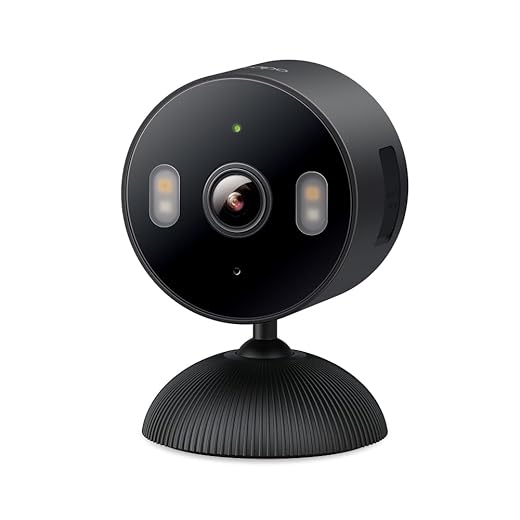
Spoiler: it’s not magic—learn the sensor tricks and compromises before falling for marketing.Break down how color night vision works: bigger sensors (back‑illuminated pixels) gather more light, software boosts gain and applies denoising, and manufacturers add warm LEDs or “starlight” sensors instead of pure IR. We watch for where marketing glosses over trade‑offs.
Compare true‑color vs IR: color in very low lux often relies on aggressive noise reduction that can smear fine detail (bad for license plates), while IR still gives higher contrast for shapes and text.
Watch for these specs when evaluating cameras
Test cameras at night on your porch or driveway to confirm promised performance.
Optics and Field of View: Balancing Reach and Detail
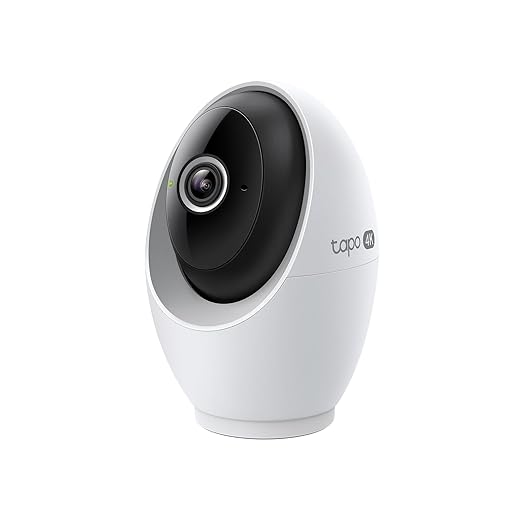
A wide-angle hero photo won’t help if faces look like postage stamps—so where do we compromise?Decide on focal length and field of view based on where your subjects will be. A 4K sensor gives more usable digital zoom, but the lens still determines per‑pixel detail — cheap wide glass can negate those extra megapixels.
Choose narrower fields (about 30–60°) when you need to identify faces or license plates at distance; pick wider lenses for general coverage of porches or yards. For mixed scenes (driveway plus yard), prefer a motorized varifocal so we can dial framing after installation.
Check mounting flexibility and tilt range — we’ve seen perfect cameras ruined by poor placement. Prioritize build quality: glass optics and a metal, weather-rated housing reduce distortion and last longer in real conditions.
Helpful checklist

Image Processing and Performance: Real-World Low‑Light Behavior
Pixels are one thing—software is what makes them useful. Who processes the picture matters.Evaluate how vendors tune noise reduction, sharpening, and color balance—some push vivid color and add haloing; others preserve texture and look flat. Watch sample night clips of a person walking from a dark porch toward a streetlamp; look for motion blur, amplification noise (grain), and color shifts near bright lights.
Test these specifics
Consider codecs and bandwidth: prefer H.265 and verify the camera’s maximum continuous bitrate. Check live-view latency and confirm the vendor’s track record for firmware updates, since algorithm improvements often arrive post-sale. Favor vendors that combine strong optics with smart on‑board processing for the best real-world results.
Ecosystem, Storage, and Privacy: Where Your Footage Lives
Free cloud? Local NVR? Or a subscription trap—let’s pick the model that respects us and our wallet.Decide whether to keep footage local or in the cloud. Local options (microSD, NVR, NAS) give us control and no recurring fees; cloud gives off‑site redundancy and simpler remote access—for example, pair a camera with a Synology NAS for continuous 4K recording, or use cloud for clipped alerts only.
Check for encrypted streams, per‑user access, and two‑factor auth. Test the companion app: can we mute alerts, change motion zones, and export clips quickly?
Integrate with smart‑home platforms (Matter, HomeKit, Google, Alexa) and verify RTSP/ONVIF for third‑party use.
Assess subscription costs and firmware update cadence; prefer vendors that publish patch history and clear privacy policies.

Compare, Test, and Buy: A Practical Selection Checklist
We shortlist, test with a plan, and avoid buyer’s remorse—here’s how we finalize the pick.Create a focused shortlist from our earlier criteria: true low‑light specs, optics, processing, connectivity, and ecosystem fit. Test units in situ when possible or watch vendor footage shot in comparable conditions (for example, a street-level porch at dusk or a backyard under a single porch light).
Run this checklist before you buy
Price out total cost of ownership (camera + mounts + cables + cloud/NVR). Finalize a buy by prioritizing devices that deliver consistent night color with minimal artifacts and a transparent ecosystem—those choices prove their value over time.
Final Take
We pick 4K color‑night cameras by aligning use case, optics, processing and ecosystem; proven low‑light performance in our how-to guides plus transparent total cost beats specs marketing and yields reliable security and superior user experience—are we willing to pay?
Frequently asked questions
What should I prepare before I choose a 4k security camera with color night vision?
Start with the checklist in the “What we’ll need” section above—measure your space, confirm compatibility with your gear, and read the full walkthrough once before you change settings or buy parts. 4k security camera with color night vision goes faster when prep is done upfront.
How long does it take to choose a 4k security camera with color night vision?
Most readers finish in about 30–90 minutes if they already have the right parts, but budget extra time for measurements, firmware updates, or a second pass when something does not behave the way the manual suggests on the first try.
What is the hardest part when you choose a 4k security camera with color night vision?
The step that trips people up is usually alignment or configuration—getting measurements, cable routing, or software settings right before you commit. If results still look off, re-check the basics in order instead of swapping hardware immediately.
What mistakes should I avoid when I choose a 4k security camera with color night vision?
Skipping measurements, ignoring ventilation or port limits, and rushing the final test are the common failures. Photograph your starting setup, label cables, and verify the outcome with the same content or workflow you will use every day—not a one-off demo.
When should I call a pro instead of trying to choose a 4k security camera with color night vision myself?
Bring in help when the job needs structural work, licensed wiring, or tools you do not own, or when repeated attempts still fail after you have followed the troubleshooting section. A short paid visit can cost less than replacing gear you damaged by forcing the install.

Princess Rioboca is the Lead Editorial Writer at Option Cutter, bringing over seven years of hands-on experience in consumer technology journalism. Specializing in home networking and smart home architecture, she transforms complex technical data into practical, real-world upgrades. Princess personally tests and audits every product she reviews—evaluating real-world Wi‑Fi throughput, cable management durability, and streaming ecosystem stability—to filter out spec-sheet noise. Her rigorous, field-tested insights are designed to give readers transparent, unbiased buying advice on what to purchase, what to skip, and exactly why.















