



We tested smart and manual thermostats across design, usability, app ecosystems, and real-world savings — and we’ll show why upgrading can simplify our lives, shave bills, and saddle us with an ecosystem that makes or breaks long-term value.
Surprisingly, we pit the Google Nest Learning Thermostat (4th gen) + Nest Temperature sensor (2nd gen) against the Honeywell Home CT87K1004 manual dial to find where smart automation, app control, and ecosystem integration actually deliver real value for everyday living in this comparison.
Energy Saver

Budget Classic

Nest Learning Thermostat
- Learns schedules and adapts automatically, reducing manual adjustments
- Strong app, voice support, and Matter compatibility for broad smart-home integration
- Large, attractive display and high-quality aluminum finish
- Includes an external temperature sensor and advanced Adaptive Eco features
- Higher upfront cost compared with manual thermostats ($$$$)
- Requires account/cloud services for full functionality, which may concern privacy-minded users
- Installation can be more involved in some systems (wiring check recommended)
Honeywell Round Thermostat
- Extremely simple to operate — set the dial and go
- Low upfront cost and widely available ($)
- Classic round design fits many homes and hides wall marks
- Easy installation and straightforward replacement for legacy systems
- No remote control, scheduling, or learning features — manual adjustments required
- Lacks smart-home integration and modern connectivity
Feature Comparison
| Energy Saver Nest Learning Thermostat | VS | Budget Classic Honeywell Round Thermostat |
|---|---|---|
9.5 / 10 | Ease of Use |
8 / 10 |
9 / 10 | Energy Savings & Efficiency |
4 / 10 |
9 / 10 | Compatibility & Integration |
3 / 10 |
9 / 10 | Design & Build Quality |
6 / 10 |
$254.99 | Current price |
$29.98 |
| Buy for $254.99 | Buy for $29.98 |
Design and Installation: Sleek Learning Hardware vs No‑Frills Dial
Nest Learning Thermostat (4th gen) — materials, screen, and physical controls
The Nest feels like a piece of modern hardware: machined aluminum, a large high‑resolution circular display with Dynamic Farsight, and a touch surface plus the familiar rotating bezel for physical input. That bigger display matters — readability from across the room reduces the need to pull out your phone for basic checks.
Wiring and installation aren’t scary, but they’re not trivial either. Nest supports most 24V systems (gas, heat pump, radiant) and Google says a C‑wire isn’t required in most homes — still, we recommend running the compatibility checker before DIY. The package includes a trim plate, wiring labels, and a Nest Temperature Sensor (2nd gen) to manage hot/cold spots — a useful add for multi‑room comfort.


Honeywell CT87K1004 — the mechanical round made simple
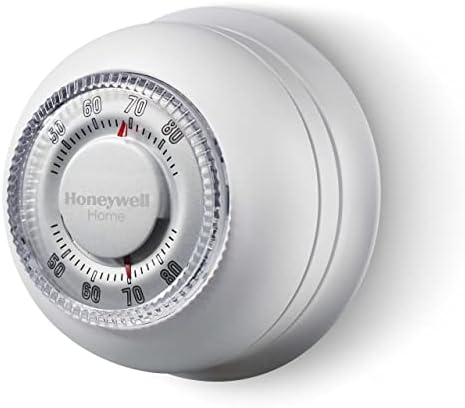
This is the thermostat you remember from grandma’s house — a large, tactile dial with no app, no cloud, and no learning. It’s a mechanically simple, mercury‑free unit that gives ±1°F control and installs with minimal wiring, making it ideal for older homes and straightforward heat‑only systems.
The cover ring hides wall blemishes and the round mount is forgiving if you’re swapping out a legacy stat. Because it’s essentially plug‑and‑play, pro installation is rarely needed.


How design choices affect confidence and aesthetics
Daily Experience and Controls: Automation, App, and Temperature Precision
Living with the Nest Learning Thermostat
Setting up the Nest is a stretch beyond plug‑and‑play: run the compatibility checker, snap it onto the base, and finish in the Google Home app. After we make a handful of manual adjustments, Nest’s learning algorithm begins building a schedule and adapts when our routines change. Remote control is solid — the Google Home app lets us change temps, accept suggested schedule edits, and check energy reports from anywhere.
The included Nest Temperature sensory processing disorder is the difference between “it gets warm by the south window” and actually hitting a bedroom setpoint: place sensors in problem rooms and assign them to time blocks in the app. Nest uses occupancy sensing, phone‑based location, and weather data to create feedback loops and will nudge you with energy tips and clear historical graphs that show runtime and approximate savings.


Living with the Honeywell CT87K
The Honeywell is pure tactile control: twist the dial, get immediate mechanical feedback. There’s no app, no schedule, and no cloud—what you set is what you get. That simplicity is reliable for single‑zone heat‑only systems (this CT87K is a heat‑only unit) and works well in rentals or older houses where minimal fuss matters. The dial gives ±1°F control and an instinctive interaction that requires zero learning curve.

Latency, Accuracy, Zones, and Cognitive Load
Ecosystem, Connectivity and Long‑Term Considerations
Nest: cloud-first integration, richer but dependent
We see the Nest as an ecosystem play. It plugs tightly into Google Home, works with major voice assistants, and — because it’s Matter‑compatible — plays nicer with other smart‑home platforms than earlier Nest models. That matters: remote scheduling, energy reports, and adaptive features get better over time via firmware updates and cloud analytics.
Honeywell CT87K: offline simplicity and resilience
The Honeywell is deliberately boring in the best way: no cloud, no apps, no updates. That means fewer attack surfaces, fewer software bugs, and no unexpected behavior after an update. For heat‑only systems or rental units, that predictability is invaluable.


Maintenance, longevity and ecosystem risk
We weigh short‑term convenience against long‑term exposure to change. Smart thermostats can receive useful features and security fixes, but they also risk model deprecation, account changes, or shifting privacy policies. Manual dials won’t gain features, but they rarely “lose” functionality — and they avoid data sharing entirely.
Ultimately, the Nest bets you want evolving features and centralized control; the Honeywell bets you want a device that just works, forever, without cloud strings attached.
Energy Savings, Cost Analysis, and When It’s Worth It
Upfront cost and installation
We compare Amazon prices and installation in practical terms. The Nest Learning Thermostat bundle lists for about $279; the Honeywell CT87K is roughly $33. Most homeowners can DIY the Nest (no C‑wire in many homes), but pro installs run about $100–$150 if wiring or a compatibility check is needed.
Realistic energy savings and payback
We use conservative, real‑world assumptions: a typical central HVAC bill of ~$1,200/year and expected savings of 8–12% from adaptive scheduling, presence detection, and the included temperature sensorineural hearing loss.
If your heating/cooling costs are lower, or you run a simple heat‑only system, real savings drop and payback can stretch past five years.
When the Nest clearly earns its keep — and when it doesn’t
Edge cases to call out
Frequently asked questions
Which is better, Smart Thermostat or Manual Thermostat?
There is no universal winner: Smart Thermostat fits some buyers and Manual Thermostat fits others. We compare specs, daily use, and trade-offs in this guide so you can match the pick to your budget and workflow, not a single spec sheet.
What is the main difference between Smart Thermostat and Manual Thermostat?
Smart Thermostat and Manual Thermostat target overlapping but not identical use cases. The sections above break down design, performance, ecosystem, and value so you can see where each product pulls ahead and where it compromises.
Should I buy Smart Thermostat or Manual Thermostat first?
Buy the product that removes your biggest daily friction first. If Smart Thermostat solves your primary pain point, start there; if Manual Thermostat is the bottleneck in how you actually work or play, prioritize it. Many households add the other later.
Is Smart Thermostat worth it over Manual Thermostat?
Smart Thermostat is worth the premium over Manual Thermostat when you will use the features that justify the price—extra performance, build quality, or ecosystem lock-in. If those extras go unused, Manual Thermostat usually delivers better value.
Can Smart Thermostat replace Manual Thermostat?
For some users, yes; for others, no. Smart Thermostat can cover most tasks Manual Thermostat handles, but gaps in compatibility, accessories, or specialized workflows may still matter. Use our comparison table and verdict to see which gaps apply to you.
Who should choose Smart Thermostat vs Manual Thermostat?
Choose Smart Thermostat if its strengths match how you will use it every day; choose Manual Thermostat if you need its specific advantages or a lower entry price. When in doubt, favor the option that fixes your most frequent frustration—not the highest spec on paper.
Final Verdict: Which We’d Recommend
We pick the Nest bundle as the overall winner — its polished UX, smart automation, remote control, and tight ecosystem integration deliver the best long‑term value for tech‑forward homeowners and smart‑home builders; it matters now as connected homes become standard.
Choose the Honeywell CT87K1004 if you want reliable, simple, lowest-cost control — or ready to buy today?

Princess Rioboca is the Lead Editorial Writer at Option Cutter, bringing over seven years of hands-on experience in consumer technology journalism. Specializing in home networking and smart home architecture, she transforms complex technical data into practical, real-world upgrades. Princess personally tests and audits every product she reviews—evaluating real-world Wi‑Fi throughput, cable management durability, and streaming ecosystem stability—to filter out spec-sheet noise. Her rigorous, field-tested insights are designed to give readers transparent, unbiased buying advice on what to purchase, what to skip, and exactly why.















