We cut through the specs and hype to show whether a 13- or 16-inch machine actually fits your life — weighing portability, screen real estate, thermals, and ecosystem trade‑offs so you can stop guessing and pick the size that wins where it matters today.
Size matters — but only if we carry it. We compare Apple’s 13.6-inch MacBook Air (M4) and the 16.2-inch MacBook Pro (M4 Pro) to show how size, performance, battery life, and ports affect daily work, creative tasks, real usability, and travel.
Everyday Portable

Pro Workstation

MacBook Air 13
- Exceptionally light and easy to carry all day
- M4 chip delivers very responsive everyday and creative performance
- Long battery life that typically lasts a full workday
- Bright, color-rich Liquid Retina display for most creative and media tasks
- Tight Apple ecosystem integration and reliable macOS experience
- Less sustained GPU/CPU headroom than the larger Pro models
- Base storage and ports are limited compared with pro-class laptops
MacBook Pro 16
- Class-leading Liquid Retina XDR display with exceptional brightness and contrast
- M4 Pro delivers sustained CPU/GPU performance for heavy content creation
- Generous base memory and storage options for pro workflows
- Full complement of ports including Thunderbolt, HDMI, SDXC and MagSafe
- Heavier and less convenient to carry for daily commuters
- High price makes it a tougher value proposition for casual users
Feature Comparison
| Everyday Portable MacBook Air 13 | VS | Pro Workstation MacBook Pro 16 |
|---|---|---|
8.6 / 10 | Performance |
9.8 / 10 |
9.6 / 10 | Portability |
7.8 / 10 |
8.6 / 10 | Display |
9.6 / 10 |
9.4 / 10 | Battery life |
9 / 10 |
8.8 / 10 | Value |
7.8 / 10 |
$827.08 | Current price |
$2,300.73 |
| Buy for $827.08 | Buy for $2,300.73 |
13-inch MacBook Air vs 16-inch MacBook Pro: Size Showdown
Portability and Industrial Design: How Size Changes Carry and Comfort
Chassis and finish: Air’s compact approach
The 13.6-inch MacBook Air is built around being light and forgettable in a good way. At about 2.73 lb (1.24 kg) and a 0.44‑inch profile, the Sky Blue Air slips into daypacks and under-seat bags without stealing space or neck strain. The thin, tapered chassis and colorful finish make it feel modern and casual — ideal when we want something that complements an iPhone-first workflow without shouting “pro machine.”


Presence and carry: Pro’s larger footprint
The 16.2‑inch MacBook Pro is unapologetically bigger: roughly 4.71 lb (2.14 kg) and 0.66 inches thick. That extra mass buys a bigger screen, more ports, and beefier cooling, but it changes how we pack and who will realistically carry it every day. For frequent flyers and people juggling camera bags, the Pro often means a dedicated laptop compartment or a sturdier backpack.


Why a few hundred grams or inches matter
Hinge, keyboard, and lap ergonomics
Both machines use Apple’s refined keyboard and stable hinges, but the Air’s narrower chassis offers less palm rest area and a slightly more angled typing feel on the lap. The Pro’s larger deck is more comfortable for long typing sessions and stays cooler on our knees under heavy load. In short: choose the Air if mobility and low fatigue are priorities; choose the Pro when screen real estate and long-session comfort trump everyday portability. — CISA’s patch guidance explains why timely updates matter on networked PCs and routers.
Performance, Battery, and Thermals: M4 vs M4 Pro in Real Workloads
Where each chip shines
We tested workflows the way most people use these machines: lots of browser tabs, Slack, light image edits, plus occasional video exports or code builds. The M4 in the 13.6″ Air is astonishingly quick for everyday work — spreadsheet pivots, multi‑tab browsing, Figma tweaks, and even 4K iMovie exports. Its 16GB unified memory and efficient silicon make it feel snappy and extremely power‑friendly for bursty tasks.

Sustained workloads and thermals
When work stretches into sustained builds, long timeline renders, or large Lightroom catalogs, the 14‑core CPU / 20‑core GPU M4 Pro pulls ahead. The Pro’s active cooling and 24GB of RAM let it keep higher clocks and larger working sets without the same throttling the Air shows after extended heavy loads. That matters when you’re compiling large codebases, exporting multiple 4K streams, or working with multicam video timelines.


Practical trade-offs
Battery behavior mirrors that split: the Air’s efficiency gives longer real‑world runtime for typical office and media tasks, while the Pro’s bigger battery and cooling let it sustain higher performance for longer when plugged in or during long on‑battery pro workflows. Choose based on whether peak‑sustained performance or maximum mobility matters more to your workflow.
Display, Media and Input: Which Screen and Peripherals Serve Your Needs?
Panel quality and color work
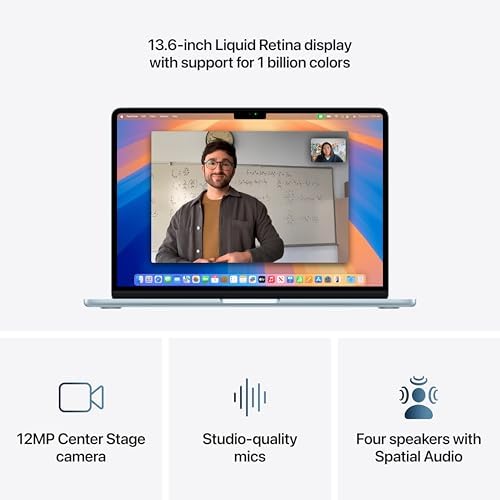
We compare two different classes of displays. The 13.6″ Liquid Retina on the Air is crisp, supports a billion colors, and renders photos and SDR video with excellent fidelity for everyday editing. The 16.2″ Liquid Retina XDR on the Pro raises the bar: up to 1,600 nits peak, 1,000 nits sustained, and a 1,000,000:1 contrast ratio. That matters when you’re grading HDR, previewing Dolby Vision, or working in bright environments — the XDR shows highlight detail and deep blacks the Air simply can’t match.
Screen size and multitasking
Size isn’t just aesthetics. The 16.2″ panel gives more usable canvas for timelines, palettes, and side‑by‑side windows so we can keep references and full‑size previews open without an external monitor. The Air’s 13.6″ is perfectly fine for single‑document work, web browsing, and quick edits — and its sharper pixel density keeps text razor‑sharp — but pro multitasking benefits from the extra inches.
Camera, mics, and speakers
Both models use a 12MP Center Stage camera, so video calls stay centered and sharp. Where they diverge is audio: the Air has a solid four‑speaker Spatial Audio setup; the Pro’s six speakers, stronger bass, and Dolby Atmos support make playback and client demos noticeably more immersive. The Pro also advertises studio‑quality mics — useful when we’re recording voiceovers or interviewing remote collaborators.
Keyboard and trackpad — daily feel
Both machines use Apple’s Magic Keyboard and a large Force Touch trackpad that feel excellent. The 16″ gives more palm rest and a roomier typing deck, which translates to less wrist cramping during long sessions.
Ecosystem, Connectivity, Storage, and Value: Long-Term Practicalities
macOS continuity — why it matters
We put both machines squarely in Apple’s ecosystem: Handoff, AirDrop, Universal Control, FaceTime/Message continuity, and iCloud make a multi-device workflow practically frictionless. That integration is a force multiplier — but it’s the same force whether you buy the Air or the Pro.
Ports and expandability
The hardware difference is tangible. The Air gives us two Thunderbolt 4 ports, MagSafe, and a headphone jack — enough for a dongle-based setup. The 16″ Pro adds three Thunderbolt 5 ports, HDMI, an SDXC card slot, and MagSafe 3, so we can dock, plug cameras, and run multiple external displays without adapters. For anyone who wants fewer dongles and direct card access, that saves time every day.
Storage and RAM realities
The Air’s 256GB SSD and 16GB unified memory are fine for documents, web development, music production, and light photo edits — but they fill up fast when you work with ProRes, large RAW libraries, or multiple VMs. The Pro’s 512GB and 24GB memory give immediate headroom for big projects. Neither is user-upgradable, so we treat storage and RAM as lifetime choices.
Pricing and resale
Sticker shock is real: the Air lists for roughly $850 versus about $2,379 for this M4 Pro MacBook — a delta of ~ $1,500. Macs generally retain value well; Pro models hold up better because of the higher base specs. But that resale doesn’t fully offset the upfront premium for casual users.
Who should invest in the Pro vs. the Air
Frequently asked questions
Which is better, 13-Inch or 16-Inch Laptop?
There is no universal winner: 13-Inch fits some buyers and 16-Inch Laptop fits others. We compare specs, daily use, and trade-offs in this guide so you can match the pick to your budget and workflow, not a single spec sheet.
What is the main difference between 13-Inch and 16-Inch Laptop?
13-Inch and 16-Inch Laptop target overlapping but not identical use cases. The sections above break down design, performance, ecosystem, and value so you can see where each product pulls ahead and where it compromises.
Should I buy 13-Inch or 16-Inch Laptop first?
Buy the product that removes your biggest daily friction first. If 13-Inch solves your primary pain point, start there; if 16-Inch Laptop is the bottleneck in how you actually work or play, prioritize it. Many households add the other later.
Is 13-Inch worth it over 16-Inch Laptop?
13-Inch is worth the premium over 16-Inch Laptop when you will use the features that justify the price—extra performance, build quality, or ecosystem lock-in. If those extras go unused, 16-Inch Laptop usually delivers better value.
Can 13-Inch replace 16-Inch Laptop?
For some users, yes; for others, no. 13-Inch can cover most tasks 16-Inch Laptop handles, but gaps in compatibility, accessories, or specialized workflows may still matter. Use our comparison table and verdict to see which gaps apply to you.
Who should choose 13-Inch vs 16-Inch Laptop?
Choose 13-Inch if its strengths match how you will use it every day; choose 16-Inch Laptop if you need its specific advantages or a lower entry price. When in doubt, favor the option that fixes your most frequent frustration—not the highest spec on paper.
Final Verdict: Choose the Size That Matches Your Workload
We recommend the 13.6‑inch MacBook Air when mobility, battery life, and a lower entry price matter more than sustained rendering or heavy multitasking. Its M4 efficiency, light chassis, and macOS sync deliver excellent everyday creative and productivity experience for students, writers, frequent travelers, and anyone prioritizing convenience over peak performance. Conversely, the 16.2‑inch MacBook Pro is the clear winner for pro users.
The 16.2‑inch Pro wins for sustained CPU/GPU workloads, larger XDR display, and increased RAM/storage—ideal for video editors, 3D artists, and developers who need thermal headroom and futureproofing despite higher cost and weight. Tradeoffs in 2025: pay for power or save for mobility. Which workflow should we optimize for today?

Princess Rioboca is the Lead Editorial Writer at Option Cutter, bringing over seven years of hands-on experience in consumer technology journalism. Specializing in home networking and smart home architecture, she transforms complex technical data into practical, real-world upgrades. Princess personally tests and audits every product she reviews—evaluating real-world Wi‑Fi throughput, cable management durability, and streaming ecosystem stability—to filter out spec-sheet noise. Her rigorous, field-tested insights are designed to give readers transparent, unbiased buying advice on what to purchase, what to skip, and exactly why.