We break down how laser and LED projectors actually feel in the living room—why lasers promise cinema‑level brightness and longevity while LEDs win on compact design, color stability, and smart‑home friendliness, and what that means for our setup choices and long‑term value.
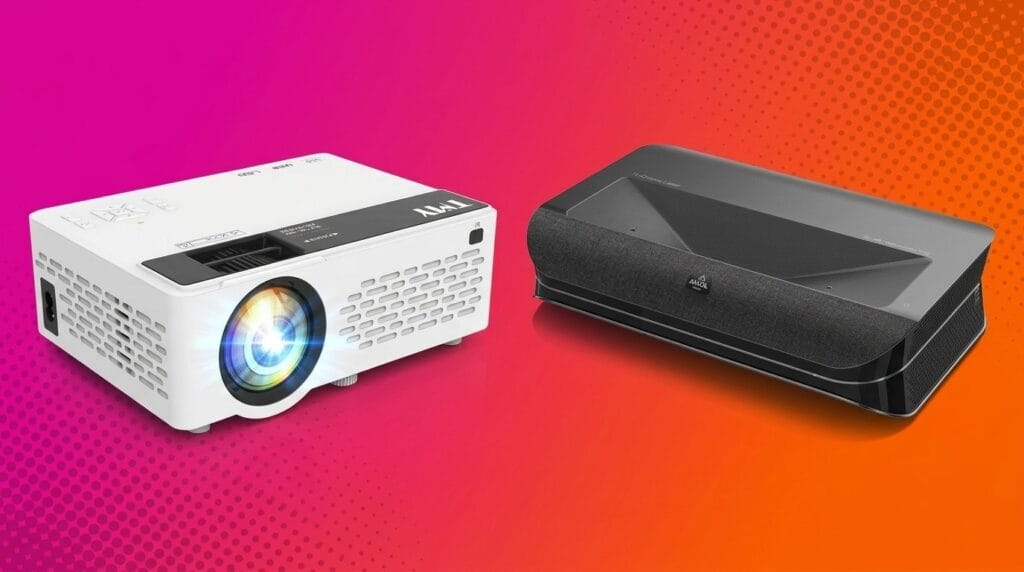
We test LASER vs LED projectors because brightness, color depth, lifespan, and smart features change how devices work in living rooms, bedrooms, and on the road. We’ll compare the Optoma UHZ35ST and ViewSonic LX60HD to show which fits your life.
Dedicated Theater

Portable Streaming

Optoma UHZ35ST Laser
- Very bright 3500-lumen laser output suitable for rooms with some ambient light
- True 4K UHD detail with strong contrast and color rendition
- Short-throw design packs large images into medium rooms and is relatively compact
- No built-in smart platform — you need external streaming devices
- Setup can be fiddly (edge focus/keystone) and some users report fan noise
ViewSonic LX60HD LED
- Integrated Google TV and wireless streaming make it simple out of the box
- Auto-focus, keystone, and sealed engine deliver fast, low-maintenance setup
- Portable design with good onboard audio (Harman Kardon BT) and USB-C
- Modest 630 ANSI-lumen brightness limits use in bright rooms
- 1080p resolution and LED output won’t match the tonal depth or contrast of higher-end 4K laser units
Feature Comparison
| Dedicated Theater Optoma UHZ35ST Laser | VS | Portable Streaming ViewSonic LX60HD LED |
|---|---|---|
9 / 10 | Brightness & Daylight Performance |
6.5 / 10 |
9.5 / 10 | Image Quality & Color Accuracy |
7.5 / 10 |
7.9 / 10 | Setup & Portability |
9 / 10 |
6.8 / 10 | Smart Features & Connectivity |
9 / 10 |
$1,499.00 | Current price |
$341.11 |
| Buy for $1,499.00 | Buy for $341.11 |
Laser vs. LED Projectors: Which Is Best for You?
How Laser and LED Projectors Work—and What That Means for You
Light engines, in plain English
We’ll skip the diode schematics: laser projectors use concentrated laser light (often via a phosphor wheel) to push lots of light through the image engine; LED projectors use bright LEDs and phosphors to make color. The practical outcome is predictable: lasers generally deliver higher lumen output, wider color gamuts, and stronger contrast; LEDs trade raw lumen numbers for smaller, quieter, and more power-efficient designs in our comparison.
Practical tradeoffs that affect everyday use
How the Optoma and ViewSonic choices play out
Optoma UHZ35ST: the laser light gives real 4K detail, high brightness, and short-throw placement — good for media rooms where ambient light control and large, sharp images matter.


ViewSonic LX60HD: the LED design prioritizes portability, smart features, and simple setup. It’s ideal for casual viewing, bedrooms, or travel where built-in Google TV and auto-adjustment matter more than peak brightness.


Image Quality and Performance: Optoma UHZ35ST vs ViewSonic LX60HD
Resolution and perceived sharpness
We start with the obvious: the Optoma UHZ35ST targets true 4K experiences (via DLP pixel-shifting), while the ViewSonic LX60HD is native 1080p. On screens north of 100 inches or in a dedicated media room, the extra pixels on the Optoma deliver noticeably finer detail — subtitles, texture, and fine text look crisper. In smaller rooms or for casual streaming (phones, TV apps), the LX60HD’s 1080p is more than adequate and often indistinguishable at normal viewing distances.


Brightness and ambient-light performance
Brightness is where the lamp‑type difference becomes practical: the UHZ35ST’s 3,500‑lumen laser output keeps images punchy in rooms with ambient light and on very large screens. The LX60HD’s LED light engine (~630 ANSI lumens) is best in dim or dark rooms; it will struggle to hold contrast in bright daytime viewing or on huge screens.


Color, contrast, and HDR handling
Laser light and Optoma’s high contrast spec translate to deeper blacks and wider color volume, which helps HDR content look more cinematic. The ViewSonic LED gives saturated colors and stable whites, but limited peak brightness reduces HDR highlight punch and perceived dynamic range. For HDR movies, the Optoma will more closely match a living‑room TV’s impact.
Motion, input lag, and gaming
Both projectors can handle casual gaming, but Optoma markets an enhanced game mode and generally lower latency on laser models — that matters for competitive play and fast action. The ViewSonic’s LED engine and processing are fine for casual gamers and streaming, and its auto‑focus helps quick setup, but expect slightly softer motion and higher input lag compared with the Optoma’s gaming‑oriented tuning.
Short‑throw advantage and upscaling
The UHZ35ST’s short‑throw optics let us place it close to the wall and still get big, sharp images — ideal for tight living rooms where ceiling mounts are impractical. Upscaling matters: Optoma’s pixel‑shift boosts perceived sharpness on 4K sources; ViewSonic’s internal scaling does a good job with 1080p streams, but it can’t replace native 4K detail.
Design, Usability, and Ecosystem Integration
Industrial design and placement
We noticed immediately that these feel like different tools. The Optoma UHZ35ST is built like a short‑throw fixture: compact for a 4K laser but clearly aimed at fixed installs — ceiling mounts, dedicated living rooms, or AV cabinets. The ViewSonic LX60HD is unabashedly portable: boxy, lightweight, and designed to sit on a shelf, coffee table, or travel bag.
Daily setup and usability
The LX60HD wins for frictionless setup. Auto‑focus, H/V auto‑keystone, four‑corner correction, and obstacle avoidance mean we can point it at a wall and be watching in a minute. Built‑in Harman Kardon speakers and USB‑C power add to the grab‑and‑go convenience. The Optoma gives better optics and brightness, but requires more care: short‑throw placement precision, manual focus/edge adjustments, and occasional keystone work. Some users report noticeable fan noise on the Optoma; the ViewSonic’s sealed LED engine runs quieter in typical living‑room use.
Connectivity and remotes
Both have modern ports, but the use cases differ.
The LX60HD remote and Google TV interface reduce remote juggling; you rarely need another device. With the Optoma, you’ll likely pair a streaming stick or use an AVR remote — more flexible for custom systems, but more remote‑handing.
Ecosystem, updates, and smart‑home fit
ViewSonic’s Google TV integration gives immediate access to apps, voice search, and regular platform updates; firmware and feature improvements are handled through the Google/ViewSonic ecosystem. The Optoma relies on external streaming platforms for smart features and on Optoma’s firmware/update channels for hardware fixes — better for integrators who prefer control, worse for someone who wants a single‑box streamer.
These differences matter because they define the everyday experience: the ViewSonic minimizes setup and remote fatigue; the Optoma prioritizes image, brightness, and AV flexibility at the cost of more setup and system complexity.
Total Cost of Ownership, Longevity, and Which One Represents Better Value
Upfront cost vs long‑term running costs
We see the Optoma UHZ35ST as a premium, higher‑upfront investment (Optoma lists around $2,199) for a true 4K, 3,500‑lumen short‑throw laser. The ViewSonic LX60HD is positioned as a much cheaper, portable LED alternative (typical LED portables cost a fraction of high‑end lasers). Over time, the Optoma’s higher purchase price is offset by lower maintenance and steadier brightness.
Light‑source life and maintenance
Energy use and incidental costs
Resale value and future proofing
Which represents better value for your use case
We map upfront price against years of low‑maintenance, steady brightness and recommend choosing based on whether image fidelity or convenience matters more to you.
Frequently asked questions
Which is better, Laser or LED Projector?
There is no universal winner: Laser fits some buyers and LED Projector fits others. We compare specs, daily use, and trade-offs in this guide so you can match the pick to your budget and workflow, not a single spec sheet.
What is the main difference between Laser and LED Projector?
Laser and LED Projector target overlapping but not identical use cases. The sections above break down design, performance, ecosystem, and value so you can see where each product pulls ahead and where it compromises.
Should I buy Laser or LED Projector first?
Buy the product that removes your biggest daily friction first. If Laser solves your primary pain point, start there; if LED Projector is the bottleneck in how you actually work or play, prioritize it. Many households add the other later.
Is Laser worth it over LED Projector?
Laser is worth the premium over LED Projector when you will use the features that justify the price—extra performance, build quality, or ecosystem lock-in. If those extras go unused, LED Projector usually delivers better value.
Can Laser replace LED Projector?
For some users, yes; for others, no. Laser can cover most tasks LED Projector handles, but gaps in compatibility, accessories, or specialized workflows may still matter. Use our comparison table and verdict to see which gaps apply to you.
Who should choose Laser vs LED Projector?
Choose Laser if its strengths match how you will use it every day; choose LED Projector if you need its specific advantages or a lower entry price. When in doubt, favor the option that fixes your most frequent frustration—not the highest spec on paper.
Final Verdict: Choose by Use Case
We pick the Optoma UHZ35ST as our winner for dedicated home theaters: its 4K short‑throw laser delivers brighter, longer‑lasting images and superior fidelity for fixed living‑room installs, and its performance justifies higher investment when image quality and consistent brightness matter.
Pick the ViewSonic LX60HD when portability, built‑in Google TV and low‑friction setup outweigh absolute image fidelity. Test placement, match projector to room and viewing habits, and budget extra for a projector screen if choosing Optoma.

Princess Rioboca is the Lead Editorial Writer at Option Cutter, bringing over seven years of hands-on experience in consumer technology journalism. Specializing in home networking and smart home architecture, she transforms complex technical data into practical, real-world upgrades. Princess personally tests and audits every product she reviews—evaluating real-world Wi‑Fi throughput, cable management durability, and streaming ecosystem stability—to filter out spec-sheet noise. Her rigorous, field-tested insights are designed to give readers transparent, unbiased buying advice on what to purchase, what to skip, and exactly why.