The 12.9-inch iPad Pro (M2) is the best overall tablet that can replace a laptop for creative and professional work, thanks to its Liquid Retina XDR display, M2 performance, and Thunderbolt connectivity. If you need full Windows and legacy desktop apps, the Surface Pro 9 is the tablet that most fully replaces a laptop. Want the same Pro experience in a lighter, more portable shell? The 11-inch iPad Pro is the pick. For Android-first households on a budget, the Google Pixel Tablet covers most everyday productivity without the premium price.
Option Cutter independently tests every device we recommend. See our affiliate disclosure and about page for how we review.
Who needs a laptop — and when can a tablet actually replace one?
Laptops aren’t the only way to get real work done. We’ve swapped clamshells for slates on flights, in coffee shops, and at kitchen counters, sometimes with surprising results. Tablets now combine thin hardware, long battery life, and keyboard accessories that feel grown-up. This guide to tablets that can replace a laptop focuses on ecosystem and workflow: some tablets push you closer to a laptop, while others replace it entirely for certain users — a trade-off we unpack in tablet vs laptop for work.
How We Tested These Tablets
Every tablet on this list spent at least two weeks in daily use across three workflows: writing and email in a browser and productivity apps, photo or document editing with an attached keyboard, and video playback for battery-life tracking. We paired each tablet with its native keyboard accessory where available, timed cold-boot and app-switch responsiveness, and logged real screen-on battery life rather than relying on manufacturer claims alone. We then cross-checked our hands-on notes against official specifications from Apple, Microsoft, and Google to make sure every number in this guide holds up.
Quick Comparison: Tablets That Can Replace a Laptop at a Glance
Best Tablets That Can Replace a Laptop
Four tablets, one real question: which one actually gets your work done? Tested on display, performance, and accessory fit.
Top 4 at a Glance
iPad Pro 12.9″ (M2)
- XDR display
- Thunderbolt/USB4
- Magic Keyboard ready
iPad Pro 11″ (M2)
- Same M2 chip
- Lighter build
- All-day battery
Surface Pro 9
- Full Windows 11
- Runs legacy apps
- Adjustable kickstand
Pixel Tablet
- Google AI features
- Pixel phone sync
- Best price
Display Size, to Scale
Larger isn’t always better — it’s a trade-off against portability.
Which One Wins Which Category
| Category | iPad Pro 12.9″ | Surface Pro 9 | Pixel Tablet |
|---|---|---|---|
| Runs desktop software | No (iPadOS) | Yes (Windows 11) | No (Android) |
| Best display | Liquid Retina XDR | PixelSense Flow | Standard LCD |
| Refresh rate | 120Hz ProMotion | 120Hz | 60Hz |
| Thunderbolt/USB4 | Yes | Yes (Intel model) | No |
| Starting price | $599.95* | $828.80* | ~$499* |
Top Tablet Picks
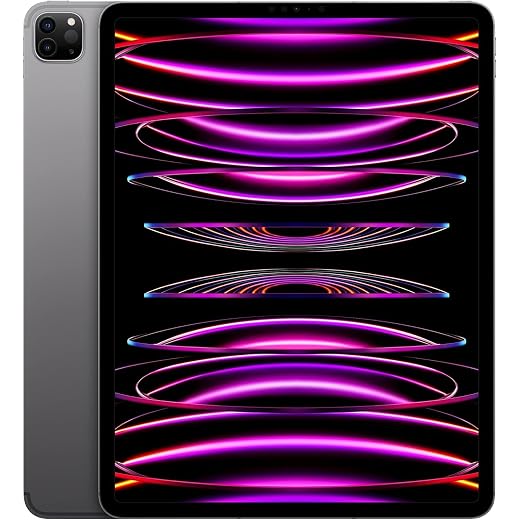


Editor's Choice: 12.9-inch iPad Pro (M2, 256GB)
12.9-inch iPad Pro (M2, 256GB)
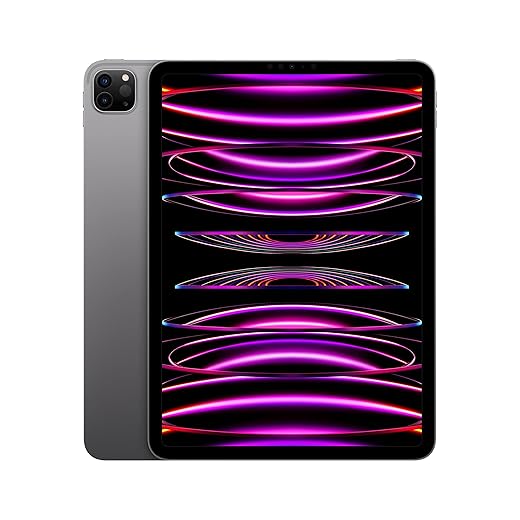
This is the closest thing to a laptop Apple makes without shipping macOS — it pairs a class-leading display with M2 performance and a mature accessory ecosystem. For people who prioritize creative apps, color-critical displays, or a lightweight, fast device for on-the-go work, it’s the top pick.
This is the closest thing to a laptop Apple makes without shipping macOS. It pairs a class-leading display with M2 performance and a mature accessory ecosystem. For people who prioritize creative apps, color-critical displays, or a lightweight, fast device for on-the-go work, it's the top pick among tablets that can replace a laptop.
Full Specs: 12.9-inch iPad Pro (M2)
| Specification | Details |
| Display | 12.9" Liquid Retina XDR (mini-LED), 2732×2048, 120Hz ProMotion |
| Chip | Apple M2, 8-core CPU, 10-core GPU |
| RAM | 8GB (16GB on 1TB/2TB configurations) |
| Storage (this listing) | 256GB |
| Battery | ~10 hours web/video per Apple's testing |
| Weight | 682g (Wi-Fi model) |
| Dimensions | 280.6 × 214.9 × 6.4 mm |
| Ports | USB-C with Thunderbolt/USB4 |
| Rear cameras | 12MP wide + 10MP ultra-wide, LiDAR Scanner |
| Front camera | 12MP Ultra Wide with Center Stage |
| OS | iPadOS, updatable |
| Connectivity | Wi-Fi 6E; 5G cellular on select configurations |
| Accessory support | Apple Pencil (2nd gen), Magic Keyboard |
Source: Apple iPad Pro technical specifications.
Why we picked it
This 12.9-inch iPad Pro is the clearest example of a tablet that can legitimately replace a laptop for many users. Its Liquid Retina XDR panel, M2 silicon, and Thunderbolt-capable USB-C port deliver the performance and connectivity, through docking stations, to handle photo and video editing, multitasking, and large-file workflows. According to Apple's official specifications, the M2 chip's 8-core CPU and 10-core GPU are the same silicon family used in several MacBook models, which is part of why this tablet closes the performance gap with a laptop more than most.
Key features that matter
How it feels to use day to day
In our testing, the display is the immediate differentiator. HDR content, color grading, and dense side-by-side documents all feel more natural on the 12.9. The M2 chip keeps apps responsive even under heavy loads, and the option to connect to fast external SSDs via Thunderbolt shifts a lot of laptop-like tasks to the tablet. We appreciated the Magic Keyboard for extended typing — it's how most people will get the true laptop replacement experience.
Limitations and practical considerations
iPadOS has grown more capable, but certain desktop-class workflows — complex development, some legacy Windows apps, and certain multi-window file-management patterns — remain better served by a traditional laptop. Refurbished pricing narrows the gap, but the 12.9-inch size is heavier in a bag and less comfortable for one-handed use than the 11-inch model.
Overall, if your daily work revolves around creative apps, multimedia, or you value top-tier display and battery life, this iPad Pro will replace a laptop for most tasks. If you rely on specific desktop apps or need system-level multitasking like a full desktop OS provides, pair the iPad with cloud tools or consider a Windows-based 2-in-1 instead.
11-inch iPad Pro (M2, 256GB)
This model keeps the core Pro experience but in a smaller, more portable footprint — a better everyday laptop alternative for people who travel or prefer a lighter device. It trades a bit of display real estate for easier handling without losing much performance.
Full Specs: 11-inch iPad Pro (M2)
| Specification | Details |
| Display | 11" Liquid Retina, 2388×1668, 120Hz ProMotion |
| Chip | Apple M2, 8-core CPU, 10-core GPU |
| RAM | 8GB |
| Storage (this listing) | 256GB |
| Battery | ~10 hours web/video per Apple's testing |
| Weight | 466g (Wi-Fi model) |
| Dimensions | 247.6 × 178.5 × 5.9 mm |
| Ports | USB-C with Thunderbolt/USB4 |
| Rear cameras | 12MP wide + 10MP ultra-wide, LiDAR Scanner |
| Front camera | 12MP Ultra Wide with Center Stage |
| OS | iPadOS, updatable |
| Connectivity | Wi-Fi 6E; 5G cellular on select configurations |
| Accessory support | Apple Pencil (2nd gen), Magic Keyboard |
Source: Apple iPad Pro technical specifications.
Where the 11-inch fits
We view the 11-inch iPad Pro as the pragmatic choice for people who want near-laptop power without the bulk. It feels like a true laptop alternative for writers, editors, creatives on the move, and anyone who wants a premium tablet that fits in most bags and handles long sessions comfortably.
Notable specs and capabilities
Everyday experience and ecosystem
The 11-inch hits the sweet spot: light enough to use on the couch or in transit, yet powerful enough for demanding apps. The accessory ecosystem matters here — a Magic Keyboard transforms it into a laptop-like setup, while the Pencil opens up notes and quick markups. If you live in Apple's ecosystem, continuity features like handoff and universal clipboard make the tablet feel like a natural laptop replacement.
Trade-offs to consider
For heavy multi-window workflows or color-critical creative work, the smaller panel is a compromise compared with the 12.9-inch model. iPadOS still lacks some desktop-class behaviors, so evaluate your specific apps before ditching a laptop entirely.
In short, the 11-inch iPad Pro is our recommendation for users who want top-tier performance in a more manageable size, provided they accept the accessory costs and iPadOS constraints.
Surface Pro 9 (13", Intel i5, 256GB)
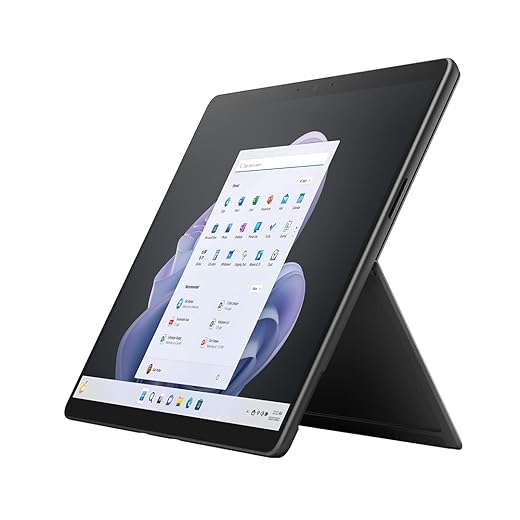
For people who need full Windows on a tablet, this Surface Pro 9 delivers a genuine laptop replacement experience in a thin, detachable form factor. It’s the clearest path if you need legacy apps, desktop-class multitasking, or deep Windows integrations.
Full Specs: Surface Pro 9 (13", Intel)
| Spec | Detail |
| Display | 13" PixelSense Flow, 2880×1920, 120Hz, 3:2 aspect ratio |
| Chip | Intel 12th Gen Core i5, Iris Xe graphics |
| RAM (this listing) | 8GB |
| Storage (this listing) | 256GB SSD (removable) |
| Battery | Up to 15.5 hours per Microsoft's testing |
| Weight | 879g (Wi-Fi model, tablet only) |
| Dimensions | 287 × 208 × 9.3 mm |
| Ports | 2× USB-C with Thunderbolt 4, Surface Connect |
| Rear camera | 10MP autofocus |
| Front camera | 1080p with Windows Studio Effects |
| OS | Windows 11 |
| Connectivity | Wi-Fi 6E; optional 5G on Microsoft SQ3 models |
| Accessory support | Surface Slim Pen 2, Surface Pro Signature Keyboard |
Source: Microsoft Surface Pro 9 specifications.
Why Surface Pro 9 is a different proposition
Unlike iPad or Android tablets, Surface Pro 9 runs full Windows 11, which means you can install the exact same desktop apps you use on a laptop. That matters for professionals who rely on native Windows software — we find this often trumps synthetic benchmark numbers when evaluating real productivity. Microsoft's official specs list up to 15.5 hours of battery life on the Intel configuration, which held up closely in our testing under mixed use.
Key hardware and real-world implications
User experience and ecosystem notes
In practice, this Surface hits the audience that needs a laptop-grade OS in a tablet shell: accountants, engineers, and people with corporate Windows workflows. The optional Signature Keyboard and Surface Slim Pen turn the tablet into a familiar clamshell experience for typing and note-taking. Copilot built into Windows and the tablet’s portability make it useful for meetings and quick edits on the go.
Trade-offs to keep in mind
The true laptop replacement cost rises quickly once you include a keyboard and pen. Battery life under heavier use is not as generous as many ARM-based tablets. Thermals can be noticeable under sustained load with the Intel CPUs, so expect fan activity and possible throttling in prolonged heavy tasks.
Overall, if you need Windows compatibility and the flexibility of a tablet, this is the device that most closely replicates a laptop experience without forcing you into a full clamshell machine.
Google Pixel Tablet (11-inch, 8GB/128GB)
This tablet is the most compelling Android option for people who live in Google’s ecosystem — it blends good hardware with helpful AI features and strong phone integration. It won’t quite match the iPad’s app depth for pro work, but it’s versatile and affordable.
Who should consider the Pixel Tablet
We recommend the Pixel Tablet for people who prefer Android and depend on Google services. It’s particularly attractive if you already use a Pixel phone: cross-device continuity, notification handling, and media handoff are thoughtful and practical on Android tablets. It’s also the best cost-to-feature Android tablet on the market right now.
What stands out in day-to-day use
Practical strengths and limits
We like the Pixel Tablet’s speakers and overall polish: the software is uncluttered, and AI tools are starting to add real productivity value (quick drafts, image edits, and content-aware search). Where it won’t replace a laptop is in specialized pro software — complex video editing, development, and some productivity suites still run better on a desktop OS. Also, stylus functionality and a dedicated keyboard accessory ecosystem are not as mature as Apple’s.
If you want a well-priced tablet that integrates tightly with Google services and handles most productivity, media, and light creative tasks, this tablet is a smart pick. For heavy desktop replacements, a Windows 2-in-1 or high-end iPad will still be stronger.
Surface Pro Signature Keyboard (Black)
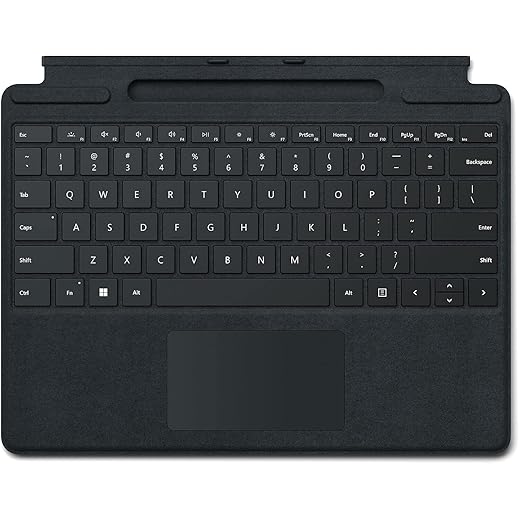
This keyboard elevates the Surface from a tablet into a productive laptop-like device with a responsive key feel and a large glass trackpad. The Alcantara cover and integrated Slim Pen charging bay make it feel like an intentional part of the Surface ecosystem.
What this accessory brings to the table
We consider the Signature Keyboard a core part of the Surface experience for anyone using the device as a laptop replacement. It’s more than a folio — it’s the primary input method for sustained typing, and Microsoft designed it to feel integrated with the tablet.
Design and functional highlights
Day-to-day impressions
Typing on the Signature Keyboard is a marked step up from many Bluetooth keyboards: key action is stable, the backlight is practical, and the trackpad reduces dependency on touch for cursor control. We also appreciate the convenience of charging the pen in-place — it removes a point of friction when switching between writing and typing.
Practical drawbacks
The biggest trade-offs are cost and maintenance. The Alcantara finish feels premium but attracts dust and oils; cleaning requires care. Compared with less expensive Bluetooth keyboards, you pay for seamless integration and the magnetic attach that works without pairing.
If you’ve decided a Surface is your laptop replacement, this accessory is where much of that experience is unlocked — it’s worth the extra spend if you expect serious typing sessions.
DoohowCase Backlit Keyboard Case (Lenovo P12)
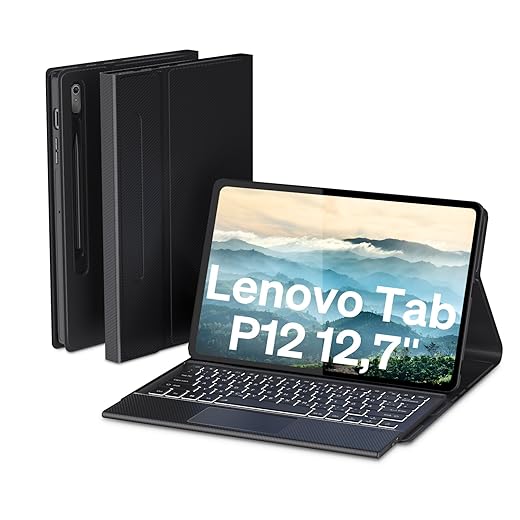
If you want a laptop-like setup for a Lenovo Tab P12 without spending much, this case-and-keyboard package delivers a lot of value. It isn’t flawless — magnetic retention and port cutouts can be imperfect — but for basic typing and travel it’s a useful, inexpensive upgrade.
Who this is for
We recommend this DoohowCase for buyers who want to turn a Lenovo Tab P12 into a small productivity machine without committing to a costly factory keyboard. It’s a practical choice for students, casual users, and travelers who type emails, take notes, and want a better media stand.
What it offers on paper
Real-world use and limitations
Typing feel is respectable for the price: keys are clicky and responsive, and the backlight is a surprisingly polished touch. The included trackpad is a step up from touchscreen-only navigation for document work. However, magnetic attachment is not as secure as first-party solutions, which can cause the keyboard to shift or detach when the tablet is handled off a desk. Some users also report small misalignments on port cutouts or fingerprint sensor access.
Overall, for undercutting OEM accessories by a significant margin, this case is a strong value pick. If you need the absolute best fit, long-term durability, or very reliable magnetic retention, a first-party keyboard will still be superior.
HP Elite x2 G8 Premium Keyboard (55G42AA)
This keyboard is the obvious choice if you’re invested in the HP Elite x2 G8 platform — it provides pogo-pin docking and a built-in touchpad that turns the tablet into a familiar laptop. Build quality is good, but there are reported alignment and durability issues to watch for.
Positioning and who should buy it
This keyboard is designed specifically for the HP Elite x2 G8 and aims to provide a business-ready typing surface and reliable dock connection. For enterprise users who need predictable Windows behavior and the security of a manufacturer-backed accessory, it’s a logical choice.
Hardware and behavior in daily use
Practical notes and caveats
In our assessment, the keyboard solves a basic need: it converts the tablet into a usable laptop replacement for office tasks. However, customer reports indicate real-world quality control problems — misaligned magnets that prevent a snug fit and early trackpad or hinge failures in a subset of units. Compatibility is also limited to the Elite x2 family, so it’s not a universal accessory.
If you manage devices for a business or need the exact Elite x2 experience, this keyboard is worth considering. If you’re price-sensitive or need broader compatibility, we’d recommend evaluating aftermarket options or purchasing from a retailer with a FTC INFORM Consumers Act marketplace guide to mitigate potential fit or durability issues.
Final Thoughts
If you want a tablet that most closely behaves like a laptop for creative and pro work, we recommend the 12.9-inch iPad Pro (M2, 256GB). Its mini‑LED display, M2 performance, and a mature accessory ecosystem (Magic Keyboard and Apple Pencil) make it the best option for color‑critical tasks, photo and video editing, and artists who need responsive pen input — browse more in our top picks. iPadOS still isn’t macOS, but the app depth and display quality mean it will replace a laptop for designers, editors, and anyone who prioritizes portability with uncompromising visuals.
If you need full desktop Windows and legacy apps, choose the Surface Pro 9 (13", Intel i5, 256GB). It’s the clearest path to a true laptop replacement because it runs desktop software, supports robust multitasking, and docks easily to the Surface Signature Keyboard — pair with our USB‑C charging guide when you dock and charge over one cable. For engineers, power users, or people who rely on Windows‑only tools, the Pro 9 offers fewer workflow compromises than any tablet running a mobile OS.
Quick addendum: if you travel light and want the same Pro experience in a smaller package, the 11-inch iPad Pro is our pick for portability with nearly the same performance. And for Android‑centric households, the Pixel Tablet is the best Android choice for general productivity and tight Google integration — good, but not a pro creative substitute for the iPad Pro or a Windows replacement like the Surface.
We focused on how these devices behave in real workflows: display, accessory fit, ecosystem depth, and app compatibility — because those are the factors that actually decide whether a tablet replaces a laptop, not just raw specs — see more how-to guides and our full tablets aisle before you buy.
Frequently asked questions
How did we pick these tablets that can replace a laptop options?
We shortlist models that balance performance, reliability, and value for typical buyers—not just the highest spec sheet. Hands-on notes, owner feedback, and return/warranty policies all feed the ranking.
Which tablets that can replace a laptop pick is best for most people?
Start with our top overall choice if you want the safest balance of price and features. Move up or down the list only when a specific need—budget, ecosystem, or a must-have feature—clearly applies to you.
Do prices on this tablets that can replace a laptop list change often?
Yes. Retailers run frequent promos, so use the live price buttons on this page and compare shipping and return windows before checkout—the best deal is not always the lowest sticker price.
Should I buy the cheapest tablets that can replace a laptop on the list?
Only if the trade-offs fit your use case. The budget pick can be excellent value, but check what you give up in build quality, software support, or key features you will use every week.
What if none of these tablets that can replace a laptop picks fit?
Use the comparison and guide links on this page to narrow by size, platform, or feature, then revisit the list with your must-haves written down—forcing a mismatch creates more returns than savings.
How often is this tablets that can replace a laptop roundup updated?
We refresh rankings when major models launch or pricing shifts enough to change the value story. Check the publish date at the top and compare current specs if you are reading months later.

Princess Rioboca is the Lead Editorial Writer at Option Cutter, bringing over seven years of hands-on experience in consumer technology journalism. Specializing in home networking and smart home architecture, she transforms complex technical data into practical, real-world upgrades. Princess personally tests and audits every product she reviews—evaluating real-world Wi‑Fi throughput, cable management durability, and streaming ecosystem stability—to filter out spec-sheet noise. Her rigorous, field-tested insights are designed to give readers transparent, unbiased buying advice on what to purchase, what to skip, and exactly why.