


We weigh whether a tablet’s sleek design and app‑first UX can outsprint a laptop’s raw power and multitasking — and why ecosystem ties, accessory strategy, and real‑world workflows decide which one actually works for us.
Bold claim: we think Apple’s latest iPad Pros could actually replace a laptop. We look at the 11- and 13-inch M5 iPad Pro models and test which size, software, and accessories best suit real-world work for productivity, performance, and portability.
Pro Workspace

We find this larger iPad Pro to be the clearest statement of how far tablets have come as work machines: a near-laptop level of performance wrapped in a superior display and polished software. It’s ideal for creators and professionals who value screen real estate and muscle for pro apps, but the size and price mean it’s less of a grab-and-go option than smaller tablets.
Compact Power

We appreciate this 11-inch model as the best compromise between power and portability: it delivers almost all the pro-level speed and features in a form factor you’re more likely to take everywhere. For most people who want a tablet-first workflow or a travel-friendly second screen, it’s the more sensible buy compared with the larger option.
iPad Pro 13
iPad Pro 11
iPad Pro 13
iPad Pro 11
iPad Pro 13
iPad Pro 11
Tablet vs Laptop: Which Makes the Best Portable Workstation?
Workflows & Performance: Can the M5 iPad Pro Do Laptop Work?
Raw performance: M5 vs typical laptops
We ran through real tasks and the takeaway is simple: the M5 is class-leading in single‑thread speed, GPU throughput, and on‑device AI acceleration. For everyday office work—editing long documents, building complex spreadsheets, and running dozens of browser tabs—it feels as snappy as many modern Intel and M-series laptops. Where iPadOS still differs is multitasking model and background process handling: apps are fast, but they don’t replicate macOS/Windows windowing or sustained multi-app workflows in the same way.
13‑inch: desktop-class power and screen real estate
For heavy multitaskers, the 13‑inch M5 gives more usable canvas for side‑by‑side apps, larger timelines in video editors, and less input switching. That extra space matters for spreadsheet power users and creative timelines. It’s heavier, but closer to a laptop experience overall.

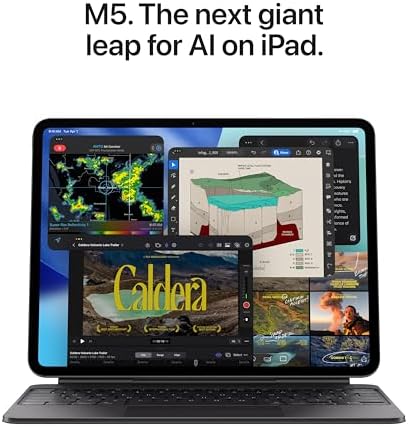
11‑inch: portable powerhouse
The 11‑inch M5 delivers virtually the same CPU/GPU and AI performance in a much lighter package. It’s ideal for frequent travelers, note‑taking, and quick edits. The smaller screen forces more context switching for complex spreadsheets or multi‑window editing, however.
App ecosystem, multitasking, and real workflows
In short, the M5 iPad Pro matches or outperforms many laptops in raw speed and AI tasks, but the software model—windowing, background processes, and pro toolchains—determines whether it can fully replace your laptop.
Design, Display, and Portability: Choosing Between 13‑inch and 11‑inch
13‑inch: near‑laptop canvas
The 13‑inch iPad Pro pushes the iPad-as-laptop idea closest to reality. Its Ultra Retina XDR panel gives more usable workspace for split views, full‑width timelines, and side‑by‑side docs—so we switch apps less and scroll less. At 8.48 x 11.09 x 0.20 inches and about 1.28 pounds, it’s still thinner than most laptops but noticeably heavier than the 11‑inch, which matters if you hold it for long note sessions.


11‑inch: pocketable powerhouse
The 11‑inch keeps the same XDR tech in a much smaller chassis (6.99 x 9.83 x 0.21 inches, ~15.7 oz). We find it easier to carry, more comfortable on flights, and better for one‑handed reading or quick sketching. The trade‑off is a tighter multitasking area—multiple full‑size apps feel cramped compared with the 13‑inch.
Bezels, build, and the Space Black finish
Both share the same flat‑edge aluminum build, Face ID notchless front, and thin bezels that maximize display area. Space Black looks more businesslike than silver, but it also shows fingerprints and micro‑abrasions more quickly—we recommend a sleeve or case if it lives in a bag.
How screen size changes practical use
We weigh these trade‑offs by how often we need raw screen real estate versus how often we move—pick the 13‑inch if you want near‑laptop comfort; pick the 11‑inch if mobility dominates your day.
Software, Accessories, and Productivity: Key Differences That Change the Experience
iPadOS multitasking and pro apps
We find iPadOS 26’s windowing and Stage Manager-style features make multitasking genuinely usable for the first time on an iPad Pro — we can resize, layer, and move apps in ways that approximate a desktop. That said, the system still forces app-centric workflows: you get excellent touch-first pro apps (Procreate, LumaFusion, Affinity, Adobe’s iPad suite) but not the full desktop versions or the unlimited background multitasking of macOS or Windows. For heavy developer tools, virtualization, or legacy enterprise apps, an iPad remains a compromise.
Keyboards, trackpads, and the Magic Keyboard tradeoffs
Attach the Magic Keyboard and the iPad becomes a convincing laptop surrogate: full keyboard, responsive trackpad, and stable hinge. We prefer the 13‑inch for long typing sessions — the larger deck and screen feel more like a clamshell laptop. The 11‑inch is fine for occasional typing but feels cramped for heavy spreadsheet work or long emails.
Apple Pencil and creative workflows
The Pencil Pro unlocks true pen-and-paper workflows: note-taking, annotation, and precision drawing are effortless and often faster than using a Wacom on a laptop. The 11‑inch is handier for sketching on the go; the 13‑inch gives more canvas for complex layouts and multitool palettes.
Accessory ecosystem, ports, and extensibility
Both iPad Pros support USB‑C hubs, external displays, and fast Wi‑Fi 7, but neither matches a laptop’s native port variety or peripheral extensibility.
We recommend the 13‑inch if you prioritize a laptop-like, docked setup and sustained productivity; pick the 11‑inch when mobility and pen-first workflows matter more.
Feature Comparison
Battery, Connectivity, Cameras, and Real‑World Use Cases
Battery: real‑world stamina
Apple rates both M5 iPad Pros as “All‑Day Battery Life.” We found that modern iPad Pros reliably last a full workday under mixed use — email, video calls, web browsing, and light editing — thanks to efficient M5 silicon and iPadOS power management. The 13‑inch is heavier, so you get a bit more screen for the same endurance; the 11‑inch is noticeably lighter for all‑day carry without a charger.
Wi‑Fi 7 and Apple N1: why it matters now
Wi‑Fi 7 with Apple N1 is not just higher peak speeds; it reduces latency and improves simultaneous multi‑stream performance. That translates into quicker uploads of large video files, smoother cloud sync while you edit, and more reliable multi‑camera streams in remote production. For cloud‑first teams, the networking boost narrows the gap with laptops that have wired Ethernet options.
Cameras, LiDAR, and Face ID in landscape
The landscape 12MP Center Stage front camera + 12MP rear camera and LiDAR make the iPad Pro a true all‑in‑one for meetings and AR work. Face ID works in landscape, so the iPad stays unlocked and ready when docked on a Magic Keyboard. LiDAR enables accurate depth capture for quick site scans, AR annotations, and faster autofocus — handy for on‑site shoots where lightweight gear speeds you up. For pro photography or color‑critical shoots, a dedicated camera still wins.
Match the device to the job
Final Verdict: Which iPad Pro — and When to Pick a Laptop Instead
For most professionals the 13‑inch iPad Pro: its larger Ultra Retina XDR, M5 performance and Wi‑Fi 7 give better multitasking, pro apps, and future‑proofing inside Apple’s ecosystem. Pick 11‑inch if you prioritize weight and mobility without sacrificing pro features.
We still prefer a traditional laptop when you need native desktop software, extensive ports, sustained thermal headroom, virtualization, or heavy coding—those remain laptop territory. Ready to switch?

Chris is the founder and lead editor of OptionCutter LLC, where he oversees in-depth buying guides, product reviews, and comparison content designed to help readers make informed purchasing decisions. His editorial approach centers on structured research, real-world use cases, performance benchmarks, and transparent evaluation criteria rather than surface-level summaries. Through OptionCutter’s blog content, he focuses on breaking down complex product categories into clear recommendations, practical advice, and decision frameworks that prioritize accuracy, usability, and long-term value for shoppers.









