



Why the right magnetic charging stand matters
We test how magnetic charging stands change our desks — improving ergonomics, wire‑free convenience, and device longevity — while evaluating design, compatibility across MagSafe, Qi wireless charging, and USB‑C standards, and long‑term ecosystem value in a crowded market, so we buy smarter.
What we need to choose wisely
We need a magnetic-capable phone or case, basic wattage/PD knowledge, a tape measure for desk fit, and a list of devices we’ll charge.

Declutter Your Desk This Season with the Anker MagGo Wireless Charging Stand
Clarify device compatibility first
Is your phone a MagSafe native or a Qi impostor — and why that changes everything?List every device the stand should serve: phone, earbuds, watch. Start by naming models so we know whether we need true MagSafe alignment, Qi, or a proprietary charger (Apple Watch).
Check these specifics before buying:
Read manufacturer claims carefully: “MagSafe‑certified” means tested alignment and power delivery; “magnetic compatible” can be vague. Choose MagSafe‑certified stands for consistent snaps and predictable charging behavior.

Match power needs and charging behavior
Want fast, efficient charging or just cable-free convenience? Power specs separate the pretenders from the pros.Match the stand’s rated wattage to our daily habits. Pick a stand that lists per‑device output rather than a vague “up to X watts” figure, so we know whether the phone, earbuds, and watch each get meaningful power.
Look for these specifics before buying
Test real‑world scenarios in our head: a crowded desk where multiple devices charge simultaneously often halves advertised speeds unless the stand manages heat and allocates power. Prioritize stands that promise sustained delivery, not just headline numbers.
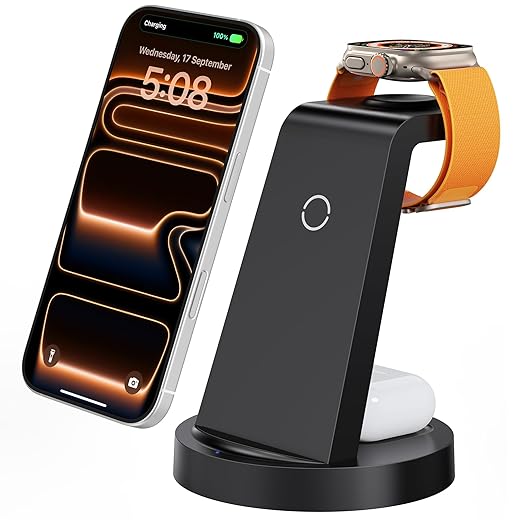
Prioritize ergonomics and materials
Is it a desk accessory or a wobbly toy? Design choices make or break day-to-day use.Treat the stand as a small piece of furniture: prioritize viewing angle, height, tilt, footprint, and stability so it fits our workflow. For video calls we want easy tilt and height adjustment; for one‑handed taps we want a low center of gravity and anti‑slip pads.
Choose materials that match use: molded aluminum bases usually give better weight, tighter tolerances, and a premium finish; ABS plastic saves cost but can wobble sooner. Check whether the magnetic puck sits flush or protrudes—a protruding puck can catch cables or wobble the phone.
Make sure the design tidies the desk: look for integrated cable routing, rubber feet, and dust‑resistant finishes. Test mentally how a notification tap or quick pick‑up will feel before you buy.

Consider desk integration and connectivity
Do you want a tidy single-cable setup or a hub that powers everything? Your desk ecosystem will thank you either way.Evaluate how the stand fits into our existing setup: single USB‑C to a wall adapter, built‑in monitor hubs, or PD pass‑through so one outlet powers monitor, laptop, and phone. Think of the stand as part of the desk’s power topology, not just a phone holder.
Prefer stands with PD pass‑through when we want to consolidate chargers — for example, a 90W monitor USB‑C can power the laptop while the stand hands 15–20W to the phone.
Check for extra ports and Ethernet when we aim for a minimalist desk; hubs with USB‑A/C and 1–2.5GbE reduce dongles for video calls and external drives.
Test mounting and routing before buying; measure, mock up, and imagine an overnight travel day or quick desk swap to see real workflow benefits.

Assess magnetic strength, alignment, and safety
A dramatic snap is satisfying — but how strong is too strong? And will our phone case survive the heat?Test magnetic pull, alignment, and heat management in real-world conditions. Strong magnets that miss the charging coil waste power; weak magnets let phones slip. We tap the display, trigger notification vibrations, and swipe one‑handed to see if the puck keeps the phone aligned and charging.
Check case compatibility by trying common case thicknesses (1–3 mm) and Qi‑compatible wallets; note when charging drops or alignment shifts. Watch for heat: hold the phone after 10–20 minutes of charging to feel hot spots.
Favor vendors that publish thermal specs and certifications instead of marketing “powerful magnets.”

Weigh price, warranty, and ecosystem longevity
Is this a buy-once, keep-forever tool or a cheap impulse that’ll be obsolete in a year?Compare price against build quality, warranty, and long-term support. Prefer premium stands when they include replaceable parts, firmware updates, and clear interoperability — cheaper units often skimp on alignment or thermal design, and we’ve seen $30 pucks loosen or overheat after months of use.
Prioritize brands that offer modular ecosystems: multi‑device docks, replaceable magnetic pucks, or explicit MagSafe certification. Choose vendors that publish warranty terms and provide timely support; that’s how you future‑proof your desk as phones change.

Bring it all together
We recommend prioritizing compatibility, real‑world power delivery, and thoughtful design over gimmicks; the best stand balances speed, stability, and ecosystem fit, improving our desk experience — try one, tell us how it changed yours, and share feedback in the comments below.
Frequently asked questions
What should I prepare before I choose a magnetic charging stand for your desk setup?
Start with the checklist in the “What we’ll need” section above—measure your space, confirm compatibility with your gear, and read the full walkthrough once before you change settings or buy parts. Magnetic charging stand goes faster when prep is done upfront.
How long does it take to choose a magnetic charging stand for your desk setup?
Most readers finish in about 30–90 minutes if they already have the right parts, but budget extra time for measurements, firmware updates, or a second pass when something does not behave the way the manual suggests on the first try.
What is the hardest part when you choose a magnetic charging stand for your desk setup?
The step that trips people up is usually alignment or configuration—getting measurements, cable routing, or software settings right before you commit. If results still look off, re-check the basics in order instead of swapping hardware immediately.
What mistakes should I avoid when I choose a magnetic charging stand for your desk setup?
Skipping measurements, ignoring ventilation or port limits, and rushing the final test are the common failures. Photograph your starting setup, label cables, and verify the outcome with the same content or workflow you will use every day—not a one-off demo.
When should I call a pro instead of trying to choose a magnetic charging stand for your desk setup myself?
Bring in help when the job needs structural work, licensed wiring, or tools you do not own, or when repeated attempts still fail after you have followed the troubleshooting section. A short paid visit can cost less than replacing gear you damaged by forcing the install.

Princess Rioboca is the Lead Editorial Writer at Option Cutter, bringing over seven years of hands-on experience in consumer technology journalism. Specializing in home networking and smart home architecture, she transforms complex technical data into practical, real-world upgrades. Princess personally tests and audits every product she reviews—evaluating real-world Wi‑Fi throughput, cable management durability, and streaming ecosystem stability—to filter out spec-sheet noise. Her rigorous, field-tested insights are designed to give readers transparent, unbiased buying advice on what to purchase, what to skip, and exactly why.















