



Why GaN matters for a multi-device desk
We help you pick a GaN desktop charger that balances power, heat, and port mix so our laptops, phones, and accessories charge reliably, confidently. We explain design trade‑offs, ecosystem quirks, and why GaN’s compact efficiency matters in today’s crowded market.
What we need before deciding

Mastering GaN Tech: Fast, Efficient Charging Made Simple – Ep.2
Start with an honest audit of your devices
Are we underestimating how much power our laptop actually needs?Audit our devices. We list every laptop, phone, tablet, earbuds, and accessory, noting maximum charging wattage, typical in‑use draw, and charging protocol (USB‑PD, PD revision, or proprietary). This gives us a realistic load picture: a 100W brick can fall to 60W for a laptop once other ports draw power.
Record key details for each device
Map simultaneous‑use scenarios: heavy laptop work + phone charging vs overnight trickle. Prefer chargers that publish per‑port allocations and power‑sharing curves. Factor in cable quality, PD revision, and a wattage buffer for future devices so our charger stays useful for years.

Match total wattage and port mix to real needs
Multiple ports beat single-number marketing — usually. But when do we need them both?Balance total wattage, port types, and desk layout. GaN lets makers squeeze more power into smaller bricks, but the headline wattage won’t tell the whole story — we need usable per‑port power under real multi‑device loads.
Prioritize chargers that deliver at least your laptop’s max on a single USB‑C PD port and provide additional ports in the 18–30W range for phones and accessories. Look for port diversity: multiple USB‑C PD ports for concurrent laptop+phone charging, plus a USB‑A for legacy gear.
Check published power‑sharing rules and support for dynamic PD/PPS (phones love variable voltage). Inspect port placement (side‑by‑side vs stacked) and form factor — upright designs save desk real estate. Ultimately, our ideal charger balances sufficient single-port top-end power with flexible multi-device distribution. We weigh future-proofing against price and buyer’s remorse.

Inspect efficiency, heat, and sustained performance
Peak watts are sexy — sustained watts and heat management are the boring truths we actually live with.Inspect efficiency and thermal behavior: these determine daily experience more than peak numbers. Run a simple stress check — plug a 65W laptop, a 20W phone, and a 10W tablet and watch for voltage sag and heat after 20–30 minutes. Note any drop in delivered wattage or repeated throttling.
Prefer chargers with conservative thermal headroom: ceramic or vented housings, or designs that spread heat instead of concentrating it in one corner. Beware tiny bricks that look sleek but get uncomfortably hot.
Listen for odd noises (clicking or “fan-like” sounds) and favor models that publish thermal test results. Verify firmware.
Choose devices that balance compactness with proven sustained performance.
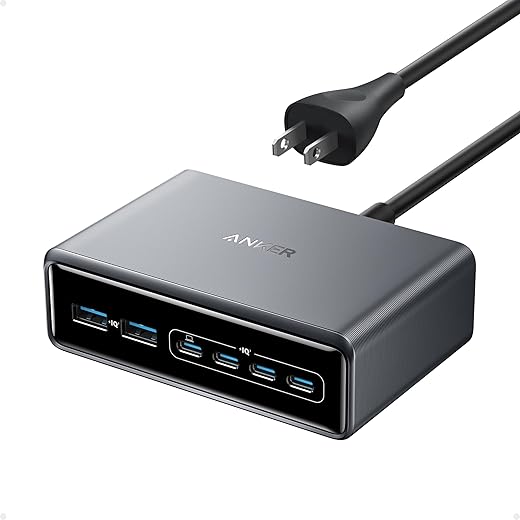
Don’t ignore cables, PD revision, and protocol quirks
Cables can ruin a great charger — yes, even the expensive ones. Are we prepared to spend a little more?Check cables first — a great charger is useless with a thin, uncertified cord. Look for USB-IF or USB-C certification and clear PD wattage markings; cheap cables often cap at 60W or fail under continuous loads. For example, a phantom 100W brick plus a 60W cable yields disappointment.
Match PD revision and protocols to your gear. PD 3.1 unlocks 140W+ and flexible voltages; PPS matters for fast, cool charging on many Samsung and Google phones. Some laptops negotiate better with vendor-branded chargers — test or read compatibility notes.
Consider firmware support package. Check whether the maker issues updates and whether other users report handshake problems.
Map accessories to ports so we avoid dongles and messy routing.
Budget for quality cables and a travel-friendly charger with interchangeable plugs when we cross time zones.

Weigh brand, warranty, and the real cost of ownership
Cheap now can be expensive later — whose support will still answer our call in two years?Prioritize vendors that back products with service and transparency. We choose brands that publish safety-test reports, push firmware ota fixes, and answer support requests quickly — it keeps a messy desk from becoming a long-term problem.
Evaluate these concrete factors
Run simple comparative checks ourselves: measure charge time, simultaneous-device throughput, and how the charger reallocates power under load. Model total cost as: charger price + certified cables + any adapters. Beware ecosystem lock-in — vendor docks simplify setup but concentrate risk if protocols change.
Make the purchase with a practical checklist
A checklist beats impulse — here’s how we avoid buyer’s remorse and get predictable results.Follow a short, decisive checklist when we buy so the charger performs for real.
Shop retailers with easy returns, keep receipts, register the product, and ask us for starter-class recommendations with measured results.
Buy for real-life behavior, not marketing numbers
We’ve matched specs to our devices, prioritized real-world power sharing, thermal design, and ecosystem fit so chargers stay useful and safe — not just headline-fast. Try one on your desk, report back with results, and help others choose smarter today, confidently.
Frequently asked questions
What should I prepare before I choose a gan desktop charger for multiple devices?
Start with the checklist in the “What we’ll need” section above—measure your space, confirm compatibility with your gear, and read the full walkthrough once before you change settings or buy parts. Gan desktop charger goes faster when prep is done upfront.
How long does it take to choose a gan desktop charger for multiple devices?
Most readers finish in about 30–90 minutes if they already have the right parts, but budget extra time for measurements, firmware updates, or a second pass when something does not behave the way the manual suggests on the first try.
What is the hardest part when you choose a gan desktop charger for multiple devices?
The step that trips people up is usually alignment or configuration—getting measurements, cable routing, or software settings right before you commit. If results still look off, re-check the basics in order instead of swapping hardware immediately.
What mistakes should I avoid when I choose a gan desktop charger for multiple devices?
Skipping measurements, ignoring ventilation or port limits, and rushing the final test are the common failures. Photograph your starting setup, label cables, and verify the outcome with the same content or workflow you will use every day—not a one-off demo.
When should I call a pro instead of trying to choose a gan desktop charger for multiple devices myself?
Bring in help when the job needs structural work, licensed wiring, or tools you do not own, or when repeated attempts still fail after you have followed the troubleshooting section. A short paid visit can cost less than replacing gear you damaged by forcing the install.

Princess Rioboca is the Lead Editorial Writer at Option Cutter, bringing over seven years of hands-on experience in consumer technology journalism. Specializing in home networking and smart home architecture, she transforms complex technical data into practical, real-world upgrades. Princess personally tests and audits every product she reviews—evaluating real-world Wi‑Fi throughput, cable management durability, and streaming ecosystem stability—to filter out spec-sheet noise. Her rigorous, field-tested insights are designed to give readers transparent, unbiased buying advice on what to purchase, what to skip, and exactly why.















