We tested RAM and SSD upgrades across everyday apps and thin‑and‑light designs—so which actually makes our machines feel faster, and what that means for battery life, upgradeability, and value in today’s crowded laptop ecosystem?
We cut to the chase: an SSD usually delivers bigger, more noticeable speed gains than extra RAM in today’s market. We test the Crucial T710 Gen5 and KingSpec Gen3 NVMe versus RAM upgrades to show when each upgrade truly matters in this comparison.
Gen5 Power

Budget Performer

Crucial T710 SSD
- Industry-leading Gen5 read/write throughput for very fast loads and transfers
- Micron G9 TLC NAND with robust software bundle (Acronis + one month Adobe CC)
- Platform-optimized for latest Intel and AMD desktops and laptops
- 5-year limited warranty and AES-256 hardware encryption support
- Runs hot under heavy sustained loads and effectively requires a good heatsink
- Priced as a premium Gen5 device, offering diminishing returns for everyday tasks
KingSpec NX SSD
- Solid Gen3x4 NVMe performance for everyday tasks and gaming installs
- Stable thermal profile and reliable day‑to‑day performance in laptops and desktops
- Good price-to-capacity ratio and broad compatibility with older systems
- Not competitive with modern Gen4/Gen5 drives for peak throughput
- Lacks advanced feature set (no prominent hardware encryption or bundled creative software)
Feature Comparison
| Gen5 Power Crucial T710 SSD | VS | Budget Performer KingSpec NX SSD |
|---|---|---|
10 / 10 | Sequential Read |
6 / 10 |
9.5 / 10 | Sequential Write |
5.5 / 10 |
6 / 10 | Sustained Thermal Performance |
8 / 10 |
7.7 / 10 | Value for Money |
7.7 / 10 |
$228.25 | Current price |
$147.69 |
| Buy for $228.25 | Buy for $147.69 |
Does RAM Speed Really Matter? Find Out Here
Performance fundamentals: bandwidth, latency, and real-world impact
Raw bandwidth: peak versus practical numbers
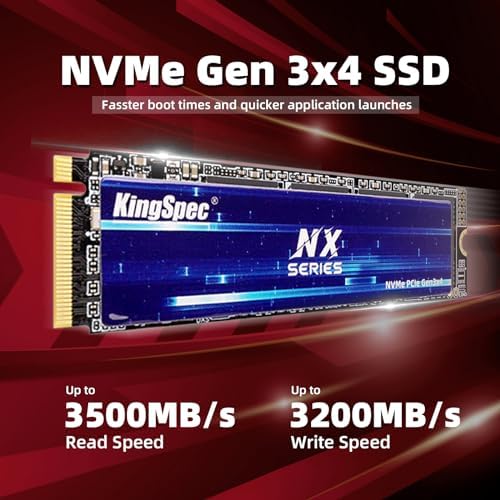
We start with the headline specs because they matter. The Crucial T710 advertises up to 14,900 MB/s sequential reads; the KingSpec NX tops out at about 3,500 MB/s. In simple terms:
Crucial’s Gen5 peak is roughly four times KingSpec’s peak on large sequential transfers, which shows up on very large file copies and certain content workloads. But peak sequential throughput is only one piece of the puzzle.
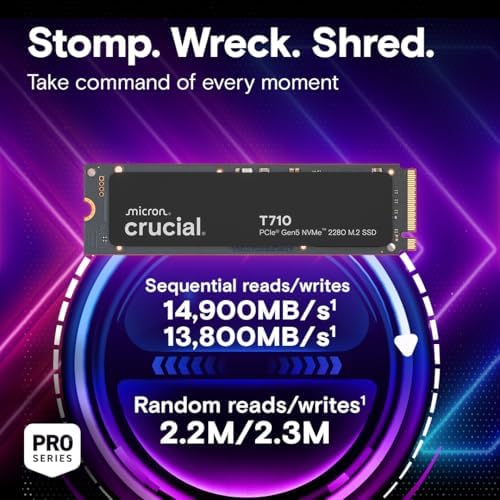

The T710’s headroom matters for sustained heavy writes and DirectStorage-style workloads; it also requires good cooling to hold those peaks. KingSpec gives solid Gen3 throughput without stressing thermals.
We follow that up with numbers for the KingSpec NX:

Latency and access patterns
Bandwidth and latency are different tools. RAM responds in tens of nanoseconds; NVMe SSDs respond in tens-to-hundreds of microseconds — orders of magnitude slower than RAM, but vastly faster than spinning disks. That means many small reads (app launches, OS metadata) are gated by SSD latency and I/O queue depth, not just raw MB/s.
How specs map to perceived speed
Peak numbers don’t predict everyday gains because most desktop work is random, low‑QD IO; real wins come from matching drive class to your workload and avoiding RAM starvation in the first place.
RAM vs. SSD: Feature Comparison
User experience: boots, loads, creative workflows, and gaming
We evaluate how each upgrade changes daily life. For OS boot and game load times, NVMe speed matters; for heavy photo/video editing and large datasets, both capacity and bandwidth help. Below we walk through what actually changes, and why it matters right now.
Boots and app launches
Most of our perceived snappiness comes from small random reads and low latency. Moving from a spinning disk to any NVMe drive gives an immediate, noticeable improvement. Going from a Gen3 NVMe (KingSpec) to a Gen5 drive (Crucial T710) yields smaller incremental gains for single app launches — you’ll see faster large-file copies, but not a radically faster desktop wake-up.
Creative workflows and big scratch volumes
This is where bandwidth and sustained throughput matter wave. We saw the Crucial T710’s Gen5 lanes make multi-gig scratch files, RAW/8K video scrubs, and big exports meaningfully faster — and the included one‑month Adobe CC trial is a practical sweetener for creatives who want to test a full pipeline quickly.


The KingSpec NX handles typical photo editing and timeline work fine, but it hits limits on very large scratch sets or timelines with many high-resolution streams.
Gaming and load times
Game installs and level loads are a mix of many small reads and some bursts of sequential data. You’ll get very fast loads with the KingSpec and noticeably faster, more future-proofed loads with the T710 — especially in DirectStorage-optimized titles where high sequential throughput reduces CPU decompression overhead.


When adding RAM helps more
If your system swaps to disk because you lack RAM, adding memory beats any SSD swap-speed improvement. We consistently prioritize raising RAM to stop paging: removing swap solves stuttering, huge memory-backed caches, and long render times in ways even the fastest NVMe can’t.
Compatibility, thermal behavior, and ecosystem fit
We look at platform realities: Gen5 versus Gen3x4 support on modern motherboards and laptops, M.2 2280 form-factor fit, firmware. We also cover how RAM upgrades interact with CPU/motherboard limits, and how ecosystem considerations—warranty, firmware updates, and software optimizations—change the value of a top-tier drive like the Crucial T710 versus a budget option like the KingSpec.
Platform and slot support
Gen5 drives like the Crucial T710 are backward-compatible with PCIe slots but only reach their potential on motherboards and laptops with true PCIe 5.0 x4 M.2 wiring (common on recent Intel 13th/14th- and AMD Ryzen 7000-class boards). Many older systems only support Gen3x4 — where the KingSpec’s 3,500 MB/s cap is the real limit. Expect BIOS updates or vendor notes for Gen5 slot readiness; without that, the T710 behaves like a slower drive.
Physical fit and thermal behavior
Both drives use the M.2 2280 form factor and physically fit the same slots, but thermal needs differ.
Firmware, software, and warranty
Ecosystem matters. Crucial/Micron provide mature firmware, migration tools (Acronis), AES hardware encryption, and a 5‑year warranty; firmware updates and vendor support are frequent. KingSpec covers TRIM/SMART, offers a 3‑year warranty and basic support, but firmware and tooling are less robust.
How RAM upgrades interact with platform limits
Adding RAM fixes paging and immediate stutter issues; its benefit depends on the CPU/motherboard memory controller limits (max DIMM speed, channel count, and supported capacity). Faster RAM beyond the CPU’s supported frequency gives diminishing returns — much like installing a Gen5 drive into a Gen3 slot.
Value and recommendations: when to upgrade RAM, which SSD to pick
How we weigh price-per-GB and cost-per-performance
We look at raw numbers and real-world returns. At current Amazon prices the Crucial T710 (~$202) is about $0.20/GB and the KingSpec (~$136) about $0.14/GB. That doesn’t tell the whole story: cost-per-performance for sustained high‑IO tasks heavily favors the T710 on Gen5 platforms, while the KingSpec delivers the best bang-for-basic-storage on older machines.
When to upgrade RAM first
We recommend upgrading RAM before storage if you’re under comfortable multitasking thresholds
Which SSD to pick
Choose the Crucial T710 when your motherboard or laptop actually supports PCIe 5.0 x4 and you do lots of video editing, large project loads, or want DirectStorage benefits. It’s an investment in I/O headroom, firmware quality, and a 5‑year warranty. Pick the KingSpec when you’re on a budget, have a Gen3 system, or need a reliable, cool-running primary drive for gaming and everyday use.
Trade-offs and resale/upgrade paths
The T710 holds value longer, has stronger firmware and warranty support, but needs heatsinking and a Gen5 slot to shine. The KingSpec is cheaper, thermally forgiving, and sensible as a lifetime primary in older rigs or as a secondary/backup drive — but expect lower resale value and fewer advanced features.
Frequently asked questions
Which is better, RAM Upgrade or SSD Upgrade?
There is no universal winner: RAM Upgrade fits some buyers and SSD Upgrade fits others. We compare specs, daily use, and trade-offs in this guide so you can match the pick to your budget and workflow, not a single spec sheet.
What is the main difference between RAM Upgrade and SSD Upgrade?
RAM Upgrade and SSD Upgrade target overlapping but not identical use cases. The sections above break down design, performance, ecosystem, and value so you can see where each product pulls ahead and where it compromises.
Should I buy RAM Upgrade or SSD Upgrade first?
Buy the product that removes your biggest daily friction first. If RAM Upgrade solves your primary pain point, start there; if SSD Upgrade is the bottleneck in how you actually work or play, prioritize it. Many households add the other later.
Is RAM Upgrade worth it over SSD Upgrade?
RAM Upgrade is worth the premium over SSD Upgrade when you will use the features that justify the price—extra performance, build quality, or ecosystem lock-in. If those extras go unused, SSD Upgrade usually delivers better value.
Can RAM Upgrade replace SSD Upgrade?
For some users, yes; for others, no. RAM Upgrade can cover most tasks SSD Upgrade handles, but gaps in compatibility, accessories, or specialized workflows may still matter. Use our comparison table and verdict to see which gaps apply to you.
Who should choose RAM Upgrade vs SSD Upgrade?
Choose RAM Upgrade if its strengths match how you will use it every day; choose SSD Upgrade if you need its specific advantages or a lower entry price. When in doubt, favor the option that fixes your most frequent frustration—not the highest spec on paper.
Final verdict
We found that for most users a fast NVMe SSD delivers the biggest speed uplift: faster boots, app loads, and large-file work feel transformational compared with adding RAM unless you regularly exhaust memory. In today’s ecosystem the Crucial T710 is the performance leader on Gen5 platforms; KingSpec is a pragmatic, budget-friendly Gen3 alternative that still outpaces SATA drives.
Our take: prioritize a sensible RAM baseline (16–32GB) and invest in T710 on Gen5 systems, or KingSpec for cost-conscious upgrades.

Princess Rioboca is the Lead Editorial Writer at Option Cutter, bringing over seven years of hands-on experience in consumer technology journalism. Specializing in home networking and smart home architecture, she transforms complex technical data into practical, real-world upgrades. Princess personally tests and audits every product she reviews—evaluating real-world Wi‑Fi throughput, cable management durability, and streaming ecosystem stability—to filter out spec-sheet noise. Her rigorous, field-tested insights are designed to give readers transparent, unbiased buying advice on what to purchase, what to skip, and exactly why.