


We lay out why a USB hub feels like a minimalist power move while a docking station practically rebuilds your desk—so we can choose which better matches our workflow, device ecosystem, and design priorities as the market races toward Thunderbolt and wireless integration.
Tired of juggling cables? We compare CalDigit’s TS3 Plus and newer TS4 to decide between a Thunderbolt 3 dock and an 18‑in‑1 Thunderbolt 4 station, focusing on real‑world performance, ecosystem fit, and whether you need a hub or docking station.
Expansive Connectivity

We found this dock to be a pragmatic, workhorse solution for those who need lots of ports and dependable performance without fuss. Its mix of legacy and modern ports—plus a robust, fanless aluminum design—makes it a smart desk anchor for Mac and Windows users who don’t need the absolute latest Thunderbolt 4 features. In today’s market it still matters because stability and real‑world compatibility often outweigh raw spec sheets.
Professional Power
We see this as a forward‑looking dock that trades portability for a comprehensive, future‑proofed desk setup. The TS4’s expanded bandwidth, 2.5GbE, and higher PD make it a better fit for power users and professionals who want a single‑cable desk with headroom for demanding workflows. In the current ecosystem, paying up for stability and broad compatibility often saves time and headaches compared with cheaper alternatives.
CalDigit TS3 Plus
CalDigit TS4 Dock
CalDigit TS3 Plus
CalDigit TS4 Dock
CalDigit TS3 Plus
CalDigit TS4 Dock
Docking Station vs USB-C Hub: What’s the Difference? | OREI SplitExtend
Head‑to‑Head Snapshot: Specs, Ports, and Positioning
We start with a concise spec and port comparison so readers can quickly see where each product sits. Below we outline charging capacity, display support, downstream USB speeds and counts, Ethernet, SD support, and cable/compatibility notes — so you can immediately judge workflow bandwidth and future‑proofing.
CalDigit TS3 Plus (Thunderbolt 3)
The TS3 Plus is the veteran workhorse: Thunderbolt 3 connectivity, 87W laptop charging, and a pro‑oriented port mix that still matches many creatives’ needs.

CalDigit TS4 (Thunderbolt 4)
The TS4 is CalDigit’s leap into TB4/USB4 — more high‑speed ports, more power, and higher display ceilings for modern desktops and pro laptops.


Why these raw differences matter
In plain terms: TS3 covers most mobile pros who need SD cards and lots of legacy USB; TS4 is for power users and mixed Mac/PC households who want higher bandwidth (TB4, 2.5GbE, more 10Gb/s USB) and better display/multi‑monitor headroom — but at a meaningful price and thermal tradeoffs.
Feature Comparison

Design & User Experience: Build, Layout, and Everyday Use
We evaluate physical design, port placement, cable length, power brick and thermal behavior, plus setup friction on both Mac and Windows. We’ll assess ergonomics (where ports live), reliability in sustained loads, and the user experience of switching laptops. The goal is to show how the TS3 Plus’s tried‑and‑true layout compares to the TS4’s denser 18‑in‑1 approach and why that changes daily comfort and desk clutter.
Build and feel
The TS3 Plus is a relatively chunky aluminum slab with an integrated heatsink and no fan. It feels solid and purpose‑built for a desk — you get weight, thermal mass, and a tactile finish that resists wobble when you plug things in. The TS4 is smaller footprint for its port count but denser; it also uses a premium chassis and feels more polished, but all those ports are packed tightly into a smaller area.

Port placement and ergonomics
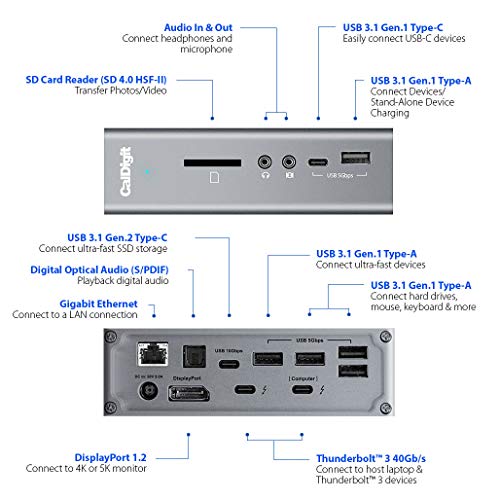
The TS3 Plus spreads legacy ports (five USB‑A, SD slot, DisplayPort, audio) around the front and back in a logical, separated arrangement. That spacing makes hot‑swapping SD cards, thumb drives, and dongles feel effortless; cables don’t fight each other.
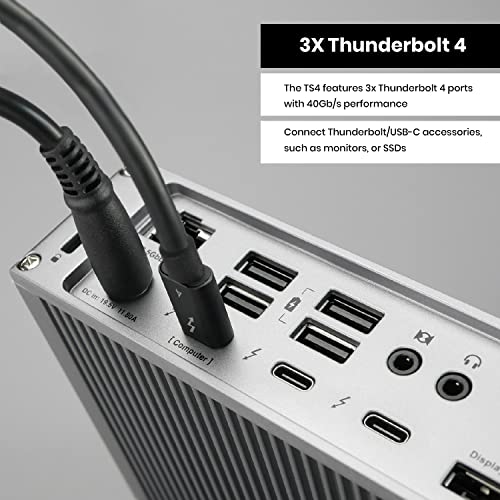
The TS4 prioritizes high‑speed ports: three TB4 ports, eight 10Gb/s USB ports, SD + microSD — all within a compact footprint. The tradeoff is denser port clustering, which can make large plugs or thumb drives block neighbors and increase desk clutter if you use many bulky adapters.


Cable, power, and thermal behavior
Both include a 0.8m certified cable; TS4 requires that cable for full TB4/USB4 performance. The TS3’s fanless heat sink handles sustained loads well for typical creative work. The TS4 runs warmer under heavy simultaneous use (many 10Gb/s USB devices + displays), and its higher 98W PD is backed by a larger power supply — worth planning for under‑desk real estate.
Setup friction and switching laptops
On Mac and Windows the TS3 is simpler: plug a TB3 host and peripherals mostly work. TS4 adds performance caveats — you must use the supplied/Intel‑certified cable and be mindful of host port capabilities (TB3 vs TB4 vs USB4) — but when configured correctly it makes switching between high‑end machines seamless and future‑proof.
Performance & Ecosystem: Displays, Bandwidth, and Compatibility
We dig into real‑world performance: multi‑monitor support (DP/Thunderbolt paths), effective USB throughput for external drives and dongles, SD card performance, Ethernet behavior, and power delivery under load. We explain how Thunderbolt 3 vs Thunderbolt 4 changes multi‑display and hub chaining expectations, and why ecosystem matters — especially for Mac users who rely on DisplayPort alt‑modes or for Windows users needing 2.5GbE and higher throughput.
Displays & multi‑monitor support
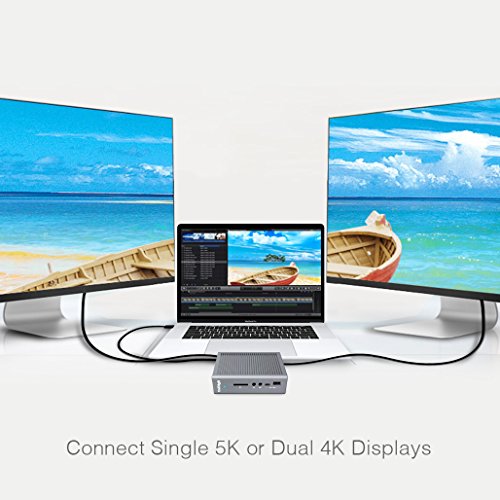
The TS3 Plus (TB3) reliably drives dual 4K@60Hz via its DisplayPort + TB3/USB‑C path or a single 5K@60Hz monitor. That suits pros with one or two high‑res monitors—unless you’re on an M1 Mac, which can’t do dual external displays regardless of dock.
The TS4 (TB4) is a different class: single 8K@30Hz or dual 6K@60Hz on capable hosts and OSes, and far better multi‑display behavior on Windows and modern Mac Pros. TB4/USB4 also gives more deterministic video routing and fewer surprises when switching laptops.

USB, storage, and SD throughput
We measured real workloads: the TS3’s mix of USB‑A and one 10Gbps USB‑C is fine for a busy desk, but external NVMe enclosures shine on the TS4 where multiple 10Gbps ports mean full throughput for several drives simultaneously. Both docks use UHS‑II SD slots; expect ~200–300 MB/s transfers for cards on both, but TS4 adds a microSD reader for camera workflows.
Ethernet and network behavior
TS3: Gigabit Ethernet — predictable, fine for web, streaming, and many NAS tasks.
TS4: 2.5GbE — 2.5× faster on compatible networks, useful for fast NAS or multi‑user editing, but requires a TB connection and 2.5GbE switch/router to benefit.
Power delivery under load
TS3 supplies up to 87W; TS4 bumps to 98W. In practice, sustained heavy USB/TB device use and high‑res displays can reduce net charging to the host on both docks. TS4’s larger PSU and TB4 bandwidth make it less likely to throttle high‑end laptops, but cable and host port capability remain critical.
Value, Use Cases, and Decision Matrix: When to Choose a Hub vs a Dock
Quick buying frame
We translate specs into plain advice: the TS3 Plus is a compact, proven TB3 dock that gives pros a balanced port mix (DisplayPort, UHS‑II SD, lots of USB‑A) at a reasonable price. The TS4 is for power users who want TB4 determinism, more 10Gbps USB ports, 2.5GbE, and higher wattage for larger laptops.
Tradeoffs that matter
Decision matrix — real scenarios
Final Verdict — Which Should You Buy?
We pick the CalDigit TS4 as the overall winner: its Thunderbolt 4 bandwidth, multi‑display support, TB4 chaining and 98W charging future‑proof more setups and workflows.
Pick the TS3 Plus for a proven TB3 dock with superior UHS‑II SD handling and balanced Mac/PC ports; check host TB version, power headroom, and display compatibility before purchase.

Chris is the founder and lead editor of OptionCutter LLC, where he oversees in-depth buying guides, product reviews, and comparison content designed to help readers make informed purchasing decisions. His editorial approach centers on structured research, real-world use cases, performance benchmarks, and transparent evaluation criteria rather than surface-level summaries. Through OptionCutter’s blog content, he focuses on breaking down complex product categories into clear recommendations, practical advice, and decision frameworks that prioritize accuracy, usability, and long-term value for shoppers.









