
Why Battery Life Still Defines Laptop Choices
We cut through marketing to show why all‑day battery matters: it shapes user experience, design trade-offs, and ecosystem choice, so you can pick a laptop that reliably lasts the workday.
What You’ll Need
Define “All‑Day” for Your Routine
Are we talking 8 hours of email or 12 hours of video? Context changes everything.Map our usage. Start by tracking how long the screen is actually on, which apps we run (browser tabs, video calls, IDEs, VMs), and whether we move between outlets or rely on battery all day. Pick a concrete target—eight hours of mixed productivity or a full 12–16‑hour travel day—so we know what to aim for.
Quantify the day by measuring:
Interpret claims against that profile. A laptop tuned for light web tasks will meet different expectations than a creative workstation; thermal throttling, power profiles, and ecosystem integration (charger standards, OS power optimizations) determine whether a model actually supports our workflow across locations.

Decode Battery Specs and Marketing Claims
mAh, Wh, and bold runtime numbers — who’s telling the truth?Read watt‑hours (Wh) first: Wh measures stored energy and beats milliamp‑hours (mAh) for cross‑device comparisons.
Compare Wh numbers between models, but remember: CPU efficiency, display power, and firmware often matter more than a few extra Wh.
Check manufacturer hours skeptically — most “up to” claims come from light‑use, low‑brightness tests.
Verify real‑world benchmarks from independent reviewers (Notebookcheck, Wirecutter, The Verge) that match our workload.
Watch marketing play: fast‑charge percentages sound good, but confirm charger wattage and how long the laptop can actually sustain that speed.
Prefer clear cycle‑life ratings (for example, ~500 cycles to 80%) and note non‑user‑removable packs that increase repair costs.
Prioritize Efficient CPUs and Integrated Graphics
ARM, Intel, or AMD — which platform actually stretches a charge?Focus on platform efficiency: modern ARM‑based SoCs and Apple’s M series tightly integrate CPU, GPU, and power delivery, so they squeeze more battery from less Wh.
Weigh CPU architectures on Windows: prefer chips with efficiency cores (Intel Alder Lake and later) or AMD mobile parts with strong Zen power management — they idle cooler and sip power during light use.
Choose integrated graphics for everyday tasks — browsing, streaming, documents — because discrete GPUs burn far more power and shave hours off real‑world runtime.
Pay attention to process node and SoC design (5nm/4nm silicon generally runs cooler), and factor in OS‑level power management: macOS often extracts more stamina from the same hardware than generic Windows builds.

Choose a Display That Won’t Drain the Day
High refresh rates and max brightness look great, but at what battery cost?Favor modest display specs: brightness, resolution, refresh rate, HDR, and touch all add up to stealth battery drain. We compare trade-offs the way we’d pick a bag for a long commute — comfort first, flash second.
Prefer a 1080p or 1440p panel with a standard refresh rate unless you need gaming‑level smoothness. Choose low‑power OLED for deep blacks and good outdoor contrast on mixed‑use days; avoid very bright HDR panels (600+nits sustained) if battery is your priority. Turn off touch or higher refresh rates when you don’t need them.
Rely on Real‑World Tests, Not Just Factory Numbers
We test like commuters — streaming, conferencing, and tabbing — because lab figures often lie.Trust third‑party, hands‑on testing over glossy spec sheets. Look for review labs that state exact conditions — brightness, adaptive refresh off, Wi‑Fi on — so we know tests match our use.
Run or expect these practical checks from reviewers:
Check charging speed, watch for thermal throttling during sustained loads, and track firmware updates that can change behavior. Compare two laptops with similar batteries — differences in cooling, power profiles, or screens often explain divergent results. This step equips us to read review sites, validate claims, and pick models that deliver consistent day‑long performance in our specific ecosystem and workflow.
Balance Battery with Design, Ports, and Ecosystem
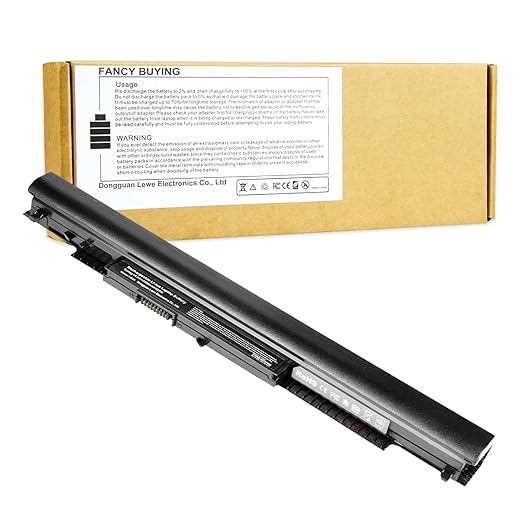
Is shaving two hours worth losing full‑size ports or macOS continuity? Trade-offs are the point.Balance battery demands with design choices. A thinner chassis and long battery life often mean fewer ports, sealed batteries, and tighter thermals; expect reduced sustained performance under heavy loads. For example, an ultra‑thin MacBook Air trades extra ports and a user‑serviceable battery for exceptional efficiency, while a business laptop may offer more ports and a removable cell.
Factor in fast charging, battery‑health modes, replaceability, and warranty. Look for models with clear battery‑care settings and service options — these extend usable life and lower replacement cost.
Compare makers and tiers:
This analysis helps us choose a laptop that fits our lifestyle, accessories, and long‑term value expectations.

Make the Right Trade-offs
We match usage to platform efficiency, display, and real tests to find balanced all‑day laptops; try one and share endurance results so we can recommend better.

Chris is the founder and lead editor of OptionCutter LLC, where he oversees in-depth buying guides, product reviews, and comparison content designed to help readers make informed purchasing decisions. His editorial approach centers on structured research, real-world use cases, performance benchmarks, and transparent evaluation criteria rather than surface-level summaries. Through OptionCutter’s blog content, he focuses on breaking down complex product categories into clear recommendations, practical advice, and decision frameworks that prioritize accuracy, usability, and long-term value for shoppers.