
We independently review everything we recommend. When you buy through our links, we may earn a commission.

Buy Gifts Shop
Menu
Gaming console on a minimal surface with soft directional light for a spatial audio headset guide

Image creator: Muhammad Hamza — Option Cutter

How to Choose a Gaming Headset with Spatial Audio

Why spatial audio changes the way we pick headsets

We now choose headsets for SPATIAL precision, low latency, and ecosystem fit rather than raw bass or RGB; that shift matters because positional fidelity transforms competitive advantage, immersion, and peripheral design choices across consoles, PC, and mobile in today’s market — see our how-to guides.

What we need before we start

A gaming platform (PC/console/phone) — we test ecosystem support.
Several candidate headsets.
Basic knowledge of our platform’s spatial audio support.
A test game/demo with clear positional cues.
Willingness to trade features for hands-on experience.
Best Value
AOC Dual-Mode Low-Latency Wireless Gaming Headset
Ultra-low 20ms latency across 2.4GHz and Bluetooth
We like how AOC packs 2.4GHz and Bluetooth 5.4 into a lightweight headset with a guaranteed 20ms ceiling, because it keeps audio tightly synchronized across consoles and PCs without juggling adapters. The 45‑hour battery, 7.1 virtual surround and triple-stage mic make it a flexible, cost-conscious pick for multi-platform players who want one headset to handle most setups.
Updated: August 1, 2026 3:38 am
Prices and availability are accurate as of the last update but subject to change. I may earn a commission at no extra cost to you.

1

Step 1 — Understand what 'spatial audio' actually means

Is it just fancy marketing, or a real directional upgrade? Spoiler: context matters.

Cut through buzzwords. Spatial audio is an umbrella term covering different technical paths that produce 3D sound; we need to know which one we’re buying into.

List the three approaches and what to expect

HRTF-based virtualization: software simulates directionality and can be tuned per ear; good for broad compatibility.
Object-based formats (Dolby Atmos, DTS:X): place sounds as objects in 3D space but require game and OS support to work correctly.
Hardware-driven multi-driver arrays: use multiple drivers to create native directionality; rare and often expensive.

Check perceptual outcomes: clarity of footsteps, accurate elevation, and stable panning. Verify platform-level support (Windows Sonic, Sony Tempest, dolby. Always test in the actual games you play — demos can mask weaknesses that show up in real matches.
Editor's Choice
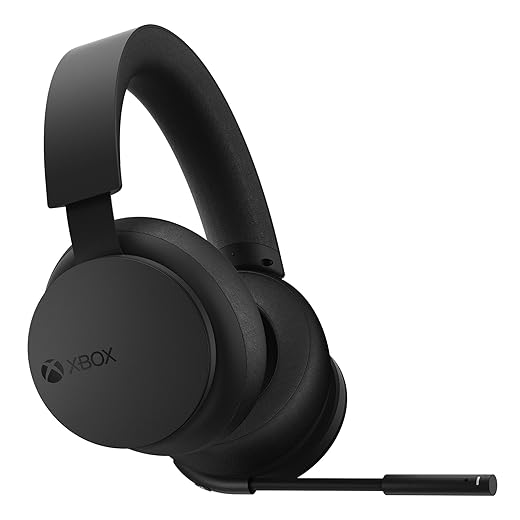
Xbox Wireless Headset with Spatial Audio Technologies
Native Xbox Wireless; Dolby Atmos and DTS
We appreciate the near-seamless integration with Xbox Wireless that lets the headset pair to the console without dongles, preserving simplicity and low latency for couch play. Combined with spatial audio support, intuitive earcup dials and strong voice isolation, it’s a streamlined choice for players deeply embedded in the Xbox ecosystem who want convenience over niche audiophile features.
Updated: August 1, 2026 3:38 am
Prices and availability are accurate as of the last update but subject to change. I may earn a commission at no extra cost to you.

2

Step 2 — Match headset technology to your platform and ecosystem

Want the best 3D sound on PS5 or PC? Don’t pick based on looks — pick for ecosystem.

Match headset technology to your platform and ecosystem. We analyze ecosystem integration because the same headset behaves differently across platforms: Sony’s Tempest Engine, Microsoft’s spatial stacks, Apple’s head‑tracking Atmos on iOS, and native thomas dolby.

Prioritize differently based on where you play. For example

Console-first: Prioritize official compatibility and low‑friction features — plug‑and‑play USB or console‑certified wireless so spatial modes work out of the box.
PC-first: Look for open driver support, vendor software that exposes HRTF tuning, and the option of an external DAC for proper decoding and improved fidelity.

Weigh trade‑offs. A Tempest‑friendly headset can lose head‑tracking or decoding on Switch or Steam Deck without drivers, so ecosystem fit often matters more than raw frequency response.

Best for Esports
Razer BlackShark V2 X Lightweight Tournament-Focused Headset
Esports-grade drivers and snug noise-isolating fit
We value the Triforce 50mm drivers and 240g form because they deliver precise positional audio and comfort during marathon sessions, while passive isolation keeps distractions out of the way. As a wired, competition-minded headset with a focused mic, it prioritizes performance and low latency for players chasing an edge rather than wireless convenience.
Updated: August 1, 2026 3:38 am
Prices and availability are accurate as of the last update but subject to change. I may earn a commission at no extra cost to you.

3

Step 3 — Pick the delivery method: wired, USB DAC, or wireless

Latency kills positional cues — so which connection is safe for competitive play?

Choose the transport layer deliberately — it controls bandwidth, latency, and whether spatial decoding happens in the headset or the host.

Prefer wired analog (3.5mm) for the simplest, lowest‑latency connection; note it may bypass console or PC virtualizers and advanced HRTF processing.

Consider USB headsets when you want processed spatial streams, firmware.

Pick proprietary 2.4GHz dongles for a strong low‑latency wireless compromise — higher bandwidth than Bluetooth and vendor‑tailored firmware.

Weigh Bluetooth for phones and casual play; LE Audio/LC3 improves battery and quality but still lags for competitive latency and true multi‑channel spatial formats.

Competitive: Wired or low‑latency 2.4GHz dongle.
Immersion/console: USB or high‑quality wireless with good codec and battery.
Mobile/casual: Bluetooth LE Audio with multipoint.

Account for simultaneous device switching and companion‑app ecosystems when deciding.

Best for Mobility
Logitech G435 Ultra-Light Lightspeed and Bluetooth Headset
Ultra-light, stylish, dual wireless modes
We like that the G435 combines LIGHTSPEED and low-latency Bluetooth into a 165g headset that prioritizes comfort, colorways and everyday portability for smaller heads. The dual beamforming mics, decent battery life and recycled materials position it as a lifestyle-forward, travel-friendly option for casual gamers and content creators who care about style and convenience more than studio-level fidelity.
Updated: August 1, 2026 3:38 am
Prices and availability are accurate as of the last update but subject to change. I may earn a commission at no extra cost to you.

4

Step 4 — Evaluate software, tuning, and customization

Good hardware needs good software — does the vendor actually care about sound design?

Assess the vendor app first. Run any HRTF personalization tool and listen for measurable improvements in left/right and elevation — if it’s only RGB controls, move on.

Check whether the app offers per‑ear HRTF, parametric EQ, and microphone processing (noise gate, de‑esser, sidetone) so you can tune for your head and headset.

Prefer editable EQ and profile export/import over locked presets. Use the EQ to tame boomy bass or brighten footsteps in real games.

Monitor firmware update cadence. Install updates and watch release notes for latency, virtualization, and bug fixes.

Compare black‑box virtualization to open standards (OS or engine spatializers). Test both: sometimes vendor processing adds clarity, sometimes it obscures positional cues.

Favor clear UIs, cross‑platform syncing, and active support — they signal long‑term value and better real‑world UX.

Best for Customization
SteelSeries Arctis Nova 1 Hi‑Fi Spatial Audio Headset
Parametric EQ and 360° spatial audio fine-tuning
We appreciate SteelSeries’ Nova Acoustic system and the Pro-grade 10‑band parametric EQ because they let us tailor the soundstage for competitive awareness or cinematic immersion across platforms. With ClearCast Gen 2 noise reduction and a comfortable ComfortMAX fit, it’s a versatile headset for players who want deep software-driven tuning without sacrificing cross-platform compatibility.
Updated: August 1, 2026 3:38 am
Prices and availability are accurate as of the last update but subject to change. I may earn a commission at no extra cost to you.

5

Step 5 — Prioritize ergonomics, mic quality, and day-to-day UX

You’ll wear these for hours — comfort and mic clarity matter as much as 3D imaging.

Prioritize comfort and practical controls over headline specs. Spatial audio is useless if we can’t wear the headset for marathon sessions or if teammates can’t hear us.

Check these UX touchpoints before buying
Weight & fit — try for even weight distribution, adjustable headbands, and low clamping force; test for 30–60 minutes to spot hot spots.
Earpads & ventilation — prefer breathable memory‑foam or hybrid pads; replaceable pads extend life.
Mic clarity & mute behavior — listen for sibilance and proximity effect; prefer physical mute switches and detachable/modular mics.
Quick controls — require accessible volume and spatial toggles; latency-prone menus are a pain mid‑match.
Battery & connection — demand real-world battery tests and a stable wireless link (or easy-swappable cable).
Servicing — favor detachable cables, replaceable pads, and modular parts over flash-only designs.
Best for Xbox
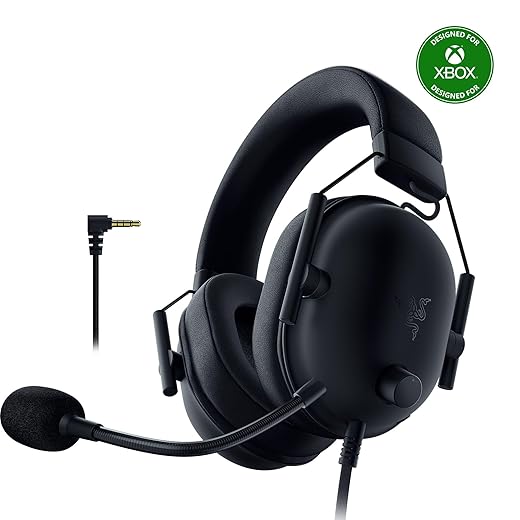
Razer BlackShark V2 X Official Xbox Licensed Headset
Xbox-certified performance with esports-focused audio
We welcome the official Xbox licensing because it removes platform guesswork and ensures chat and compatibility behave as expected on Xbox consoles while preserving the BlackShark’s esports-tuned drivers and HyperClear mic. It’s the same lightweight, performance-first design tailored to competitive play, but with smoother integration for Xbox owners.
Updated: August 1, 2026 3:38 am
Prices and availability are accurate as of the last update but subject to change. I may earn a commission at no extra cost to you.

6

Step 6 — Real-world testing and value comparison

How to test spatial audio like a pro — and when to pay for it versus save your cash.

Run tests in a quiet room. Use binaural demo tracks (search “binaural headphone demo” or use Dolby/Windows Atmos samples) to judge imaging, elevation, and stability.

Play in-game scenarios: check footsteps in shooters (CS2, Call of Duty), vertical cues like helicopters in Tarkov or Flight Sim, and distant gunfire in Battle Royale matches.
Listen for positional shifts by moving your head; test head-tracking demos and VR/console guided samples.
Compare sustain: wear each headset for 30–60 minutes to spot comfort and thermal issues.

Compare headsets on identical material and in our usual environment; prefer a midrange model with solid virtualization and comfort over an expensive novelty. Factor in warranty, software updates, and platform partnerships. Think long-term: are we buying for a console ecosystem that will retain support, or a PC setup where drivers evolve? This contextual, hands-on comparison is the decisive step in picking a headset that actually improves our games.

Best for Comfort
HyperX Cloud III Wired Comfort-Focused Gaming Headset
Angled 53mm drivers and DTS Spatial Audio
We view the Cloud III as the next step in HyperX’s comfort-first lineage: angled 53mm drivers, plush memory foam and an aluminum frame deliver reliable comfort and tuned audio for long sessions. The wired connection and lifetime DTS Spatial Audio activation give streamers and competitive players predictable latency and a roomy virtual surround stage without extra dongles or software hurdles.
Updated: August 1, 2026 3:38 am
Prices and availability are accurate as of the last update but subject to change. I may earn a commission at no extra cost to you.

Make the call with context, not hype

We weigh format, platform fit, delivery, software maturity and real‑world testing today to choose a headset that actually improves our play—prioritizing usable spatial cues, ergonomics, and ecosystem integration over marketing noise; which tradeoffs are worth it for our game library?

Frequently asked questions

What should I prepare before I choose a gaming headset with spatial audio?

Start with the checklist in the “What we’ll need” section above—measure your space, confirm compatibility with your gear, and read the full walkthrough once before you change settings or buy parts. Gaming headset with spatial audio goes faster when prep is done upfront.

Most readers finish in about 30–90 minutes if they already have the right parts, but budget extra time for measurements, firmware updates, or a second pass when something does not behave the way the manual suggests on the first try.

The step that trips people up is usually alignment or configuration—getting measurements, cable routing, or software settings right before you commit. If results still look off, re-check the basics in order instead of swapping hardware immediately.

Skipping measurements, ignoring ventilation or port limits, and rushing the final test are the common failures. Photograph your starting setup, label cables, and verify the outcome with the same content or workflow you will use every day—not a one-off demo.

Bring in help when the job needs structural work, licensed wiring, or tools you do not own, or when repeated attempts still fail after you have followed the troubleshooting section. A short paid visit can cost less than replacing gear you damaged by forcing the install.

Confident woman in glasses and business suit with arms crossed
Comparisons, Top Picks & Guides Editor at  | Web |  + posts

Princess Rioboca is the Lead Editorial Writer at Option Cutter, bringing over seven years of hands-on experience in consumer technology journalism. Specializing in home networking and smart home architecture, she transforms complex technical data into practical, real-world upgrades. Princess personally tests and audits every product she reviews—evaluating real-world Wi‑Fi throughput, cable management durability, and streaming ecosystem stability—to filter out spec-sheet noise. Her rigorous, field-tested insights are designed to give readers transparent, unbiased buying advice on what to purchase, what to skip, and exactly why.


Princess Rioboca is the Lead Editorial Writer at Option Cutter, bringing over seven years of hands-on experience in consumer technology journalism. Specializing in home networking and smart home architecture, she transforms complex technical data into practical, real-world upgrades. Princess personally tests and audits every product she reviews—evaluating real-world Wi‑Fi throughput, cable management durability, and streaming ecosystem stability—to filter out spec-sheet noise. Her rigorous, field-tested insights are designed to give readers transparent, unbiased buying advice on what to purchase, what to skip, and exactly why.

Leave a Reply

Your email address will not be published. Required fields are marked *

Newest Posts

This website uses cookies

We use cookies to personalize content, provide social media features, and analyze our traffic. We also share information about your use of our site with our analytics partners. You can change your preferences at any time. For more information, please see our Privacy Policy and Cookie Policy.












