


Cheap price, NOT cheap feel — which phones actually act like a classy compromise?
You don’t need a $1,000 phone to feel fancy. We kept phones in hand, used them all day, and asked one simple question: does this feel premium when you’re actually using it? Short answer: several do.
Budget phones have stopped apologizing. Better screens, faster refresh rates, smarter cameras, and longer update promises mean a $200–$400 phone can deliver most of the everyday experience of a flagship. We focused on design, software polish, camera results, and real-world battery life — because those are the things that make a cheap phone stop feeling cheap.
Top Budget Picks




Pixel 7a — Compact, Camera-First Performer
This device punches well above its price with class-leading computational photography and a smooth, clean Android experience. We found its performance and battery life balanced for everyday use, making it the easiest premium-feeling buy in this roundup.
Why we picked it
We appreciated how this model brings flagship photographic tools and Google’s software polish to a smaller, much more affordable package. In everyday use it feels decisive — snappy UI transitions, reliable call features like Call Assist, and a camera system that consistently produces images that look better than the phone’s price would suggest.
Hardware and user experience
The Pixel 7a uses the Tensor G2 chipset paired with 8 GB of RAM, which keeps the phone responsive across typical workloads like browsing, messaging, and moderate multitasking (mobile SoC basics explain why RAM and silicon tier still matter on budget picks). The 6.1-inch screen and compact footprint make it comfortable to use one-handed; the durable build and wireless charging add to the premium feel.
Camera and software: reasons to buy
Photography is the headline here. Computational photography handles low-light scenes and fixes a lot of ordinary mistakes (motion blur, imperfect composition) with single-tap edits. On the software side we like the clean Android interface on our unlocked phones and Google’s update cadence — features like Magic Eraser and Call Screen are useful in daily life.
Trade-offs and practical notes
As a renewed market item, we saw two recurring limitations: inconsistent unlocking status and variable battery cycle counts. That matters more here than in some cheaper phones because the hardware and software make the Pixel 7a compelling only when you actually get an unlocked, well-conditioned unit. If you buy refurbished, verify carrier status and battery health before committing.
Samsung Galaxy A54 — Balanced Midrange Power
It offers a smooth 120Hz Super AMOLED display, solid battery life, and a camera system that handles everyday shooting with confidence. We found it to be the most well-rounded Samsung pick when you want flagship touches without flagship pricing.
Design and screen
The Galaxy A54 stands out in this group because it borrows many of Samsung’s flagship design cues — a bright Super AMOLED panel, a 120Hz refresh rate, and Gorilla Glass protection — but at a much lower price. The result is a device that looks and feels higher-end than its cost suggests.
Performance and cameras
Equipped with the Exynos 1380 and 6 GB of RAM, the A54 delivers snappy UI performance, reliable multitasking, and thermal control for extended sessions. The 50MP main camera with OIS is the practical star: it produces stable shots and benefits from Samsung’s mature image pipeline.
Why it matters
Samsung has positioned this device as the premium option inside its midrange lineup: you get a well-calibrated display, IP-rated durability, and a camera system that rarely disappoints. Our main caveat is buying refurbished — like the other renewed devices here, condition and unlocking status vary, so vet the seller carefully if you’re buying used.
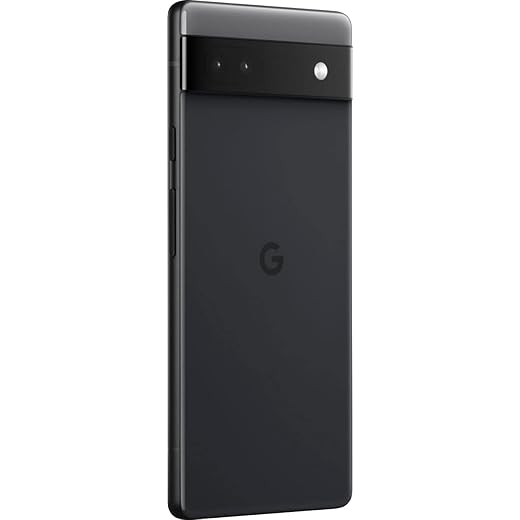
Pixel 6a — Small, Smart, Value Camera
It delivers a tidy balance of camera chops, decent performance, and clean Android at a low price. We found it especially appealing for buyers who want Google’s software experience without a flagship price tag.
Where it fits in the market
The Pixel 6a remains one of the most cost-effective ways to get Google’s computational camera and long-term software support on a budget Android phone. It’s a device aimed at users who prioritize imaging and a clean Android experience over bleeding-edge specs.
Performance and design
Powered by a midrange chipset and paired with 6 GB of RAM, the 6a handles daily tasks — messaging, browsing, light gaming — without fuss. The compact 6.1-inch form factor and modest weight make it an easy carry; the Android interface emphasizes simplicity and quick access to Google services.
Things we noticed while testing
On a technical level the camera still outperforms what the price implies, producing reliably pleasing photos. The main caveat in this roundup is that many of the available units are renewed or carrier-locked; that can create activation issues and make the purchase riskier than a new-device transaction. For buyers comfortable verifying IMEI/carrier status, it remains a strong buy.
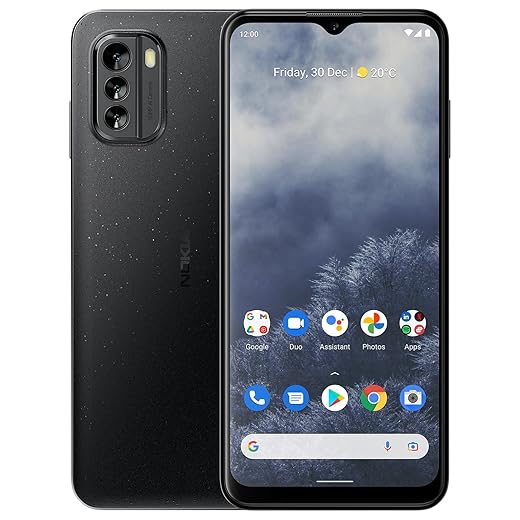
Nokia G60 5G — Durable, Update-Focused Phone
It pairs a solid, 120Hz display with a durable build and a clear promise of multi-year OS updates. We liked the combination of sustainability, clean Android, and a dependable user experience for long-term ownership.
Durability and updates as a selling point
Nokia’s value proposition here is longevity: a thoughtfully built device that emphasizes sustainability and a clear update policy. That matters if you want to keep a phone for years without the fragmentation and sluggishness that often plague cheaper models.
Screen, camera, and performance
The G60 pairs a roomy 6.58" FHD+ 120Hz display with a Snapdragon 695-class chipset. The 50MP AI-enhanced camera delivers solid everyday photos and useful computational features like improved low-light modes. We found the combination of performance and clean Android to be steady and predictable.
Practical considerations
Some buyers reported inconsistent accessory packing (no charger included) and occasional issues with the fingerprint reader or SIM tray variants. Also, dual-SIM versus SIM+microSD compatibility varies by regional SKU — check the exact configuration before buying. For people who prioritize long-term software support and a robust build, this phone stands out among budget devices.
Moto G Stylus 5G — Creative Tool With Stylus
The integrated stylus and large 120Hz display make it the right pick for shoppers who want creative tools without a high price. We found it useful for productivity, casual sketching, and fast text input.
Who should consider a stylus phone
If you doodle, take hand-written notes, annotate documents, or want a productivity boost without paying flagship prices, a phone with a built-in stylus is compelling. The Moto G Stylus offers that capability alongside reasonable performance and battery life.
Tools, media, and camera
The Snapdragon 6 Gen 1 provides capable everyday performance and drives a vivid 6.6" 120Hz screen. The stylus integrates with the software for quick note-taking and photo edits. Multimedia is strong thanks to Dolby Atmos and a large, bright display.
Limitations and value
The stylus is excellent for quick tasks and annotations but lacks the pressure sensitivity and latency of premium pen ecosystems. Some users reported car stereo/Android Auto compatibility quirks; if you rely heavily on in-car connectivity, verify compatibility with your vehicle. Overall, it’s a practical pick for creatives on a budget.
Galaxy A53 — Reliable, Feature-Rich Midranger
It’s a dependable pick if you want a large, vivid display and long battery life without luxury pricing. We liked its balanced feature set and Samsung’s software familiarity for mainstream users.
The practical choice for mainstream buyers
The A53 appeals to buyers who want a large, bright screen for media, a versatile camera array, and reassuring battery life. It’s not trying to be a flagship; it’s trying to be the phone you can rely on for a couple of years without fuss.
Experience and ecosystem
Samsung’s One UI gives the A53 a familiar, polished interface that integrates well with Galaxy wearables and services. The phone is comfortable for media consumption and everyday multitasking; performance is suited to typical daily needs rather than heavy gaming.
What to watch out for
We’ve seen occasional reports of update-related problems in refurbished units leading to bricked or unstable devices. If you choose a renewed model, check the seller’s return policy and confirm the device is unlocked and up to date.
Moto G Power 5G (2023) — Battery Champion
The huge battery and efficient chipset make it an excellent choice if you want long runtimes and a smooth display. We liked its pragmatic feature set and solid value proposition.
Why battery matters here
The Moto G Power (2023) bases its value on endurance. If you frequently forget chargers or need a phone that lives through travel and long days away from outlets, this model’s 5000mAh milliamp-hour rating is the defining feature.
Screen, performance, and media
Motorola balances the large battery with a 120Hz FHD+ display and a midrange Dimensity chipset that performs well in common tasks. We found the phone comfortable for streaming, browsing, and social apps, though heavy gaming will tax the hardware and battery.
Practical trade-offs
Charging is slower than what you’ll see on many rivals, so the convenience of long battery life comes with the patience cost during top-ups. The camera system is competent for daylight shots but won’t match the computational results of the Pixel class. Still, for a sensible, durable daily driver on a budget, it’s a strong contender.
OnePlus Nord N20 — Stylish AMOLED, Good Value
It pairs a glossy, premium-feeling design with an AMOLED display and a clean software experience. We found it a nice middle ground for buyers who care about looks and a pleasant screen without spending flagship money.
A style-first budget phone
The Nord N20 stands out in this roundup because it looks and feels like a much more expensive phone. The AMOLED panel and slim design make it a strong pick for buyers who want premium aesthetics on a budget.
Screen and daily use
The 6.43-inch AMOLED display gives richer color and deeper blacks than typical LCD rivals; it’s pleasant for streaming and photos. The phone handles day-to-day tasks smoothly, though we’d caution power users that sustained heavy workloads will expose the midrange chipset’s limits.
Durability and long-term support
OnePlus’ track record for updates on lower-tier models is less robust than for its flagships; users should expect fewer major OS updates over time. If you prioritize design, an excellent screen, and a clean UI, this model is a strong stylistic bargain.
Galaxy A14 5G — Ultra-Budget Everyday Phone
It covers the essentials — 5G, a large screen, and a long-lasting battery — at a very low price. We recommend it for users who prioritize cost, battery life, and simple media consumption over high-end camera or speed.
Who this phone is for
The A14 5G is aimed squarely at buyers who need a functional smartphone without the frills. If you want reliable calling, social apps, video streaming, and multi-day battery life on a strict budget, it’s a sensible choice.
Hardware and user expectations
The phone’s large 6.6-inch screen and 5000mAh battery are its headline specs. Performance is modest — fine for browsing, social media, and media playback, but less suited to sustained gaming or heavy multitasking.
Real-world trade-offs
We noticed a few recurring firmware and touchscreen complaints in refurbished examples: overly sensitive glass and intrusive confirmation dialogs in the UI. Those issues are not dealbreakers for the budget-conscious, but they illustrate why the price is low: you accept compromises in polish and performance.
OnePlus Nord N300 — Affordable 5G Performer
A straightforward, low-cost way to get 5G and decent battery life in a friendly package. We found it good for basic daily tasks, though it’s not built for heavy apps or long-term power users.
Value proposition
The Nord N300 is OnePlus’ answer to budget 5G: it doesn’t try to compete with premium hardware but delivers the basics for a very low outlay. For first smartphones or secondary devices it’s compelling.
Everyday performance and build
You get a sizable display and a large battery, which translates to comfortable media sessions and multi-day standby in light use. The software leans toward a cleaner, near-stock Android feel — which we appreciate at this price point.
Limitations that matter
The phone’s modest internals limit long-term responsiveness and storage headroom, and in the renewed market we saw a handful of units with cracked screens or LTE/5G mismatches. For buyers who need a simple, inexpensive 5G phone, it’s a decent pick; those expecting silky performance should look higher up the list.
Final Thoughts
Our top pick is the Pixel 7a — Compact, Camera-First Performer. It’s the pick for people who want the cleanest Android experience, class-leading computational photography, and a compact design that doesn’t compromise on battery life — browse our Top Picks. The Pixel 7a feels premium because Google brings software smarts (real-time photo processing and tight OS integration) that make everyday shots and gestures feel effortless. Buy the Pixel 7a if you prioritize camera quality, timely updates, and a compact phone that behaves like something more expensive.
If you want a more traditional all-rounder, pick the Samsung Galaxy A54 — Balanced Midrange Power. Its 120Hz Super AMOLED screen, dependable battery life, and versatile camera array give you flagship-like daily use and a familiar One UI experience. It’s the best choice for people who watch a lot of video, want smooth scrolling, and value Samsung’s ecosystem (watch, earbuds, and software features) without the flagship price.
For narrower needs: choose the Moto G Power 5G (2023) if multi-day battery is your priority, or the Nokia G60 5G if long-term updates and a durable build matter most. But for the sweet spot between premium feel, software polish, and camera chops, we’d reach for the Pixel 7a — and for a more balanced, big-screen daily driver, the Galaxy A54 is our pick.
Frequently asked questions
How did we pick these budget phones that don’t feel cheap options?
We shortlist models that balance performance, reliability, and value for typical buyers—not just the highest spec sheet. Hands-on notes, owner feedback, and return/warranty policies all feed the ranking.
Which budget phones that don’t feel cheap pick is best for most people?
Start with our top overall choice if you want the safest balance of price and features. Move up or down the list only when a specific need—budget, ecosystem, or a must-have feature—clearly applies to you.
Do prices on this budget phones that don’t feel cheap list change often?
Yes. Retailers run frequent promos, so use the live price buttons on this page and compare shipping and return windows before checkout—the best deal is not always the lowest sticker price.
Should I buy the cheapest budget phones that don’t feel cheap on the list?
Only if the trade-offs fit your use case. The budget pick can be excellent value, but check what you give up in build quality, software support, or key features you will use every week.
What if none of these budget phones that don’t feel cheap picks fit?
Use the comparison and guide links on this page to narrow by size, platform, or feature, then revisit the list with your must-haves written down—forcing a mismatch creates more returns than savings.
How often is this budget phones that don’t feel cheap roundup updated?
We refresh rankings when major models launch or pricing shifts enough to change the value story. Check the publish date at the top and compare current specs if you are reading months later.

Princess Rioboca is the Lead Editorial Writer at Option Cutter, bringing over seven years of hands-on experience in consumer technology journalism. Specializing in home networking and smart home architecture, she transforms complex technical data into practical, real-world upgrades. Princess personally tests and audits every product she reviews—evaluating real-world Wi‑Fi throughput, cable management durability, and streaming ecosystem stability—to filter out spec-sheet noise. Her rigorous, field-tested insights are designed to give readers transparent, unbiased buying advice on what to purchase, what to skip, and exactly why.














