



Why camera AI should drive our phone choice
We test camera AI by real use, weighing UX, design trade-offs, and ecosystem fit to see which computational camera features actually improve everyday photos. We explain what changed, why it matters now, and how to pick a phone that stays useful.
What we need before we start

Clarify how we actually use the camera
Are we posting quick socials, making cinematic videos, or preserving family memories? Different AI features serve different masters.Map our primary use cases and be ruthless about what matters most. Start by listing how we actually shoot on a phone camera: casual social snaps, portraits, low‑light nightlife, travel landscapes, vlogging, or pro editing. The best AI for one of us (ultra‑sharp computational zoom for travel) can be useless for another (natural skin tones for portraits).
Test the camera UI and physical design right away. Open the camera and count taps to reach our go‑to mode. Check whether modes are one tap away or buried in menus. Try holding the phone for a quick selfie—assess button placement and grip comfort. Launch a third‑party app and confirm the camera APIs and exports behave the same.
Consider ecosystem and workflow compatibility. Export a RAW, import into our desktop editor, and see whether AI edits are reversible and sensible. Note whether cloud syncing preserves metadata and edits.
Concluding: define our top three photo/video needs and rank them; that ranking will steer every later test and trade-off.

Audit the phone’s AI camera capabilities
Which features are real improvements and which are clever marketing? We separate substance from spin.Break down vendor‑speak into concrete test points. Open the camera on a Pixel and settings, then look for explicit toggles like On‑device processing, RAW capture, and AI enhancement. Check the changelog or support page to see whether models get updates.
List the core AI categories and ask the same three questions for each: local or cloud? model update cadence? UI transparency?
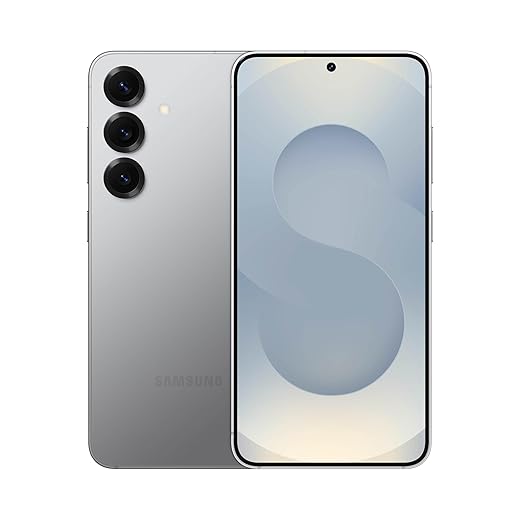
Compare ecosystems: Apple’s Neural Engine favors consistent on‑device results and timely updates; Google’s pixel‑level fusion emphasizes per‑pixel intelligence; Samsung’s multi‑frame blend leans on complex stacking. Those architectures shape consistency, battery drain, and how quickly improvements arrive. This audit helps us read spec sheets critically and shortlist brands whose AI aligns with our ranked use cases.
Run practical side-by-side tests in the real world
Lab scores don’t capture frustrating edge cases — let’s try worst-lights, moving kids, and crowded scenes.Run repeatable side‑by‑side scenes in our product reviews and shoot a fixed checklist so we can compare outputs, latency, and consistency across phones.
We test phones across a repeatable set of scenes: bright daylight landscapes for dynamic range, indoor mixed light for white balance, low-light nightscapes on handheld video for noise and detail, portraits for skin tone and edge detection, moving subjects for AF and motion artefacts, and at-range zoom shots. For video we record walk-and-talk sequences, low-light handheld clips, and quick panning shots to evaluate stabilization and AF tracking. We use default auto first, then test the AI-specific modes (Night, Portrait, Super-Res Zoom, etc.). Capture both JPEG and RAW/Pro formats where available to inspect processing versus retained detail. We pay attention to speed — how fast does the phone process AI modes, and does it interrupt our shooting flow? Export samples and compare side-by-side on a calibrated screen; look for over-processed textures, blown highlights, unnatural skin tones, and inconsistent results across frames. This testing reveals the user-facing trade-offs that specs hide, and indicates which phones give reliable, repeatable outcomes.

Check hardware, software updates, and ecosystem integration
A camera is more than a lens — it’s sensors, chips, cloud, and software updates working together. Do they play nicely?Inspect the physical stack. Look at sensor size, pixel binning, and OIS — larger sensors and effective optical stabilization give better base detail and cleaner low‑light shots, which AI can only enhance if the raw signal is good. Check lens types: a true periscope telephoto beats digital crops; an optically corrected ultra‑wide reduces edge smearing.
Check the processing stack. Ask which SoC/ISP/NPU runs the camera pipeline and whether heavy ML runs on‑device or offloaded. On‑device NPU work on a flagship phone means lower latency and fewer privacy issues; weak NPUs mean throttled features or cloud reliance.
Ask about software and formats. Verify frequency of algorithm/model updates, and whether the phone exposes standard RAW (DNG) to third‑party apps or uses proprietary RAW. Confirm if key features require cloud processing — that affects latency and privacy.
Test sustained performance. Shoot a 10–15 minute video or a long burst in an AI mode and watch heat, battery drain, and any throttling. Note ecosystem fit: does the phone sync cleanly with our desktop editor and backup workflow, or will proprietary formats and apps lock us in?

Choose with clear trade-offs and futureproofing in mind
Which compromises will bother us in a year? Let’s quantify sacrifice versus benefit before we buy.Synthesize our tests and priorities into a simple decision framework: list our top use cases, assign weights, and score each candidate on the core dimensions we measured in the field.
Score phones on the following dimensions (use 1–5, then apply your weights)
Score and compare. For example, if low‑light portraits are #1, give AI reliability and sensory processing disorder. If we vlog, prioritize stabilization, heat throttling, and storage for long 4K clips. Favor previous‑gen flagships when budget‑constrained; they often match current AI pipelines at lower cost. Ultimately, pick the phone that gives consistently satisfying results in our highest‑priority scenarios, even if it sacrifices headline megapixels or an extra lens.

Make the pick and keep testing
We pick the phone that best matches ranked needs, proven by real-world tests and ecosystem fit, then keep testing across updates because AI image quality often improves post‑launch. Try your shortlist, share results with us, and vote with your wallet.
Frequently asked questions
What should I prepare before I choose a phone with the best camera ai features?
Start with the checklist in the “What we’ll need” section above—measure your space, confirm compatibility with your gear, and read the full walkthrough once before you change settings or buy parts. Phone with the best camera ai features goes faster when prep is done upfront.
How long does it take to choose a phone with the best camera ai features?
Most readers finish in about 30–90 minutes if they already have the right parts, but budget extra time for measurements, firmware updates, or a second pass when something does not behave the way the manual suggests on the first try.
What is the hardest part when you choose a phone with the best camera ai features?
The step that trips people up is usually alignment or configuration—getting measurements, cable routing, or software settings right before you commit. If results still look off, re-check the basics in order instead of swapping hardware immediately.
What mistakes should I avoid when I choose a phone with the best camera ai features?
Skipping measurements, ignoring ventilation or port limits, and rushing the final test are the common failures. Photograph your starting setup, label cables, and verify the outcome with the same content or workflow you will use every day—not a one-off demo.
When should I call a pro instead of trying to choose a phone with the best camera ai features myself?
Bring in help when the job needs structural work, licensed wiring, or tools you do not own, or when repeated attempts still fail after you have followed the troubleshooting section. A short paid visit can cost less than replacing gear you damaged by forcing the install.

Princess Rioboca is the Lead Editorial Writer at Option Cutter, bringing over seven years of hands-on experience in consumer technology journalism. Specializing in home networking and smart home architecture, she transforms complex technical data into practical, real-world upgrades. Princess personally tests and audits every product she reviews—evaluating real-world Wi‑Fi throughput, cable management durability, and streaming ecosystem stability—to filter out spec-sheet noise. Her rigorous, field-tested insights are designed to give readers transparent, unbiased buying advice on what to purchase, what to skip, and exactly why.















