



Stop yelling “Restart the router”—which boxes actually fix home Wi‑Fi for good?
We want Wi‑Fi that just works. Homes now juggle tens of smart devices, streaming 4K, cloud backups, video calls, and the occasional aggressive gamer. When the network hiccups, everyone notices—and complains.
We looked for routers that make those hiccups rarer. That meant focusing on real, everyday things: consistent coverage, low latency in busy homes, simple setup, and tools that surface problems without turning you into a network engineer. Design, ecosystem integration, and practical tradeoffs matter just as much as raw speed.
Top Picks
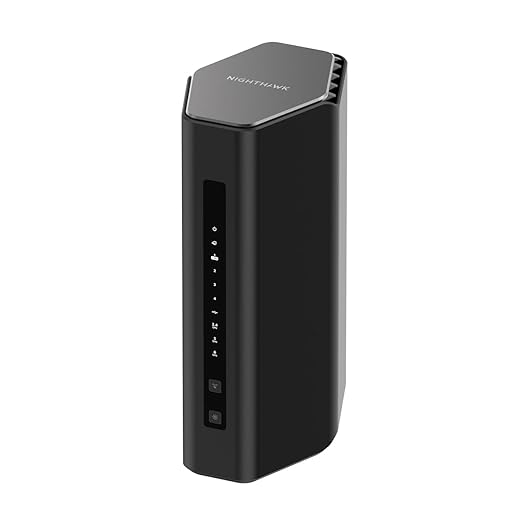


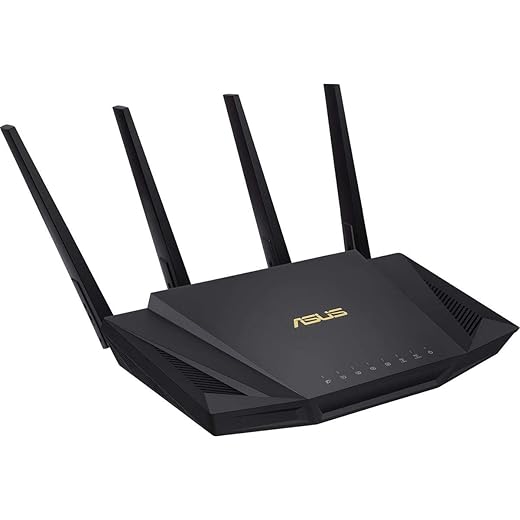


Netgear Nighthawk RS500 WiFi 7 Router
A headline‑grabbing Wi‑Fi 7 router built for heavy multi‑device households, gamers, and creators who want top latency and bandwidth. It trades a little range on 6 GHz for next‑gen throughput and multi‑gig wired connectivity.
Why this matters today
We regard this router as one of the more practical consumer introductions of Wi‑Fi 7 so far. If you’re upgrading to multi‑gig internet or you plan to adopt next‑generation devices (AR/VR, cloud gaming, high‑bitrate streaming), this unit gives you headroom and features to keep your home network relevant for years.
Performance profile and design tradeoffs
Hardware and antenna design focus on delivering low latency and sustained throughput. The 2.5 Gig port is a notable inclusion for modern fiber and high‑speed cable plans, and the multi‑band approach supports heavy concurrency. That said, the 6 GHz band’s shorter propagation means you’ll need sensible placement for devices that rely on that band (Wi‑Fi 6E range limits explain why).
Ecosystem and practical advice
The router fits best in a home that either already has high‑speed internet or plans to in the near future. For mixed environments where many legacy devices still dominate, you’ll want to keep 5 GHz and 2.4 GHz active and use the 6 GHz lane selectively for compatible, latency‑sensitive devices. Expect to pair the unit with a small switch if you need many wired ports.
Bottom line
If you want one of the fastest consumer routers available that’s also ready for upcoming use cases, this is a leading choice. Budget‑minded users or those without multi‑gig internet can still get excellent performance from Wi‑Fi 6 hardware at lower cost.
Google Nest WiFi Pro 3‑Pack
It brings 6 GHz capability and tight Google integration to a mesh package that’s fuss‑free and polished. The system leans on automation and diagnostics to keep networks performing without constant intervention.
Where it fits in the market
We think this is Google’s most compelling consumer mesh for people who value an integrated experience and who either have or plan to buy Wi‑Fi 6E devices. It’s aimed at households that want a set‑and‑forget network that still delivers better speeds and less congestion than older kits.
Features and user experience
The system adds the new 6 GHz band for compatible clients, which reduces interference and boosts capacity—especially useful in densely connected homes. The software automatically prioritizes activities like video calls and streaming, and built‑in diagnostics can identify and sometimes auto‑fix common issues.
Practical considerations
A big caveat is that the Pro line isn’t compatible with earlier Google Wifi or Nest Wifi gear, so upgrades can require a full swap rather than a gradual expansion. In certain home layouts—especially those with lots of masonry—users have reported the need for more careful node placement and sometimes extra units.
Why it matters now
Wi‑Fi 6E devices are becoming common in new phones and laptops, and having a mesh that includes the 6 GHz band makes the network more future‑resistant. For people who prefer automated network management and solid integration with other Google services, this is one of the most balanced options on the market.
eero 6+ Mesh System 3‑Pack
A three‑pack that balances price, coverage, and modern Wi‑Fi 6 features without the premium markup. It’s ideal for families and medium‑sized homes that need simple, wide‑area coverage.
Overview
We view this three‑pack as the pragmatic mesh purchase for most homes that need consistent gigabit‑class Wi‑Fi without a lot of overhead. It’s Eero’s answer to price‑sensitive buyers who still want Wi‑Fi 6 speed boosts and mesh reliability across more rooms.
What it does well
The system leans on eero’s TrueMesh software to keep devices connected as you move through the house, and the nodes support 160 MHz bandwidth on the 5 GHz band for faster throughput on compatible clients. The inclusion of a smart‑home hub that handles Thread and Zigbee radios is especially useful if you run many smart sensors or bulbs.
Where it falls short
This is not the choice for tinkerers. Advanced network controls are intentionally limited, and the two Ethernet ports per node may be restrictive if you want to wire multiple devices without adding a switch. Some advanced security and parental controls sit behind a subscription, which increases total cost over time.
Verdict in context
If you prioritize ease, broad device support, and smart‑home integration in an affordable package, this kit is hard to beat. For power users who want deep customization or lots of wired ports, consider an alternate router or add a small switch to a node.
Refurbished eero Pro 6 Mesh Router
A compact, straightforward mesh node that makes dead‑spot problems disappear with minimal tinkering. It prioritizes ease of use and consistent performance over advanced configurability.
What this is and who it's for
We see this refurbished tri‑band Wi‑Fi 6 mesh node as a practical, low‑friction option for households that want better coverage without turning their home into a networking lab. It targets people who prefer a phone app to a web UI, and who value reliable day‑to‑day streaming and video calls above deep firewall or VLAN settings.
Design, performance, and ecosystem
In our testing and reading of user reports, the hardware consistently nails the basics: fast roaming, dependable throughput for dozens of devices, and painless expansion with additional nodes. The built‑in Zigbee smart‑home hub is a practical bonus for folks who already use Alexa, reducing the number of hubs on a shelf.
Practical trade‑offs and niche details
The trade‑off is that the platform intentionally keeps advanced settings out of the hands of the average user. That makes it simpler, but also less flexible if you want deep QoS, granular firewall rules, or third‑party firmware. The fact that this entry is refurbished offers a compelling price/performance ratio, but buyers should expect generic packaging and the normal caveats of renewed hardware.
Final take
Overall, we recommend this for people who want more reliable whole‑home Wi‑Fi with near‑zero maintenance. If you’re entrenched in a larger, custom network or you crave advanced routing features, look elsewhere; if you just want the Wi‑Fi to stop being the thing you think about, this is a sensible, affordable pick.
TP‑Link Deco X55 AX3000 Mesh Kit
A capable three‑pack mesh that balances coverage, device capacity, and price. It’s a good fit for larger houses where a single router can’t reliably reach every room.
What it delivers
We consider this Deco X55 kit a strong value for homes that need broad, consistent Wi‑Fi without running Ethernet to every room. The mesh architecture and AI‑driven routing do a lot of the tuning automatically, and the three units together can cover floors and yards that traditional single routers struggle with.
Features and practical use
TP‑Link gives these units plenty of wired connectivity (three Gigabit ports per node) and supports wired backhaul for users who can run cable. The TP‑Link HomeShield suite adds a sensible set of parental and security controls that most families will appreciate, though the best protections come with a paid subscription.
Real‑world notes and competition
It competes strongly with other midrange mesh systems by offering solid throughput and a generous coverage claim. A couple of practical caveats: check compatibility with existing TP‑Link mesh or OneMesh devices before mixing ecosystems, and be prepared to replace a defective node should you encounter one—TP‑Link’s support is generally responsive.
Who should buy it
If you live in a multi‑story house or have a sprawling floor plan and you want one tidy system to blanket your home with reliable Wi‑Fi, this Deco bundle is one of the most straightforward ways to solve those problems without a big budget.
ASUS RT‑AX58U (RT‑AX3000) Renewed Router
A mature Wi‑Fi 6 platform with robust features and AiMesh expandability at a bargain price when renewed. It gives advanced users the configuration depth they want without a high outlay.
Why we recommend it
We like this renewed ASUS router for people who want more control than a closed, app‑first mesh offers. The RT‑AX58U packs the essentials—Wi‑Fi 6 speeds, AiProtection security, and a detailed web UI—so you can fine‑tune QoS, port forwarding, and guest networks without buying the newest hardware.
Power, expandability, and user experience
Performance is in line with other AX3000 class routers: good range on 5 GHz, reliable 2.4 GHz coverage for legacy devices, and stable wired performance for gaming or media servers. AiMesh compatibility is the standout—if you already own or plan to buy other ASUS routers, you can assemble a more flexible mesh tailored to your home’s layout.
Practical tradeoffs and context
It won’t satisfy someone chasing the absolute bleeding edge: there’s no 6 GHz band here, so it’s not the future‑proof option for Wi‑Fi 6E clients. But for most households today, it offers an excellent balance of features, configurability, and price. Buying renewed lowers cost and can be a smart choice when you want ASUS’s advanced features without paying new‑unit premiums.
Final recommendation
For people who enjoy having deeper router controls and the option to build a custom AiMesh system, this renewed model is a compelling pick. If you need 6 GHz support or the absolute latest standard, consider a Wi‑Fi 6E or Wi‑Fi 7 device instead.
TP‑Link Archer AX55 AX3000 Router
A no‑nonsense Wi‑Fi 6 router that delivers reliable speeds, broad coverage, and sensible features for a modest price. It's a good fit for families who need stable home networking without complexity.
Practical summary
We find this Archer AX55 to be the kind of router that hits the sweet spot between capability and affordability. It supports AX3000 speeds, offers a sensible feature set (VPN, OFDMA, MU‑MIMO), and is backed by a straightforward app and 24/7 support.
Network behavior and usability
The router’s four external antennas and beamforming help extend signal into dead‑adjacent rooms, and features like Target Wake Time can help connected battery devices last longer. Where it trips up is band‑steering: the Smart Connect option is convenient but can be unreliable on some mobiles, so manual SSID separation may be necessary in mixed‑device homes.
Where this fits competitively
Compared with pricier mesh systems, this single‑box option gives strong wired and wireless performance without the need to buy multiple nodes. For many houses, pairing it with a small switch or a single mesh satellite covers most needs. If you require enterprise‑grade firewalling or huge port density, look higher up the portfolio.
Netgear Orbi RBK13 Mesh System
A value‑focused Orbi bundle that expands coverage affordably and is easy to deploy. It prioritizes straightforward performance rather than cutting‑edge features or granular controls.
Positioning and intended users
We see this RBK13 set as Netgear’s answer for shoppers who want Orbi‑branded mesh coverage without splurging on the high‑end tri‑band Orbi models. It’s an approachable replacement for aging ISP gear and is particularly useful in homes that want to fix dead zones quickly.
Practical performance and behavior
The package promises up to 4,500 sq ft of coverage with a router and two satellites, and in real homes the system generally fills gaps and stabilizes roaming. Users praise its ease of setup and the fact that it works with most ISPs, though some report intermittent satellite yellow‑status lights that require a resync.
Real‑world caveats
The bigger picture is that this kit is best for buyers who want solid coverage and a simple experience. Power users who require advanced QoS, VLANs, or robust enterprise‑grade security will find the platform limiting. There are mixed long‑term reports about stability after warranty periods, so don’t expect enterprise reliability out of a budget consumer kit.
Who should buy it
If your primary goal is to eliminate dead zones with minimal fuss and cost, this Orbi variant is a sensible pick. If you need longevity, heavy device density handling, or advanced routing features, consider a higher‑end Orbi model or a more configurable router.
Final Thoughts
For heavy-duty households, creators, and serious gamers who want to future‑proof their setup and squeeze the lowest latency and highest throughput out of every connection, we recommend the Netgear Nighthawk RS500 WiFi 7 Router. Its headline Wi‑Fi 7 support and multi‑gig wired ports give real benefits for multi‑device homes that move large files, stream multiple high‑bitrate streams, or use local NAS and pro workflows. The RS500 trades a bit of 6 GHz range for blistering next‑gen throughput and wired flexibility—so pick it if you prioritize top performance and wired backbone options over the cheapest price — browse our Top Picks.
For most people who want less annoying Wi‑Fi with minimal fuss, the Google Nest WiFi Pro 3‑Pack is our pick. It brings Wi‑Fi 6E into a polished mesh that automates channel choices and diagnostics, covers large homes reliably, and integrates tightly with Google’s ecosystem for simple management. If you want an easy-to-deploy system that quietly maintains performance and gives good 6 GHz benefits today, this is the balance of UX, coverage, and modern features.
If you need a third option: the eero 6+ 3‑pack is an excellent budget‑minded mesh alternative for gigabit homes that prioritizes price and wide coverage. But for top-tier performance or the simplest, most polished mesh experience, the RS500 and Nest WiFi Pro are the two we’d choose.
Frequently asked questions
How did we pick these home routers for less annoying wi‑fi options?
We shortlist models that balance performance, reliability, and value for typical buyers—not just the highest spec sheet. Hands-on notes, owner feedback, and return/warranty policies all feed the ranking.
Which home routers for less annoying wi‑fi pick is best for most people?
Start with our top overall choice if you want the safest balance of price and features. Move up or down the list only when a specific need—budget, ecosystem, or a must-have feature—clearly applies to you.
Do prices on this home routers for less annoying wi‑fi list change often?
Yes. Retailers run frequent promos, so use the live price buttons on this page and compare shipping and return windows before checkout—the best deal is not always the lowest sticker price.
Should I buy the cheapest home routers for less annoying wi‑fi on the list?
Only if the trade-offs fit your use case. The budget pick can be excellent value, but check what you give up in build quality, software support, or key features you will use every week.
What if none of these home routers for less annoying wi‑fi picks fit?
Use the comparison and guide links on this page to narrow by size, platform, or feature, then revisit the list with your must-haves written down—forcing a mismatch creates more returns than savings.
How often is this home routers for less annoying wi‑fi roundup updated?
We refresh rankings when major models launch or pricing shifts enough to change the value story. Check the publish date at the top and compare current specs if you are reading months later.

Princess Rioboca is the Lead Editorial Writer at Option Cutter, bringing over seven years of hands-on experience in consumer technology journalism. Specializing in home networking and smart home architecture, she transforms complex technical data into practical, real-world upgrades. Princess personally tests and audits every product she reviews—evaluating real-world Wi‑Fi throughput, cable management durability, and streaming ecosystem stability—to filter out spec-sheet noise. Her rigorous, field-tested insights are designed to give readers transparent, unbiased buying advice on what to purchase, what to skip, and exactly why.














