

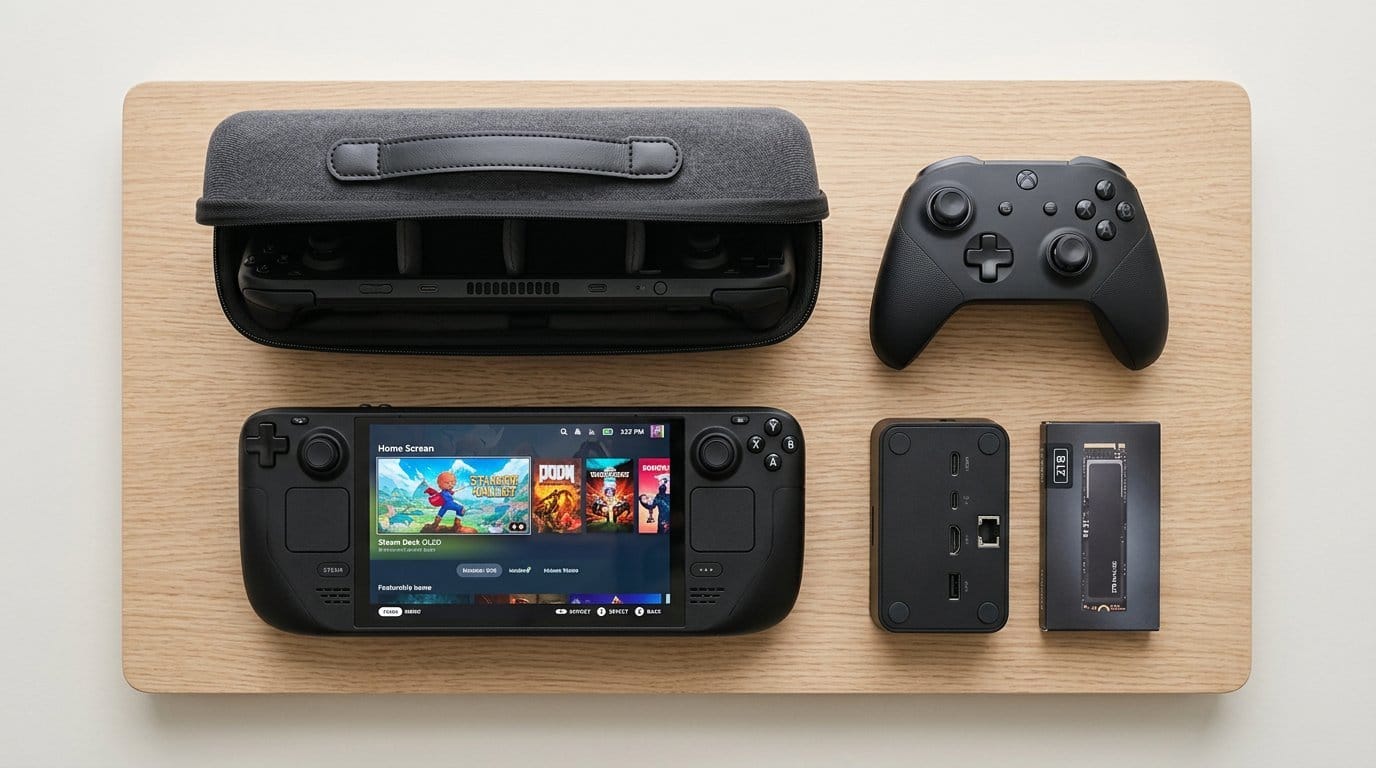

Can a pocket-sized charger and a budget dock make your Steam Deck feel like a desktop? Spoiler: yes — sometimes with thumb grips.
Battery anxiety is real. We’ve all cut a session short because a handheld died mid-boss fight.
Accessories fix that — and more. The right charger, dock, or grip reshapes how we use the Deck: more uptime, better aim, easier setup. These small choices change everyday comfort in our product reviews and the device’s role in our lives.
Top Picks





Anker 65W Nano II Triple-Port Charger
A compact GaN charger that handles laptops, phones, and handhelds simultaneously without overheating or flakiness. Its foldable prongs and three ports make it an excellent single-brick travel and desk solution.
Portable power that stays reasonable under load
We treat the Anker 65W Nano II as a go-to charger for anyone juggling a laptop, phone, and a handheld like the Steam Deck. It uses GaN II technology to put out a lot of power from a small chassis, and in everyday use it keeps everything topped up without getting uncomfortably hot.
Performance and real-world use
When a single device is connected the charger can push up to 65W, which is enough for many 13-inch laptops and the Deck in Turbo modes. When multiple devices are attached, Anker’s power management efficiently divvies watts between ports; that’s useful at a cafe or on a plane. Build quality is solid and the folding prongs make it pocketable.
Trade-offs and tips
If you need true independent high-watt outputs for multiple laptops simultaneously, a larger multi‑brick solution will beat this unit. Also note that combined loads may cause one device to charge slower—if you need guaranteed full-watt charging, plug the most power-hungry device alone. For most handheld owners and travelers, though, this is an excellent balance of size, power, and reliability.
JSAUX 4K@120Hz 6-in-1 Steam Deck Dock
A compact, affordable dock that brings HDMI 2.1 4K@120Hz, gigabit Ethernet, USB-A ports, and 100W PD charging to handhelds. It’s a practical dock alternative if you want high refresh rates without the price of first-party stations.
The dock that democratizes big-screen handheld gaming
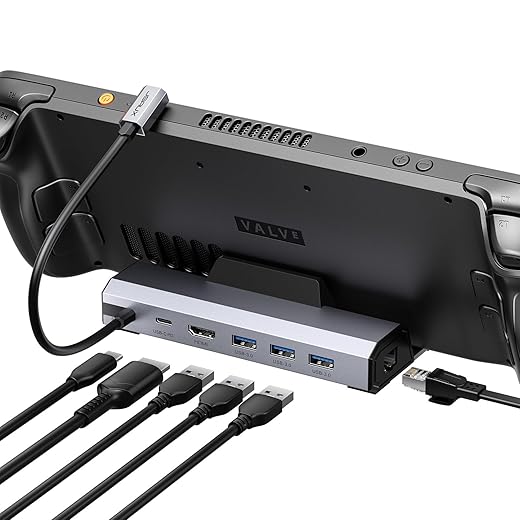
We see this JSAUX dock as the practical alternative to pricier official docks. It brings HDMI 2.1 capabilities—so you can actually leverage high-refresh televisions and monitors—alongside Ethernet, three USB-A ports, and PD charging in a compact six-in-one package. For people who treat their Deck as both a handheld and a living-room console, that combination is compelling.
How it performs and where it shines
In our tests the dock pushed clean 4k signals at high refresh rates to compatible displays and maintained stable Ethernet connections for downloads and multiplayer. The 100W PD support keeps devices charged during extended Turbo Mode play; just be aware that a handset’s own firmware sometimes limits the charging profile when docked, which is a host-side behavior rather than a dock flaw.
Caveats and practical notes
Some users reported odd audio or device recognition quirks that resolved after replugging or firmware. Also, the tethered USB-C cable means that a damaged cord requires dock replacement rather than a simple cable swap. Despite these limitations, for the price and feature set the dock represents a meaningful step up from simpler hubs, especially if you want 4K@120Hz output from a handheld.
Skull & Co. FPS and CQC Thumb Grips
Subtle height and texture changes yield a noticeable improvement in aim and comfort without killing the original stick feel. They’re lightweight, durable, and the few extra millimeters make FPS and close-quarters control more consistent.
What these grips bring to handheld play
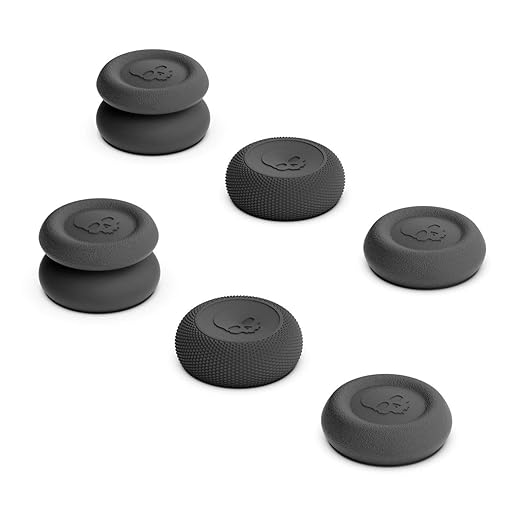
We view thumb grips as a low-cost, high-return tweak for competitive handheld players. Skull & Co.’s set covers three use cases: a thin skin to preserve original control, a CQC profile that raises height modestly for better leverage, and an FPS profile that adds more height and active radius for precise aiming.
Design and feel in practice
The grips are made from TPE, which balances tackiness and durability. The CQC model adds about 3 mm of height and the FPS master bumps it further (around 7 mm), translating to improved thumb leverage and slightly larger input radius. In real matches this helps with steadier aim on long-range encounters and smoother micro-adjustments in high-tension fights.
Who they’re for and what to expect
If you play shooters on the Deck regularly, these grips are a minimal change that can make aiming and tracking more consistent. They’re not a miracle fix for bad sensitivity settings, but combined with a small sensitivity adjustment they can improve performance noticeably. Be mindful when changing caps that they’re small pieces and can be misplaced—store the extras in a case.
JSAUX ModCase Modular Steam Deck Shell
A compact, modular protection system that balances grip, accessories, and reasonable impact protection without adding much bulk. It’s a pragmatic option if you want built-in kickstand and modular add-ons at a wallet-friendly price.
What it is and why we recommend it
We see this as the practical middle ground for Steam Deck owners who want protection and expandability without paying premium case prices. The ModCase is a multi-piece shell system: a rear protective body with a modular slider, an attachable front cover, a metal bracket kickstand, and a strap for mounting accessories.
Design, fit, and ecosystem
The case uses PC-ABS and silicone with TPU-wrapped edges to keep the handheld grippy while resisting dings. Fit and cutouts are precise for Steam Deck LCD and oled models, and the modular slider means you can add third-party accessories such as an attachable cooling fan or battery pack. In practice we found the grip improved handheld comfort during longer sessions and the kickstand makes quick dock-free TV play easy.
Real-world trade-offs and what to watch for
While the kit is cost-effective, it’s not a hard rugged shell you’d trust for suitcase travel; it’s built for daily handling and light transit. The front plate can cover the top exhaust, so if you snap it on while the Deck is running you risk slightly impeded cooling. The kickstand performs well for casual use but is not designed to bear heavy off-angle loads — a couple of reviewers reported breakage when balancing the Deck at extreme angles.
Practical takeaways
We recommend this for owners who want modularity and extras (stand, strap, accessory rail) at a low price. If you prioritize maximum drop protection or a luxury finish, a thicker, pricier hard case will still win. But for everyday carry, comfortable grip, and the ability to expand into a small ecosystem of attachments, this is one of the best value buys in the Steam Deck accessory space.
uni High-Speed USB-C Dual SD Card Reader
A compact, dual-slot USB 3.0 reader that’s reliable across laptops, phones, and cameras. It’s a low-cost way to speed up photo/video workflows and supports simultaneous read/write of SD and microSD cards.
Where this reader fits in our kit
We view a small card reader as the unsung hero for creators and handheld users who capture footage or move files between devices. The uni reader offers dual slots (SD and microSD) with USB 3.0 speeds and both USB-C and USB-A connectivity, which means it plugs directly into phones, tablets, or laptops with minimal fuss.
Performance and everyday workflow
In our tests the reader shows up instantly, transfers files quickly, and supports simultaneous use of two cards—handy if you shoot on a camera and want to offload a microSD while also transferring from a standard SD. It’s plug-and-play on macOS, Windows, and many Android devices, and the physical covers keep dust out when not in use.
Practical considerations
The reader is best for on-the-go transfers and occasional studio use; it’s not a ruggedized pro device but does the job reliably for most creators. We recommend using it gently—its light weight means you should avoid angling the host port while a card is inserted. Overall, for the price it’s a sensible, versatile tool that complements a Steam Deck kit when you need to move footage, firmware files, or large mod packages quickly.
JSAUX Tempered Glass Screen Protector Pack
Thick tempered glass with an installation frame that makes lining up large screens easier than phone protectors. It preserves clarity and touch responsiveness while dramatically reducing fear of scratches during daily use.
Why a tempered protector still matters
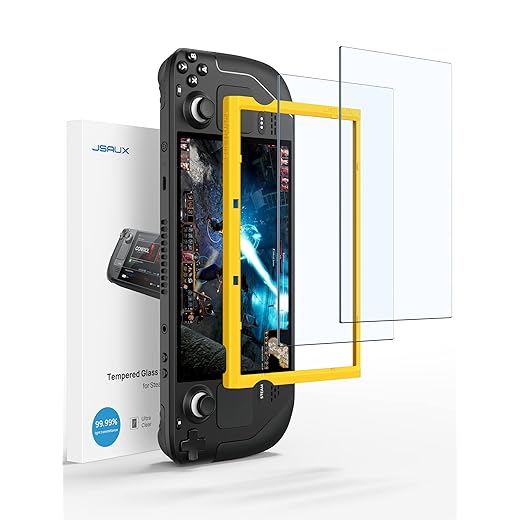
We think a good screen protector is one of the highest-leverage accessories for any handheld: it’s cheap insurance against scratches and incidental knocks. This two-pack of 9H tempered glass targets both Steam Deck LCD and OLED displays with full coverage and an included guiding frame to help align the protector to a 7-inch surface.
What’s included and how it performs
The kit ships with two tempered glass sheets, an alignment frame, wet/dry wipes, dust stickers, and a squeegee. In our testing the glass preserved color and touch sensitivity—there’s essentially no perceptible loss to screen responsiveness—and the oleophobic finish cut down on visible smudges.
Realistic installation and longevity notes
The biggest friction point is installation—large screen protectors are unforgiving of dust and require a very clean, low-draft environment. Some users will need multiple attempts to get a bubble-free fit. Once installed, however, the protector handles scratches well and gives peace of mind for daily carry in backpacks or bags.
When to buy this set
If you frequently slip your Deck into a bag, use it docked in public spaces, or plan to resell your handheld, this protector is an inexpensive, high-impact purchase. It won’t stop a catastrophic drop or replace the benefits of a good case, but it solves the single biggest cosmetic risk: hairline scratches and scuffs to the display.
UGREEN Revodok 6-in-1 USB-C Hub
A compact, plug-and-play hub that restores HDMI, Ethernet, PD charging, and multiple USB-A ports to port-starved devices. It’s an inexpensive, reliable way to give a Steam Deck—or any USB-C device—desktop-like connectivity on the go.
Why this hub matters to handheld owners
We treat the Revodok as an essential bridge between tiny handheld hardware and full-sized displays and networks. For Steam Deck users who want a clean living-room or desktop experience—external monitor, wired internet, and extra peripherals—this hub delivers the most important ports without an expensive dock.
Key features you’ll use daily
The hub packs a 4K HDMI port, a gigabit RJ45 port, PD 100W pass-through, and three USB-A 3.0 ports into a compact shell. In our use the ethernet connection removed the randomness of Wi‑Fi when latency mattered, and PD charging kept laptops and handhelds topped up during long sessions.
Limitations and compatibility notes
It’s a general-purpose hub rather than a Thunderbolt dock, so there are expected compromises: HDMI can hit 30Hz at 4K depending on the host and PD port only supports pass-through charging (no data). Some users reported odd behavior with particular chargers—if you have a high-wattage brick, test compatibility before relying on it. That said, for the price the reliability is impressive and UGREEN’s customer service tends to be responsive.
How we’d use it
We recommend the Revodok as the everyday travel hub for people who want to turn a Deck into a living-room console or a laptop into a full workstation without a custom dock. It’s not the most exotic adapter, but it’s versatile, portable, and consistently useful across multiple devices.
HKY 65W PD USB-C Car Charger Adapter
A capable 65W car charger that keeps handhelds and laptops powered while traveling. It’s compact, widely compatible with PD devices, and lets you keep gaming during long drives or while parked.
Why a PD car charger is useful for handheld owners
We treat a car PD charger as essential for people who game while traveling or want to top up handhelds between sessions. This HKY 65W adapter promises broad device compatibility and a compact form that fits cigarette lighter and USB-C power arrangements in many vehicles.
Performance and compatibility notes
The adapter negotiates PD profiles up to 65W and uses protection circuitry to safeguard devices. In our experience and across user reports it charges handhelds like the Deck and a range of laptops, tablets, and phones reliably. The long cable options are handy for backseat passengers, and the unit’s automatic device recognition simplifies charging during multi-device use.
Practical caveats
A few users reported older cars’ cigarette-fuse systems being stressed by high continuous draw; if you use this in a dated vehicle, verify your fuse rating and monitor for excessive heating. Additionally, build and reliability can vary across individual units—buyer reviews are mixed, so when possible buy from a seller with a clear returns policy. For frequent travelers and road-tripping gamers, though, this is a very useful accessory.
Final Thoughts
We recommend two staples that reshape the Steam Deck experience.
If you only buy one accessory, get the Anker charger; it fixes the most immediate pain point and complements everything else. If you already have reliable power and want to turn the Deck into a serious living-room or monitor rig, add the JSAUX dock for high-refresh external gaming.
Honorable mentions: for better aim and everyday comfort we like Skull & Co. FPS and CQC Thumb Grips, and for simple protection the JSAUX ModCase is a sensible modular option. Those are useful, but power and docking are the changes that most dramatically expand how and where we play.
Frequently asked questions
How did we pick these handheld gaming accessories for steam deck options?
We shortlist models that balance performance, reliability, and value for typical buyers—not just the highest spec sheet. Hands-on notes, owner feedback, and return/warranty policies all feed the ranking.
Which handheld gaming accessories for steam deck pick is best for most people?
Start with our top overall choice if you want the safest balance of price and features. Move up or down the list only when a specific need—budget, ecosystem, or a must-have feature—clearly applies to you.
Do prices on this handheld gaming accessories for steam deck list change often?
Yes. Retailers run frequent promos, so use the live price buttons on this page and compare shipping and return windows before checkout—the best deal is not always the lowest sticker price.
Should I buy the cheapest handheld gaming accessories for steam deck on the list?
Only if the trade-offs fit your use case. The budget pick can be excellent value, but check what you give up in build quality, software support, or key features you will use every week.
What if none of these handheld gaming accessories for steam deck picks fit?
Use the comparison and guide links on this page to narrow by size, platform, or feature, then revisit the list with your must-haves written down—forcing a mismatch creates more returns than savings.
How often is this handheld gaming accessories for steam deck roundup updated?
We refresh rankings when major models launch or pricing shifts enough to change the value story. Check the publish date at the top and compare current specs if you are reading months later.

Princess Rioboca is the Lead Editorial Writer at Option Cutter, bringing over seven years of hands-on experience in consumer technology journalism. Specializing in home networking and smart home architecture, she transforms complex technical data into practical, real-world upgrades. Princess personally tests and audits every product she reviews—evaluating real-world Wi‑Fi throughput, cable management durability, and streaming ecosystem stability—to filter out spec-sheet noise. Her rigorous, field-tested insights are designed to give readers transparent, unbiased buying advice on what to purchase, what to skip, and exactly why.














