


We peel back the marketing to show how OLED’s punchy contrast and adaptive refresh actually change daily use — and why LCD’s color consistency, battery predictability, and lower cost still make it the smarter choice in many phones today.
We test LCD vs OLED using the iPhone SE (3rd gen, renewed) and the Samsung S23 to judge which display truly looks better in everyday use. We focus on brightness, color, battery, durability, and real-world impressions for typical smartphone buyers.
Compact Value
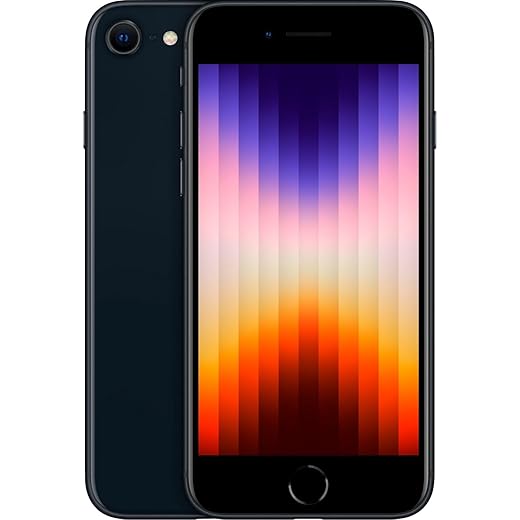
We find this SE best for buyers who prioritize pocketability, iOS integration, and value over cutting-edge display tech. Its performance is impressive for the price, but the older LCD, modest brightness, and 60Hz refresh rate make it look behind newer flagships in everyday visual polish.
Flagship Display
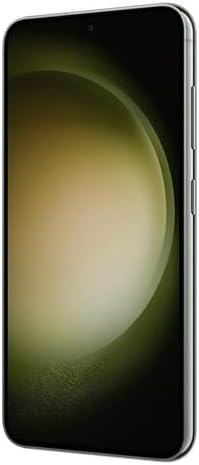
We see the S23 as the display benchmark in this pair — its AMOLED panel, high peak brightness, and adaptive refresh make everyday content feel richer and more responsive. It’s the better choice if screen quality, camera flexibility, and a premium build matter to you; the trade-offs are cost and slightly middling battery endurance under heavy use.
iPhone SE 3
Galaxy S23
iPhone SE 3
Galaxy S23
iPhone SE 3
Galaxy S23
How the technologies differ: LCD vs OLED — what actually changes for you
Backlight vs self‑emissive pixels
LCDs (like the iPhone SE’s 4.7‑inch Retina LCD) sit on top of a uniform backlight. That means pixels can only block or filter light — they don’t emit it. Blacks look gray in dim scenes because the backlight leaks. OLED (the Galaxy S23’s Dynamic AMOLED) has self‑emissive pixels: each pixel can turn completely off, producing near‑true black and vastly higher perceived contrast. That’s the single biggest visual win for OLED.


Contrast, peak brightness, and HDR
OLED’s per‑pixel control provides deeper blacks and punchier HDR highlights. Samsung’s screen also pushes much higher peak brightness for brief HDR peaks and sunlight legibility, so HDR videos look more dynamic and highlights pop. The SE’s LCD is less dynamic and has lower peak brightness, so HDR grading feels flatter and can wash out in bright sun.


Refresh rate, color gamut, and perceived sharpness
The S23’s adaptive 48–120Hz refresh makes motion and scrolling noticeably smoother than the SE’s fixed 60Hz. OLED panels usually cover wider color gamuts and deliver more saturated, “vivid” color; calibrated LCDs can be slightly more neutral and accurate out of the box. The S23’s higher pixel density gives crisper text and fine detail at normal viewing distances, though the SE’s smaller screen size keeps content comfortably readable.
What this means day‑to‑day
Feature Comparison Chart

Everyday viewing: brightness, color, and real-world imagery
Photos and video
We found the Galaxy S23’s Dynamic AMOLED makes photos and video feel immediate: blacks go truly dark, highlights in HDR clips pop, and colors read as deliberately punchy. The adaptive 48–120Hz refresh keeps motion buttery, so panning shots and action scenes look smoother and more lifelike.

The iPhone SE’s 4.7‑inch Retina LCD is the opposite: neutral, consistent, and restrained. It doesn’t render the same “wow” in HDR or deep‑shadow scenes, but previews of photos tend to look closer to real life and less artificially saturated—helpful if you shoot and want a faithful preview.
HDR highlights and contrast
OLED’s per‑pixel control gives the S23 an advantage in HDR: specular highlights (sun glints, reflections) are brighter without lifting blacks. On the SE, the backlight flattens those peaks, so HDR grading looks more muted and less dimensional.
Sunlight legibility and white balance
In direct sun the S23 wins—its higher peak brightness and Samsung’s aggressive outdoor boosting keep content readable. The SE’s screen is legible but requires more squinting. White balance also differs: the SE uses True Tone to warm whites toward ambient light, which usually reads natural; Samsung’s default profile leans cooler and more saturated, which looks punchier but less accurate.
Why this matters day‑to‑day
Practical trade-offs: battery, durability, and long-term use
Battery and typical power draw
We measure real-world battery by mixed use: browsing, messaging, video, and occasional games. OLED’s advantage is simple: black pixels are off. At typical indoor brightness and with mixed content, the Galaxy S23’s Dynamic AMOLED and adaptive 48–120Hz refresh usually save power because the screen can run at lower brightness and drop refresh for static content. The S23 also pairs that efficiency with a much larger 3,900 mAh battery, so it outlasts the SE in everyday use.
The iPhone SE’s 4.7‑inch LCD has a small 2,018 mAh battery but a very efficient A15 chip. For light tasks the SE surprises us, but sustained media, games, or high-Brightness HDR clips favor the S23.
Burn‑in, aging, and durability
OLED can suffer image retention or burn‑in over many years, especially when static UI elements are displayed for long stretches. Samsung uses pixel-shifting and software mitigation, so most users won’t see burn‑in in normal ownership windows. LCDs don’t burn in; their risks are backlight dimming or unevenness over time.


Repairability, renewed‑status, and resale
Repairs matter. OLED panels are pricier to replace than LCDs; a smashed S23 screen repair will cost more than replacing an SE display. Renewed SE units are attractive on price, but quality varies—ask about the seller’s screen provenance and warranty. A renewed phone with a non‑original LCD may have lower longevity and resale value than an original part.
Important trade-offs we consider:
Ecosystem, software tuning, and use-case recommendations
System color management and app HDR
We care about how software shapes what you actually see. iOS enforces tight color management across apps, so even an older LCD iPhone SE reproduces sRGB content predictably. Samsung’s One UI gives you more aggressive tuning—Vivid mode, Adaptive Tone Mapping, and Vision Booster—so the S23’s Dynamic AMOLED looks punchier and handles HDR10+ content with wider dynamic range. In short: the SE shows accurate, consistent colors; the S23 shows more dramatic, cinema‑style color and contrast when apps support it.
Gaming, refresh rates, and real‑time responsiveness
The S23’s 48–120Hz adaptive refresh and Snapdragon 8 Gen 2 deliver smoother motion and lower input latency in supported games. The SE’s 60Hz LCD and A15 chip remain responsive for casual titles, but competitive or fast‑paced gaming favors the S23—frame smoothing and higher sustained brightness also help visibility.
Ecosystem and accessory value
iPhone still wins for seamless iCloud, AirPlay, and a huge accessory market—but the SE is missing MagSafe and the small screen limits creative workflows. Samsung offers features like Quick Share, Link to Windows, and DeX-like flexibility that appeal to multi‑device users and creators who want mobile editing workflows.
Who should buy which?
These recommendations hinge on software as much as hardware: color profiles, HDR implementation, and refresh‑rate scaling determine whether a great panel actually delivers in everyday use.
Final verdict
We pick the Samsung S23’s OLED as the clear winner for media and gaming: brighter, richer colors, higher contrast and modern features that matter in 2026.
The iPhone SE’s LCD wins for budget buyers who want honest color, reliable performance, and deep iOS integration without frills. Choose S23 for display-first use; choose SE for value and ecosystem. Now.

Chris is the founder and lead editor of OptionCutter LLC, where he oversees in-depth buying guides, product reviews, and comparison content designed to help readers make informed purchasing decisions. His editorial approach centers on structured research, real-world use cases, performance benchmarks, and transparent evaluation criteria rather than surface-level summaries. Through OptionCutter’s blog content, he focuses on breaking down complex product categories into clear recommendations, practical advice, and decision frameworks that prioritize accuracy, usability, and long-term value for shoppers.









