



How to Pick Earbuds with Real Call Noise Reduction
We tested earbuds across price ranges to find models that consistently deliver REAL call-noise reduction and clearer voice. In this guide we explain our evaluation methods, trade-offs, and why microphone design, on-device processing, and ecosystem fit determine real-world call performance.
What You Need
We’ll need

Enable Phone Noise Cancellation on iPhone: Quick Setup Guide
Define Your Call Noise Problem
Who are we calling from — a subway or a home office? The use case decides everything.Clarify what “call noise reduction” means for us: suppressing ambient sound, isolating our voice, and delivering a clear signal to the person on the other end.
Identify who we are — commuter, open‑plan worker, parent, or someone who uses speakerphone — because that determines which noise types matter. Recreate realistic test conditions: busy buses and trains, office chatter, vacuum or washing‑machine hum, and echo‑prone rooms for speakerphone testing.
Use focused metrics, not marketing copy: speech‑to‑noise ratio, beamforming reliability, and whether mic processing removes speech or just masks noise. Remember that earpiece ANC is different from microphone-side noise reduction. Also account for platform quirks — iOS, Android, and PC audio stacks change codec support and in‑call processing, so performance can vary by device.

Prioritize Microphone Hardware and Placement
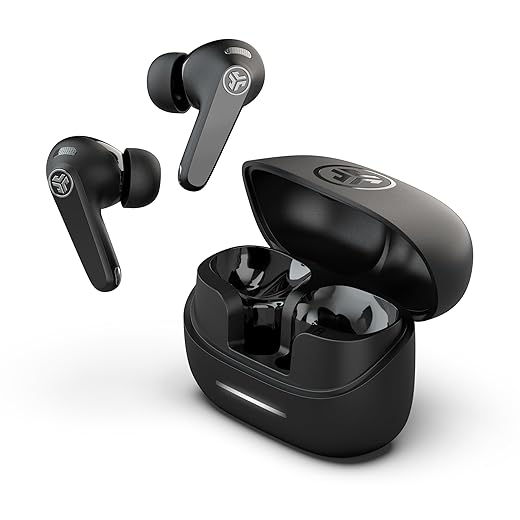
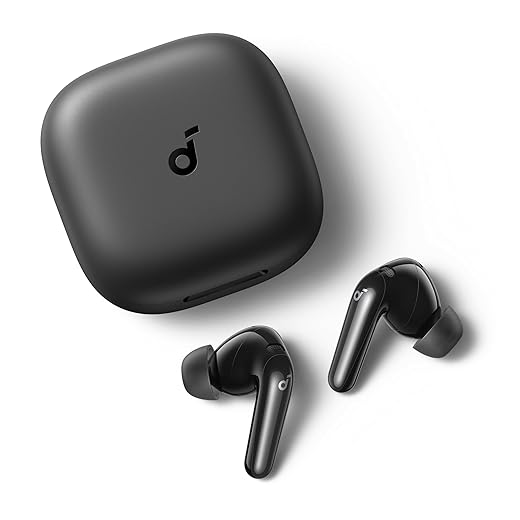
Tiny mics, big difference — why location often beats headline specs.Focus on the physical mic setup on true wireless earbuds: count, type, and placement determine how well algorithms can separate speech from noise. We favor designs that physically put mics closer to the mouth.
Compare form factors with concrete examples: stems (AirPods‑style) usually win for clarity because the mic sits nearer the lips; in‑ear pods hide mics and suffer from body/ear resonance; neckbands keep mics close but add clothing/neck noise. Note how metal housings, venting, and port placement change resonance and wind sensitivity — a steel shell can ring, a vent can let wind in.
Check the signal chain: verify whether raw mic signals go to the phone, are processed on‑device, or routed to the cloud — this affects latency, privacy, and consistent performance.
Look at spec sheets; focus on
Avoid vague marketing buzzwords like “AI” or “pro” without specs. We include sample call clips for direct comparison.
Evaluate On-Device Algorithms and Processing
Is AI doing the talking? Spoiler: where it runs matters for latency and privacy.Evaluate on‑device DSP and vendor pipelines on true wireless models. We prefer local on-device DSP for low latency and privacy; accept that cloud processing can deliver heavier ML denoising at the cost of delay, network dependency, and variable behavior.
Note vendor‑led stacks (Qualcomm’s cVc lineage, Apple’s silicon+OS tuning) often give more consistent in‑call results on their own phones. Expect third‑party earbuds to shine at ANC but stumble in call handling without tight ecosystem ties.
Focus on beamforming, adaptive filtering, wind suppression, and aggression tuning: aggressive reduction kills noise but can hollow or clip timbre; gentle tuning preserves natural voice.
Run quick in‑field tests

Test in Real Environments and with Real People
Lab numbers lie — go outside and make someone shout. Seriously.Run controlled, repeatable tests across realistic settings: commuting (train/bus), busy cafes, windy sidewalks, and quiet offices to see how earbuds behave in real conversations.
Bring a friend and swap roles—caller and receiver—so each earbud’s mic gets equal scrutiny. Record both ends to judge clarity, presence, and artifacting.
Record both ends and use these checks
Pay attention to sudden noises, overlapping speech, and wind; try iOS/Android and apps (Cell call, WhatsApp, Zoom) to see whether voice‑isolation modes or call presets survive cross‑platform routing.
Compare recordings with A/B blind tests and spectrogram inspection; keep the same phone and carrier to isolate the earbuds’ contribution. Monitor battery and heat during long calls, as processing fidelity can drop as power throttles.
Assess Ecosystem Integration and Compatibility
Don't just buy earbuds — buy an experience that actually works with our devices.Assess how headphones behave across our device ecosystem; seamlessness often trumps headline specs.
Check codec support (AAC, aptX, LDAC) and remember codec fallbacks can raise latency and worsen in‑call sync.
Verify platform-specific call enhancements — try iOS Voice Isolation on an iPhone and Android carrier or OEM call optimizations on a Pixel or Samsung to see real differences.
Use the companion app to confirm features (custom mic modes, firmware updates, cloud‑processing opt‑ins) actually work as advertised.
Prefer earbuds that match our main device ecosystem to avoid vendor‑only noise suppression that runs only in a native app. Consider warranty and support as part of long‑term call quality stewardship.

Make a Purchase and Post-Purchase Testing Plan
Buy smart, test fast, return faster — our foolproof checklist for avoiding regret.Buy from retailers with generous return policies so we can run a structured two‑week test on true wireless earbuds and avoid buyer’s regret; real calls reveal what specs don’t.
Use trial data to demand exchanges or refunds; accept firmware fixes only if the vendor commits to a timeline and delivers.
Spend on microphones and on‑device processing over flashy ANC if call clarity is the priority.
Track community feedback, follow firmware roadmaps, and set reminders to re‑evaluate after major updates.
Final Take
We favor earbuds that pair strong mic hardware, effective on-device processing, and tight ecosystem integration; testing in real scenarios and prioritizing voice pickup yields clearer, less fatiguing calls. Try our approach in how-to guides, pick a pair, and share your results.
Frequently asked questions
What should I prepare before I choose earbuds with real call noise reduction?
Start with the checklist in the “What we’ll need” section above—measure your space, confirm compatibility with your gear, and read the full walkthrough once before you change settings or buy parts. Earbuds with real call noise reduction goes faster when prep is done upfront.
How long does it take to choose earbuds with real call noise reduction?
Most readers finish in about 30–90 minutes if they already have the right parts, but budget extra time for measurements, firmware updates, or a second pass when something does not behave the way the manual suggests on the first try.
What is the hardest part when you choose earbuds with real call noise reduction?
The step that trips people up is usually alignment or configuration—getting measurements, cable routing, or software settings right before you commit. If results still look off, re-check the basics in order instead of swapping hardware immediately.
What mistakes should I avoid when I choose earbuds with real call noise reduction?
Skipping measurements, ignoring ventilation or port limits, and rushing the final test are the common failures. Photograph your starting setup, label cables, and verify the outcome with the same content or workflow you will use every day—not a one-off demo.
When should I call a pro instead of trying to choose earbuds with real call noise reduction myself?
Bring in help when the job needs structural work, licensed wiring, or tools you do not own, or when repeated attempts still fail after you have followed the troubleshooting section. A short paid visit can cost less than replacing gear you damaged by forcing the install.

Princess Rioboca is the Lead Editorial Writer at Option Cutter, bringing over seven years of hands-on experience in consumer technology journalism. Specializing in home networking and smart home architecture, she transforms complex technical data into practical, real-world upgrades. Princess personally tests and audits every product she reviews—evaluating real-world Wi‑Fi throughput, cable management durability, and streaming ecosystem stability—to filter out spec-sheet noise. Her rigorous, field-tested insights are designed to give readers transparent, unbiased buying advice on what to purchase, what to skip, and exactly why.















