Menu

How to Choose a Budget Phone With a 120 Hz Display

Yogesh Kumar / Option Cutter
Picture of By Chris Powell
By Chris Powell

Why 120 Hz on a budget actually matters

We show a pragmatic way to pick a budget phone with a TRUE 120 Hz display — not marketing copy — focusing on real-world smoothness, battery trade-offs, panel quality, and ecosystem fit so you get noticeable value without surprises and long-term reliability.

What you'll need

A target budget range we can stick to
Patience to compare specs, reviews, and hands-on tests
Access to reliable benchmarks or a demo device
Familiarity with phone specs and ecosystems
Best Value
Motorola Moto G 5G (2024) 6.6" 120Hz Display
Best for immersive media on a budget
We find the Moto G 5G (2024) delivers a fast, media-first experience with a 120Hz display, stereo Dolby Atmos speakers, and a long-lasting battery that keeps binge sessions smooth. Its vegan-leather finish and expandable storage give it a polished, practical feel—strong entertainment hardware without locking you into a single ecosystem.
Amazon price updated March 4, 2026 10:46 pm
Prices and availability are accurate as of the last update but subject to change. I may earn a commission at no extra cost to you.

1

Start by defining realistic priorities

Do we want buttery UI or all-day battery — can we have both on a tight budget?

Define our priorities. We begin by deciding which trade-offs we’re willing to accept: a 120 Hz panel improves perceived responsiveness but often reduces battery life and can push manufacturers to use cheaper panels or weaker processors.

Gaming and smooth UI: prioritize higher refresh and a stronger SoC.
Battery endurance: favor adaptive 120 Hz or phones that default to 60/90 Hz and have larger cells.
Camera quality and build: accept 60 Hz if photography or materials matter more.

Set a clear price band so we don’t chase features outside our budget. For example, $200–300 usually gives basic 120 Hz with compromises; $300–400 often delivers better panels and chips. We use this map to compare models and avoid marketing fluff.

Editor's Choice
Motorola Moto G (2025) 6.7" 120Hz AMOLED
Top choice for cinematic mobile entertainment
We appreciate the Moto G (2025) for dialing up the cinematic experience with a super-bright 6.7″ 120Hz display and Bass Boost stereo speakers that make video and gaming noticeably more engaging. Paired with MediaTek performance, RAM Boost, and a 5,000mAh battery in a water-repellent vegan-leather design, it’s a midrange contender that prioritizes screen quality and day-to-day usability without carrier lock-in.
Amazon price updated March 4, 2026 10:46 pm
Prices and availability are accurate as of the last update but subject to change. I may earn a commission at no extra cost to you.

2

Verify it’s a real 120 Hz, not just lip service

Marketing says 120 Hz; does the screen actually refresh at 120 times per second?

Confirm the phone supports true 120 Hz across everyday use, not only in a special “game” or benchmark mode. We look for adaptive refresh that steps down to save power and for manufacturers to explicitly state 120 Hz in normal UI or display settings.

Check these points before you buy:

Adaptive vs fixed: does it scale (120→60/30) automatically?
Real‑world modes: is 120 Hz available in home screen, browsers, and apps—not just in a performance profile?
Touch sampling: does the phone report a higher touch rate (e.g., 120–240 Hz)?
Third‑party tests: do reviewers or lab measurements confirm sustained 120 Hz?
App support: do your common apps and the OS actually refresh at 120 Hz?

Try scrolling social feeds and opening apps to feel the difference.
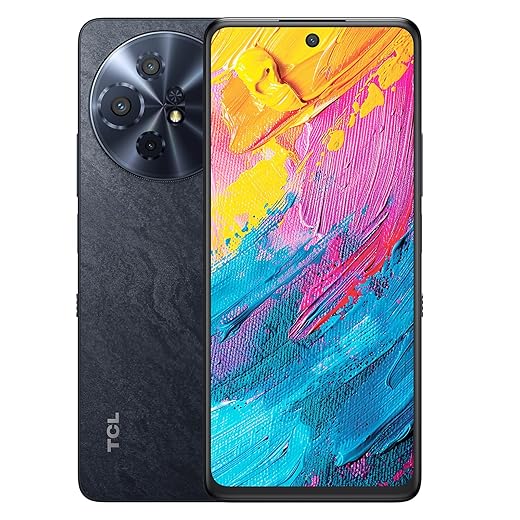
Reader's Pick
TCL 60 XE NXTPAPER 6.8" 120Hz Paper-Like Display
Best for eye comfort and long reading sessions
We like the TCL 60 XE NXTPAPER because its anti-glare, paper-like panel and four viewing modes noticeably reduce eye strain while still offering a 120Hz refresh rate for smooth motion. Coupled with built-in AI tools, a capable camera array, long battery life, and broad carrier support, it’s a distinct choice for students, readers, and multitaskers who want comfort plus productivity.
Amazon price updated March 4, 2026 10:46 pm
Prices and availability are accurate as of the last update but subject to change. I may earn a commission at no extra cost to you.

3

Evaluate panel quality, not just refresh rate

120 Hz + poor panel equals flashy numbers and disappointing visuals.

Compare OLED versus LCD implementations. We look beyond Hz: contrast, color accuracy, peak brightness, HDR support, and viewing angles shape daily experience more than refresh rate alone. Many budget phones pair 120 Hz with low‑res panels or dim backlights to cut cost — that kills the “premium” feel.

Test panels in person: bring a dark wallpaper to check deep blacks and blooming on OLEDs, and step outside to judge peak brightness. Use a calibration app or rely on lab reviews to verify color accuracy (sRGB/Display P3 coverage). Prefer FHD+ or higher, solid peak nits for sunlight, and any advertised HDR support. These basics decide whether 120 Hz truly enhances your use.
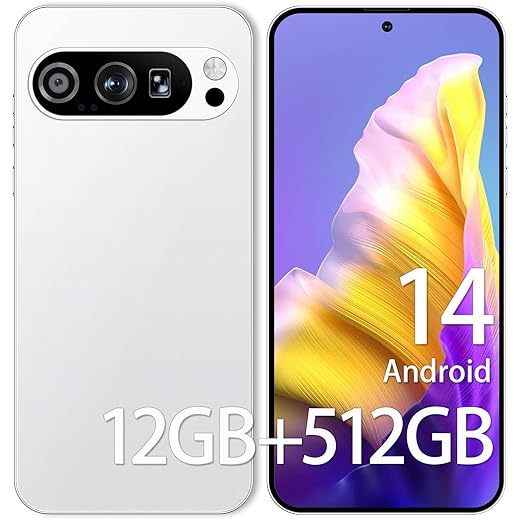
Performance Champion
PI9 Pro 12GB/512GB 6.8" OLED 120Hz Flagship
Powerful specs for power users on a budget
We’re impressed by the PI9 Pro’s near-flagship package—Snapdragon 888, 12GB RAM, and high-res cameras—at a price that undercuts many mainstream flagships. The large OLED 120Hz panel, 5,000mAh battery, and global dual-SIM 5G support make it an attractive option for power users and travelers, though buyers should consider third-party warranty and update assurances versus established brands.
Amazon price updated March 4, 2026 10:46 pm
Prices and availability are accurate as of the last update but subject to change. I may earn a commission at no extra cost to you.

4

Test performance and battery trade-offs

Can the chipset sustain 120 Hz without throttling and killing battery life?

Analyze the SoC, thermal design, and battery capacity together. We check whether a modest chipset can keep UI frame pacing consistent; otherwise 120 Hz becomes a wasted spec.

Check independent sustained‑performance tests (game‑loop benchmarks, long run CPU/GPU tests).
Measure battery delta between 60 Hz and 120 Hz modes.
Watch thermal throttling patterns during gaming and heavy UI use.
Verify charger speed and how fast the phone recovers battery under load.

We prefer phones with adaptive refresh and efficient midrange SoCs that maintain frame pacing. If we play games a lot, favor sustained performance over headline Hz. Practical advice: prioritize phones that offer adaptive refresh and efficient chips that balance smoothness with endurance.


5

Consider ergonomics and design impact

A fast screen is pointless if the phone is a brick or awkward to use one-handed.

Assess how the display integrates into the handset — bezels, weight, curvature, and glass protection shape day‑to‑day comfort. Hold devices, swipe through menus, and notice which one feels faster to move and grip; a lighter, flatter phone often feels snappier than a heavy, curved one.

Check the following when you test phones in person:

Bezels & usable edge: confirm the active screen area is reachable and not lost to rounded glass.
Weight & balance: prefer phones that don’t feel top‑heavy in one hand.
Curvature & accidental touches: watch for palm rejection issues.
Glass protection & case fit: ensure screen protectors don’t wreck touch or 120 Hz responsiveness.
Fingerprint sensor placement: test reachability and reliability.
Haptic feedback & finish: judge vibration quality and the grip of the back material.

Also check fingerprint sensor placement (under-panel vs side), haptic feedback quality, and build finishes — these design choices influence perceived smoothness and premium feel, which matter as much as raw refresh rate.


6

Look beyond the display: cameras, software, and ecosystem

Is the phone an island, or does it play nicely with our apps, accounts, and longevity expectations?

Place the 120 Hz screen in context: software polish, update policy, camera quality, and bloatware shape the overall value. We know a buttery refresh rate loses its charm when the skin stutters or updates never arrive.

Test the phone in everyday use: open multiple apps, stream HDR video, and snap shots in low light to see how the whole package performs.

Check update track record: confirm promised OS and security updates actually ship.
Test real-world imaging: compare photos across lighting and HDR scenes.
Verify DRM/HDR support: ensure Netflix/Prime play HDR if that matters.
Confirm bands, chargers, and cases: make sure carriers, fast charging, and accessories work.
Audit bloatware and UI smoothness: watch for background tasks that kill frame rates.

We recommend verifying these before you buy.

Most Future-Proof
Samsung Galaxy A26 5G (2025) 6.7" AMOLED Display
Best for long-term software updates and reliability
We recommend the Galaxy A26 5G for anyone who values longevity and a cohesive ecosystem—Samsung’s six OS upgrades and Knox Vault security are rare in the midrange. Its 6.7″ Super AMOLED, OIS-backed camera, IP67 durability, and bundled 25W charger combine to deliver a dependable, well-rounded phone that will stay current longer than most rivals.
Amazon price updated March 4, 2026 10:46 pm
Prices and availability are accurate as of the last update but subject to change. I may earn a commission at no extra cost to you.

7

Final checks: pricing, deals, and long-term support

Can we wait a sale or buy from a brand that will keep the phone useful for years?

Compare street prices across retailers and watch seasonal sales; we often find last-year models drop $100–200 and give better firmware polish than bargain-new releases.
Assess warranty and software‑update commitments; prefer brands that publish timelines and have a history of delivering them.
Read multiple long-term reviews and forum threads to catch throttling or degradation reports.
Check return and warranty policies before buying; use a 14–30 day return window for real-world testing.

Verify updates: confirm promised OS/security updates match delivered history.
Consider refurbished: certified units can save money and include warranty.
Confirm returns: ensure easy refunds if the 120 Hz experience deteriorates.

Make the choice that feels smooth for you

We prioritize real 120 Hz, usable panels, efficient performance and lasting software; test a candidate in person, pick the package that matches our needs, then try it and share results.

CEO at  |  + posts

Chris is the founder and lead editor of OptionCutter LLC, where he oversees in-depth buying guides, product reviews, and comparison content designed to help readers make informed purchasing decisions. His editorial approach centers on structured research, real-world use cases, performance benchmarks, and transparent evaluation criteria rather than surface-level summaries. Through OptionCutter’s blog content, he focuses on breaking down complex product categories into clear recommendations, practical advice, and decision frameworks that prioritize accuracy, usability, and long-term value for shoppers.


Newest Posts