

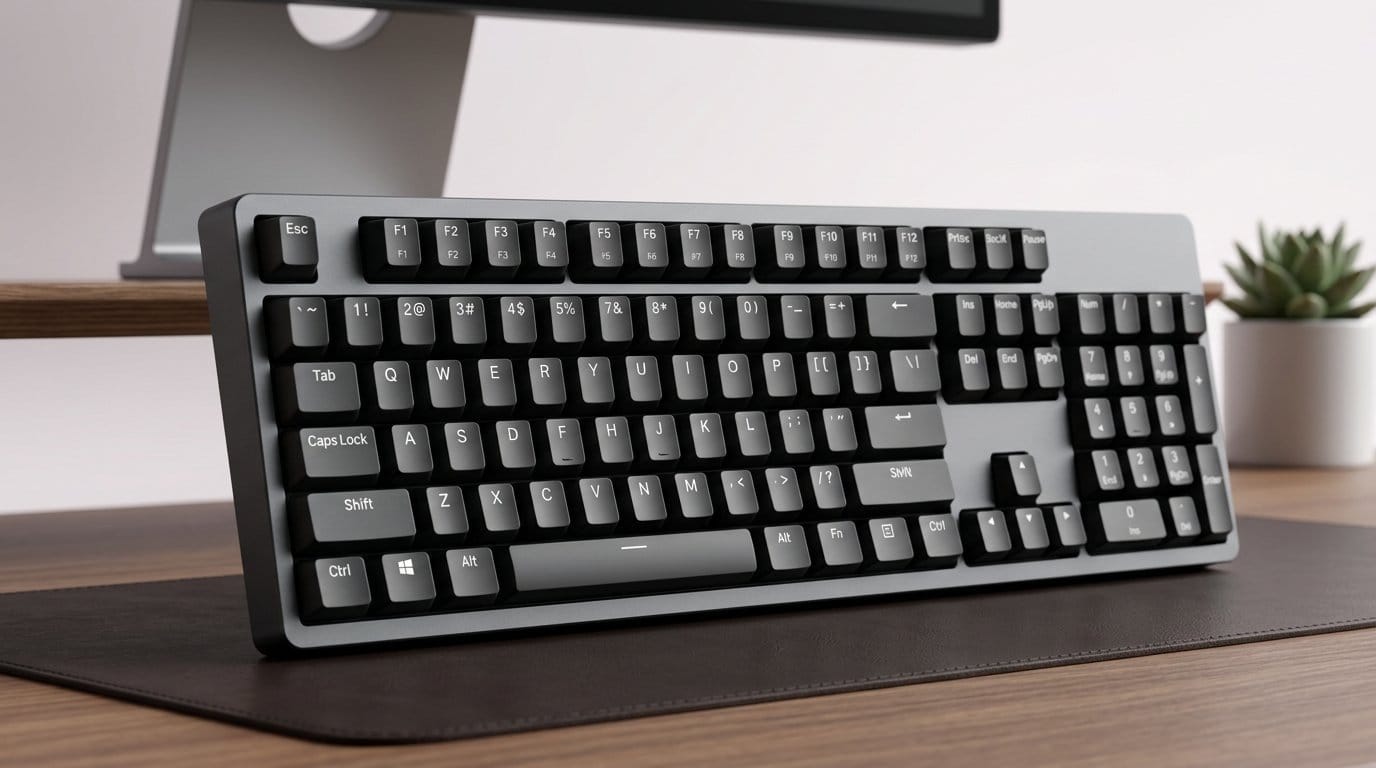

Click, clack, no crash course — mechanical keyboards that feel *instantly* familiar.
You shouldn’t have to relearn typing to enjoy a mechanical keyboard. We want the satisfying feel of switches without a week of hunting for the right layout or learning new key layers.
We focused on what matters most for zero learning curve: familiar layouts, sensible key profiles, and reliable software or wireless behavior. Simple things like PBT keycaps, consistent travel, and full-sized or TKL layouts in our keyboards shop make a huge difference in day-one comfort.
Top Picks
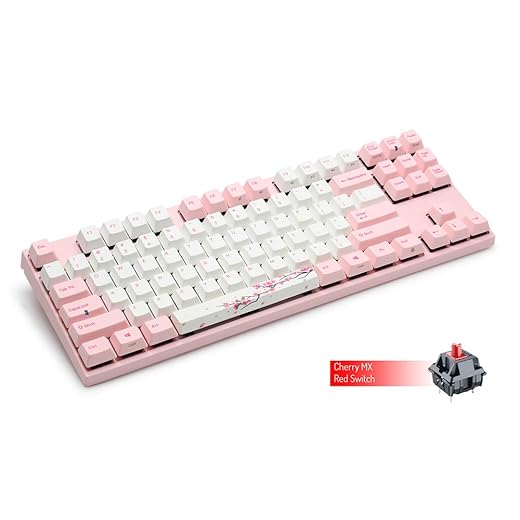

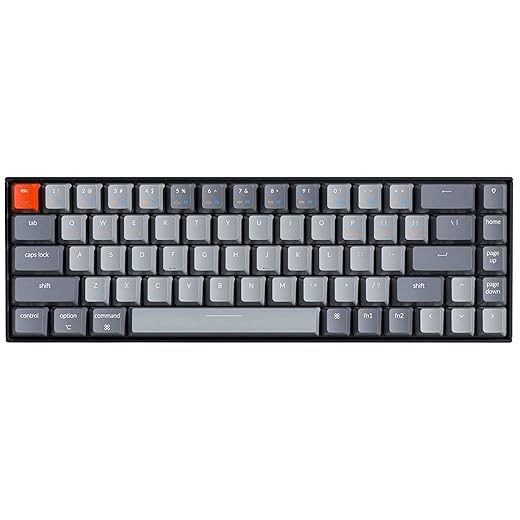


Varmilo VA87M Sakura TKL Cherry Brown Keyboard
A beautifully finished tenkeyless keyboard that emphasizes materials and typing refinement. It’s a great fit for people who care about long-term durability, premium keycaps, and a pleasant, familiar typing feel without a steep adjustment period.
Materials and design that reward long-term use
We value Varmilo's attention to detail: thick dye-sub PBT keycaps resist shine and feel pleasant under the fingers, and the Sakura colorway is executed without being gimmicky. The VA87M is built as a utilitarian premium board — it favors lasting materials and a reliable typing experience over feature chasing.
Typing experience and who it’s for
Typing on the VA87M feels refined: the Brown switches offer a bump that’s easy to live with all day, and the PBT keycaps give a comfortable texture and longevity that ABS caps often lack. Because it’s wired and intentionally simple, there’s no learning curve — you plug it in and type exactly as you expect.
Trade-offs and practical guidance
This is a focused, premium product: you pay for materials and feel rather than software features, wireless convenience, or RGB showmanship. If you want a clean, dependable keyboard for heavy typing sessions and care about keycap longevity, this is a top choice. If you need Bluetooth, macros, or lighting, browse gaming keyboards instead.
Ultimately, the VA87M rewards the kind of buyer who prioritizes long-term tactile satisfaction and aesthetic restraint; it’s an excellent pick when the learning curve should be effectively zero and the day-to-day feel is the priority.
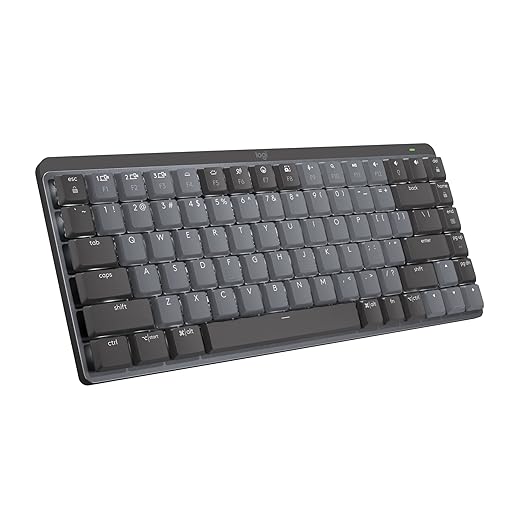
Logitech MX Mechanical Mini Low-Profile Keyboard
A thoughtfully built low-profile mechanical keyboard that prioritizes typing feel, battery life, and cross-device workflows. It’s tailored for people who value a refined, office-friendly mechanical experience with advanced software integration.
What sets this low-profile board apart
We view the MX Mechanical Mini as Logitech’s answer to people who want mechanical precision without desktop disruption. The low-profile switches reduce travel and wrist strain while delivering a mechanical feel — a layout topic covered in NIOSH workplace ergonomics guidance — a combination that appeals to long-session typists and professionals who spend most of their day at a keyboard.
Real-world typing and software
In practice the typing experience is polished: keycaps and switches combine for consistent feedback, and the backlighting is functional without being distracting. The Logi Options+ software unlocks function remaps and Flow (cross-computer control) which is a productivity multiplier for people who use multiple machines. The use of recycled plastic in parts of the chassis is another welcome detail for users who care about materials.
Who should buy, and what to watch for
If you want a premium office keyboard that blends mechanical feel with modern features, this is an easy recommendation. The trade-off is cost and a more limited modding ecosystem than you get from enthusiast kits; switches aren’t hot-swappable on most SKUs, and deep per-key macros are handled through Logi Options+ rather than onboard storage.
We find it to be one of the best plug-and-play mechanical keyboards for office users because it minimizes the usual learning curve while delivering a noticeably better typing experience than membrane or laptop keyboards.
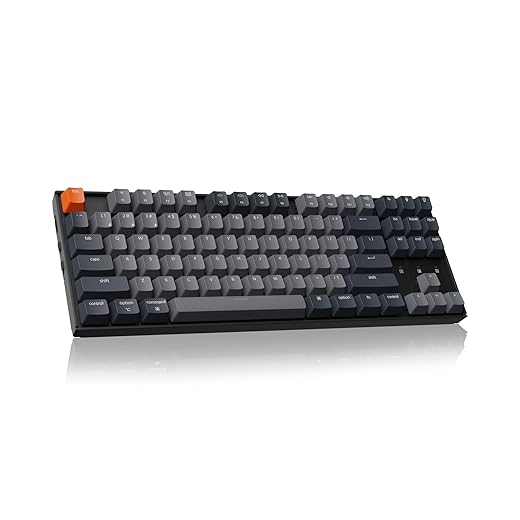
Keychron K8 Tenkeyless Wireless Mechanical Keyboard
A well-rounded tenkeyless board that balances tactile typing, cross-platform compatibility, and reliable wireless performance. It’s a sensible pick for people who want a near-immediate upgrade with minimal adjustment and strong battery life.
The case for a TKL wireless keyboard
We prefer tenkeyless boards for most desktop setups because they free up mouse space while keeping navigation keys accessible. The K8 nails that balance: macOS and Windows keycaps are included, pairing with three devices is straightforward, and the typing experience is approachable for people moving from full-size layouts.
Typing feel and practical workflow notes
In typical use the tactile switches feel crisp without being fatiguing; they’re well-suited to programming, writing, and extended office sessions on a laptop or desktop. The board’s height and OEM-profile keycaps make for a familiar touch-typing feel, which minimizes the learning curve for new users. Where Keychron stands out is the way it blends wireless convenience with practical ergonomics rather than chasing RGB or extreme customization.
Caveats and buying tips
Keychron’s SKUs can be confusing: some versions advertize hot-swap but ship soldered switches in certain regions — confirm the exact SKU before purchasing. Also, while battery life is strong, charging behavior with certain hubs can be finicky; we recommend charging directly from a laptop or wall adapter when possible.
All told, the K8 is one of the smoother out-of-the-box experiences in the affordable wireless TKL category, which is why it’s one of our Top Picks for users who want near-zero learning curve upgrades.
Keychron K2 75% Bluetooth Mechanical Keyboard
A tidy 75-percent layout that keeps arrow and shortcut keys while freeing up desk space. It blends solid battery life and multi-device Bluetooth pairing into an affordable package that’s easy for anyone to pick up and use.
What we like about this layout and approach
We find the K2 to be one of the most approachable mechanical keyboards for users who want a clear upgrade without relearning how they type. The 75% (84-key) layout keeps the arrow cluster and a condensed function row so shortcuts work the same way they did on full-size boards. That low learning curve is the product’s biggest strength: you get mechanical switches and a compact footprint without a layout that forces you to remap muscle memory.
Build, switches, and day-to-day experience
The K2's case and keycaps feel sturdy for the price. We liked the tactile feedback offered by the stock brown-style switches — they provide a satisfying bump without excessive noise. The inclusion of extra Mac and Windows keycaps is a practical touch for people who switch between platforms regularly. Typing is immediately comfortable; there’s no awkward key spacing that forces a relearning of where things live.
Limitations and practical advice
This is a workhorse rather than a luxury product, and that shows in a few places. The backlight is white-only and programmable options are limited compared with feature-rich RGB boards. Also, NKRO is only available wired, so if you depend on simultaneous key combos over Bluetooth (rare in most productivity work but relevant in some niche workflows), you’ll hit a limitation.
In short, this is a great first mechanical keyboard for people who want an immediately familiar layout, wireless convenience, and solid battery life without a steep price — start with our mechanical vs membrane keyboard guide if you are still deciding. We recommend checking switch type (Red/Brown/Blue) and choosing the one that matches noise and tactile preferences before buying.
Keychron K6 65% Bluetooth Mechanical Keyboard
A 65-percent design that condenses the layout without hiding essential keys behind awkward layers. It’s an easy pick for users who want wireless multitasking and a small footprint without sacrificing everyday productivity.
Why the K6 fits so many desks
We think the K6 strikes a useful middle ground: small enough that your mouse arm has more room, but retaining arrow keys and essential function combos. That means minimal retraining for everyday typing and shortcuts while saving desk real estate — a practical choice whether you’re remote or working from a café.
Typing experience and hardware
The board ships with Keychron’s Brown-style switches by default in many SKUs and they produce a tactile, forgiving feel suitable for long typing sessions. The keycaps and case finish are consistent with Keychron’s design language: utilitarian, durable, and approachable. Pairing to multiple machines is straightforward and stable for our daily workflow.
What to expect and practical notes
Because the K6 compresses keys, you’ll encounter more function-layer combos than on larger boards; this is not a steep learning curve but does require a short adjustment period. Also, if you want deep lighting or macro customization, this model leans toward simplicity over software-heavy configuration.
Overall, the K6 is a compact, reliable board that keeps the learning curve low while delivering the wireless convenience many people want.
Logitech G915 X Lightspeed TKL Low-Profile Keyboard
A sleek, ultra-thin TKL that brings Lightspeed wireless reliability and premium materials to a compact gaming form factor. It offers pro-level features but buyers should test for hardware consistency given some reported reliability oddities.
A design aimed at competitive and style-conscious users
We rate the G915 X as a compelling option for players and power users who want a thin, high-end TKL keyboard from our gaming keyboards aisle that also works in a professional setup. The combination of a brushed-aluminum finish, low-profile GL switches, and a media wheel creates a premium tactile and visual experience that feels at home on both desk and streaming setups.
Performance, ergonomics, and the real-world caveat
In our testing the keyboard feels fast and luxurious; the low-profile switches reduce travel which can speed up repeated actions. The media wheel is one of those small design choices that we kept reaching for. That said, there are real user reports of double-press or missed-key behavior on some units. We found this to be a concern worth calling out because it changes the risk calculus: a premium price should come with premium reliability.
Buying advice and practical guidance
If you opt for this keyboard, test it thoroughly on arrival. Logitech support has been responsive for replacements in our experience, but the extra step is inconvenient. For players who prioritize low latency and a thin footprint, the G915 X remains an attractive pick — just be ready to validate the unit under real typing/gaming conditions.
Overall, the G915 X balances aesthetics and performance well, but the potential for isolated hardware issues means it’s not an entirely carefree purchase.
Arteck Low-Profile Wireless Mechanical Keyboard
A surprisingly full-featured entry-level mechanical keyboard with a rechargeable battery and low-profile brown-style switches. It’s a strong choice if you want mechanical feel on a budget, but it isn’t without trade-offs in robustness and connectivity options.
Why budget buyers should consider this board
We see Arteck’s offering as a pragmatic entry point to mechanical keyboards: it delivers tactile keys, a metal-backed case, and a rechargeable battery at a price point that lowers the barrier to trying mechanical typing. The onboard nano receiver stows in the case — a travel-friendly nicety you don’t often see at this price.
Day-to-day use and limitations
Typing is pleasant for office and productivity work: the brown-style switches give a satisfying maar not obnoxious sound profile. However, this model trades convenience features such as Bluetooth multi-device pairing and backlighting for affordability. Some users report intermittent key registration issues or dongle interference, so expectations should be tempered accordingly.
Practical recommendations
If you need a cheap, rechargeable mechanical keyboard primarily for one machine, this is a useful pick. If you frequently switch devices or need rock-solid long-term reliability and support, you’ll probably get more value from investing a bit more in a mainstream brand.
We recommend buying from a retailer with an easy return policy so you can rule out any defective unit early — that’s the simplest way to reduce risk with this price-sensitive option.
Final Thoughts
We recommend the Varmilo VA87M Sakura TKL Cherry Brown Keyboard as our Top Picks winner for anyone who wants a truly plug‑and‑play mechanical upgrade for a desktop setup. Its tenkeyless, full‑sized-ish layout, premium PBT keycaps, and familiar Cherry Brown feel mean very little adaptation is required — you get a refined, quiet typing experience that suits writers, developers, and creatives who value materials and long‑term durability.
For professionals who move between devices or prefer a shallower key profile, the Logitech MX Mechanical Mini Low‑Profile Keyboard is the best alternative to the compact layouts we compared in Logitech MX Mechanical vs Keychron K6. It keeps a very familiar layout while offering low‑profile switches, excellent battery life, and deep software integration for macOS and Windows workflows — ideal for multitasking, remote work, and anyone who needs cross‑device pairing with minimal fuss.
Both picks prioritize immediate comfort: Varmilo for tactile, durable, desktop typing; Logitech MX Mechanical Mini for office‑friendly, low‑profile productivity with strong ecosystem support. If you need a wireless TKL that bridges Mac/Windows without surprises, consider the Keychron K8 in our keyboards shop as a close runner‑up — or browse more product comparisons — but for the clearest, no‑learning‑curve experience pick Varmilo or the MX Mechanical Mini.
Frequently asked questions
How did we pick these mechanical keyboards with no learning curve options?
We shortlist models that balance performance, reliability, and value for typical buyers—not just the highest spec sheet. Hands-on notes, owner feedback, and return/warranty policies all feed the ranking.
Which mechanical keyboards with no learning curve pick is best for most people?
Start with our top overall choice if you want the safest balance of price and features. Move up or down the list only when a specific need—budget, ecosystem, or a must-have feature—clearly applies to you.
Do prices on this mechanical keyboards with no learning curve list change often?
Yes. Retailers run frequent promos, so use the live price buttons on this page and compare shipping and return windows before checkout—the best deal is not always the lowest sticker price.
Should I buy the cheapest mechanical keyboards with no learning curve on the list?
Only if the trade-offs fit your use case. The budget pick can be excellent value, but check what you give up in build quality, software support, or key features you will use every week.
What if none of these mechanical keyboards with no learning curve picks fit?
Use the comparison and guide links on this page to narrow by size, platform, or feature, then revisit the list with your must-haves written down—forcing a mismatch creates more returns than savings.
How often is this mechanical keyboards with no learning curve roundup updated?
We refresh rankings when major models launch or pricing shifts enough to change the value story. Check the publish date at the top and compare current specs if you are reading months later.

Princess Rioboca is the Lead Editorial Writer at Option Cutter, bringing over seven years of hands-on experience in consumer technology journalism. Specializing in home networking and smart home architecture, she transforms complex technical data into practical, real-world upgrades. Princess personally tests and audits every product she reviews—evaluating real-world Wi‑Fi throughput, cable management durability, and streaming ecosystem stability—to filter out spec-sheet noise. Her rigorous, field-tested insights are designed to give readers transparent, unbiased buying advice on what to purchase, what to skip, and exactly why.














