Why this feels familiar: the anatomy of a cluttered, slow setup
We’ve all sat at a desk that looks tidy but still feels noisy and slow. Device design, software defaults, and vendor ecosystems push us toward features and syncs that promise convenience but create hidden friction. Those design choices matter now because teams are distributed, apps multiply, and expectations for instant responsiveness have hardened.
In this piece we take a UX-focused view. We’ll move from visible clutter — tangled cables, monitors, toolbars — to invisible problems: notifications, cross-platform mismatches, and duplicated services. Understanding these layers helps us choose smarter fixes, not faster hardware. Our aim is practical: explain why things drag and how to make them faster and calmer.



Physical space: when ergonomics and gear multiply into noise
Monitor geometry and visual fragmentation
We think a second (or third) screen will free up cognitive space, but mismatched bezels, heights, and arm mounts break our visual field. Thin-bezel panels like the Dell UltraSharp U2720Q or a 34-inch LG ultrawide can help, but only if they’re aligned. Otherwise your eye bounces across seams and stands — tiny interruptions that add up to a sluggish feeling even when the machine is fast.
Peripherals, footprints, and the dongle economy
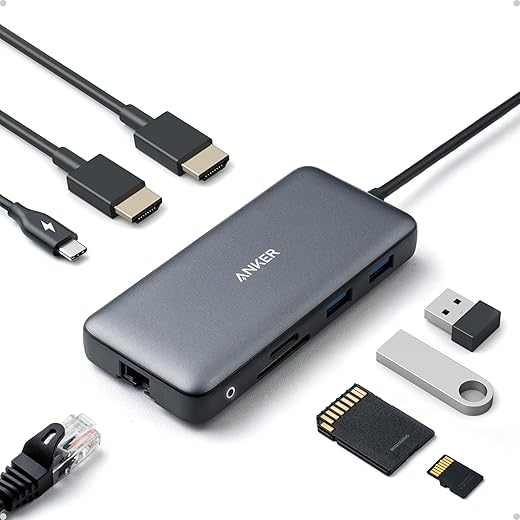
Peripheral design has cratered into a “more modular” promise that often means more parts. Mechanical keyboards (Keychron K8), compact numpads, and magnetic mice are great ergonomically, yet proprietary feet, USB-C-only laptops, and single-vendor docks (CalDigit TS3 Plus or an Anker hub) saddle us with dongles and spare chargers. Manufacturers trade a minimal laptop footprint for an ecosystem of adapters; the clutter shifts from a single brick to a pile of micro-accessories.
Cable routing and staging
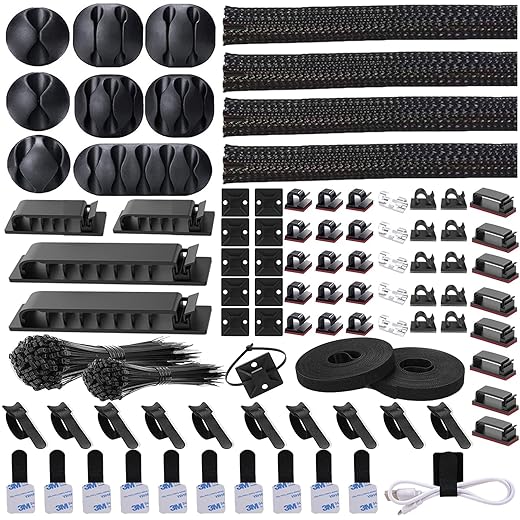
Cables are where physical noise becomes constant background friction. We see easy wins here: clip channels, under-desk trays, and Velcro bundles. Staging — a small, labeled area for active chargers, a second tier for “fast access” devices, and an out-of-sight zone for long-term backups — reduces fumble time and visual distraction.
Quick, practical fixes
These are inexpensive, high-impact moves that flip the math: fewer micro-parts, less visual fragmentation, and quicker task flow — all without buying the latest laptop.
The digital desktop paradox: tidy icons, messy workflows
Static desktop vs. dynamic work
We’ve all clicked into a pristine desktop only to hunt for the actual file we need — the tidy icons lie to us. The desktop and hierarchical file system were built for discrete, locally stored documents. Modern work is ephemeral: collaborative Google Docs, shared cloud drives, one-off downloads, and temporary exports. That mismatch forces us to use a static surface for a kinetic problem, and the result is scatter you can’t visually tidy away.
Where order leaks: platform defaults and sync clients
Platform decisions nudge behavior in invisible ways. Examples that trip people up:
Each vendor optimizes for a different priority — local reliability, minimal disk use, or ubiquitous access — and those priorities collide, scattering artifacts across places we forget.
Quick diagnostics: find your leak points
Run this mini-audit:
These steps reveal whether your chaos is a naming problem, a sync gap, or a policy mismatch.
Product-level fixes that change behavior
Don’t just teach tidiness — change defaults and feedback loops:
Small UX shifts — clearer save dialogs, explicit “make available offline,” and automatic cleanup suggestions for the desktop — create habits that stick, not just admonitions to “be organized.”
App sprawl and notification overload: the invisible clutter
We thought clearing icons would fix the mess. Instead, the real clutter is invisible: a web of apps, bots, and badges that fragment our attention even when the home screen looks immaculate. Here we unpack how market incentives and notification UX create a constant, low-grade interruption that feels like background noise.
How apps multiply (and why that matters)
Freemium economics and narrow-point solutions encourage many single-purpose apps — Slack for chat, Notion for notes, Asana for tasks, Calendly for scheduling — plus automation layers like Zapier that glue them together. Cross-platform parity gaps make things worse: Teams behaves differently on macOS than on Windows; Slack’s mobile notifications are noisier than desktop; Chrome-hosted Google Workspace features can feel more capable than their native macOS equivalents. The result: we jump between contexts and rebuild the same micro-workflows in multiple places.
Notification design: badges, boops, and attention metrics
Design choices prioritize engagement over sustained focus. Persistent badges, mandatory banners, and mirrored push notifications across devices create a chorus of alerts. Platforms reward apps that keep us coming back — not apps that let us finish deep work. The UX outcome: low-importance pings masquerading as urgency.
Why deletion rarely helps
Removing an app leaves integrations, email digests, calendar invites, and coworkers who still prefer the old channel. Background webhooks or shared documents keep the pipeline open. Deleting is a blunt instrument.
Product-aware, practical fixes
Next, we’ll look at how vendor ecosystems fight for priority on our devices and what that means for performance.
Ecosystem friction: when different vendors fight for attention
Why ecosystems pull us apart
We think of devices and apps as neutral tools, but vendors design defaults to keep our data and attention inside their gardens. Apple nudges photos, messages, and Handoff traffic to iCloud; Google routes editing and previews through Drive and Chrome; Microsoft elevates OneDrive and Teams on Windows. Those choices are small UX decisions — default save locations, a one-tap “Open in” selector, automatic pairing — that cascade into steady micro-friction. A file that previews fine on macOS may lose metadata on Windows; AirDrop works beautifully within one corner of our workflow and disappears the moment a teammate uses Android. Those tiny incompatibilities add seconds, then minutes, to routine tasks.
Hardware and peripheral politics
Peripheral design is part of the ecosystem playbook. Closed hardware — think AirPods’ instant pairing or Apple’s keyboard shortcuts — rewards staying in-platform. Cross-vendor peripherals try to bridge gaps (Logitech Flow, multi-host keyboards), but they’re imperfect: different modifier keys, subtle latency, or quirky driver dialogs break flow.
Lock-in trade-offs: convenience vs flexibility
We face a practical choice: single-vendor convenience (deep native features, fewer friction points) or best-of-breed flexibility (pick the right apps, accept more context switches). Single-vendor setups — MacBook Pro + iPhone, Surface + Xbox controller, Samsung + Galaxy Buds — feel cohesive because vendor incentives align. Cross-platform mixes give freedom but force us to build connective tissue: cloud syncs, third-party hubs, manual exports.
How to pick integrations that actually reduce friction
Next, we’ll examine why buying faster hardware often fails to deliver that perceptible speed boost, and how platform choices interact with perceived performance.
Performance illusions: why new hardware doesn’t always feel faster
Throughput vs. responsiveness
We often equate faster specs with faster feeling, but throughput (how much work a system can do) and responsiveness (how quickly it answers us) are different things. A new CPU/GPU/SSD raises throughput, but latency-sensitive actions — opening a file, switching tabs, typing into a chat — are dominated by I/O queuing, single-threaded latency, and whether something else is stealing cycles or the network.
Common culprits that hide behind “slow”

How to test and isolate bottlenecks
When buying speed actually helps — and when it won’t
Upgrading to NVMe (moving from a spinning HDD or saturated SATA SSD), adding RAM to avoid swapping, or getting a CPU with better single-thread latency often yields real gains. Replacing a slow Wi‑Fi 4 router with Wi‑Fi 6 can fix cloud-bound lags. But a new chip won’t cure a chat client that continually reindexes or a fragmented workflow that constantly forces syncs — those need software and habit changes to stick.
Work habits and cognitive architecture: how we amplify clutter ourselves
We’ve looked at cables, apps, and chips; now we shift to the human side. A lot of the “slowness” we feel isn’t raw hardware — it’s the way our attention and team norms get shaped by product design that rewards constant context switching. Multitasking is treated like a badge of honor, and that turns every open tab, chat thread, and calendar block into friction we carry in our heads.
How our brains turn noise into drag
Product teams design for engagement: ephemeral messages, threaded mentions, and always-on presence cues coax us to check in. Studies suggest task switching can cost a sizable fraction of our productive time — we lose momentum, error rates rise, and decision latency increases. The result: tab hoarding, ad-hoc session hopping, and no single source of truth become self-fulfilling bottlenecks.
Quick diagnostics: what to look for
Behavior-focused remedies that actually work
Why this outperforms hardware fixes
These interventions increase perceived responsiveness by reducing context-switch overhead — which is where we actually lose time. Reclaiming attention often feels faster and calmer than buying the latest laptop, because it directly targets the cognitive bottleneck.
Next, we pull these layers together into a practical plan that targets the right kinds of fixes.
A plan that targets the right layers
We’ve argued that clutter and slowness are symptoms, not single problems: physical design, software defaults, ecosystem choices, and habits stack into a single experience. To fix it we recommend a layered approach — clear the physical plane (ergonomics, cables, one primary screen), rationalize apps and notifications (limit to essentials, set rules), choose integrations deliberately (prioritize interoperable vendors, reduce sync duplication), and correct workflow patterns (batching, templates, decision gates). This isn’t about the fastest CPU; it’s about aligning design and behavior so improvements compound across the stack.
Run a five‑minute diagnostic audit we provide: space, apps, alerts, integrations, and habits. Small targeted changes beat blind upgrades. Start with one change today and measure the difference now.

Chris is the founder and lead editor of OptionCutter LLC, where he oversees in-depth buying guides, product reviews, and comparison content designed to help readers make informed purchasing decisions. His editorial approach centers on structured research, real-world use cases, performance benchmarks, and transparent evaluation criteria rather than surface-level summaries. Through OptionCutter’s blog content, he focuses on breaking down complex product categories into clear recommendations, practical advice, and decision frameworks that prioritize accuracy, usability, and long-term value for shoppers.