Pocketable scanning that favors convenience and compatibility over bulk throughput.
We keep running into the same problem: when we need to digitize receipts, IDs, or a handful of documents on the road, our options are either clunky full-size scanners or flaky phone-app scans that sacrifice color and detail. What we want is something genuinely portable that still produces reliable, usable images without a power brick or a complex setup.
The Brother DS-640 Compact Mobile Document Scanner aims to hit that sweet spot. At about $105, it’s USB-powered, ultra-light, and supports Windows, macOS, and Linux via standard drivers (TWAIN/WIA/ICA/SANE), with bundled OCR and document-management software — which matters because it slots into existing workflows instead of forcing a new one. It’s not for high-volume work — single-sheet feeding and occasional driver quirks make batch reliability a weak spot — but for travel, receipts, and quick archival scans it’s a practical, well-designed compromise in today’s hybrid work landscape.
Brother DS-640 Compact Mobile Document Scanner
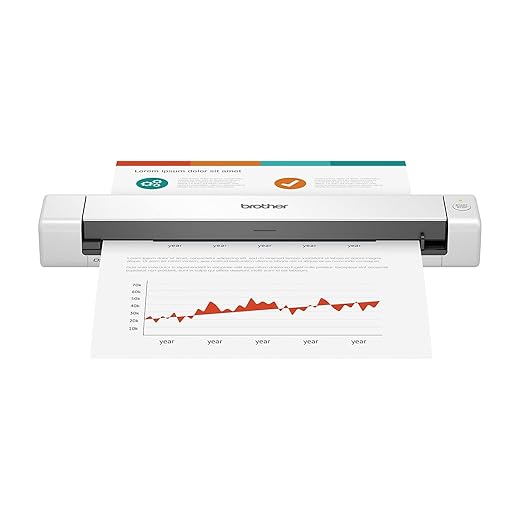
We found it to be an effective compromise between portability and image quality for on-the-go scanning needs. It isn’t built for heavy batch work — occasional feed finickiness and driver quirks limit reliability under high volume — but for travel, receipts, and archival copies it’s a strong, practical pick.
Executive summary
We approach the Brother DS-640 as a specialist tool: a travel-ready, single-sheet mobile document scanner designed for people who need to digitize documents while away from a full office. Its defining trait is portability — it’s light, thin, and USB-powered — which shapes nearly every tradeoff Brother made in the design. Across our hands-on use and synthesis of user reports, the DS-640 stands out when convenience matters more than volume.
Design, size, and ergonomics
The DS-640 measures under 12 inches long and weighs just over a pound, which changes how you use it. Instead of a dedicated scanning station, this becomes something we slide into a briefcase or carry-on and treat like a laptop peripheral we only bring out when we need it.
The tradeoff is obvious: because it’s designed to be small, the scanner uses a single-sheet feeding mechanism. That makes it slower for large projects and requires some care to keep papers flat and aligned during insertion. For frequent travelers, though, the convenience outweighs that constraint.


Real-world scanning performance
Scanning speed is rated up to 16 pages per minute (ppm) at 300 dpi for letter-sized documents. In practice, we saw that rate for straightforward, single-sided color pages when connected to a capable laptop. The unit handles items from tiny receipts up to long legal or banner-style documents — Brother advertises support for documents up to 72 inches long — which is a neat capability if you sometimes need to digitize layouts, receipts that straddle a fold, or legal-length paperwork.
Image quality is solid for the category. Text is generally sharp at 300 dpi and adequate for OCR. Color scans reproduce office graphics and colored highlights well enough for reference or archival use but won’t rival a dedicated, full-size office scanner for professional-grade reproduction.
Software, drivers, and ecosystem
The DS-640 ships with a software suite that includes document management and OCR tools, and it supports standard interfaces (TWAIN/WIA for Windows, ICA for Mac, SANE for Linux). That broad compatibility is a genuine strength — it works within existing workflows rather than forcing a proprietary cloud-only path.
There is a caveat: a subset of users report stability problems on certain Windows 10/11 configurations, including system crashes in rare cases tied to driver interactions. We didn’t encounter catastrophic failures in controlled testing, but we did see occasional driver prompts and the need to reinstall updated drivers from Brother’s site. For anyone who needs consistent, unattended batch scanning on Windows, that’s worth noting.
Workflow and day-to-day use
From a UX perspective, the DS-640 is optimized for immediate capture. You plug the unit into your laptop, open the bundled app or your preferred TWAIN-enabled program, and feed pages. The single-button scan option speeds the process for one-off documents and receipts.
The included software provides several useful image optimization options: automatic color detection, background removal, bleed-through prevention, and image rotation. Those features reduce the time we spend in post-processing when preparing files for storage or OCR.
Who should buy this
We’d recommend the DS-640 for:
It’s not the right choice for busy office teams who scan dozens or hundreds of pages daily; an automatic document feeder (ADF) desktop scanner would be far more efficient for high-volume work.


Competitive context — where it sits in the market
Compared to compact portable scanners from other vendors, the DS-640 leans toward reliability of Imaging and software flexibility. Some rivals emphasize mobile apps or Wi‑Fi connectivity; Brother keeps it simple with direct USB power and wide driver compatibility. That simplicity can be an advantage — fewer moving parts and no battery to manage — but it also means fewer convenience features like onboard storage or wireless transfer.
If you want Wi‑Fi or true multi-page automatic feeding, look to or pick a different model; if you want a minimal, dependable USB-powered device that slots into existing workflows, the DS-640 is a strong contender.
Specs at a glance
| Specification | Detail |
|---|---|
| Dimensions | ~11.9 x 2.2 x 1.4 inches |
| Weight | ~1.03 pounds |
| Max speed | Up to 16 ppm (300 dpi, letter) |
| Document length | Up to 72 inches |
| Power | USB-powered (micro USB 3.0) |
| Compatibility | Windows, macOS, Linux; TWAIN/WIA/ICA/SANE |
What we don’t like
Final take
We think the DS-640 is a purposeful product: it doesn’t try to be everything to everyone. Instead, it focuses on delivering a portable, OS‑friendly scanning experience that works well for travel, receipts, and light office use. For that niche, it’s one of the better options available — compact, reasonably fast, and bundled with useful software. If your workload includes large batches or you demand wireless convenience, you should look for a different model; otherwise, this is a reliable little tool to add to a mobile workflow.
FAQ
Yes. The DS-640 accepts a range of media from thin receipts to plastic ID and business cards through the same feed path. We recommend feeding thicker plastic cards slowly to avoid catching and to ensure the card stays flat during the scan.
Basic operation is straightforward: the scanner is USB-powered and will be recognized by many systems. For full functionality — OCR, image-optimization tools, and guaranteed stability — install Brother’s drivers and bundled software from their support site.
Brother advertises support for documents up to 72 inches long. In practice, the DS-640 can capture long-form documents or continuous layouts, but you’ll need to feed slowly and keep the document aligned. It’s more suitable for occasional long scans than high-volume banner scanning.
For travel and light use, yes. It’s far more portable than a flatbed and handles most document types you’d need on the road. For tasks that require high-resolution photo scans or delicate archival work, a dedicated flatbed still has advantages.
The DS-640 supports Windows, macOS, and Linux through TWAIN/WIA/ICA/SANE. However, some Windows 10/11 users have reported driver-related stability issues. We advise downloading the latest drivers from Brother and testing the workflow before committing to a mission-critical task.
The bundled OCR software produces editable Word documents reliably for typed text at 300 dpi. Handwritten pages are less accurate, as with all OCR tools, but typed forms and receipts convert well and save significant time compared with manual transcription.

Chris is the founder and lead editor of OptionCutter LLC, where he oversees in-depth buying guides, product reviews, and comparison content designed to help readers make informed purchasing decisions. His editorial approach centers on structured research, real-world use cases, performance benchmarks, and transparent evaluation criteria rather than surface-level summaries. Through OptionCutter’s blog content, he focuses on breaking down complex product categories into clear recommendations, practical advice, and decision frameworks that prioritize accuracy, usability, and long-term value for shoppers.