



Why a Single Upgrade Can Transform Our Movie Nights
We want the biggest improvement to home theater movie nights without gutting the living room. In this piece we cut through marketing and checklists to find the single upgrade that delivers the most perceptual bang for the buck.
We compare three vectors: display, sound, and source. Each changes the experience differently. We look at picture upgrades and when a better display is actually worth it. We explain how audio reshapes the feeling of a film. We cover source and interface — the small upgrade with outsized UX impact.
Finally, we weigh costs, installation, and future‑proofing. Our advice is practical: buy, install, and enjoy in a weekend. We focus on design, ecosystem fit, and long‑term value so our choice makes films feel more cinematic tonight. We’ll recommend one upgrade that works for most.


What Delivers the Biggest Perceptual Impact: Display vs. Sound vs. Source
Before we recommend one upgrade, we have to ask: where will our money be most noticeable? Many people instinctively buy a bigger TV because it looks impressive in a store. In real rooms, though, the limiting factors are often content, room acoustics, and how frictionless the UX is. We break the choices down into three upgrade axes—display, sound, and source—and evaluate where incremental dollars do the most work.
Display: the obvious visual lift (but with caveats)
A bigger, brighter, or higher‑contrast screen is an obvious upgrade. But size and panel tech only translate to better nights if viewing distance, content, and HDR handling line up. If you sit 8–10 feet from the couch, the jump from 55″ to 65″ is noticeable; past that, returns taper. Panel choice matters: OLED (LG C3) wins for contrast and shadow detail, mini‑LED (Samsung QN90C) for bright rooms, and well‑tuned LED (Sony X90L) can be the value pick. Key how‑tos: measure actual seating distance, confirm Dolby Vision or HDR10+ support for your streaming habits, and budget for at least one calibrated picture preset rather than relying on “Vivid” mode.
Audio: the emotional multiplier
Sound changes how we feel a scene: better dialog clarity, impactful bass, and a sense of space often outweigh a few extra inches of screen — a compact soundbar often beats marginal screen gains. A compact soundbar plus a wireless subwoofer or two small rear speakers can transform immersion for a few hundred dollars. Look for eARC support and object‑based Dolby Atmos if you want room‑filling effects without running wires. Placement and room acoustics matter more than raw wattage—hard floors and bare walls amplify harshness; a rug and a few soft surfaces go a long way for clarity.
Source & interface: small spend, outsized UX gain
A better streamer or remote often gives the biggest day‑to‑day improvement. Upgrading to an Apple TV 4K, Roku Ultra, or Nvidia Shield fixes slow app switches, gets you the latest codecs (AV1), and ensures consistent HDR passthrough and firmware updates. The payoff is less waiting, better search across apps, and fewer format headaches. Practical checklist: confirm HDMI version (2.1 for future 4K120 use), eARC for audio routing, and whether your chosen vendor locks you into an ecosystem or keeps app choice open.
Across these axes, modest dollars in the right place—sound or source—can deliver bigger perceptual gains than chasing ever‑bigger panels.
Picture Upgrades: When a Better Display Is Worth It
Upgrading the display is the instinctive move — and it pays off, but only when the new screen matches how and where we watch. Below we focus on the user-level choices that actually change our movie nights: size vs. distance, how panel choices translate to perceived contrast and color, why HDR handling matters, and the small design and ecosystem details that can turn a beautiful picture into a daily nuisance.
Size and seating: pick a screen that fits your room
Measure from the couch to the screen and pick a size that fills your field of view without overwhelming the room. As a practical guide:
We prefer judging size by how much of our vision the screen occupies (about 30–40 degrees) rather than rigid inch rules—sit with a tape measure and imagine the frame filling your view.
Panel tech: what actually changes on screen
Not all “bigger” is equal. OLED gives us perfect blacks and deceptively deep shadow detail; ideal for dim rooms and cinematic content. High‑end mini‑LED delivers higher peak brightness and aggressive local dimming, so it wins in sunny rooms and with HDR that needs punch. A well‑tuned midrange LED with effective local dimming often delivers most of the perceptual gain for a lot less money.
HDR, tone‑mapping, and brightness
Peak nit numbers matter but aren’t everything. For HDR highlights that pop in living rooms, aim for sets that sustain 600+ nits on specular highlights; for bright rooms, 1,000+ nits helps. More important is how the TV tone‑maps — a TV that crushes highlights or clips skin tones makes HDR look worse than SDR. Look for user reports on real‑world HDR performance, not just marketing nits.
Design, UX, and ecosystem
Thin bezels and a low profile matter visually, but check stand width (does it fit your cabinet?) and VESA mount compatibility. And don’t let a slick panel be hamstrung by a clunky OS or a terrible remote. Confirm the TV supports the streaming apps and codecs we use, plus eARC for sending sound to our receiver or soundbar.
Quick checklist before buying
Next, we’ll look at how audio upgrades often deliver emotional impact that complements — or sometimes outperforms — an expensive display swap.
Audio Upgrades: How SoundShape Changes Our Movies
Audio is the stealth winner: it alters how we feel a scene more often than how we see it. A well-chosen audio upgrade turns a flat TV soundtrack into palpable tension, clearer dialogue, and real spatial cues. We focus on practical options that deliver the biggest cinematic lift per dollar while fitting into living rooms and existing ecosystems.
Why a soundbar + sub often wins for living rooms
For many rooms, a modern soundbar with a separate subwoofer and upward‑firing drivers gives the most dramatic improvement with minimal fuss. It improves dialogue clarity, widens dynamics, and creates a convincing sense of vertical space—without the speaker placement gymnastics of a full surround rig. Key features to prioritize:
We’ve seen compact bars like the Sonos Arc or Sony HT‑A7000 transform evening viewing simply because they make dialogue and ambience textured and present. The plug‑and‑play UX—integrated remotes, network streaming, app tuning—keeps the bar feeling like a thoughtful living‑room appliance, not an av‑project.
Alternatives and when they make sense
A modest three‑piece system (two bookshelf/tower speakers + sub) tied to a small AV receiver still beats a midrange bar in imaging, dynamics, and future expandability. It’s the right move if you want better music fidelity and plan to add surrounds later—but accept more cables, speaker placement work, and occasional menu tinkering.
Wireless multiroom speakers (Sonos, Apple, etc.) are an attractive hybrid: they double as smart speakers and can stream music throughout the house. They’re easier to set up but may lock you into an ecosystem and often don’t deliver the same cinematic bass or discrete height channels as a bar + sub.
Practical setup tips that actually matter
Cost and upgrade thinking
If you want the biggest emotional gain with little installation pain, start with a quality soundbar + sub (£/US$ varies). If you care about music fidelity, future expandability, or an open standards approach, invest in separates and a modest AV receiver. Either path benefits hugely from a little attention to placement and calibration—those factors often trump raw spec sheets.
Next, we’ll weigh the source and interface upgrades that amplify these audio gains.
Source and Interface: The Small Upgrade with Outsized UX Impact
We’ve spent pages on screens and speakers, but a surprising share of the maddening stuff—long app load times, missed HDR, muffled dialog—lives in the box between our couch and the content. Upgrading the streamer or the remote is one of the smallest, fastest ways to make everything else feel modern again.
Why the interface matters more than raw specs
Responsiveness, search, and remote design shape how often we sit down to watch. A streamer that boots quickly, finds the show we want in two keystrokes, and hands audio to our sound system without extra menus changes behavior: we watch more and complain less. In real life, swapping a slow TV UI for a $50 streamer cut our app-launch times from six seconds to nearly instant—enough to change that “maybe later” into “play now.”

Connectivity and ecosystem fit
Design here isn’t cosmetic. It’s about HDMI-CEC for single-remote control, eARC for lossless Atmos/DTS:X, and proper HDR passthrough so colors look as intended. A few notes from our testing:
Voice, remotes, and smart‑home integration
Remotes matter: tactile buttons, a dedicated voice button, and a bulky backplate that doesn’t disappear down the couch make nightly control painless. If multiroom audio or routines are important, pick a streamer that plays well with your ecosystem: Apple TV for AirPlay 2, Chromecast/Google TV for Google Assistant, or Fire TV for Alexa ties. Open platforms (Roku, Chromecast) tend to offer the broadest third-party app support; ecosystem players add features but can lock you in.
Practical buying tips and future‑proofing
A streamer upgrade is cheap, reversible, and immediate: it’s the quick UX fix that often unlocks the value of better picture and sound. Next we’ll weigh the installation and cost trade‑offs that turn these upgrades into lasting improvements.
Costs, Installation, and Future-Proofing: Real-World Trade-Offs
Upgrades don’t stop at a sticker price. We have to add cables, mounting, possible electrical work, and the hours you’ll spend tuning picture and sound. Here’s a practical breakdown so our “one upgrade” actually makes life better without a surprise bill.
Total cost of ownership: what to tally
Think beyond the device
If we’re buying an AVR for object audio, add speaker wire, room correction mics, and maybe a second amplifier for surrounds.
Installation and time costs
Mounting a TV or running in‑wall speaker cable is rarely a one‑hour job. We’ve hired electricians to run in‑wall HDMI or dedicated circuits; expect $150–$500+ depending on local rates and drywall repair. A handyman installing a mount runs $75–$200.
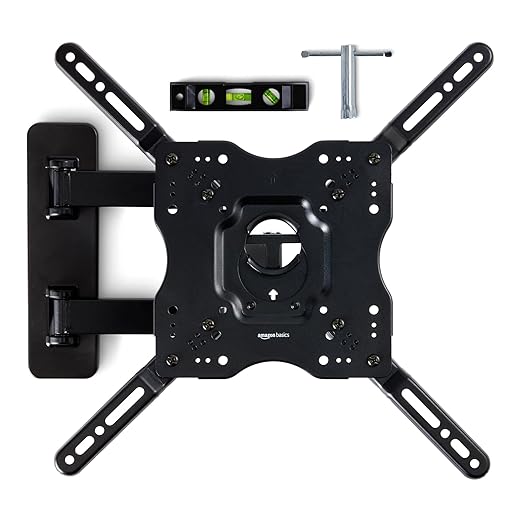
Budget an afternoon to calibrate picture and audio. Auto room correction goes a long way, but dialing sub levels, dialog normalization, and HDMI handshake issues can take another hour or two.
Design fit: room-by-room trade-offs
A sloped‑ceiling home theater means projector or custom mounting and likely black‑out treatments. A compact apartment often forces us to choose a low‑profile soundbar over a 5.1 system; a multipurpose living room prioritizes non‑intrusive gear (silent black finishes, slim speakers, or in‑ceiling options). Match the physical impact of the upgrade to how the space is used.
Ecosystem lock‑in and future‑proofing
We prefer features that extend lifespan: eARC support, HDMI bandwidth headroom (48Gbps for current 4K/120Hz use), AV1 or broad codec support, and vendors known for firmware updates. Be wary of closed TV OSes or soundbars that require proprietary wireless modules—those limit resale value and later expansion. Modular speaker ecosystems (Sonos, HEOS, or native wireless‑speaker systems from major AVR makers) let us grow without replacing the whole stack.
Resale, repurpose, and staged upgrades
What keeps value? Displays and modular speakers usually have longer resale life than cheap soundbars or closed-streaming sticks. Plan purchases so each component can be repurposed—use a second TV as a bedroom set or move satellite speakers to a secondary room.
A quick cost‑vs‑impact rule
If you want immediate UX wins on a budget, upgrade the source/interface or a versatile soundbar. If you seek long-term investment, put more into a display with HDMI headroom or into a modular speaker ecosystem—even if it means staging purchases over 12–24 months.
Next, we pull these threads together and recommend the single best upgrade for most movie lovers — browse our how-to guides.
Our Bottom Line: The Best Value Upgrade for Most Movie Lovers
After weighing perceptual impact, installation friction, ecosystem effects, and long-term value, we conclude that an audio-first upgrade — a well-designed soundbar with subwoofer support and connections (eARC, Dolby Atmos where possible) — is the most cost-effective move for most viewers. It improves dialogue clarity and the visceral low end, makes films feel cinematic, is simple to install and pairs with most TVs and streamers.
For tiny screens or dedicated theaters a display upgrade can come first, but in typical living rooms better sound delivers more immersion per dollar. Practical steps: evaluate your room, prioritize eARC and room correction, check compatibility, and add a modest subwoofer — the upgrade bang is today.
Frequently asked questions
What is the main point of “The Most Cost-Effective Upgrade for Movie Lovers”?
This piece explains where the most cost-effective upgrade for movie lovers matters in real buying decisions—not just headline specs. We focus on trade-offs, who benefits most, and what to verify before you spend.
Who should read this the most cost-effective upgrade for movie lovers guide?
Read it if you are actively shopping, upgrading, or trying to separate marketing claims from day-to-day use. Skip it if you already own the gear and are not planning a change this season.
What changed recently around the most cost-effective upgrade for movie lovers?
Prices, firmware, and feature tiers shift quickly in this category. We call out what is new enough to affect your decision and what is incremental hype you can safely ignore.
How should I use this editorial when buying?
Treat it as context before you compare models: note the risks and priorities here, then cross-check specs and current pricing on the picks that match how you actually use the product.
What is easy to get wrong about the most cost-effective upgrade for movie lovers?
Buyers often overweight one spec—brightness, speed, or brand—and underweight fit for their room, ecosystem, or warranty support. We flag the mismatch we see most often in reader questions.
Where should I go next after reading?
Use the related comparisons and top picks linked near the end of this article for model-level shortlists, then confirm return policies and compatibility with the devices you already own.

Iqra Jumar is Option Cutter's editorial writer. She writes practical editorials and buyer guides that focus on real-world upgrades—better Wi‑Fi, cleaner cable setups, smarter streaming, and everyday fixes—not spec-sheet noise alone. Her work helps readers decide what to change now, what to skip, and why.









