Rethinking Smart Lighting: A Practical Way Forward
Smart lighting is no longer a novelty. We’ve moved from playful color bulbs to systems that should quietly improve daily life. But many setups still feel like collections of features, not a coherent whole.
In this piece we explain how to make lighting feel like part of the room, not an app. We focus on design, controls, integration, privacy, and practical setup. We care about what actually shapes daily experience: reliability, simplicity, and thoughtful defaults.
The market pushes bells and whistles and ecosystem lock-in. We’ll show practical choices that reduce friction, protect your privacy, and make smart lighting feel inevitable — not fiddly. We want systems that last and grow with minimal fuss now.


Design and hardware: make the light feel like part of the room
We begin with the physical side of lighting because this is where people form an instant judgment. A fancy app won’t save a room lit by harsh beams, slow-to-dim bulbs, or fixtures that hum. Our goal is practical: pick hardware that disappears into the background and produces light that feels natural.
Color quality and tunable white
Start with color rendering. Look for CRI (or better, TM-30) numbers — anything under CRI 90 will make skin tones and wood finishes look off. Tunable-white capability (warm 2700K through cool 6500K) matters less for gimmicks and more for matching tasks: warm for relaxing, cooler for reading or focused work. In real homes we swap between modes throughout the day; bulbs or fixtures that make those shifts smooth and neutral are the ones we keep.
Dimming, flicker, and beam control
Dimming behavior is a make-or-break experience. Cheap bulbs often flicker at low levels or jump in brightness as they change color — both break immersion. Test for:
Beam spread and optics are equally important. A narrow spot makes a pendant feel like a spotlight; a wide flood can wash a wall. Choose bulb shapes and lenses to match the fixture: A19 floods for table lamps, PAR30/38 for recessed cans, and integrated fixtures for even ambient light.
Retrofits vs. integrated fixtures
Retrofit bulbs win on replaceability and upgrade paths. We favor Philips Hue and LIFX-style bulbs for flexibility — swap a bulb, change protocols, or replace when specs improve. Integrated smart fixtures, however, often have superior optics, thermal management, and a sleeker look; they can last longer before color shifts or failure. The trade-off: when an integrated driver or app is abandoned, you may replace the whole unit.
Build quality, lifespan, and real costs
Check thermal design and warranty. Bad cooling shortens LED life and skews color. Total cost of ownership isn’t just price-per-bulb: factor in expected lifetime, replacement ease, and ecosystem longevity. Practical rule: pay a little more for optical quality and a decent warranty — it pays back in months, not years.
In short: choose hardware that respects light’s physical behavior. The right optics, dimming, and build quality let smart features feel inevitable instead of gimmicky — and set us up to automate lighting that truly belongs to the room.
Control and automation: make routines feel inevitable, not fiddly
The control layer is where smart lighting stops being a toy and starts saving time. After choosing fixtures that behave, we turn to how people actually interact with lights: apps, voice, switches, and the invisible rules that make rooms change without thinking. Our goal is obvious behavior, low friction, and predictable failovers.
Apps and voice: expect speed and clarity
Apps should be fast and obvious. Slow cloud hops, buried sliders, and ambiguous names break trust. In practice, that means:
Platform notes: Philips Hue with a Hue Bridge often delivers the snappy local response and reliable sensor integrations we want. Apple HomeKit favors local automations and privacy; Google and Alexa trade some immediacy for broad third‑party reach. For power users, Hubitat and Home Assistant provide local, complex rules without cloud dependency.
Physical controls and graceful fallbacks
A smart home that ignores the wall switch is a failure mode. Physical switches must always work; map them to sensible toggles, not single-scene locks. If a switch cuts power to smart bulbs, consider a smart switch or add a companion switch so the bulbs remain powered.
Automation choices: cloud vs local
Cloud automation can offer easy setup and cross-device links, but it introduces latency and single‑point failures. Local automation yields reliability (instant motion triggers, schedules that don’t fail during an outage) but often requires a hub and a steeper learning curve. Our rule: run critical automations locally (occupancy, schedules) and use cloud for nonessential integrations (IFTTT, remote access).
Presence, sensors, and detectability
Geofencing is convenient but flaky—battery life and OS restrictions make it unreliable for “turn off the lights when we leave.” We prefer a hybrid:
Good defaults and onboarding
Reduce setup friction by shipping sensible defaults: immediate on/off via switch, one relaxation and one bright scene per room, and a simple tour in the app showing how automations work. Small, predictable wins build trust — and once trust exists, users are willing to explore smarter automations.
Interoperability and ecosystems: plan to avoid lock-in
Smart lighting lives inside a bigger smart‑home puzzle. The choices we make about protocols and platforms determine whether we can swap a bulb next year or whether we’re stuck replacing half the house. Below we map the practical trade‑offs and give concrete steps to avoid painful migrations.
Protocol choices: Wi‑Fi vs mesh radios vs hubs
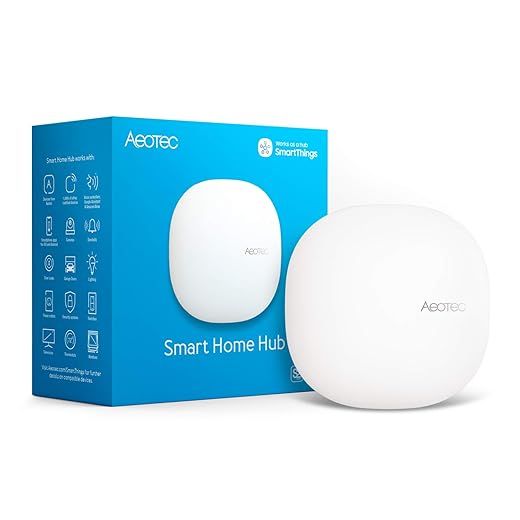
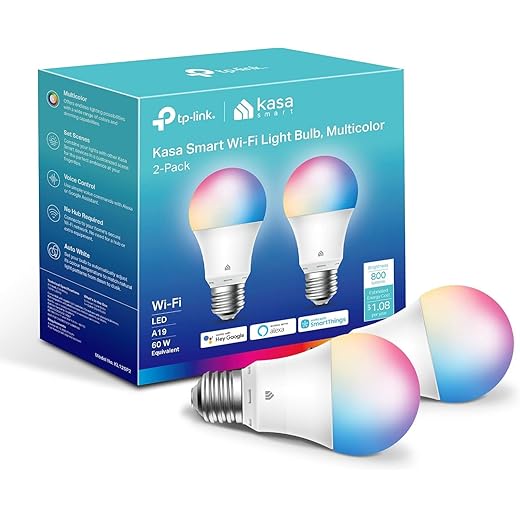
Wi‑Fi bulbs (LIFX, TP‑Link Kasa) are easy to add—no hub required—but they crowd your network and rarely work with non‑proprietary hubs. Mesh radios (Zigbee, Z‑Wave, Thread) are more efficient, scale better, and let devices talk locally through bridges or hubs. Hub‑based systems (Hue Bridge, SmartThings, Hubitat) add stability and local rules but introduce another vendor to depend on.
Standards and Matter: why it changes the calculus
Matter and Thread are shifting the landscape by promising cross‑brand interoperability and local control. A Matter‑capable bulb that also supports Thread gives us portability across ecosystems (Apple Home, Google Home, Alexa) without rewriting automations. That portability matters: we buy lighting to last a decade, not until the next platform pivot.
Practical costs of lock‑in
Lock‑in shows up as real costs:
Firmware, vendor commitment, and update practices
We should vet vendors for transparent update policies. Look for:
How to plan for portability today
Actionable steps we recommend:
Choosing for interoperability is pragmatic: we trade a few exclusive features for flexibility, lower risk, and a system that can evolve as standards and vendors change.
Privacy, security, and reliability: the invisible user experience
Security and privacy are the UX you don’t notice—until something breaks. We’re no longer just buying bulbs; we’re choosing who gets a window into our homes, who can push firmware to our devices, and what happens when the cloud hiccups. Below we unpack the trade‑offs and give practical steps you can apply while you plan and buy.
Cloud dependence, accounts, and telemetry
Cloud‑first bulbs (many Wi‑Fi models) simplify setup but usually mean account linking, telemetry, and remote dependencies. That can be convenient—remote control from anywhere—but it also centralizes risk: account compromises, vendor data collection, and service outages all affect you.
Actionable steps:
Local control, encryption, and firmware rollouts
Local control isn’t just about privacy; it makes automations faster and more reliable. We prefer devices or ecosystems that: support on‑LAN control (Hue Bridge, some LIFX LAN APIs), integrate with local hubs (Hubitat, Home Assistant), and advertise strong transport encryption for cloud traffic (TLS). Equally important is how vendors handle firmware: look for frequent security patches, transparent changelogs, and an update process that can be scheduled or paused. Vendors that document EOL policies and have a history of supporting older hardware earn our trust.
Reliable fallbacks and incident response
Plan for failure. A reliable system assumes the cloud will be slow or unavailable at times.
Key practical measures:
Transparency about telemetry, clear patching practices, and resilient local options aren’t flashy features, but they’re why we keep using a system year after year.
Buying, setup, and maintenance: practical steps to build a system that lasts
We close with hands‑on guidance so the smart lighting we buy today still feels smart in two years. These are pragmatic choices—zones, hardware type, switch strategy, staging, and maintenance—that reduce regrets and ongoing costs.
Plan zones first
Map rooms by function, not by fixtures. We sketch daytime zones (kitchen task, dining ambient), evening zones (living room reading, TV bias lighting), and “always‑on” paths (hallways, stairs). Smaller zones let us mix hardware types and phase purchases without sacrificing scene control.
Bulbs versus integrated fixtures
Decide by permanence and ceilings. Bulbs are flexible and cheap to replace; integrated LED fixtures are compact, often more efficient, and look cleaner long term. If you rent, bulbs win. If you own and want minimal future clutter, consider fixtures with replaceable modules.

Handling wall switches and power habits
Existing switches are the practical failure mode. If people will toggle a physical switch, use:
We once demoed a setup that failed because a guest kept killing the bridge power—an inexpensive switch guard fixed weeks of frustration.
Staging, testing color, and rollout
Buy one or two bulbs to test color rendering and scene presets in each room. Observe them over evenings and different natural light. Then stage by zone: kitchen first, living second, bedrooms last. This minimizes disruption and exposes unforeseen issues early.
Documenting automations and firmware hygiene
Name devices consistently and keep a simple spreadsheet or home‑automation export with:
Maintenance, spares, and sustainability
Consider warranty length and vendor responsiveness; companies with clear EOL policies save headaches. Keep one or two spare bulbs (same model/lot) and favor ENERGY STAR or replaceable modules. LEDs run 15,000–25,000 hours; fixture choices affect future e‑waste and replacement costs.
Quick checklist before you buy:
With these steps we make practical choices now that keep options open later, and reduce the “oh no” moments that turn a clever system into a drawer of useless bulbs. Next, we pull these ideas together into a strategy for smarter lighting across the home.
A smarter lighting strategy, not just smarter bulbs
We argue that good smart lighting is a product decision: prioritize build quality and human‑centric light so fixtures feel like part of the room rather than gadgets. Choose control systems that match how we live, design automations that reduce fiddling, and favor open ecosystems to avoid vendor lock‑in—these choices matter more than headline specs today.
Insist on transparent security, reliable updates, and maintenance plans so systems keep working. Done well, smart lighting becomes invisible; it simply makes our homes more comfortable, efficient, and easier to live in. Let’s build to that standard.

Chris is the founder and lead editor of OptionCutter LLC, where he oversees in-depth buying guides, product reviews, and comparison content designed to help readers make informed purchasing decisions. His editorial approach centers on structured research, real-world use cases, performance benchmarks, and transparent evaluation criteria rather than surface-level summaries. Through OptionCutter’s blog content, he focuses on breaking down complex product categories into clear recommendations, practical advice, and decision frameworks that prioritize accuracy, usability, and long-term value for shoppers.