We found an airy, near‑studio soundstage and premium build—great for quiet setups and streamers, less so for noisy rooms or pro‑grade mics.
We’ve all had that heart‑stopping moment when a headset promises pinpoint footsteps and delivers a muddy blob of sound instead. When spatial cues matter — whether we’re lining up a snipe or mixing a stream — what we need is accuracy, comfort for marathon sessions, and an ecosystem that actually plays nice with our streaming tools. The Corsair Virtuoso PRO Wired Open Back headset pitches itself at exactly that problem: delivering a near‑studio soundstage without turning your rig into a furnace.
On paper it’s a tidy package — 50mm graphene drivers, a 20Hz–40kHz response, an aluminum frame, memory‑foam pads, and detachable cables and mic — plus Elgato Wave Link and NVIDIA Broadcast compatibility that speak directly to creators. In practice, the open‑back design and airy imaging are the headset’s point of differentiation: they give us spacious, precise positioning and cooler comfort during long sessions, but they also leak sound and expose the middling built‑in mic. At $199.99, it’s compelling for gamers and streamers in quiet setups who prioritize fidelity and integration; it’s a tougher sell for anyone needing isolation or a broadcast‑grade microphone.
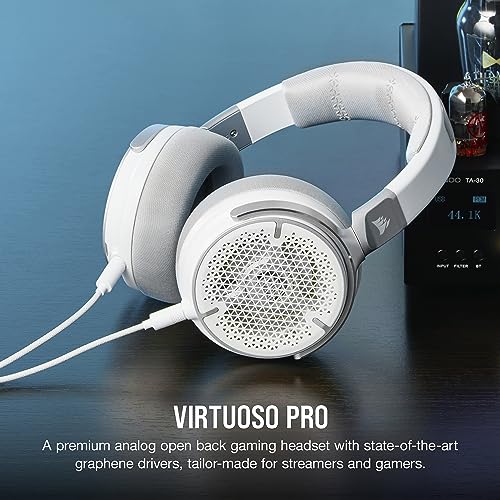
Corsair Virtuoso PRO Wired Open-Back Headset

We think this headset delivers an expansive, near-studio soundstage that benefits streamers and gamers who prioritize spatial accuracy and comfort. It pairs serious audio hardware with software integration, but the open-back design and middling built-in mic mean it’s not ideal for noisy environments or broadcast rigs that demand a pro-grade microphone.
Overview
We approached the Virtuoso PRO expecting Corsair to prioritize clarity and a streamer-friendly feature set — and they largely delivered. This wired, open-back headset leans into natural acoustics and comfort rather than isolation or flashy wireless features. That’s a deliberate choice: the design favors spatial fidelity and long-wear ergonomics at the expense of sound leakage and a completely closed listening environment.
Design and materials
The Virtuoso PRO feels like a step up from most gaming headsets in its construction. An aluminum framework gives the headset a reassuring rigidity while keeping weight down. The earcups use breathable fabric and memory foam that help us stay comfortable during marathon sessions.
Build impression: the headset sits comfortably without feeling flimsy, and replaceable components mean it won’t be obsolete after one season of use.
What open-back actually means for you
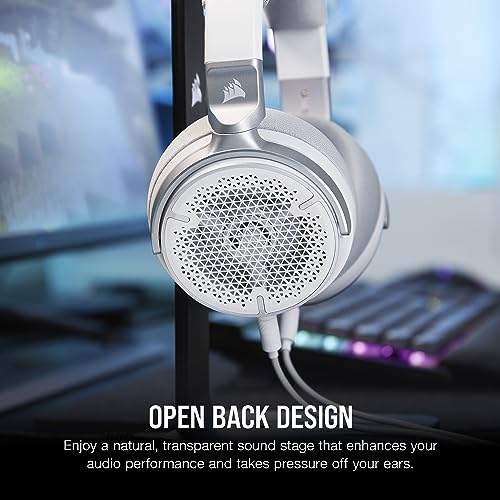
Open-back cans change more than just the sound — they change the use cases. Open cups allow air (and sound) to pass through the back of the drivers, which reduces pressure buildup and produces a wider, less “in-your-head” image.
In short: if you stream from a quiet room and care about positional accuracy, the open-back approach will feel liberating. If you share a small room or stream to a close audience, the leakage and ambient pickup will be a problem.
Audio performance: what the graphene drivers bring
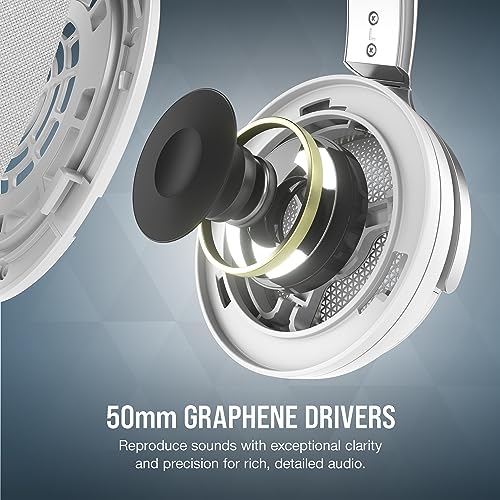
The headline spec is the 50mm graphene driver, paired with a broad 20Hz–40kHz frequency response. In practice, that translates to crisp mids, articulate highs, and enough bass weight to satisfy most players without clouding detail.
We found the sound to be forward where it matters: footsteps and environmental cues in competitive games are distinct, and orchestral or ambient tracks reveal a lot of texture. The extra high-frequency ceiling above 20kHz doesn’t create audible magic for most listeners, but it does reflect Corsair’s tuning emphasis on headroom and transient response.
Table: Practical effect of headline specs
| Spec | What it means in use |
|---|---|
| 50mm graphene drivers | Faster transients, clearer detail in mids and highs |
| 20Hz–40kHz response | Tight sub-bass and extended highs for music and ambience |
| Open-back design | Wider imaging, lower ear pressure, but sound leakage |
Microphone and communication
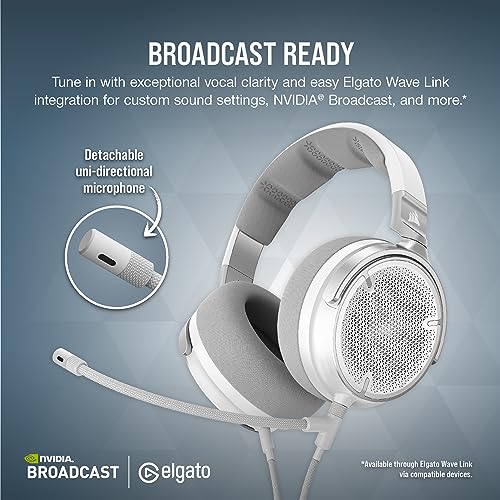
Corsair includes a detachable uni-directional microphone that’s practical and easy to mount. It’s tuned for clarity in voice chat, and it benefits from the Wave Link and NVIDIA Broadcast pipeline for noise reduction and processing. That said, the onboard mic isn’t a substitute for a dedicated condenser or dynamic broadcast microphone.
We recommend pairing the headset with a desktop mic if you’re building a pro streaming setup. But for quick streams and in-game chat, the included mic is competent and noise-canceling in quieter rooms.
Software and ecosystem integration
Corsair leans into ecosystem play: the Virtuoso PRO integrates with Elgato Wave Link software for routing and VST support, and pairs with NVIDIA Broadcast if you want on-the-fly noise suppression and echo removal. That makes the headset more than hardware — it’s part of a workflow.
For users already invested in Elgato or NVIDIA workflows, this is significant: the headset slots into an existing toolchain and benefits from software-level processing that improves the user experience.
Comfort, fit, and long sessions
Comfort is one of the Virtuoso PRO’s strengths. The memory foam and breathable fabric reduce hot-ear fatigue, and the clamping force is balanced to stay secure without pinching. Still, fabric pads can show wear over time and we’ve seen reports of edge lifting under heavy use — something to monitor if you expect years of daily wear.
Who should consider this headset
Who should look elsewhere
Final thoughts
The Virtuoso PRO is a thoughtful, use-case-driven product: it chooses fidelity, comfort, and software integration over isolation and “gamer” gimmicks. We appreciate that choice. It won’t be the right headset for everyone, but for those who value spatial accuracy and a comfortable, long-session fit, it’s a compelling pick — especially if you plan to pair it with a standalone microphone or already use Elgato/NVIDIA tools.
Practical buying tips and alternatives
We recommend auditioning open-back headphones in a quiet environment before committing — the physical experience of openness and leakage is difficult to judge from specs alone.
FAQ
Open-back designs give a wider, more natural soundstage that can make positional cues easier to locate, which some FPS players prefer for situational awareness. However, if you play in a loud environment or need to avoid sound leakage (for teammates or neighbors), a closed-back headset might be a better fit. We recommend testing both styles to see which helps your playstyle.
Yes — the Virtuoso PRO uses a standard 3.5mm audio connection, so it works with desktops, consoles (via controller jack), and most mobile devices. Advanced features like Elgato Wave Link and NVIDIA Broadcast are PC-specific, so you’ll only get the full software benefits on a computer.
The included detachable mic is fine for casual streams and in-game chat, but it doesn’t replace a good USB or XLR microphone for professional-sounding broadcasts. If your stream depends on broadcast-grade audio, budget for a dedicated mic while using the headset for monitoring.
Graphene drivers tend to offer faster transient response and lower distortion at comparable sizes, which translates to clearer detail and tighter imaging. In practice, the difference is most noticeable on complex tracks and in competitive gaming where clarity of small sounds matters.
Yes — the headset’s pads are replaceable. We recommend sourcing genuine Corsair replacements or vetted third-party pads (breathable fabric types) to maintain comfort and preserve sound balance. Replaceable parts extend the product’s usable life.
Elgato Wave Link is most valuable for streamers who want per-app mixing and VST support, while NVIDIA Broadcast provides convenient noise reduction and echo suppression for clean voice transmission. Together they allow you to shape your audio pipeline without changing hardware.

Chris is the founder and lead editor of OptionCutter LLC, where he oversees in-depth buying guides, product reviews, and comparison content designed to help readers make informed purchasing decisions. His editorial approach centers on structured research, real-world use cases, performance benchmarks, and transparent evaluation criteria rather than surface-level summaries. Through OptionCutter’s blog content, he focuses on breaking down complex product categories into clear recommendations, practical advice, and decision frameworks that prioritize accuracy, usability, and long-term value for shoppers.