



Is your iPad one keyboard away from a promotion?
An iPad with the right keyboard can replace a laptop for lots of real work. Short emails quickly turn into long documents when the keys and trackpad feel right — and that changes how we use the iPad every day.
We tested these cases in classrooms, on commutes, and at our desks. We looked at typing feel, hinge stability, trackpad quality, Pencil compatibility, and how each option fits into the broader iPad ecosystem.
Top Picks
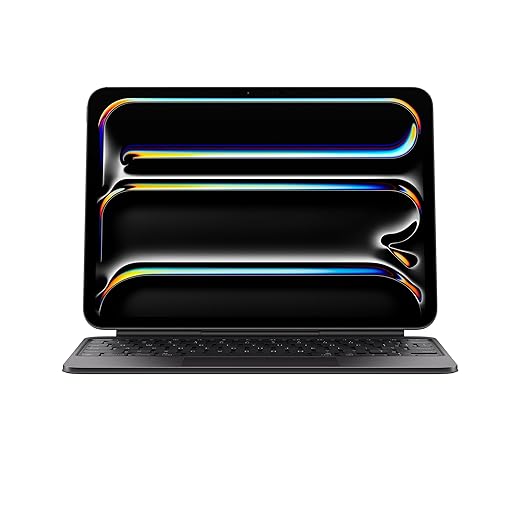


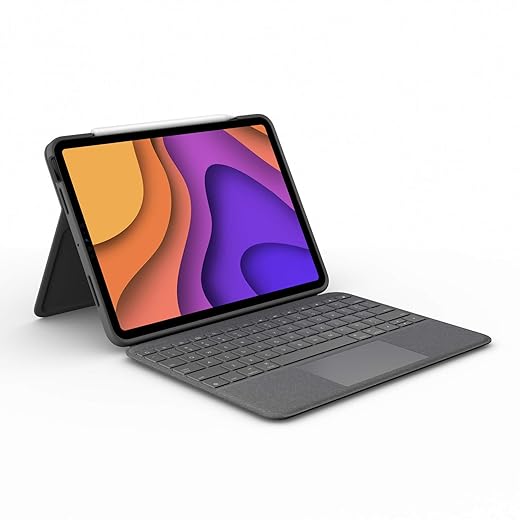

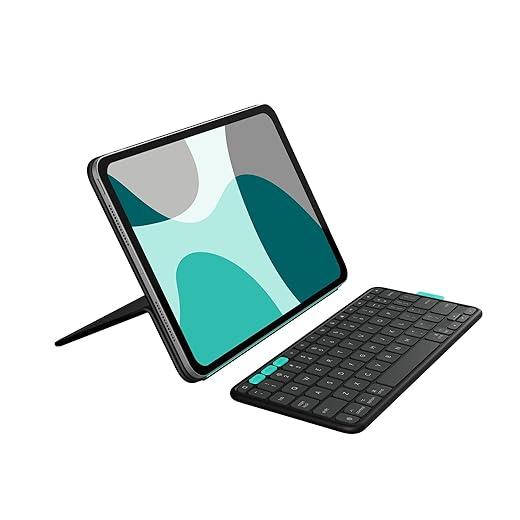


Magic Keyboard Case for 11-inch iPad Pro
We find this keyboard turns the iPad into a believable laptop replacement thanks to a tactile scissor-switch keyset and a large haptic trackpad. The Smart Connector integration keeps things seamless, but the trade-offs are price and a noticeable weight increase.
Why we recommend it
The Magic Keyboard Case for the 11-inch iPad Pro is the closest thing Apple makes to turning an iPad into a proper laptop. We appreciate how Apple's material choices and engineering make interaction feel intentional: the scissor switches have satisfying travel, the backlit keys are well spaced for long typing sessions, and the trackpad brings macOS-like precision to iPadOS gestures. For anyone who wants a minimal friction transition from touch-first workflows to keyboard-driven productivity, this is the most polished option.
Design, usability, and integration
Trade-offs and real-world use
We often carried this setup for a day of notes, email, and light document editing. The keyboard is heavier than folio alternatives, so the combination is better suited to a bag-based commute than a true ultra-light carry. The price is high, and there’s no Apple Pencil holster, so if you’re juggling the pencil often you’ll need a separate solution. Still, for users who care about typing quality and a trackpad that actually improves their workflow, the combination of fit, finish, and system-level polish makes this our pick.
Logitech Combo Touch for 11-inch iPad Pro
We appreciate how Combo Touch balances protection, a full-size keyboard, a generous trackpad, and a detachable design that supports multiple use modes. It’s a strong third-party alternative to Apple’s own accessories, especially for users who want more versatility at a lower price.
Why we like the Combo Touch
Logitech’s Combo Touch nails the feature set most people actually want from an iPad keyboard case: a comfortable typing surface, a large trackpad, and a detachable layout so you can go from laptop-like productivity to full tablet mode. The Smart Connector removes the battery hassle, while the kickstand provides much more viewing flexibility than Apple’s floating hinge.
Real-world performance and ergonomics
Considerations and competition
If you use an iPad as a primary productivity device, Combo Touch is one of the best third-party options: it combines value with thoughtful design. The trade-offs are mainly cosmetic (fingerprints) and occasionally long-term durability; some users have experienced hinge or seam wear over many months. Still, for students and professionals who want the functionality of a laptop without the Apple premium, it’s our top recommendation in the third‑party space.
Magic Keyboard for 12.9-inch iPad Pro (Refurbished)
We think the 12.9-inch Magic Keyboard still represents the best full‑size Apple keyboard experience for iPad — and the refurbished channel can make it easier to stomach the cost. It delivers the same trackpad and hinge benefits as the smaller model but with a larger typing surface.
What this keyboard brings to the 12.9-inch iPad
The Magic Keyboard for the 12.9-inch iPad Pro is essentially Apple’s laptop keyboard experience compressed into an iPad accessory. The larger footprint gives more generous key spacing and a bigger trackpad, which helps when you’re drafting long documents or managing multiple split-screen apps. Buying a refurbished unit can soften the financial sting while preserving that core experience.
Fit and function in daily workflows
Practical considerations and where it matters
The downsides are obvious: size and weight. The 12.9 setup is more of a bag-based laptop substitute than a tablet you’ll want to read on in bed. Refurbished units can be an excellent compromise if you want the premium feel without the full retail price, but expect variability in packaging and cosmetics. If you need a true laptop replacement and appreciate a larger typing area, this is the most convincing option.
Logitech Folio Touch for iPad Air 11-inch
We find the Folio Touch a compelling mix of laptop-like typing, a responsive trackpad, and MIL‑grade protection for the iPad Air. It’s an excellent option for heavy note-takers and creatives who need a reliable keyboard case without sacrificing Pencil usability.
Why Folio Touch stands out
The Folio Touch blends the practicality of a rugged case with a mature keyboard and trackpad experience. We liked that Logitech prioritized a precise trackpad and good key travel while keeping the Smart Connector to avoid battery juggling. The four use modes make it adaptable for typing, sketching, viewing, or reading without removing the case.
Day-to-day impressions
How it fits the market
If you want a protective, work‑oriented folio that approximates a laptop workflow, Folio Touch is one of the best third-party picks. It’s heavier than the thinnest folios, but that’s the cost of having a better keyboard and more resilient build. For students and professionals who treat the iPad as their primary productivity device, this is a sensible and well-rounded choice.
Logitech Slim Folio Pro for 11-inch iPad
We value the Slim Folio Pro for its solid typing feel, backlit keys, and pencil storage at a price that undercuts premium options. It trades some modern conveniences — like Smart Connector instant pairing in newer models — for a lower cost and durable protection.
Where the Slim Folio Pro fits
Logitech’s Slim Folio Pro aims squarely at people who want a laptop-style typing experience without Apple’s accessory prices. The keyboard has real travel and a full row of iOS shortcuts, and the case offers a secure place for the Apple Pencil — features that make it a strong choice for students and professionals on a tighter budget.
Everyday experience
Who should buy it
If you want a dependable typing experience and Pencil storage without spending for premium materials or the Magic trackpad experience, the Slim Folio Pro is a pragmatic and affordable middle ground.
Logitech Flip Folio with Stowable Keyboard
We like the Flip Folio’s stowable keyboard and multi‑device Bluetooth support for users who juggle an iPad and other devices. Its removable keyboard and portrait/landscape flexibility make it a good travel companion, though it trades Smart Connector convenience for wireless versatility.
What makes Flip Folio different
Flip Folio’s hook is straightforward: a full-size keyboard you can stow away when you don’t need it and a bluetooth stack. For people who split time between an iPad, a phone, and a laptop, that flexibility is a practical win. The keyboard snaps back into place magnetically, which keeps the case tidy when you switch modes.
Strengths in daily use
Who should consider it
We recommend the Flip Folio for multi-device users who value the ability to type on the iPad but also need to control other devices with the same keyboard. It’s not the lightest option and it doesn’t give the absolute seamless integration of Smart Connector cases, but the flexibility to move the keyboard and pair various gadgets makes it a solid choice for road warriors and hybrid device users.
Smart Keyboard Folio for 11-inch iPad
We like this folio when low weight and simplicity matter more than a trackpad. It’s a lean, durable option that provides front-and-back protection and instant keyboard availability without batteries or pairing.
Why choose the Smart Keyboard Folio
The Smart Keyboard Folio trades bells and whistles for a clean, minimal experience. For students and commuters who prioritize lightness and reliability, it’s a pragmatic choice: attach it and type. Because it uses the Smart Connector, we never have to think about charging or re-pairing — the keyboard is simply ready.
Design and day-to-day use
Where it fits in the market
If you want something lighter and cheaper than the Magic Keyboard and you don’t need a trackpad for cursor work, this is a sensible middle ground. Typing isn’t as satisfying for long sessions, and power users who rely on keyboard shortcuts and pointer input will find it limiting. But for note-taking, short writing tasks, and travel days, the trade-offs usually make sense.
Smart Keyboard for 12.9-inch iPad Pro
We see this older Smart Keyboard as a cost-conscious way to add physical keys without dealing with batteries. It gives a decent typing surface, but lacks a trackpad and more flexible viewing angles, so it's less of a laptop stand-in.
Who this is for
This Smart Keyboard for 12.9-inch iPad Pro is a straightforward, lower-cost way to get a physical keyboard without the maintenance of a bluetooth low energy beacon. It’s best for users who want a simple typing surface and don’t require a trackpad or laptop-like hinge.
Strengths and limits
Verdict in context
If price and simplicity are your priorities, this cover will do the job. For power users and people who frequently switch between touch and pointer workflows, a Magic Keyboard or one of the Logitech folios will deliver a noticeably better experience.
Final Thoughts
For users who want their iPad to behave like an honest-to-goodness laptop, we recommend the Magic Keyboard Case for 11-inch iPad Pro. Its tactile scissor-switch keys, large Force Touch–style trackpad, and seamless Smart Connector integration make iPadOS gestures and pointer control feel native. In practice that means fewer workarounds, faster typing, and a more consistent workflow for power users and professionals who prioritize a true laptop-like experience — at the cost of extra weight and a premium price.
If you want nearly the same productivity benefits but with more flexibility and a friendlier price, the Logitech Combo Touch for 11-inch iPad Pro is our pick. Its detachable keyboard, robust protection, full-size keys, and a generous trackpad give you multiple use modes (typing, sketching, presenting) and better value for students, commuters, and anyone who swaps between tablet and laptop setups. It’s the best third-party compromise between comfort, versatility, and cost.
Frequently asked questions
How did we pick these ipad keyboards for work and school options?
We shortlist models that balance performance, reliability, and value for typical buyers—not just the highest spec sheet. Hands-on notes, owner feedback, and return/warranty policies all feed the ranking.
Which ipad keyboards for work and school pick is best for most people?
Start with our top overall choice if you want the safest balance of price and features. Move up or down the list only when a specific need—budget, ecosystem, or a must-have feature—clearly applies to you.
Do prices on this ipad keyboards for work and school list change often?
Yes. Retailers run frequent promos, so use the live price buttons on this page and compare shipping and return windows before checkout—the best deal is not always the lowest sticker price.
Should I buy the cheapest ipad keyboards for work and school on the list?
Only if the trade-offs fit your use case. The budget pick can be excellent value, but check what you give up in build quality, software support, or key features you will use every week.
What if none of these ipad keyboards for work and school picks fit?
Use the comparison and guide links on this page to narrow by size, platform, or feature, then revisit the list with your must-haves written down—forcing a mismatch creates more returns than savings.
How often is this ipad keyboards for work and school roundup updated?
We refresh rankings when major models launch or pricing shifts enough to change the value story. Check the publish date at the top and compare current specs if you are reading months later.

Princess Rioboca is the Lead Editorial Writer at Option Cutter, bringing over seven years of hands-on experience in consumer technology journalism. Specializing in home networking and smart home architecture, she transforms complex technical data into practical, real-world upgrades. Princess personally tests and audits every product she reviews—evaluating real-world Wi‑Fi throughput, cable management durability, and streaming ecosystem stability—to filter out spec-sheet noise. Her rigorous, field-tested insights are designed to give readers transparent, unbiased buying advice on what to purchase, what to skip, and exactly why.














