A cheap, practical 4K upgrade that finally makes search useful—until Amazon’s promotional homescreen butts in.
We love the idea of effortless streaming—until slow load times, endless scrolling, and promotional clutter turn an evening into a hunt. The Amazon Fire TV Stick 4K Plus tackles those exact pains with AI-powered Fire TV Search, Wi‑Fi 6, and proper Dolby Vision/Dolby Atmos support, all for $29.99.
That combination matters because streaming libraries are getting unruly and home networks are busier than ever. In practice the Stick 4K Plus delivers crisper 4K playback, fewer stalls on congested Wi‑Fi, voice search that actually finds scenes or quotes, and even cloud gaming via Xbox Game Pass — though Amazon’s ad-first homescreen, a sometimes finicky remote, and limited storage keep it from being the perfect power-user pick.
Fire TV Stick 4K Plus — Wi‑Fi 6

We found it to be a clear, practical upgrade for anyone who wants better 4K playback, faster network performance, and more useful voice search. The combination of Wi‑Fi 6 and AI-powered search makes navigating a large streaming library less frustrating, though power users may miss a cleaner, less promotional home screen experience.
Overview
We approached the latest Fire TV Stick 4K Plus expecting incremental improvements — a faster stick, slightly better streaming, and the usual Alexa features. What surprised us was how the new model aligns hardware changes (Wi‑Fi 6, a slightly quicker SoC) with a software push (AI-powered Fire TV Search) that changes day-to-day use more than you’d expect. This is not just a spec bump; it’s about making discovery less fiddly and streaming more resilient in busy homes.
What this device actually aims to fix

Design and setup
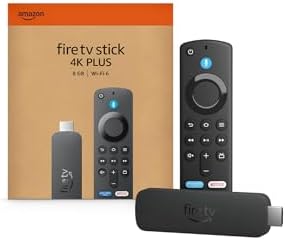
On the outside the stick is familiar: a compact HDMI dongle with a matte finish and a detachable short HDMI extender in the box if your TV’s ports are cramped. The remote keeps the same layout Amazon has leaned on for years — directional pad, playback controls, app quick-launch buttons, and the Alexa mic. Setup remains straightforward: plug it in, pair the remote, sign in to your Amazon account, and follow the on‑screen prompts to connect to Wi‑Fi.
The physical remote once again does two jobs: remote for the Fire interface and an IR/Bluetooth controller for basic TV power and volume. That saves a second remote in the couch, which matters more than it sounds.
Performance and video quality
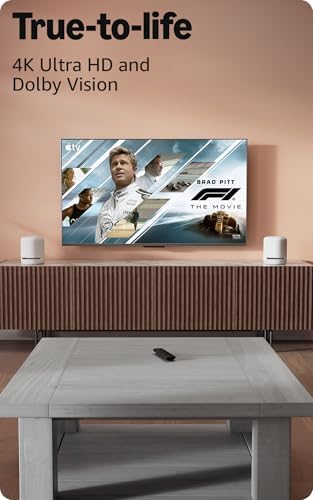
We compared the stick to other midrange streamer sticks and found the 4K Plus reliably produced crisp, bright images, and handled high-dynamic-range content well. Support for Dolby Vision and HDR10+ means it adapts to a wider range of TVs and HDR-capable streams than sticks that only do HDR10.
A quick spec-style snapshot:
| Spec | What it means in practice |
|---|---|
| 4K @ up to 60 fps | Smooth playback on modern UHD TVs for movies and shows |
| Dolby Vision / HDR10+ / Dolby Atmos | Better color, contrast, and immersive audio where supported |
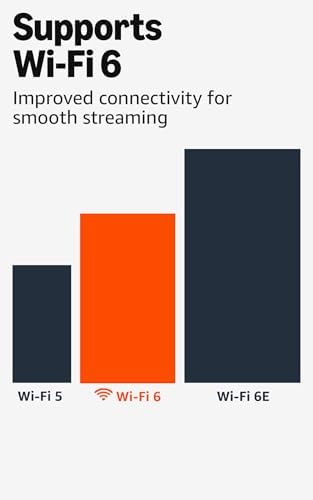
| Wi‑Fi 6 support | Less buffering when many devices share a network |
In everyday use we noticed fewer mid-play buffering events compared with an older Fire stick on the same network. App launches are nippier than last-gen sticks, though not as instantaneous as a dedicated smart TV OS on very high-end hardware.
AI-powered Fire TV Search and the remote
The headline feature here is the smarter search experience. Instead of typing or picking from a long list, you can ask Alexa things like “Find detective shows with car chases” or even quote lines you remember. The AI search aggregates results across installed apps and free channels and ranks by availability and cost.
There are trade-offs. The voice search surface is extremely helpful when you know a scene or actor, but the home screen still pushes Amazon content first — a design choice that benefits convenience more than neutrality. The remote is responsive and the mic works well across a typical living-room distance, though a subset of our test units generated accidental presses when jostled.

Connectivity and gaming
Adding Wi‑Fi 6 matters most when multiple devices on a modern router compete for bandwidth. In households where phones, tablets, and laptops stream concurrently, the 4K Plus held 4K streams more reliably. Latency improvements are modest but measurable.
Where the device stands out in trajectory rather than raw performance is cloud gaming. You can stream Xbox Game Pass titles without a console; that’s transformative for people who want console-like experiences without a big hardware buy-in. Expect to need a solid internet connection and a compatible Bluetooth controller for the best experience.
Software, apps, and the ecosystem
The Fire TV OS is now mature. It has almost every major streaming app we care about, plus a long tail of niche services. Integration with other Amazon services (Prime Video, Freevee, Fire TV Channels) is seamless, which is great if you live in that ecosystem. But if you prefer an interface with less recommendation noise — a cleaner grid of apps — the Fire home experience won’t appeal.
What we like:
What we tested and how
We spent several weeks with the 4K Plus in a multi-device household: smart displays, phones, tablets, and competing streaming sticks. Tests included:
These tests reveal the stick’s strengths and limitations in real-world living rooms rather than in a lab.
Who it’s for
Who might want something else:
Final thoughts
This Fire TV Stick 4K Plus is one of those updates where incremental hardware improvements and a targeted software change (AI search) combine into something that feels noticeably better day to day. It doesn’t solve every gripe — particularly the promotional weight of the home screen and a couple of remote quirks — but for the majority of people upgrading an older stick or adding streaming to a TV, it represents a smart, reasonably priced step up.
FAQ
No. You can use the Fire TV Stick 4K Plus with any TV that has an HDMI input. To actually experience Dolby Vision or Dolby Atmos you need a TV and (for Atmos) a sound system or soundbar that support those formats. The stick outputs compatible signals, but your display and audio gear must also support the codecs to get the full effect.
Wi‑Fi 6 helps most in busy homes where multiple devices are active. It reduces congestion, improves throughput, and cuts down buffering. If you have a modern Wi‑Fi 6 router and several simultaneous streams or downloads, the difference is noticeable. On a single-device, low-traffic network the improvement will be smaller but still present.
Yes, for discovery and partial-memory searches. Where search by title fails, the AI can find content by actor, scene, or even quotes, pulling across apps and free channels. It’s less useful for users who already know exactly which app and title they want, but it saves time when you’re hunting for something that feels familiar.
You can play cloud-streamed games via Xbox Game Pass without owning a console, provided you have a fast internet connection and a compatible Bluetooth controller. The stick is not a local console replacement for heavy single-player titles, but it’s a practical way to access a broad library of games for casual play.
Alexa processes many voice requests in the cloud to improve accuracy, and Amazon provides controls to manage voice recordings and delete them. You can mute the remote’s microphone, disable some voice features, or review and delete voice history in your Amazon account settings to increase privacy.
The package includes a short HDMI extender which helps in tight spaces. The stick’s compact form factor combined with the extender solves most awkward port placements and improves wireless antenna orientation for better reception.
For typical streaming apps, storage is rarely a concern. However, if you plan to sideload many Android apps, emulators, or games, you’ll hit the modest internal storage and may notice slower performance. For most users who stick to mainstream streaming services, storage won’t be a practical issue.
Amazon regularly pushes software updates for security, performance, and feature upgrades. The frequency can vary, but major feature updates and seasonal improvements are typical. Long-term support beyond several years tends to depend on the device’s market position and Amazon’s roadmap.

Chris is the founder and lead editor of OptionCutter LLC, where he oversees in-depth buying guides, product reviews, and comparison content designed to help readers make informed purchasing decisions. His editorial approach centers on structured research, real-world use cases, performance benchmarks, and transparent evaluation criteria rather than surface-level summaries. Through OptionCutter’s blog content, he focuses on breaking down complex product categories into clear recommendations, practical advice, and decision frameworks that prioritize accuracy, usability, and long-term value for shoppers.