



Why syncing your scale with your watch actually matters
We argue that seamless scale-to-watch syncing is MORE than a gimmick: it shapes daily habits, tightens data reliability, and preserves device value across ecosystems. We weigh design, UX, and integrations so you buy a scale in our how-to guide that improves long‑term health tracking.
What you'll need

Garmin Index S2 Smart Scale: What You Need to Know Before You Buy
Confirm ecosystem compatibility first
Is your watch in the same camp—or are we about to stage a fragile cross‑brand negotiation?Start by checking which ecosystems the scale and watch natively support. We prioritize devices that write directly to our platform (Apple Health, Google Fit, Samsung Health) because native integrations cut setup time and reduce dropped readings.
Look for explicit watch support in the scale’s specs or app‑store copy; many scales only sync to a phone app and then pass data on indirectly. Prefer scales that advertise direct Apple Health/Google Fit sync rather than ones that rely solely on a vendor cloud.
Check whether the vendor uses a proprietary cloud bridge, third‑party services (IFTTT, Health Sync), or open standards. For example, choose a scale that lists “Apple Health” in its app description if we pair an Apple Watch.
Pick the right connectivity model
Bluetooth vs Wi‑Fi: fast local chats or dependable cloud whispers—what do we want?Decide whether Bluetooth or Wi‑Fi fits our daily routine. Bluetooth gives quick, local syncs and fewer cloud hops; Wi‑Fi uploads automatically and shares data across devices and users without the phone.
Consider how we actually use the scale: if we want zero‑touch morning logs on our watch and multiple family profiles, favor Wi‑Fi/cloud models. If we travel, value privacy, or don’t want a home network dependency, a Bluetooth scale that pairs to the phone (or rarely, the watch) can be simpler.
Check a few concrete things before buying
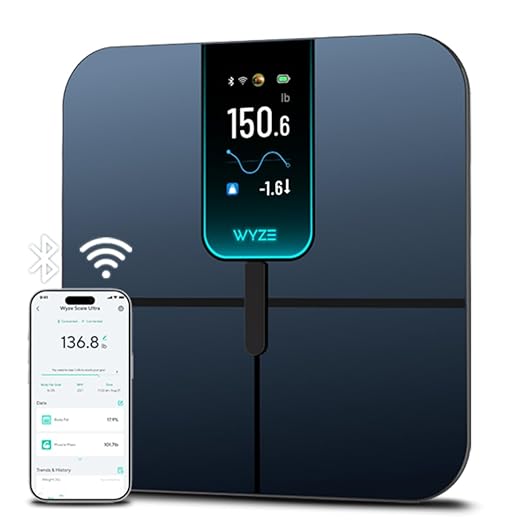
Evaluate which metrics actually matter
Do we care about accurate weight or alluring body‑composition numbers that may wobble?Prioritize repeatability over flashy percentages. Most scales give weight readings reliable enough for trends; body‑composition numbers (body fat, muscle mass, hydration) use bioelectrical impedance and fluctuate by device, foot placement, and time of day.
Check whether the scale offers these concrete features and why they matter
Prefer a model that explains uncertainty and makes long‑term trends obvious.

Inspect the app and watch integration
Does the app act like a smooth translator or a wonky interpreter for our watch?Open the vendor’s app before buying. Judge apps on setup simplicity, sync latency, clarity of history, and direct watch support (complications, widgets, or notifications). Prefer apps that push data straight into the platform we use without manual exports and that surface trends on the watch in concise formats.
Look for these concrete signals
Test before the return window: pair the scale, step on it, and watch the reading appear. If the watch lag or missing complication frustrates us, move on.
Check accounts, privacy, and lock‑in
We get convenience — but are we trading our data and future choices for it?Examine where our data lives — local only, vendor cloud, or third‑party partners — and read privacy policies for sharing, retention, and export rules.
Consider whether a subscription is required for historical access or advanced metrics; freemium paywalls raise long‑term cost and lock us in.
Verify we can unlink accounts and export data in usable formats (CSV, Apple Health, Google Fit).
Prefer vendors with documented APIs or open export to increase portability.
Avoid scales that hide history behind a paywall — if we cancel, we shouldn’t lose years of tracked weight.
Prefer vendors that respect portability and privacy to reduce the risk of sudden service lockouts.

Run practical tests during setup and returns window
Small checks reveal big UX problems—try before you commit long term.Pair the scale with our phone and watch right away. Confirm the watch shows the reading or that the app forwards it to the watch within a minute; note any lag.
Weigh twice back‑to‑back to measure repeatability (e.g., same barefoot stance, same time of day). Ask a partner to step on to test multi‑user recognition and profile switching.
Install firmware updates and verify they finish without dropping the connection. Check whether the scale remembers profiles after power cycles or app logouts.
Perform quick physical checks: platform stability, anti‑slip surface, and build quality (wobble, hairline cracks). Contact support to confirm returns and warranty responsiveness—initiate a return or support ticket if possible.
These practical checks expose integration gaps and poor UX that spec sheets hide; in competitive terms, they separate genuinely seamless products from ones that only look smart on paper.
Make the sync work for you
We pick scales by prioritizing ecosystem fit, reliable connectivity, honest metrics and a polished app/watch experience — then test during the returns window. Do the same, make syncing useful in daily life, try one now and tell us what worked.
Frequently asked questions
What should I prepare before I choose a smart scale that syncs with your watch?
Start with the checklist in the “What we’ll need” section above—measure your space, confirm compatibility with your gear, and read the full walkthrough once before you change settings or buy parts. Smart scale that syncs with your watch goes faster when prep is done upfront.
How long does it take to choose a smart scale that syncs with your watch?
Most readers finish in about 30–90 minutes if they already have the right parts, but budget extra time for measurements, firmware updates, or a second pass when something does not behave the way the manual suggests on the first try.
What is the hardest part when you choose a smart scale that syncs with your watch?
The step that trips people up is usually alignment or configuration—getting measurements, cable routing, or software settings right before you commit. If results still look off, re-check the basics in order instead of swapping hardware immediately.
What mistakes should I avoid when I choose a smart scale that syncs with your watch?
Skipping measurements, ignoring ventilation or port limits, and rushing the final test are the common failures. Photograph your starting setup, label cables, and verify the outcome with the same content or workflow you will use every day—not a one-off demo.
When should I call a pro instead of trying to choose a smart scale that syncs with your watch myself?
Bring in help when the job needs structural work, licensed wiring, or tools you do not own, or when repeated attempts still fail after you have followed the troubleshooting section. A short paid visit can cost less than replacing gear you damaged by forcing the install.

Princess Rioboca is the Lead Editorial Writer at Option Cutter, bringing over seven years of hands-on experience in consumer technology journalism. Specializing in home networking and smart home architecture, she transforms complex technical data into practical, real-world upgrades. Princess personally tests and audits every product she reviews—evaluating real-world Wi‑Fi throughput, cable management durability, and streaming ecosystem stability—to filter out spec-sheet noise. Her rigorous, field-tested insights are designed to give readers transparent, unbiased buying advice on what to purchase, what to skip, and exactly why.















