
Is your webcam doing the job—or just making you look like a mystery silhouette? Find the one that actually shows you as presentable, professional, or camera-ready.
You’re judged by your pixels. We’ve all been on a call where bad lighting, weird colors, or a laggy image made the meeting feel amateurish. Short of canceling, the camera is often the easiest thing to fix.
We looked at clarity, color handling, low-light performance, and how each camera fits into real workflows—home office, small studio, or a conference room. We also weighed design, software ecosystems, and whether the hardware plays nicely with Windows Hello, streaming tools, or conservative IT policies.
Top Picks




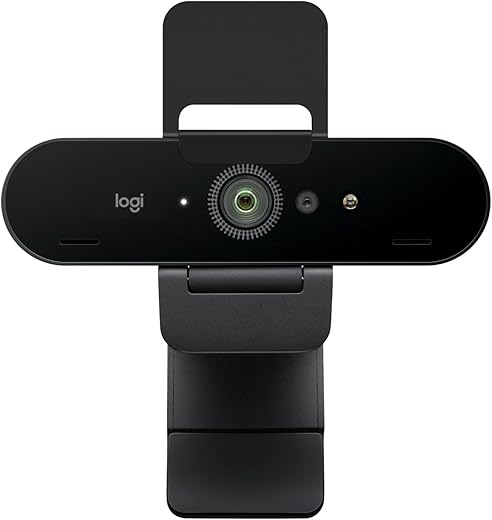
Logitech Brio — 4K HDR Business Webcam
It delivers outstanding detail, reliable HDR handling, and Windows Hello support, which matter for professionals who want a future‑proof external camera. The price premium is justified if you need top‑tier clarity and consistent performance across lighting conditions.
We treat the Brio as the webcam that pushed consumer expectations for external cameras. Its 4K sensor and RightLight/HDR processing make a visible difference on video calls: faces retain texture and color balance without the blown highlights or mushy shadows common in cheaper models. For telehealth, sales demos, and creators who want to present crystal‑clear visuals, the Brio is a significant step up.
Design, software, and real‑world tradeoffs
Logi’s software ecosystem (Logi Tune/Options+) gives you control over zoom, color, and field of view — and those controls make the Brio feel like a managed camera rather than a simple plug‑in device.
The main considerations are cost and friction: at this price point, users expect perfect ergonomics and a polished privacy mechanism. We found the attachable shutter works but feels less integrated than a mechanical switch, and a thicker cable can make positioning awkward. Still, in a market where webcams have converged on acceptable image quality, the Brio stands out for people who want maximum clarity and flexible framing.
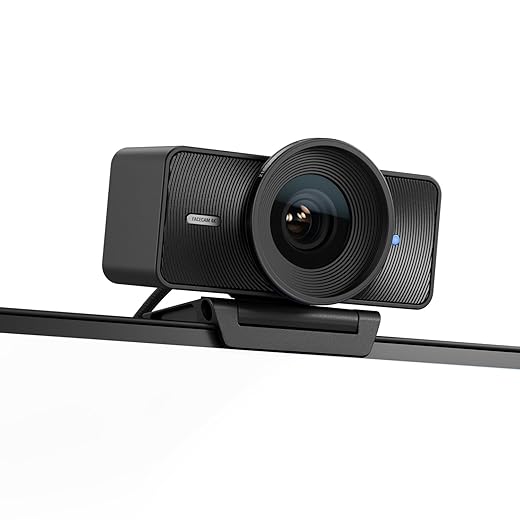
Elgato Facecam 4K — Studio‑Grade Webcam
Its sensor and prime lens deliver a filmic, detailed look that outclasses most webcams. We appreciate the camera hub software that exposes camera‑level controls; it makes the Facecam feel like a compact studio tool rather than a simple peripheral.
We view the Facecam 4K as a product that blurred the line between webcams and professional cameras. Its Sony STARVIS 2 sensor, Elgato Prime Lens tech, and the option for uncompressed output mean you can get very high quality without bringing a mirrorless camera into the mix. For creators who prioritize image fidelity — color depth, dynamic range, and detail — it’s a meaningful step up.
Imaging control and integration
Elgato understands creators: Camera Hub exposes white balance, exposure, and cinematic effects, and you can use 49mm filters for ND or diffusion. Pairing it with streaming software (OBS, Streamlabs) gives you a near‑studio pipeline without extra capture cards.
The Facecam is best for users who will leverage those controls. If you only do routine Zoom calls, its advantages aren’t fully realized — but for anyone producing tutorials, branded streams, or high‑quality vlogs, it’s one of the most capable dedicated webcams on the market.
Logitech C920 — Reliable 1080p Webcam
It balances image quality, compatibility, and price in a way that still makes sense today. The C920's plug‑and‑play reliability and consistent 1080p performance keep it a smart pick for anyone who needs dependable video calls.
We still reach for the C920 when we want a no‑surprises webcam that simply works. Its 1080p feed is crisp enough for meetings and light content creation, and the camera's color rendering is generally neutral and accurate. In practice it rarely causes troubleshooting calls with IT; plug it in and your conferencing app recognizes it.
Performance and day‑to‑day use
The autofocus and HD light correction are tuned for typical home‑office setups, which is why the C920 feels familiar to so many users. It doesn't chase tiny adjustments, so your subject stays steady and presentable without constant fiddling.
The trade‑offs are straightforward: if you routinely work in dim rooms or want 4K, this won't be the upgrade you need. But in the current market — where simplicity and compatibility matter — the C920's combination of price, performance, and ubiquity still makes it a compelling default for most people.
In ecosystem terms, the camera doesn't rely on proprietary cloud features, so it plays nicely with third‑party software and streaming tools. For teams provisioning dozens of units, its predictability and endurance are valuable: it's a model we've seen remain useful through several webcam cycles.
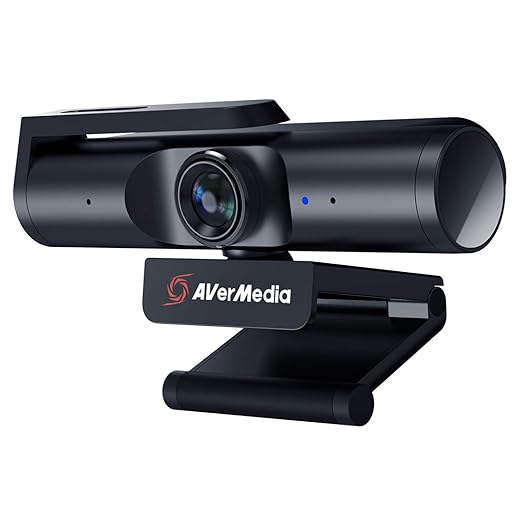
AVerMedia PW513 — 4K Wide‑Angle Streamer Cam
It gives an ultra‑wide field of view and strong 4K30 performance when lighting is good, which is useful for multi‑person calls and demos. The CamEngine software adds necessary image controls, though some users report the camera prefers brighter setups.
We think the PW513 is a smart option if your workflow benefits from a wide frame — think small group meetings, tabletop demos, or any situation where you want more context in the shot. Its 94° FOV captures more of the room without requiring a secondary camera, and the 4K sensor provides detail that looks good on larger displays.
How it fits into creator and office setups
AVerMedia’s CamEngine software is key: it gives you exposure, color, and skin‑tone adjustments that bring the hardware’s potential to life. The build quality is noticeably solid, and the detachable USB‑C cable is handy for portability.
Where the PW513 struggles is in dim rooms — like most wide‑angle 4K webcams, it becomes noisy without extra lighting. If you can pair it with good LED panels or studio lights, the camera rewards that setup with expansive, detailed framing that avoids the tight, cropped look of many desktop cams.
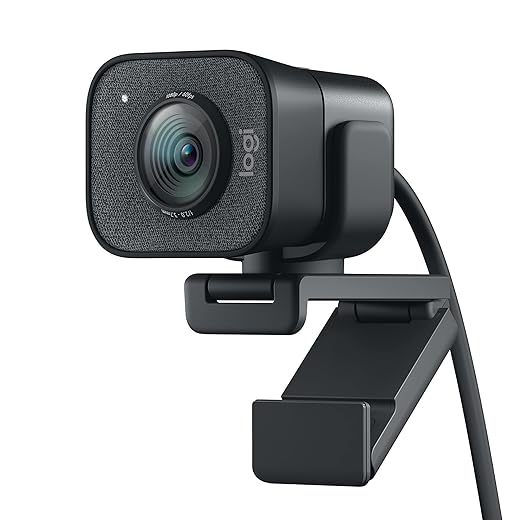
Logitech StreamCam — 1080p 60fps Creator Cam
It targets content creators with 1080p/60fps capture, face tracking, and portrait orientation support — features that matter for social video. The camera is resource‑hungry and requires Logitech software for best results, but it’s a strong option for creators on desktop systems.
We see the StreamCam as Logitech’s pitch to streamers and social creators who want immediate, polished output without a huge camera rig. The higher frame rate makes a real difference for motion and gestures, and the auto‑framing keeps you centered while you move around. It’s designed to be used with Logitech Capture and other streaming apps, which unlock its full potential.
Creator‑focused features and limitations
The hardware is solid: a premium glass lens and a USB‑C connection. But the experience is inseparable from Logitech’s software — on some systems the camera appears flatter until you install their apps and tweak the settings.
If you primarily use Zoom for meetings, the StreamCam’s higher frame rate is overkill; it’s most valuable when you’re producing livestreams, tutorials, or vertical content. Also be mindful of platform quirks: power users told us Windows setups typically get the best, most consistent experience compared with some macOS configurations.
Razer Kiyo V2 — AI Auto‑Framing 4K Webcam
It combines Sony STARVIS sensor performance with AI framing and a flexible wide‑angle lens, which suits streamers who move around or want a strong low‑light image. The software is feature rich, but real‑world results can depend on your USB bandwidth and PC configuration.
We think the Kiyo V2 targets a niche that sits between prosumer webcams and small mirrorless cameras: people who need sharp 4K capture, intelligent on‑camera framing, and fine‑grained control from software. The STARVIS sensor delivers punchy, low‑noise images in mixed lighting, and the auto‑framing keeps energy in the frame whether you’re reacting to a chat or presenting.
Practical considerations for streamers and hybrid workers
Razer leans into software polish with Synapse and Lifetime Camo integrations, which give you everything from manual ISO/shutter control to visual effects. That control is useful, but it also means the best results often require some setup time and a reliable USB 3.x connection.
If you’re plugging into a newer desktop with available USB‑C or a laptop with robust ports, the Kiyo V2 is a compelling combo of modern imaging and creative software. But if you’re after simple, trouble‑free conferencing on older hardware, the extra features can become unnecessary overhead.
Logitech C922x — Streaming‑Friendly 1080p Camera
It offers a 720p/60fps mode that streamers and game‑chat users will appreciate while keeping strong 1080p performance for meetings. The software bundle and dual mics add value, though lighting still makes or breaks the image.
We see the C922x as a pragmatic bridge between pure conferencing webcams and entry‑level streaming cameras. It keeps the dependable 1080p capture you expect from Logitech while adding streaming tweaks like the 720p/60fps option that matters for live gameplay or high‑motion video calls. The bundled background tools (XSplit VCam) are a helpful plus for users without a green screen.
Why it works for hybrid creators
The C922x’s dual purposes show up in the hardware and software pairing: autofocus and HD light correction minimize the setup fiddling, while the stereo mics and included VCam license let you jump into lightweight production workflows.
That said, the camera occupies a middle ground. If you need pristine low‑light fidelity or 4K detail, it’s not the flagship upgrade — but for people who switch between Zoom calls, streaming sessions, and casual recording, it’s a versatile, cost‑effective choice. In teams we advise provisioning, it's predictable and widely supported across platforms.
Logitech Brio 101 — Simple 1080p Business Webcam
It prioritizes reliable video, RightLight processing, and a built‑in shutter for privacy over advanced features. The result is a tidy, environmentally conscious option for offices and remote workers who want a no‑fuss external camera.
We see the Brio 101 as a pragmatic entry in Logitech’s portfolio — a camera built for meetings rather than creative workflows. It improves on older built‑in webcams with RightLight processing and a physical cover, which addresses both image quality and privacy in one package.
Office‑friendly design and sustainability note
Logitech’s focus here is predictability: straightforward setup and consistent output across conferencing platforms. The use of post‑consumer recycled plastics is also a nod toward sustainability that matters to IT procurement teams.
For most desk‑based users, the Brio 101 hits the right balance: it’s better than an integrated camera, easy to deploy at scale, and avoids the complexity and cost of high‑end webcam features that many users never use.
NexiGo N60 — Affordable 1080p Plug‑and‑Play Camera
It delivers solid 1080p performance at a very low price and includes a privacy cover, which is a thoughtful addition. The microphone is usable for casual calls, but power users will want a separate headset or desktop mic.
We recommend the NexiGo N60 when budget and simplicity are the priority. It gives you dependable 1080p/30fps capture with a noise‑reducing mic and a hardware privacy cover — features many low‑cost webcams omit. For remote workers outfitting a home office on a budget, it’s a practical and low‑friction choice.
What you get versus more expensive models
The unit sacrifices advanced image tuning and premium lenses in exchange for stability and compatibility. The company’s software offers some controls, but the best results come from pairing the camera with good ambient lighting.
If you need reliable video for Zoom, Teams, or class sessions without the headache of driver installs, the N60 is a very reasonable pick. For creators, or anyone needing adaptive focus, replaceable optics, or higher frame rates, stepping up to a mid‑range camera will pay dividends.
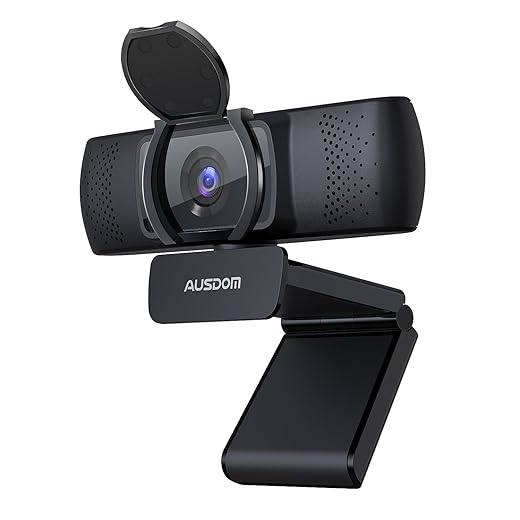
AUSDOM AF640 — Budget 1080p Wide‑Angle Webcam
It gives solid 1080p image quality and a manual focus ring that some users prefer to shaky autofocus. The built‑in mics are passable for casual meetings, but power users will opt for an external microphone.
We consider the AUSDOM AF640 a no‑frills option for people who need a reliable external camera without spending much. The manual focus is surprisingly useful for fixed setups — it prevents the tiny focus adjustments that can distract during a call. Its wide 90° angle also makes it useful for small group calls or anyone who prefers more background context.
Practical strengths and when to upgrade
The AF640’s mechanical build and simple feature set make it an easy buy for education and home offices where cost matters more than pro features. However, its onboard microphones and low‑light handling are modest, so pairing it with a desk mic or basic lighting will noticeably improve results.
If you’re replacing an aging laptop webcam and want an inexpensive, sturdier option, this does the job. For creators or frequent presenters who need crisp audio and better low‑light fidelity, we recommend investing in a mid‑range webcam or a separate camera/microphone setup.
Final Thoughts
For most professionals who need the clearest, most future‑proof external camera, we recommend the Logitech Brio — 4K HDR Business Webcam. It delivers the best mix of resolution, HDR handling, and enterprise features (including Windows Hello support). That extra detail matters for presentations, client calls, and recorded content where a crisp, color-accurate image reduces distractions and looks consistently good across varied lighting.
If you want a no‑nonsense, reliable camera that simply works for everyday meetings, pick the Logitech C920 — Reliable 1080p Webcam. It’s plug‑and‑play, affordable, and still one of the most consistent performers for 1080p calls and streaming. It’s the practical choice for remote workers, teachers, and anyone who values stability over top-end specs.
A quick note for creators: if you want a filmic, camera‑style look and more manual control, the Elgato Facecam 4K is our pick among creator tools. It behaves less like a peripheral and more like a compact studio camera, which matters if you’re producing branded video or streaming frequently.
We chose these because they solve real user problems today: the Brio raises the bar for clarity and enterprise integration, the C920 gives dependable performance without fuss, and the Facecam offers creator‑grade control where image style matters.

Chris is the founder and lead editor of OptionCutter LLC, where he oversees in-depth buying guides, product reviews, and comparison content designed to help readers make informed purchasing decisions. His editorial approach centers on structured research, real-world use cases, performance benchmarks, and transparent evaluation criteria rather than surface-level summaries. Through OptionCutter’s blog content, he focuses on breaking down complex product categories into clear recommendations, practical advice, and decision frameworks that prioritize accuracy, usability, and long-term value for shoppers.