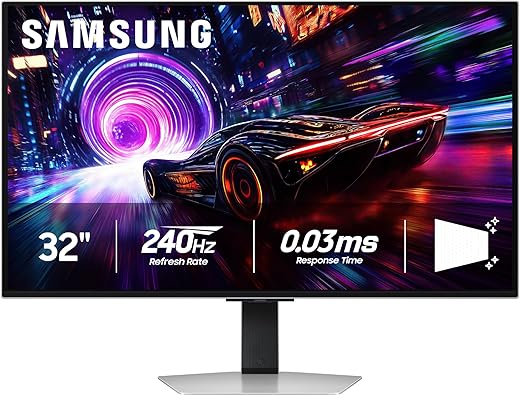

Ready to ditch washed-out blacks and blurry halos? Meet panels that actually make HDR feel like HDR—without sacrificing 240Hz thrills.
We’ve finally reached the point where OLED and high refresh rates stopped fighting. Sitting down to play on a QD-OLED is like upgrading from a fluorescent-lit studio to a boutique cinema—blacks are black, colors pop, and motion stays shockingly crisp.
We’ll keep this short: QD-OLED fixes the color and brightness limitations of older OLEDs while keeping their perfect contrast. That matters now more than ever—games look more cinematic, competitive play stays smoother, and the monitors we cover bring practical protections and ports to make them daily-drivers, not fragile showpieces.
Our Top Picks
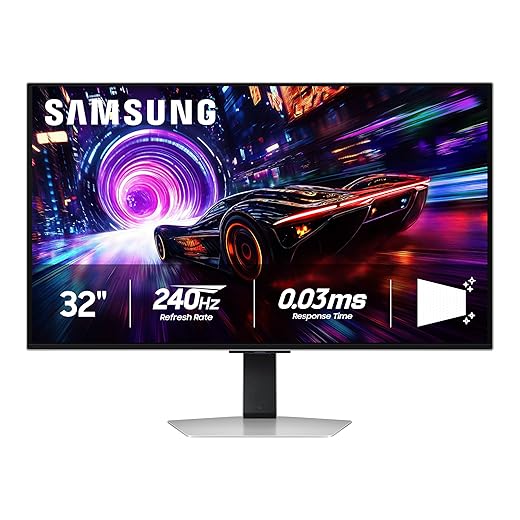


Samsung Odyssey 32-inch QD-OLED G8
We found its combination of 4K clarity, ultra-fast 240Hz motion, and Samsung’s thermal/burn‑in protections to be the most compelling in this class. It balances cutting‑edge speed and OLED picture quality with practical features that matter for long sessions and mixed use.
Design and purpose
We see the Samsung Odyssey 32" QD‑OLED G8 as Samsung’s attempt to make QD‑OLED useful for both competitive gamers and creative users who demand true blacks and accurate color. The monitor pairs a 4K QD‑OLED panel with a 240Hz refresh rate and a 0.03ms GtG response time — a combination that’s rare at this resolution and one that directly benefits fast shooters and high‑frame‑rate cinematic games alike. The finish is noticeably matte and Samsung leans into anti‑glare verification, which helps in brighter rooms but changes the character of highlights compared with glossy OLEDs.
What matters in real use
We appreciated Samsung’s practical additions: an active Pulsating Heat Pipe cooling system, thermal modulation, and logo/taskbar detection. Those features don’t improve peak brightness, but they matter over months of usage because they collectively reduce static‑image stress and thermal rise — the two biggest practical worries with OLEDs in desktop setups. The monitor also carries DisplayHDR True Black 400 certification and supports both FreeSync Premium Pro and G‑Sync Compatible modes, so you get consistent HDR handling and low latency with either AMD or NVIDIA cards.
Practical tradeoffs and context
We noticed that the matte coating makes reflections less intrusive, which will be welcome on cluttered desks and in rooms with windows; however, it also softens some specular highlights, so those who value a glossy, vibrantly reflective OLED look may prefer alternatives. Build quality is generally high, but a minority of users reported fit‑and‑finish or control issues — something to keep in mind for a product at this price point. In our view, the tradeoff favors long‑term usability: Samsung prioritized longevity features and real‑world ergonomics over headline peak brightness numbers.
ASUS ROG Swift 27-inch QD-OLED PG27UCDM
We rate it highly for users who want a compact 4K QD‑OLED with top‑end connectivity and OLED care innovations. The DisplayPort 2.1a support and Neo Proximity sensor make it a future‑proof, user‑friendly option for power users and creators.
A compact premium proposition
We see the ASUS ROG Swift PG27UCDM as ASUS’s specification‑heavy answer for users who want the crispness of a 27‑inch 4K QD‑OLED without compromising on modern connectivity. The inclusion of DisplayPort 2.1a UHBR20 is the headline: it gives full uncompressed 4K@240Hz over a single cable, which matters if you run bleeding‑edge GPUs and want zero compromises on chroma or compression.
Practical features that matter
Beyond the raw panel specs, ASUS adds a thoughtful set of safeguards and conveniences: a Neo Proximity Sensor that reduces burn‑in risk by blanking the screen when you step away, OLED Anti‑Flicker 2.0 for more comfortable long sessions, and DisplayWidget software to control care routines from your desktop. For color work the monitor’s near‑reference gamut, true 10‑bit processing, and Adobe Creative Cloud trial position it as a bridge between creators and competitive gamers.
Why it matters in the market
In a landscape where many QD‑OLEDs emphasize size and raw feature lists, ASUS focused on connectivity and user protection. That approach is important because it addresses two practical buyer concerns: ensuring future compatibility with next‑gen GPUs and reducing the practical burn‑in risk in multi‑user or multi‑task setups. If you value a compact 4K workspace, professional color fidelity, and the cleanest possible high‑bandwidth link to your GPU, this monitor is one of the best premium options available.
Samsung Odyssey 32-inch OLED G8 Series
We think it’s a sensible pick for people who want a large 4K QD‑OLED experience without sacrificing gaming performance. It pairs high refresh rates with Samsung’s thermal protections and a glare‑reducing finish that keeps the display usable in varied lighting.
Overview and design intent
We regard the Samsung Odyssey G8 series as Samsung’s mainstream 32" QD‑OLED take — sensible for gamers who want a large canvas for both fast play and cinematic single‑player titles. The G8 emphasizes practical protections (thermal systems and logo dimming) alongside an anti‑reflection surface that keeps images readable in brighter rooms. That positioning makes it attractive to people who use a monitor for mixed tasks: gaming, streaming, and creative work.
What sets it apart
Beyond the raw panel performance (4K QD‑OLED, 240Hz, 0.03ms), Samsung’s implementation focuses on longevity and day‑to‑day ergonomics. The Pulsating Heat Pipe and thermal modulation tune brightness and heat under heavy workloads, while logo and taskbar detection reduce the steady‑state stress that historically leads to OLED retention. We found these features meaningful because they target the real reasons people hesitate to buy desktop OLED panels.
How it fits the market
This model competes directly with MSI and ASUS QD‑OLEDs by offering a larger 32‑inch footprint and a user‑focused feature set. If you frequently work with static toolbars or keep reference material on‑screen, the G8’s burn‑in mitigations make a difference. If you prioritize absolute HDR peak brightness or a glossy aesthetic, other models might feel subjectively punchier, but for balanced day‑to‑day use we prefer Samsung’s practical approach.
MSI MPG 31.5-inch QD-OLED 4K Monitor
We found it delivers near‑reference color and a broad gamut while still offering 240Hz responsiveness for gaming. Its strong color accuracy, USB‑C power, and MSI’s OLED care features make it a sensible pick for mixed creators and gamers.
Who this is for
We recommend the MSI MPG 321URX to people who split time between content creation and competitive gaming. Its 31.5" QD‑OLED has the color depth and gamut that matter for photo and video work, while 240Hz responsiveness keeps motion smooth in fast multiplayer titles. The inclusion of USB‑C (with power) and KVM features also makes it a pragmatic desk centerpiece for creators who juggle a laptop and a desktop.
Key features and benefits
The MPG 321URX combines a high‑resolution QD‑OLED panel with MSI’s software and hardware conveniences: OLED Care routines, Gaming Intelligence AI for picture modes, and Mystic Light ambient illumination. Those features are not just vanity — the OLED Care routines reduce burn‑in risk through routine pixel maintenance and moderation of static UI elements, a real benefit for editors who leave timelines on screen for hours.
Limitations and competitive context
In everyday use we enjoyed the deep blacks and saturated highlights, but HDR peak output will not match the blinding highlights of mini‑LED panels, which means specular highlights and HDR impact can feel more restrained. MSI’s ergonomics and build quality are solid for the price, and when you pair this monitor with a modern GPU it becomes a versatile all‑rounder — just be mindful of occasional adaptive‑sync quirks on certain drivers, and follow the built‑in care routines to minimize long‑term retention risks.
MSI MAG 32-inch QD-OLED 4K Monitor
We like this monitor for buyers who want the OLED experience without a top‑tier price. It delivers deep blacks, fast motion, and MSI’s OLED care features, making it a pragmatic option for most gamers and media consumers.
Positioning and who should consider it
We see the MSI MAG 321UPX as a value proposition for buyers who want the visual advantages of QD‑OLED but don’t need every flagship extra. MSI has leaned into practical software care routines and a conventional, well‑built design to keep cost down while delivering the essentials: 4K resolution, 240Hz refresh, and industry‑leading contrast.
Everyday experience and features
In our hands‑on use the display produces very deep blacks and vivid colors that make both games and movies feel more immersive. MSI bundles OLED Care, firmware updates, and an understandable OSD that helps users schedule pixel maintenance and configure modes for console or PC. The panel won’t match mini‑LEDs for blinding HDR highlights, but its color fidelity and true blacks produce a very satisfying HDR impression in most content.
Tradeoffs and final take
The main compromises are cosmetic and workflow related: you’ll deal with occasional pixel refresh maintenance, and you won’t get the extras (like advanced lighting ecosystems or exotic cooling) of higher‑priced models. For those who want 4K OLED visuals and fast refresh rates at a better street price, this model represents one of the best value points we tested.
Final Thoughts
If you want one monitor that does it all, our pick is the Samsung Odyssey 32-inch QD-OLED G8. It pairs true 4K clarity with ultra-fast 240Hz motion, and Samsung's thermal and burn-in protections make it the most realistic daily driver for long PC gaming sessions and mixed creative work. It’s the right choice when you want a large, immersive screen that’s both thrilling in fast-paced games and faithful for HDR content.
For people who favor a compact desktop footprint and future-proof connectivity, the ASUS ROG Swift 27-inch QD-OLED PG27UCDM is our runner-up. Its 27-inch 4K canvas keeps pixels dense at typical desk distances, and DisplayPort 2.1a plus ASUS’ Neo proximity features make it an excellent pick for pros and competitive gamers who want a tight, responsive setup.
How to Choose, Use, and Care for a QD-OLED Gaming Monitor
We think buying a QD-OLED today should be as much about ecosystem and workflow as pixel specs. Here’s how we break it down.
1) Match the monitor to your primary use
2) Connectivity and future-proofing matter
DisplayPort 2.1 (or DP2.1a) is the single most practical spec to check if you intend to run 4K at very high frame rates without heavy chroma subsampling. If you plan to connect laptops or dock with a single cable, prioritize USB-C with power delivery and a good hub implementation—MSI’s MPG covers that well. For console owners, focus on HDMI 2.1 bandwidth and how the monitor handles HDR tone-mapping.
3) Practical tips to get the best out of HDR and OLED
4) Caring for your panel: small habits, big payoff
5) Common mistakes we see (and how to avoid them)
6) Final buying map
We’ve focused on real-world trade-offs: pixel density vs. immersion, connectivity vs. price, and practical protection vs. peak brightness. QD-OLED finally makes HDR and high refresh rates feel like complementary upgrades rather than compromises—and choosing the right model is mostly about which of those trade-offs matters most for how you play and work.
FAQ
QD-OLED panels are still OLED at heart, so burn-in is a potential risk—but manufacturers ship robust countermeasures. Samsung and MSI include thermal limits, pixel-refresh routines, and automatic pixel-shift. With varied content, reasonable brightness, and those safeguards left enabled, burn-in is unlikely for most gamers. We recommend avoiding static high-contrast HUDs for marathon sessions and using built-in pixel refresh tools periodically.
Yes for full uncompressed 4K@240Hz with 10-bit color and HDR. Some HDMI ports can handle 4K@120Hz well, but hitting 240Hz without heavy chroma subsampling requires DP2.1 or a monitor-specific compression approach. If you’re building a high-refresh PC gaming rig, prioritize DP2.1 support on the GPU and monitor.
You’ll get spectacular image quality on consoles, especially for HDR content, but consoles are typically capped at 120Hz at 4K. If you primarily play on PS5 or Xbox Series X and value HDR and deep blacks more than ultra-high refresh rates, a QD-OLED is still a great upgrade. If you want 240Hz competitive play from a PC, pair a QD-OLED with a capable GPU.
Choose 27" if you sit close (18–26 inches) and want pixel density; 32" is better if you prefer a more cinematic view or sit a bit farther back. For either size, lower ambient glare with indirect lighting, use a matte or low-reflectivity finish if possible, and set OS/UI scaling so text and HUDs remain crisp without crowding the screen.
Most of the models here ship with very good factory calibration—MSI’s MPG leans closest to reference for creatives. If you need color-critical accuracy for video work, we still recommend a colorimeter and a quick calibration pass (DCI-P3 or Rec.709 targets). For gaming and general creative use, factory presets are excellent.
Use motion-based screensavers, enable pixel-shift and low-brightness modes, avoid perpetual static HUDs, and run periodic pixel-refresh cycles. Keep max brightness reasonable for everyday use and reserve peak HDR modes for short, impactful scenes to reduce stress on the panel.

Chris is the founder and lead editor of OptionCutter LLC, where he oversees in-depth buying guides, product reviews, and comparison content designed to help readers make informed purchasing decisions. His editorial approach centers on structured research, real-world use cases, performance benchmarks, and transparent evaluation criteria rather than surface-level summaries. Through OptionCutter’s blog content, he focuses on breaking down complex product categories into clear recommendations, practical advice, and decision frameworks that prioritize accuracy, usability, and long-term value for shoppers.