Can shaving a few millimeters off your switches make your 9–5 less clacky and more classy?
We spend more hours with our keyboards than with most people in our lives. A slim, well-tuned mechanical keyboard can feel like a tiny office upgrade that actually changes how the whole day goes.
We tested low-profile options across build quality, wireless performance, and real-world typing comfort. Short story: the difference isn’t just cosmetic—low-profile boards affect speed, noise, and desk ergonomics in ways that matter for office work.
Top Picks



Logitech G915 X LIGHTSPEED TKL
A premium, low-profile TKL that brings pro-grade wireless, build quality, and workstation conveniences into one package. It’s the best fit if you want near-latencyless wireless, a metal chassis, and dedicated media controls in an office-friendly design.
What we like about the design
We view the G915 X TKL as Logitech’s statement that a low-profile mechanical keyboard can be both stylish and work-focused. The brushed-aluminum top and slim chassis make it look at home in an executive setup, and the tenkeyless layout preserves desk space without sacrificing essential controls.
Performance and ecosystem integration
In practice the G915 X feels premium: the volume roller and dedicated media buttons are small but significant workflow improvements once you adopt them. The board is quieter than many clicky mechanicals, making it reasonable for shared offices. That said, the price premium and a non-trivial set of reports about sticky/double-press behaviors mean we recommend checking return policies or buying during a sale.
Who should consider it
We recommend the G915 X for power users who prioritize wireless performance, a premium feel, and Logitech’s ecosystem. If you don’t need the best-in-class wireless or prefer QMK-level remapping, there are more affordable low-profile options; but for a plug-and-play, high-end office keyboard the G915 X is hard to beat.
Keychron K3 v3 Low-Profile 75%
A compact, programmable low-profile board that balances portability, battery life, and customization. It’s an excellent option if you want deep remapping and multi-device Bluetooth without the bulk of a full-size mechanical keyboard.
Design and purpose
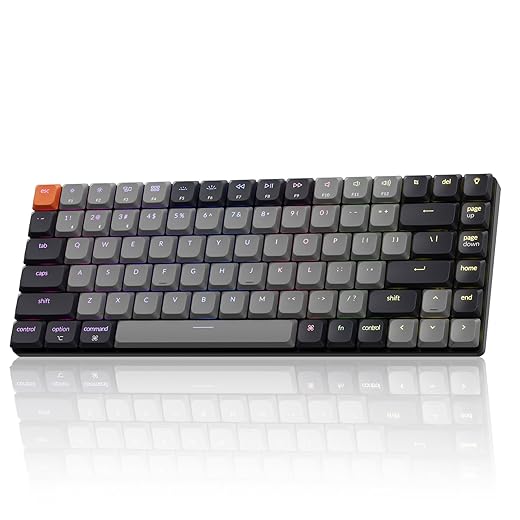
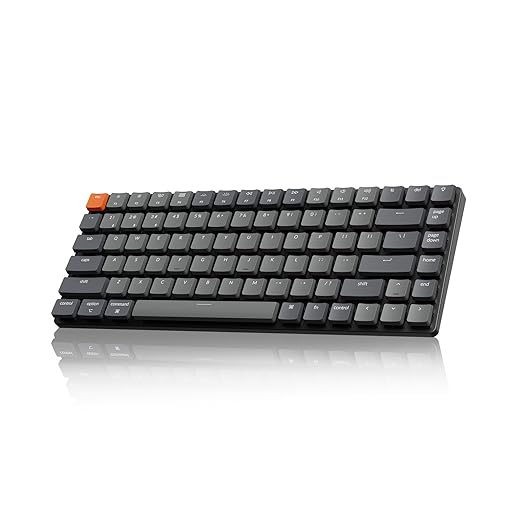
We see the K3 v3 as Keychron’s attempt to give office users a genuinely portable, programmable mechanical keyboard without sacrificing the low-profile form factor that matters during long typing sessions. The 75% layout keeps the arrow and compact function cluster while trimming bulk—useful when you want a mechanical feel on a laptop-forward desk.
Key features and day-to-day experience
We found the typing profile to be closer to a laptop than a tall-profile mechanical keyboard—less wrist extension, quicker travel, and a generally less tiring feel across long documents and email threads. Acoustic foam and version 3’s improved internals tame some of the hollowness that plagued older thin boards, but if you’re extremely sensitive to key sound, this will still sound different from a bulky thocky board.
Ecosystem, limitations, and context
We think the K3 v3 matters in today’s market because it blends true QMK-level customization with a mainstream price and broad OS compatibility—something midrange office users have been asking for. The trade-offs are clear: you get a lot of features in a small package, but you won’t have a numpad or the deep, heavy stabilizer feel of a full-size board. For hybrid workers who switch among laptop, tablet, and phone throughout the day, it’s one of the more practical low-profile mechanical choices available.
Keychron K1 V6 TKL QMK Low-Profile
A thin, metal-framed TKL with QMK programmability that suits Mac-forward desks and users who want an approachable, portable numpad-free layout. It’s fast and flexible, though a few practical details—lighting design and key sensitivity—trouble some users.
A TKL that aims for thin and programmable
We rate the K1 V6 as Keychron’s attempt to combine a thin profile with pro-level firmware. The TKL footprint is useful for office work where a dedicated numpad is unnecessary, while QMK gives us the kind of remapping power enthusiasts expect.
Features and real-world behavior
The downsides we consistently encountered in user reports and our hands-on time were practical: the backlight implementation is less effective than advertised on some units because the illumination comes from small north-facing outlets rather than full shine-through, and a subset of users found the switches overly sensitive or the key spacing cramped. For users sensitive to accidental presses or who need bright illumination, these are real trade-offs.
Where it sits in the market
In the current market, the K1 V6 sits between mainstream low-profile boards and enthusiast-oriented programmable keyboards. If you want a slim, QMK-capable TKL that integrates well with a Mac-centric workflow, it’s worth considering—just verify the lighting and try a switch variant that suits your typing style before committing.
Keychron K3 v2 Ultra-Slim 75%
A simple, well-built low-profile keyboard that focuses on core typing needs and multi-device Bluetooth. It’s an approachable choice for people who want mechanical feel without gaming bells and whistles.
A concise, practical low-profile keyboard
We see the K3 v2 as Keychron’s reliable, mass-market low-profile offering: it doesn’t try to be everything but gets the essentials right. If you spend most of your day in documents, email, or coding and want an upgrade from a laptop keyboard, it’s a practical step up without complexity.
What it does well
Where it doesn’t shine is in lighting and advanced customization: the white backlight is functional but lacks the visual flexibility of RGB, and advanced users looking for QMK-level remapping will want a different model. Still, for a straightforward daily driver, the K3 v2’s combination of price, portability, and tactile feedback lands it in a sweet spot for many office users.
Practical recommendations
We recommend the K3 v2 for users who value a slim profile and reliable Bluetooth performance over flashy lighting and deep programmability. Choose slightly heavier switches if you’re prone to accidental presses or want firmer feedback for coding and long typing sessions.
Glorious GMMK2 65% Hotswap Keyboard
An affordable, hotswappable compact keyboard that’s ideal for people who want to tinker. Its sonic profile and build quality punch above its price, but the 65% layout and software quirks limit its appeal as a primary office board for some users.
Why this exists in our roundup
We include the GMMK2 65% because it represents the modder-first corner of the low-profile market. For office users who also tinker—swap switches, change keycaps, experiment with sound foams—it offers an accessible baseline that’s more customizable than prebuilt mainstream boards.
Key traits and real-world use
Our practical take: this is a great second keyboard or the right primary device for people who enjoy customizing hardware. If you need a numpad or full-size layout for spreadsheets and data entry, you’ll spend productivity time on workarounds or external numpads. Also expect to spend some time with the configuration software to get lighting and keymaps the way you want.
Competitive context
Price-wise and feature-wise it sits between entry-level OEM boards and boutique custom kits. It’s compelling for hobbyists and those who want a compact, changeable keyboard without the expense of a full custom build.
Final Thoughts
For the best overall office experience, we recommend the Logitech G915 X LIGHTSPEED TKL. It nails the professional trifecta: premium build (metal chassis), near-zero wireless latency, and thoughtful workstation features like dedicated media controls and a stable TKL layout. If you want a quiet, luxurious, reliable keyboard that disappears under your hands and stays connected all day, this is our top pick for executive desks and hybrid setups.
If portability, multi-device Bluetooth, and battery life matter more than flashy extras, the Keychron K3 v3 Low-Profile 75% is the practical choice. It’s programmable, lighter on battery use than many competitors, and gives you the compact footprint without sacrificing deep remapping or cross-device switching—ideal for people who split time between a laptop and a home office.
Buying & Use Guide: How we think about low-profile keyboards for the office
What matters most
Tips & tricks we actually use
Care and maintenance
Common mistakes to avoid
Budget vs. Premium: where each model fits
In the current market, low-profile mechanicals are no longer a niche curiosity—they’re the practical choice for people who want mechanical feel without full-height ergonomics. We think the real win comes from matching the board’s connectivity, layout, and build quality to how you actually work, not just how it looks on camera.
FAQ
Sometimes. Lower travel and a shorter actuation point can speed up repeat keystrokes and reduce finger travel, which helps experienced typists gain small but noticeable speed. But comfort matters more: if a switch feels shallow or fatigues you, speed gains evaporate.
Generally yes. Many low-profile switches are quieter than full-height mechanicals because of reduced travel and slimmer keycaps. That said, acoustics depend on switch type, plate material, and stabilizers—so a premium low-profile board (like the G915 X) sounds different from a budget model.
Not always. Low-profile keycaps use different profiles and stem spacing in some cases. Keychron and other vendors often provide compatible sets, but if you’re planning a keycap swap, confirm stem compatibility and profile height first.
Yes — especially with modern implementations. Logitech’s LIGHTSPEED is effectively indistinguishable from wired for latency-sensitive tasks. Bluetooth is fine for everyday typing and multi-device switching, but expect occasional pairing quirks and slightly higher latency compared with dedicated wireless gaming stacks.
Absolutely. Hotswap lets you experiment with switches without soldering, which is ideal if you want to fine-tune acoustics and tactility. The Glorious GMMK2 is the most DIY-friendly on our list, though its 65% layout may be limiting for heavy spreadsheet users.
It varies. Keychron’s K3 v3 is tuned for battery life and multi-device use, so expect several days to a couple of weeks on moderate use. RGB, high polling rates, and heavy backlighting will shorten that considerably.

Chris is the founder and lead editor of OptionCutter LLC, where he oversees in-depth buying guides, product reviews, and comparison content designed to help readers make informed purchasing decisions. His editorial approach centers on structured research, real-world use cases, performance benchmarks, and transparent evaluation criteria rather than surface-level summaries. Through OptionCutter’s blog content, he focuses on breaking down complex product categories into clear recommendations, practical advice, and decision frameworks that prioritize accuracy, usability, and long-term value for shoppers.