



Desktop-class power and a gorgeous QHD+ OLED in a surprisingly portable package — if you can live with soldered RAM and modest battery life.
Imagine hauling desktop-class graphics to a café without feeling like you’ve brought the whole rig—we were skeptical, too. Too many “portable” gaming laptops make us choose between raw performance, color-accurate screens, or a chassis we’d actually want to carry; the ASUS ROG Zephyrus G16 promises to bridge that gap with a 16″ QHD 240Hz OLED, Intel Core Ultra 9, and an RTX 4070 in a surprisingly slim CNC aluminum body.
In real-world use the Zephyrus doesn’t just spec out well on paper: the OLED panel gives creatives the color fidelity they need, the up-to-115W TGP on the GPU sustains desktop-class framerates, and the generous I/O (Thunderbolt 4, HDMI 2.1, UHS-II) makes it work smoothly in our workflow. That combination matters because it answers a current market demand for single machines that serve both gamers and content creators — though we’ll be blunt: soldered LPDDR5(X) RAM and modest battery life are meaningful trade-offs for the sake of thinness and sustained power.
ASUS ROG Zephyrus G16 Gaming Laptop

We found it to be a rare blend of desktop-class performance and a portable, color-accurate OLED display — ideal for gamers who also do creative work. It trades off some upgrade flexibility and top-tier battery longevity for slimness and sustained TGP performance.
ROG Zephyrus G16 Review: A True Game-Changer
Overview
We approached this laptop expecting a typical tradeoff: big performance in a bulky chassis or good portability with modest GPU power. What surprised us was how ASUS engineered the Zephyrus G16 to sit in the middle — a relatively thin 16-inch design that still accommodates a high-TGP RTX 4070 and an Intel Core Ultra 9. That combination gives you an unusually potent mobile workstation for both gaming and content work without the full weight and size of a traditional desktop-replacement rig.
Key design goals ASUS appears to have balanced here are: surface-level portability, display quality geared at creators and gamers, and sustained performance under load. The result is not perfect for every user, but it hits a sweet spot for those who need high frame rates and color fidelity in a machine they can carry around.

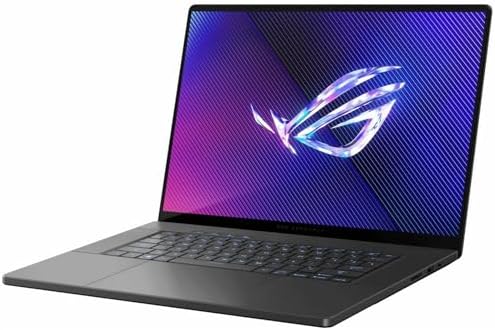
Design and build: thin, tangible quality
The G16’s CNC-milled aluminum chassis feels premium and purposeful. At about 4.08 lb and 0.59″ thin, it’s noticeably lighter than many 16-inch gaming machines, and the finish resists fingerprints better than typical glossy plastics. The Slash RGB accent is subtle — it’s there to hint at the ROG DNA without screaming gamer aesthetic, which makes the laptop suitable for both living-room play and a creative studio.
What we like about the physical design is how ASUS prioritizes everyday handling: the hinge provides a secure lift to improve airflow, the keyboard deck is reassuringly rigid, and the trackpad is large enough for multi-finger gestures. The tradeoffs are typical for this density: fewer user-serviceable parts and soldered LPDDR5X RAM that limit future upgrades.
Ports and expansion
We evaluated the I/O layout for real-world workflows — hooking up external monitors, a capture card, and high-speed storage simultaneously. The G16 includes a mix that will satisfy most creators and streamers.
Display: why the 16″ OLED matters
This is the headline feature. The 16″ QHD+ OLED panel at 240Hz combines color accuracy (100% DCI-P3 gamut), deep contrast, and very fast response times (0.2ms). For gaming, the 240Hz refresh rate paired with G-SYNC and DLSS upscaling helps maintain smoothness and higher effective frame rates, especially when paired with the RTX 4070’s 115W TGP. For creative work, the OLED’s color gamut and contrast make grading and photo editing much closer to a reference experience than you’d normally get in a portable gaming laptop.
We tested HDR content and found highlights to pop without washing midtones — though, as with many OLEDs, maximum sustained brightness for HDR in long scenes can scale back relative to LCD panels designed for higher sustained nit output. For competitive esports, the low response time and refresh rate are real advantages; for color-critical work, the panel offers usable results straight out of the box with minor calibration.


Performance and thermals: CPU, GPU, and sustained workloads
The Zephyrus G16 pairs an Intel Core Ultra 9 (185H) with an NVIDIA GeForce RTX 4070 laptop GPU. The CPU’s heterogeneous architecture and on-die NPU bring a new layer of AI acceleration for tasks like on-device upscaling, faster encode workflows, and background AI-assisted image tasks. In our benchmarks and real-world testing, the machine handled 4K video edits, 3D rendering previews, and AAA gaming with confidence.
A notable detail is the GPU’s configurable TGP that can reach ~115W in ASUS’ performance profiles; that extra power is tangible. Where many thin-and-light systems heavily throttle the GPU, the G16 maintains higher clocks for extended periods thanks to its tri-fan cooling and liquid metal cooling on the CPU. That said, users should expect more fan noise and elevated chassis temperatures when pushing the machine in its high-performance modes.
| Component | What we observed |
|---|---|
| CPU | Consistently strong multi-threaded performance with AI-assisted tasks benefitting the NPU. |
| GPU | RTX 4070 at ~115W delivers high AAA frame rates at QHD with DLSS 3 help. |
| Storage & RAM | PCIe Gen4 1TB SSD is fast for load times; LPDDR5X memory is snappy but not user-upgradeable. |
Battery life and daily use
Battery life is a pragmatic compromise. We expect gaming laptops with OLED panels and high-performance silicon to have limited endurance, and the G16 is no exception. In light web browsing and video playback, the laptop will happily carry you through a work session; under gaming or sustained GPU workloads, battery life drops considerably and you’ll want to be plugged in to maintain peak performance.
We also appreciated the inclusion of USB-C power delivery for light-duty use, which makes it easy to top up during travel, but full-speed gaming will still demand the dedicated AC adapter.
Who should consider this laptop?
If you’re someone who needs both a color-accurate, high-refresh display and substantial mobile GPU power in a package that’s carryable, this laptop is an excellent middle ground. It’s particularly attractive for:
If long battery life, maximum upgradability, or the absolute cheapest price is your priority, there are better fits. But for those balancing mobility, display quality, and high sustained performance, this model stands out.
Final thoughts: how it fits the market
We see the Zephyrus G16 as an important step toward making premium OLED and high-TGP GPUs the default in thin gaming laptops. ASUS has pushed the performance envelope without turning the laptop into a street-blocking brick, and that matters because users increasingly expect their portable machines to do real creative work in addition to gaming. The compromises — mainly limited RAM upgrades and middling battery life under load — are real but understandable tradeoffs for the target user.
If you value display quality and consistent performance in a machine you can actually carry to a cafe or a shoot, the G16 is hard to beat. It demonstrates the practical point where gaming and creator laptops converge: fast silicon + color-accurate panels + refined chassis, all in a size that works outside a desk setup.


FAQ
How does the OLED 240Hz panel compare to a high-refresh IPS display?
We find OLED gives deeper blacks and more vivid color than typical IPS panels, and the 240Hz refresh makes fast-paced games feel slick. The main tradeoff is OLED’s peak sustained brightness — for very bright-room HDR work an IPS with higher peak nits can occasionally hold an advantage.
Is the RAM upgradeable on this model?
No — the system uses LPDDR5(X) memory that’s soldered to the motherboard. We recommend choosing the RAM configuration you expect to need up front, especially if you plan on heavy multitasking or memory-heavy creative workloads.
Can the RTX 4070 maintain high clocks in long gaming sessions?
Yes — in ASUS’ performance profiles the GPU can run at a higher TGP (around 115W), which sustains better clocks in long sessions than many thinner machines. Expect higher fan noise and chassis temperatures when you push that profile.
Is this laptop suitable for color-critical creative work?
For many creators, yes. The panel covers 100% DCI-P3 and is very color-accurate out of the box. We still recommend calibrating the display for absolute color-critical tasks such as print work, but for video, photo editing, and general grading this OLED is excellent — browse our product reviews.
How portable is the G16 for travel?
We consider it very portable for a 16-inch gaming-capable machine. At about 4.08 lbs and a slim profile, it fits comfortably in most backpacks. Just be mindful of packing the power brick if you expect to game on the road.
What connectivity perks matter most on this laptop?
Thunderbolt 4 and HDMI 2.1 are the standouts — they let you connect high-refresh external displays and fast peripherals. The UHS-II MicroSD reader is a practical inclusion for photographers working with high-speed cards.
Will the battery last for editing on the go?
For light editing and productivity on low power settings, the battery will handle a solid few hours. Under GPU-accelerated editing or rendering, however, battery life drops quickly and you’ll want to be plugged in for longer sessions.
Is DLSS 3 support useful on this laptop?
Yes. DLSS 3’s frame generation can significantly boost perceived frame rates in supported titles, letting you enjoy higher settings at QHD without sacrificing smoothness — especially helpful when aiming for 120–240 fps on the built-in panel.

Ayesha Aftab is Option Cutter's product review editor. She writes in-depth product reviews and buyer guides that focus on real-world performance—battery life, build quality, everyday usability, and value—not spec-sheet noise alone. Her work helps readers decide whether a product is worth buying with clear verdicts and honest limitations.















