Near‑flagship hardware at a non‑Apple price — great for media and multitasking, with a few software and display caveats.
Finding a truly premium Android tablet used to mean compromises: you either paid Apple prices for tight software and great displays, or settled for hardware that couldn’t keep up with gaming, streaming, or serious split‑screen work. We’ve been looking for a device that balances speed, battery life, and speakers without turning into a compromise machine — something that actually feels like a flagship in day‑to‑day use.
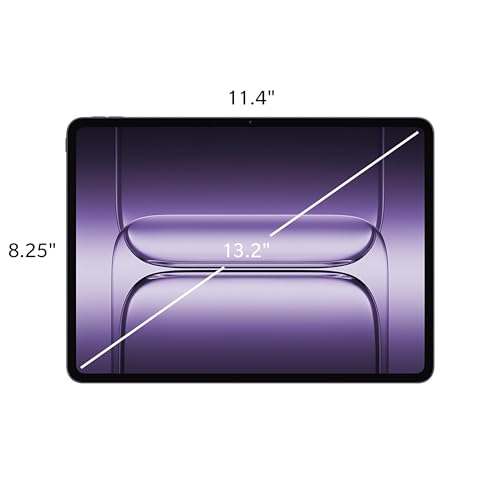
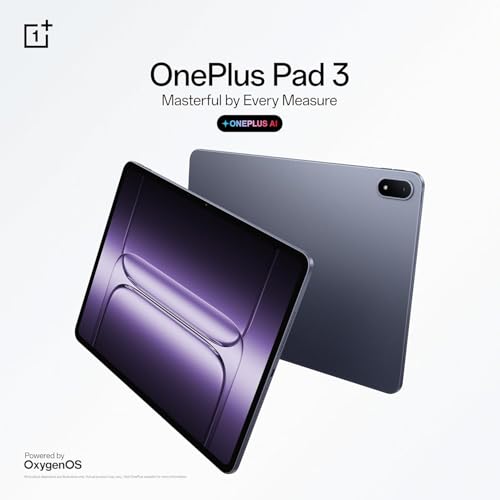
The OnePlus Pad 3 Storm Blue tries to be that middle ground. With a 13.2″ 3.4K 144 Hz display, a Snapdragon 8 Elite chipset, a huge 12,140 mAh battery with 80 W charging, and an eight‑speaker Dolby Atmos array in a slim aluminum body, it brings near‑flagship hardware at a sub‑$700 price. In practice we found it excellent for streaming, gaming, and multitasking, and it reshapes the Android tablet value conversation — though the LCD’s contrast limits and rougher software touches remind us there’s still a gap between value and refinement.
OnePlus Pad 3 — 13.2" Storm Blue
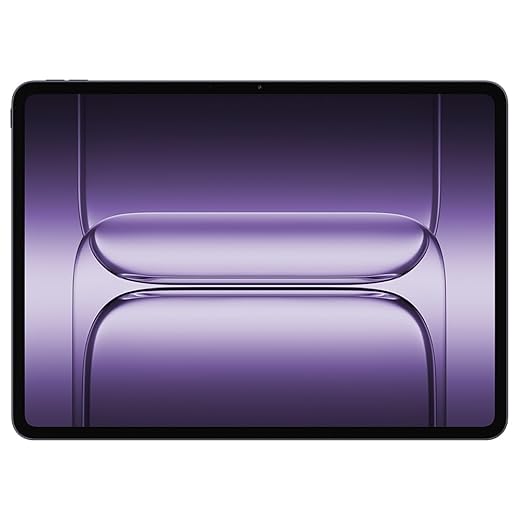
We found this tablet excels at streaming, gaming, and split-screen productivity thanks to its fast display and chipset. It’s a compelling value for users who want premium hardware without an Apple price tag, though software rough edges and the LCD’s contrast hold it back from the top tier.
OnePlus Pad 3 Tablet Review: Incredible Performance & Battery Life
OnePlus Pad 3 — What we found after weeks of use
We approached the OnePlus Pad 3 as a mid‑to‑high‑end Android tablet that wants to compete on hardware rather than price alone. Over several weeks of daily use—streaming, writing, gaming, video calls, and sketching—we looked for where it improves on its predecessors and where it still trails the best tablets on the market.
Design and feel
The Pad 3’s aluminum body is one of the first things you notice: it’s thin (about 5.97 mm) and surprisingly rigid for its weight class. The Storm Blue finish is tasteful without being flashy, and the flat edges give it a modern, premium silhouette that makes it comfortable in hand and stable on a lap.
The physical buttons are well-placed, and the balance between screen size and portability is thoughtful—this is a device you’ll happily carry in a large bag for work or bring to the couch for a movie night.


Screen: fast, sharp, but not OLED
At 13.2″ with a 3.4K resolution and up to 144 Hz refresh, the display is where the Pad 3 makes the most immediate impression for motion-heavy tasks: scrolling feels fluid, games that support high refresh rates look alive, and UI animations are buttery when the device keeps the panel at its higher refresh state.
In practice, the LCD handles HDR-formatted streaming reasonably well, but it can’t reproduce the deep blacks or infinite contrast of OLED panels. For most users—especially those who prioritize refresh rate and brightness over pure contrast—the tradeoff is acceptable. The adaptive refresh behavior also means it will drop to save battery in static scenarios; the experience can vary depending on app-specific refresh settings.
Performance and multitasking
Under the hood the Snapdragon 8 Elite paired with 12 GB of RAM gives the Pad 3 genuine flagship-level horsepower. We ran multiple productivity apps side-by-side, edited photos, and played demanding titles. Open Canvas on OxygenOS 15 proved useful for split-view workflows: you can comfortably run two apps and keep a third floating window for reference.
There are caveats: some animations and gestures can feel slightly inconsistent compared with the highest-end tablets, and a few users will notice sporadic stutters in launcher scrolling. For gaming and heavy multitasking, though, the Pad 3 is more than capable and competes well against pricier alternatives.
Sound and media consumption
OnePlus outfits the Pad 3 with an eight‑speaker Dolby Atmos system that delivers impressively wide sound for a tablet. The spatial processing adapts to orientation, which helps during landscape movie watching and when the tablet stands on a desk for conference calls.
At mid volumes the system is excellent; pushed to maximum it can lose refinement, which is common in small, loud speaker systems. Still, for watching shows, playing casual games, or conducting video calls without external speakers, it’s a clear strength.
Battery life and charging
Battery capacity is one of the most competitive specs here: 12,140 mAh gives the Pad 3 multi-day endurance for light users and a full day of heavy mixed use for most people. When time is short, the 80 W SUPERVOOC charge brings the tablet back to useful levels rapidly—this is a practical advantage versus slower-charging competitors.
We measured excellent longevity in streaming and browsing, and the combination of battery size plus fast charging lowers anxiety when you need to top up between sessions.
Software and ecosystem fit
OxygenOS 15 builds on Android with useful productivity features like Open Canvas and app refresh controls per app. Integration with OnePlus phones provides conveniences (like mobile data sharing) for users in the OnePlus ecosystem. However, the software isn’t without friction—some system defaults (AI assistant behavior, remappable buttons) may not suit everyone, and update cadence is a factor to monitor over time.
Ports, accessories, and extras
The Pad 3 supports a solid accessory ecosystem, though the bundled stylus and keyboard experiences vary in subjective quality compared to market leaders. The tablet’s wide display makes it a credible laptop replacement for writing and light editing when paired with a keyboard, but professionals who rely on the absolute best stylus latency or color-critical displays might still look to premium alternatives.
Where this tablet sits in the market
We see the OnePlus Pad 3 as an aggressive value proposition: it blends flagship silicon, a high-refresh large display, long battery life, and strong speakers into a package priced below many premium tablets. If you prioritize OLED contrast or a mature pro‑level stylus, consider competitors, but for most people who want a fast, big-screen Android tablet for media and productivity, it’s hard to ignore.
Quick spec snapshot
| Key area | What to expect |
|---|---|
| Display | 13.2″ 3.4K LCD, 144 Hz — sharp and fast, not OLED contrast |
| Performance | Snapdragon 8 Elite + 12 GB RAM — smooth for apps and games |
| Battery | 12,140 mAh with 80 W charging — long life and quick top-ups |
| Audio | 8 speakers, Dolby Atmos — loud and spacious for a tablet |
Final thoughts
We like how the Pad 3 balances real-world performance with practical features: fast display, robust chipset, long battery life, and immersive audio. The tradeoffs—LCD contrast vs OLED, a few software rough spots, and accessory maturity—are worth weighing, but for anyone who wants a large-screen Android tablet that feels premium without the top-tier price, this is one of the most convincing options we’ve tested.
FAQs
It’s capable: the Snapdragon 8 Elite and 12 GB of RAM let you run mobile photo and video editors smoothly for most consumer workflows. Color accuracy is good for general editing, but because the panel is LCD rather than OLED and lacks the deepest blacks and highest contrast, we wouldn’t recommend it as a color-critical studio reference display.
The stylus covers everyday note-taking and casual sketching well, but if your work depends on ultra-low latency or pro‑grade palm rejection, the best results will still come from high-end pens paired with tablets that prioritize drawing performance. Expect modest latency and an acceptable drawing experience for most users.
For many people, yes: paired with a keyboard accessory, the Pad 3 handles email, document editing, web research, and light media creation. If your workflow includes heavy desktop apps, complex spreadsheets, or multitasking with dozens of windows, a dedicated laptop or a tablet with a more mature desktop‑style OS may be a better fit.
Gaming is a strong suit thanks to the 144 Hz display and the Elite chipset—titles that support high refresh rates feel especially fluid. Thermal throttling is controlled well in our testing, so sustained sessions are comfortable, though battery drains faster under heavy gaming as you’d expect.
OnePlus has improved update cadence in recent years and offers useful features in OxygenOS 15. However, Android update timetables vary by manufacturer, and some users may find certain preconfigured assistant or navigation defaults intrusive. If long‑term OS guarantees are critical, check OnePlus’s current policy at purchase time.
Yes. Despite the large 13.2″ screen, the thin aluminum build and reasonable weight make it portable for a large tablet. It’s well suited to commuters with room for a tablet in a bag, and its battery life and fast charging reduce the need to hunt for outlets frequently.

Chris is the founder and lead editor of OptionCutter LLC, where he oversees in-depth buying guides, product reviews, and comparison content designed to help readers make informed purchasing decisions. His editorial approach centers on structured research, real-world use cases, performance benchmarks, and transparent evaluation criteria rather than surface-level summaries. Through OptionCutter’s blog content, he focuses on breaking down complex product categories into clear recommendations, practical advice, and decision frameworks that prioritize accuracy, usability, and long-term value for shoppers.