



Stop Losing Signal: Why a Multi‑AP System Matters
We walk you through a design-forward approach to eliminate Wi‑Fi dead zones using multiple access points — not just hardware shopping, but thoughtful coverage, ecosystem choice, and UX-aware installation that fits modern devices and spaces, and explains market tradeoffs clearly.
What We Need
We need a floor plan, networking basics, APs or mesh nodes, optional Ethernet backhaul, a laptop/phone for surveys, and patience — to test UX and ecosystem fit.

Eliminate Wi‑Fi Dead Spots: Master Mesh for Seamless Coverage
Map the Space: Do a Quick Site Survey
How bad is coverage, really? We’ll show you how to find the trouble spots — and why that should change your gear choices.Start by walking the space and measuring—don’t guess. We treat site mapping as a design exercise in our how-to guide: where people sit and what they do matters more than advertised range numbers. A quick survey tells us whether to optimize for raw coverage, capacity, or discreet hardware that blends with the room.
Use simple tools (phone or laptop) and a free app to log signal strength and real throughput. Pay attention to UX pain points like streaming TVs, home offices, and crowded living rooms. This prevents overbuying: a single well-placed AP with wired backhaul can beat three consumer nodes in a dense apartment.
What to note
Walk the house with a phone or laptop and a free app to record RSSI and throughput in rooms you care about. Note construction materials, device hotspots (TVs, workstations), and typical client counts.
Pick an Ecosystem: Mesh or Multiple Standalone APs?
Spoiler: mesh isn’t magic. Which systems actually behave like a unified network and which are just glossy routers?Choose an ecosystem early; we find that decision shapes management, aesthetics, and guest-network behavior.
Weigh integrated consumer mesh (Google Nest, Eero, Orbi) against multiple APs from UniFi, Ruckus, or Aruba; we prefer mesh for simplified setup and coordinated firmware.
Prefer multiple APs when we need true scalability, wired backhaul, and advanced roaming controls; we also accept more hands‑on configuration.
Consider the device ecosystem: if we already run a brand’s router, stay inside it to simplify setup and guest integration.
Test real roaming; we prioritize seamless handoffs, vendor update cadence, and how mobile OSes handle roaming — these affect daily experience far more than raw benchmark numbers.

Decide Backhaul: Run Ethernet or Rely on Wireless?
Want top speed and reliability? We’ll make a blunt case for wired backhaul and show when wireless is acceptable.Choose gigabit Ethernet between APs whenever we can. It preserves full bandwidth, lets tri‑band radios use a dedicated mid‑haul, and keeps latency low during handoffs — critical when multiple people stream or game.
If wiring isn’t feasible, dedicate a wireless backhaul channel on 5 GHz or 6 GHz (if supported) and accept lower throughput on mid‑haul links. For example, use a 6 GHz link for node-to-node traffic in a modern Wi‑Fi 6E mesh to reduce contention with client devices.
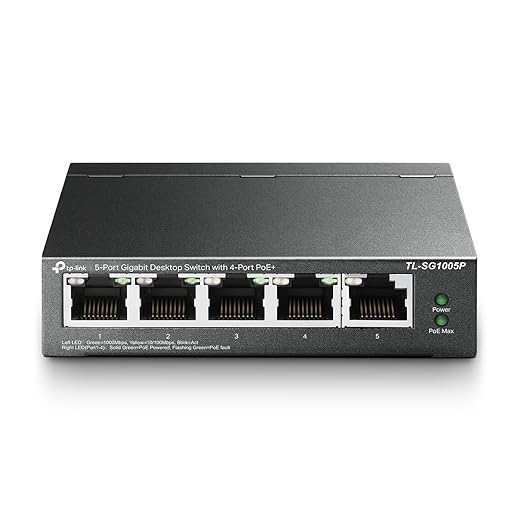
Plan power: use PoE switches or injectors to simplify placement and hide cabling. Check switch compatibility and the APs’ power budget before purchase.
Keep these priorities in mind
Consider mesh auto‑backhaul optimizations and when to invest in switches or power injectors.
Place and Install: Mounts, Height, and Aesthetics
Yes, placement is design. A poorly located AP ruins even the best hardware — here’s where to hide tech without hurting performance.Place APs on ceilings or high walls near the center of each coverage area; we prefer ceiling installs because they radiate more evenly and keep devices out of sight.
Avoid metal obstructions and large appliances that shadow RF; don’t hide APs in narrow closets or behind bluetooth stack. For example, a hallway ceiling works better than a bookshelf nook behind a TV.
Stagger APs on different floors to reduce co‑channel interference and align channels to avoid overlap (think non‑overlapping groups per floor rather than identical channels everywhere).
Use PoE mounts or in‑wall faceplates to tuck cabling and keep a clean aesthetic.
Choose slim, unobtrusive hardware — we’ve seen customers actually mount sleek APs where they belong, while bulky routers end up under desks and underperform.
Configure for Real Use: SSIDs, Channels, Roaming & QoS
One SSID or many? Band steering or user choice? We set sane defaults that prioritize consistent UX over theoretical throughput.Configure network basics with UX front of mind. Use a single SSID for both bands when our vendor supports robust band steering and fast roaming (802.11r/k/v); otherwise create a separate SSID for legacy devices so newer clients can roam smoothly. Manually set 2.4 ghz to non‑overlapping channels 1, 6, 11, and let 5 GHz auto‑optimize — or lock 5 GHz channels in dense buildings to avoid DFS surprises. Enable WPA3 if available and put IoT/guest devices on VLANs to protect the main network. Apply QoS to prioritize video calls and game consoles.

Test, Monitor, and Iterate: Keep Dead Zones Dead
Installation isn’t finish line — we show the quick diagnostics and monitoring habits that keep performance high over time.Run throughput and roaming tests with the devices we use every day; test at original trouble spots and again after changes, and run tests during peak usage (evenings). Measure latency, jitter, and handoff times — we fixed a living‑room dropout by reorienting an AP and cutting transmit power.
Use the vendor’s monitoring dashboard or free apps (Wi‑Fi Analyzer, Speedtest) to track client RSSI, airtime, and interference. Set alerts for firmware releases and spikes in retransmission rates so we catch regressions before users complain.
Wrap Up: A Reliable Network Is an Experience
We’ve shown how planning, ecosystem choice, backhaul, placement, and tuning turn multi‑AP setups into seamless experiences; in today’s congested market, that UX and integration matter. Try it, tell us your results, and keep refining for reliable Wi‑Fi — share widely, please.
Frequently asked questions
What should I prepare before I set up a multi-ap wi‑fi system without dead zones?
Start with the checklist in the “What we’ll need” section above—measure your space, confirm compatibility with your gear, and read the full walkthrough once before you change settings or buy parts. Multi-ap wi‑fi system without dead zones goes faster when prep is done upfront.
How long does it take to set up a multi-ap wi‑fi system without dead zones?
Most readers finish in about 30–90 minutes if they already have the right parts, but budget extra time for measurements, firmware updates, or a second pass when something does not behave the way the manual suggests on the first try.
What is the hardest part when you set up a multi-ap wi‑fi system without dead zones?
The step that trips people up is usually alignment or configuration—getting measurements, cable routing, or software settings right before you commit. If results still look off, re-check the basics in order instead of swapping hardware immediately.
What mistakes should I avoid when I set up a multi-ap wi‑fi system without dead zones?
Skipping measurements, ignoring ventilation or port limits, and rushing the final test are the common failures. Photograph your starting setup, label cables, and verify the outcome with the same content or workflow you will use every day—not a one-off demo.
When should I call a pro instead of trying to set up a multi-ap wi‑fi system without dead zones myself?
Bring in help when the job needs structural work, licensed wiring, or tools you do not own, or when repeated attempts still fail after you have followed the troubleshooting section. A short paid visit can cost less than replacing gear you damaged by forcing the install.

Princess Rioboca is the Lead Editorial Writer at Option Cutter, bringing over seven years of hands-on experience in consumer technology journalism. Specializing in home networking and smart home architecture, she transforms complex technical data into practical, real-world upgrades. Princess personally tests and audits every product she reviews—evaluating real-world Wi‑Fi throughput, cable management durability, and streaming ecosystem stability—to filter out spec-sheet noise. Her rigorous, field-tested insights are designed to give readers transparent, unbiased buying advice on what to purchase, what to skip, and exactly why.















