


Introduction — Why fast solar input matters more than capacity claims
We focus on FAST SOLAR INPUT because real recharge speed, not raw capacity, shapes usability. We explain which specs and design trade-offs matter, how ecosystems affect longevity, and how to pick a station that keeps pace with your solar panels.
Requirements — What we need before we start
We need a clear use‑case, device list, panel specs (Voc/Vmp), watt‑hour spreadsheet, and basic tools/skills (multimeter, solar‑calculator app) plus willingness to compare brands, warranties, and weight limits.

Step 1 — Define the mission: power, duration, and recharge goals
Are we planning weekend off-grid bliss or daily tool-site uptime? The wrong mission dooms even the best specs.Define what we’ll actually power and where. Start by inventorying every load — phone chargers, fridge, CPAP, power tools — and write down each device’s wattage and hours per day. For example: a 60 W mini-fridge × 24 h = 1,440 Wh; a 40 W CPAP × 8 h = 320 Wh. Sum those numbers to get your daily watt‑hour target.
Calculate the solar input needed by dividing that daily Wh by your expected peak sun hours (e.g., 5 h). Then add 20–30% to cover MPPT inefficiency, battery acceptance curve, partial inverter loss, and shading. If we need 2,000 Wh/day and have 5 peak sun hours, target ~500 W of solar input × 1.25 = ~625 W.
Consider seasonality, partial shade, and the practicality of deploying panels (weight, setup time). Use this mission profile to choose inverter size, port types (AC, 12 V, USB-C), and whether we prioritize high solar‑input stations or lighter packs that need overnight charging. This step turns vague capacity claims into actionable throughput targets.

Step 2 — Decode solar input specs: MPPT, volts, and real watts
Is '600W solar' actually useful? Spoiler: the voltage window and MPPT tell a different story.Decode the solar-input specs—this is where marketing claims collide with physics. We read three numbers first: maximum solar input watts, MPPT voltage window (Vmp/Voc), and maximum input current. Those determine whether a “600W solar” rating actually works with common panels or forces awkward wiring.
Cross‑reference your panel’s Vmp/Voc with the station’s MPPT window. Check whether the manufacturer lists a PV open‑circuit voltage limit, supports parallel MC4 connections, and specifies an MPPT (not a basic PWM). For example, many 100 W panels have Vmp ~18V and Voc ~22V; stringing panels to hit a station’s Vmp may be necessary or impossible if Voc limits are low.
Watch for real‑world traps: MPPT efficiency, Voc rise in cold mornings (10–20% higher), and thermal throttling that cuts input at high internal temps. Note market norms—higher‑end stations push 1,000–2,000W (often with LiFePO4); midrange units cap 300–800W. Finally, inspect the manual for parallel‑support guidance, included cable adapters or MC4 ports, and whether the maker publishes real charge graphs or throughput tests.

Step 3 — Pick chemistry and charge acceptance: LiFePO4 vs NMC
Want 2,000 cycles and fast acceptance or lighter weight now? It's a longevity gamble worth understanding.Choose LiFePO4 when you want high throughput and longevity. It tolerates higher sustained charge currents, survives many more cycles, and handles rapid solar replenishment with less long‑term capacity loss. Pick NMC only if weight and compact energy density outweigh recharge speed for your use case.
Check the battery’s maximum charge acceptance listed in amps or C‑rate—this is the hard cap on how much of your solar array the station will actually use. For example, feeding ~800 W into a 1,000 Wh pack is roughly a 0.8C charge; LiFePO4 stacks deal with that better than most NMC packs.
Inspect these items before buying:
Prefer models with clear telemetry, app control, firmware updates, and modular parts—those design choices keep real throughput high and extend useful life in a competitive market.
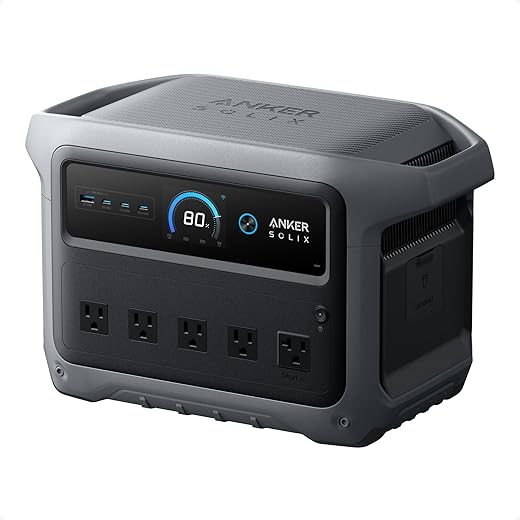
Step 4 — Evaluate design, UX, and accessory ecosystem
A clever handle and decent app beat a shiny spec sheet—setup speed, connectors, and panels matter more than bragging watts.Evaluate port layout and power flow so the station fits how we actually live with it. Check AC, USB‑C PD, USB‑A, and 12V ports; confirm the station’s simultaneous‑output limit so one laptop and a fridge don’t silently trip a cap.
Inspect build and handling. Prefer robust handles, weather‑resistant latches for folded panels, integrated stands, and logical connector placement that keeps high‑voltage MC4 runs away from USB ports. Favor units with deliberate cooling paths over lightweight designs that thermal‑throttle in midday sun.
Validate the accessory ecosystem. Ask whether compatible foldable panels, MC4 or proprietary adapters, extension cables, and car‑to‑solar leads are sold by the maker. Demand app telemetry, firmware updates, and downloadable charge logs—those features turn a product into a platform.
Test in the field. Bring your panels and run a single‑day recharge: time setup, measure end‑to‑end throughput, note cable lengths and connector friction, and confirm the vendor’s panel recipe matches your conditions. Prioritize vendors with clear docs, responsive support, and available spare parts.
Step 5 — Compare vendors, warranties, and real-world throughput
Who stands behind their claims? Support, firmware updates, and verified throughput separate winners from also-rans.Shortlist stations that meet our watt‑hour and solar‑input targets, then rank them by effective solar throughput shown in hands‑on reviews or vendor charge graphs. If a review shows a model topping out at 500W from panels while the spec sheet says 800W, move it down the list.
Call vendor support with deployment questions—ask about panel recipes, MC4 vs proprietary plugs, and firmware dongles. Use their responses as a stress test; slow or evasive answers predict trouble later.
Favor vendors with regular firmware updates, clear app diagnostics, and an available spare‑parts list. Insist on transparent warranties—LiFePO4 units should promise longer cycle warranties and clear end‑of‑warranty behavior.
Compare price‑per‑cycle not just price-per‑kWh. A cheap inverter that throttles or dies after a year costs more over time.
Our purchasing checklist:
Use that to pick the station that fits both our immediate needs and long‑term uptime goals. Buy from sellers with return policies.
Conclusion — Prioritize throughput and ecosystem, not just kWh
We’ve shown how balancing capacity, chemistry, and genuine solar input yields faster, more reliable recharges; we favor verified MPPT, smart thermal design, and broad accessory ecosystems because they drive uptime and user satisfaction—are you ready to choose throughput over specs?

Chris is the founder and lead editor of OptionCutter LLC, where he oversees in-depth buying guides, product reviews, and comparison content designed to help readers make informed purchasing decisions. His editorial approach centers on structured research, real-world use cases, performance benchmarks, and transparent evaluation criteria rather than surface-level summaries. Through OptionCutter’s blog content, he focuses on breaking down complex product categories into clear recommendations, practical advice, and decision frameworks that prioritize accuracy, usability, and long-term value for shoppers.









