


Why the right SD card matters for 4K
We focus on how sustained write speeds, camera compatibility, and workflow reliability decide whether 4K footage is usable or corrupted, and why, in a crowded market of varying specs and prices, choosing the right SD card matters to our experience.
What you’ll need
We’ll want:

Best SD Cards for 4K Video: Which one should you buy?
Match card specs to your camera’s real needs
Why guessing “the fastest” often wastes money — can your camera even use that speed?Identify your camera’s physical bus and sustained-write ceiling first. Many mirrorless bodies, drones, and action cams are limited to UHS‑I or a modest UHS‑II implementation, and firmware—not the card’s headline speed—usually caps sustained writes.
Check your manual or manufacturer test notes for the camera’s maximum sustained write requirement. Translate codec and frame-rate demands into bits: for example, H.264/H.265 4K30 typically sits around 50–150 Mbps (6–19 MB/s), 4K60 can reach 100–400 Mbps (12–50 MB/s), while ProRes/RAW workflows can demand hundreds to thousands of Mbps (50–500+ MB/s).
Pick a card whose V‑class rating (V30, V60, V90) comfortably exceeds your camera’s peak 4K bitrate. For example, if your camera needs ~50 MB/s sustained writes, a V60 card gives headroom; buying V90 for a UHS‑I camera that maxes at ~50 MB/s wastes money and yields no speed benefit.
Verify real-world examples—read camera-specific benchmarks—and match capacity/endurance to your shooting pattern before upgrading.
Understand speed ratings and what they actually mean
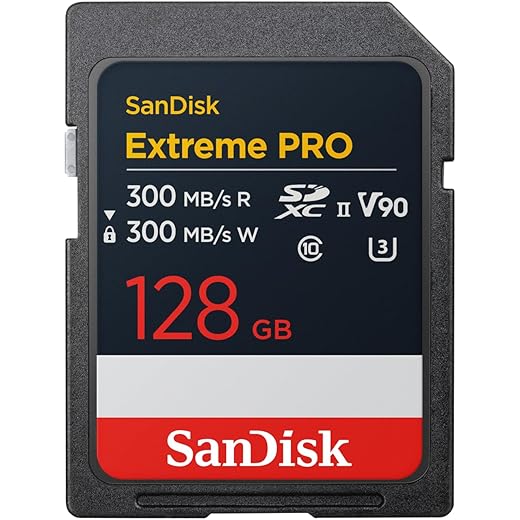
Confused by UHS, V, A and ‘MB/s’ labels? You’re not alone — here’s what matters and what’s marketing.Unpack the labels on the package before you buy. UHS‑I and UHS‑II describe the card’s bus—the maximum highway bandwidth—while U1/U3 and V‑class ratings tell you minimum sustained write performance. A1/A2 describe app/random IO performance for phones, not continuous video capture.
Focus on sustained write guarantees (the V classes). V30 = 30 MB/s, V60 = 60 MB/s, V90 = 90 MB/s; these are the numbers that prevent dropped frames during long 4K takes. Marketing peak speeds (e.g., 300–3000 MB/s) usually advertise the UHS‑II bus or lab read peaks and matter only if your camera or reader supports that bus.
Prefer a card whose V‑rating comfortably exceeds your camera’s peak 4K bitrate. For example, a V60 gives headroom for many 4K60 workflows; buying V90 for a UHS‑I camera wastes money. Expect faster read speeds to cut transfer times in post, but rely on V‑class for recording predictability.
Key quick mapping:

Choose capacity and endurance for your workflow
Do we really need a 512GB card, or is swapping every 20 minutes a better plan?Size cards to match how long you actually shoot and how fast you offload. We recommend planning card capacity around typical clip lengths: for example, shooting 4K ProRes at ~400 Mbps fills a 128 GB card in roughly 30–40 minutes, so a 256 GB card gives about an hour of continuous record before swapping.
Balance risk versus handling: fewer large cards reduce swapping and interruptions but raise the stakes if one card fails. Many smaller cards limit loss to a single reel but increase labeling and cataloging work.
Watch endurance ratings and sustained-write behavior. Brands now sell “high‑endurance” SDs (dashcam/drone markets) with TBW‑like guarantees; choose those for nonstop recording. Beware thin, inexpensive cards that heat and thermal‑throttle during extended 4K writes.
Adopt a practical workflow: pair high‑capacity, high‑V‑class cards (V60/V90) with a disciplined offload + verify routine and keep a rotating spare set. Also match card bus (UHS‑I vs UHS‑II) to your camera and reader—buying a top‑tier UHS‑II V90 card only makes sense if your ecosystem can use it.

Test compatibility and real-world speeds before the big shoot
Benchmarks matter — do a reality check with your gear, or risk lost footage.Format the card in-camera. We always start by letting the camera do the low-level setup — it clears file-system quirks and shows if the camera accepts the card reliably.
Record a long-duration continuous clip at your intended codec and frame rate. We recommend a full-session run (or at least 30–60 minutes) to reveal thermal throttling or dropped frames that short tests miss.
Use a UHS‑II-capable reader and run a disk utility (Blackmagic Disk Speed Test, CrystalDiskMark, or AJA System Test) on your editing machine. We compare sustained write numbers to the card’s V/Class rating and to the camera’s announced limits.
Run these quick checks:

Balance brand, warranty, and price for long-term reliability
Is cheap “no-name” fine if it passes a speed test today? Spoiler: sometimes it’s not.Balance brand reputation against cost when you plan to depend on cards for client work. We prioritize established makers — SanDisk, Sony, Lexar, ProGrade, Delkin — because their manufacturing consistency, firmware maturity, and support ecosystems matter in the field.
Prefer cards with clear warranty and RMA processes. We look for global warranty, easy RMA, and published compatibility lists from camera makers. For example, when a wedding shoot flustered us years ago, the card vendor’s fast RMA and replacement saved the client deliverables.
Check whether paying more actually solves your problem: V90/V60 cards justify their premium for sustained high-bitrate codecs (ProRes RAW, high-frame-rate 4K). For most 4K DSLRs/mirrorless work, V30 hits the sweet spot on price-per-GB and reliability.
Invest in a UHS‑II card reader and adopt a strict offload+verify workflow. Back up immediately and verify checksums — this disciplined practice protects footage far more than chasing the final 10–20 MB/s of headline speed.
Our quick checklist
We match card class to camera bitrate, prefer sustained‑write ratings, test cards in‑device for real speeds, and buy reputable brands while planning backup and archive workflows; try this checklist on your next shoot and please share your results with us.

Chris is the founder and lead editor of OptionCutter LLC, where he oversees in-depth buying guides, product reviews, and comparison content designed to help readers make informed purchasing decisions. His editorial approach centers on structured research, real-world use cases, performance benchmarks, and transparent evaluation criteria rather than surface-level summaries. Through OptionCutter’s blog content, he focuses on breaking down complex product categories into clear recommendations, practical advice, and decision frameworks that prioritize accuracy, usability, and long-term value for shoppers.










