


Why 4K webcams with AI Auto Framing matter now
We walk through how to pick a 4K webcam with AI auto framing—balancing image quality, tracking tech, and platform fit. Hardware and software evolve fast, so we focus on real-world performance, ecosystem fit, and practical trade-offs that matter right now.
What you’ll need before we start

Start with how you’ll actually use it
Are you hosting webinars, streaming in 4K, or just joining meetings? The right webcam changes with your purpose.Define the primary use case before you get distracted by specs. Decide if this is for single-person video calls, multi-speaker meetings, live streaming, or content creation—each pushes different priorities.
Prioritize one or two technical trade-offs rather than chasing everything at once:
Give concrete constraints now: set a budget, decide portability (clamped, tripod, or compact), and confirm platform certification (Teams/Zoom/Google Meet) if your organization needs it.

Ignore the headline resolution—inspect the sensor and optics
4K marketing is cheap; sensor size and glass tell the real story. Bigger sensor beats pixel counting in low light.Inspect imaging fundamentals: check sensor size, native 4K capture vs. upscaling, pixel binning, dynamic range, and lens quality before you trust a “4K” badge. We look for larger sensors (e.g., 1/1.8″ or bigger) and true native 4K capture; a tiny 1/2.3″ sensor that bins pixels to hit 4K will clip detail and fall apart in low light.
Evaluate the lens: glass elements, aperture, and focal length matter more than megapixels. Choose a wider field of view for multi-person framing and a narrower, ~50–80mm equivalent for flattering head-and-shoulders. Test samples or reviews to confirm the imaging pipeline preserves color and shadow detail—many vendors sell weak optics to hit specs; we favor cameras that hold up in real rooms, not lab lighting.

Understand what ‘AI Auto Framing’ actually means
Is it smart tracking or just a canned crop? Spoiler: implementations vary wildly.Dissect auto-framing approaches: face-only centering, multi-subject layouts that tile or widen the view, continuous pan/zoom that physically moves/zooms the frame, and virtual camera crops that simulate optical changes. We test each in real-room scenarios—panel discussions, one-on-one calls, and moving presenters—to see what feels natural.
Weigh on-device inference (low latency, better privacy, immediate reacquire) against cloud processing (heavier models, occasional lag, subscription ties). Watch common failure modes: overzealous crops that chop gestures, jittery micro-adjustments, and misidentifying background objects as people. We prefer vendors that push model updates and explain data-handling.
Ask these buyer questions:
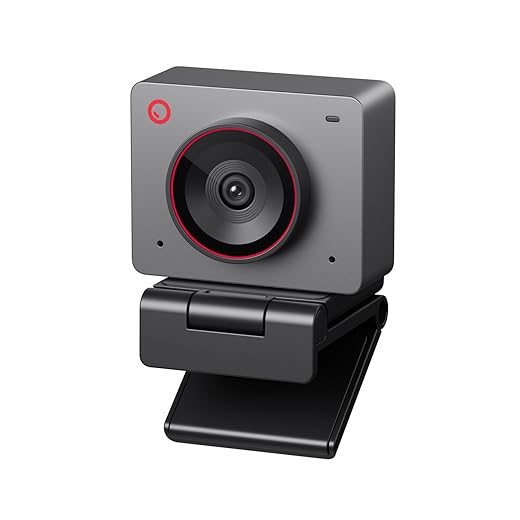
Prioritize connectivity, software, and ecosystem integration
A camera with great hardware and poor app support is a half-finished product. Platform matters.Check whether the camera is UVC-compliant or needs proprietary drivers. Prefer UVC for plug-and-play across macOS, Windows, and Linux; expect added friction if a vendor forces drivers.
Verify official macOS and Windows support. Test the camera in your primary apps—Teams, Zoom, and Slack—to confirm native feature parity.
Test OBS and virtual-camera compatibility. Try sending the webcam feed into OBS or Streamlabs and back into a meeting; some vendor apps block virtual cameras or break color/auto-exposure.
Watch for subscription traps. Avoid models that lock essential auto-framing or higher-resolution modes behind recurring fees.
Demand clear firmware and model-update policies. From a Verge-style perspective, a strong ecosystem—regular firmware, open drivers, and broad app support—reduces friction and extends a webcam’s useful life in a fast-moving market.

Think mechanical: design, mounts, and physical controls
A webcam’s hardware posture—how it sits on our monitor or tripod—affects image and tracking more than you’d expect.Inspect build quality and mounting options first. We want a camera that stays put and aligns with how we work.
Check these things on any candidate:
Try mounting the camera where you’ll use it and test framing—design choices change perceived value as much as specs.
Test performance, trade-offs, and final decision rules
How do we judge latency, tracking stability, and CPU overhead? Try these real-world tests (and avoid these traps).Run a battery of tests to see real-world behavior:
Weigh hard trade-offs:
Apply pragmatic rules we use:
Check shopping tactics:

Make the pick — balancing quality, tracking, and ecosystem
We pick a webcam with strong optics and sensor, reliable on-device AI framing for responsiveness and privacy, and software that fits our workflow—because that mix delivers everyday experience. Ready to decide?

Chris is the founder and lead editor of OptionCutter LLC, where he oversees in-depth buying guides, product reviews, and comparison content designed to help readers make informed purchasing decisions. His editorial approach centers on structured research, real-world use cases, performance benchmarks, and transparent evaluation criteria rather than surface-level summaries. Through OptionCutter’s blog content, he focuses on breaking down complex product categories into clear recommendations, practical advice, and decision frameworks that prioritize accuracy, usability, and long-term value for shoppers.









