


Why a Compact NAS Still Matters for Home Media
We want a small, quiet NAS so our media is central, streams smoothly, and stays private; one compact box can replace dozens of cloud subscriptions and cut buffering — a single 2.5‑inch unit can hold terabytes and hum almost silently.
What you'll need

Define the Streaming Experience You Actually Want
Do you want flawless 4K everywhere or a reliable library for the TV? Narrowing scope saves money and headaches.Map our real use cases before we shop. Write down whether we need single‑TV 1080p, multi‑room 4K, remote streaming, or mobile access — each choice sets different CPU, transcoding, RAM, and network needs.
Choose apps next: Plex and Jellyfin often transcode and demand CPU cycles; DLNA favors direct‑play and lighter hardware. Prioritize quiet, reliable playback and fast startup over headline specs — a responsive UI and consistent direct‑play will matter more than peak benchmark numbers during everyday viewing.
Pick the Right Form Factor and Drive Count
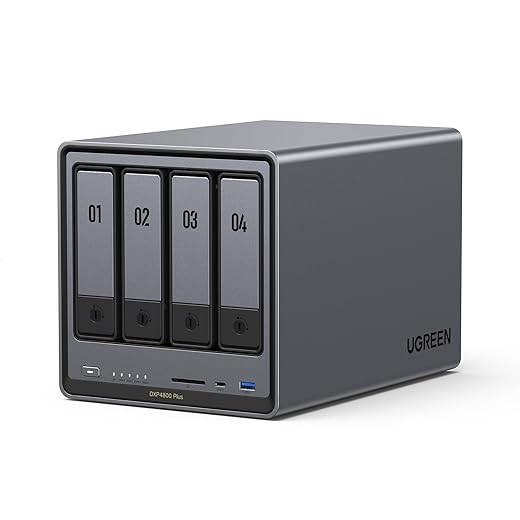
Tiny boxes can be surprisingly capable — but fewer bays mean trade-offs. Are we okay with external backups?Compare 1‑bay and 2‑bay designs: 1‑bay gives the smallest footprint and lowest power/noise, but leaves us vulnerable to drive failure and forces manual USB backups or external‑drive hacks.
Prefer 2‑bay units for a practical sweet spot: mirror drives (RAID1) give modest redundancy without a big chassis.
Use a 1‑bay only when we truly need the absolute smallest, quietest box and accept DIY backups or cloud copies.
Consider drive‑swap ergonomics: front tool‑less trays make living‑room maintenance painless, while internal‑only drives mean more fiddly work behind the AV rack.
Integrate form and finish with our media setup — slim matte chassis blends into shelves, while tiny fanless boxes suit bedside or compact living rooms.
Choose the Right SoC, RAM, and Transcoding Ability
Why a stronger chip changes the whole streaming story — and when it’s overkill.Compare ARM vs. Intel Celeron: ARM SoCs are power‑efficient and fine when our clients do direct‑play or we stream a single 1080p file. Choose Intel Celeron when we need reliable on‑the‑fly transcoding and better single‑thread performance.
Explain hardware transcoding: look for Intel Quick Sync support (exposed via VA‑API on Linux). Plex Pass can offload work to Quick Sync; that makes multi‑device 4K or HEVC transcoding practical. Avoid relying on weak SoC software transcodes if we expect many simultaneous streams.
Plan RAM: allocate 2 GB minimum, 4 GB recommended for smooth app response and caching. Upgrade to 8 GB if we run Docker, many apps, or frequent concurrent transcodes.
Network, Ports, and Real-World Throughput
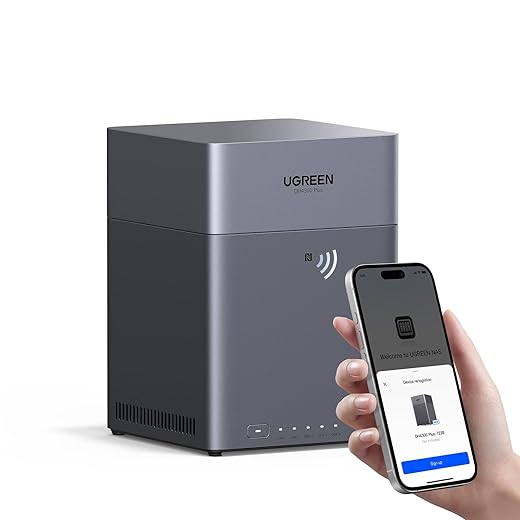
Gigabit is the baseline — but what about link aggregation, Wi‑Fi 6, and flaky home routers?Evaluate the NAS and router Ethernet options first: we look for 2.5GbE if we want headroom for multiple 4K streams, otherwise 1GbE will cap sustained throughput around 100–120 MB/s per device.
Test link aggregation realistically: we try a multi‑client file copy and SMB benchmarks, because LACP rarely helps a single stream — most home routers and clients use per‑flow hashing so one stream stays on one link. For example, two simultaneous 4K transcodes can saturate a single 1GbE link; 2.5GbE often fixes that without complex switch setups.
Run these practical checks:
Place the NAS close to the main router or on a wired switch; poor Wi‑Fi or cheap routers create real bottlenecks we can avoid.
Software, Ecosystem, and App Support
The OS makes or breaks the experience — do we want polished apps or raw flexibility?Compare the major NAS ecosystems by using their GUIs and apps — the software decides how fast you’ll set up and how little you’ll worry later.
Try these quick checks: app store polish, Plex/Jellyfin install path, mobile streaming app quality, and how updates/patches are delivered.
Check security features (2FA, HTTPS, automatic patches), remote options (cloud relay, VPN, Tailscale), and vendor commitment to updates — software integration usually trumps marginal hardware gains for smooth, low‑maintenance streaming.

Capacity Planning, Backups, and Practical Setup Tips
Storage math, backup strategy, and the one setup tweak that fixes most playback problems.Calculate required capacity: tally our current library (media files + thumbnails + metadata), estimate growth (example: 1–2 TB/year for a growing 4K collection), and add redundancy overhead (reserve one drive for RAID1/SHR or plan ~1.2–1.5× usable space for parity arrays).
Understand backups: don’t treat RAID as a backup. We prefer a 3‑2‑1 approach — two local copies plus one offsite. Use cloud sync (Backblaze B2, Google Drive via rclone) for irreplaceables and periodic external‑drive snapshots for fast restores.
Enable SMB tuning and set clear media folders (Movies, TV, Music) so discovery is reliable. Test transcoding with real 4K/HEVC files to verify CPU/GPU behavior and client playback.
Place the NAS near your router but hidden in the AV cabinet to keep it invisible and cables short.
Mitigate noise with rubber feet or a low‑RPM drive profile.
Schedule monthly health checks and file integrity scans.
Bringing it together
We clarified our use cases, balanced hardware and software, and planned capacity to build a compact, future-ready NAS for smooth streaming—now let’s build it, test it, and share our results.

Chris is the founder and lead editor of OptionCutter LLC, where he oversees in-depth buying guides, product reviews, and comparison content designed to help readers make informed purchasing decisions. His editorial approach centers on structured research, real-world use cases, performance benchmarks, and transparent evaluation criteria rather than surface-level summaries. Through OptionCutter’s blog content, he focuses on breaking down complex product categories into clear recommendations, practical advice, and decision frameworks that prioritize accuracy, usability, and long-term value for shoppers.









