


Menu

How to Choose a Smart Home Security Kit with Local Storage

Yogesh Kumar / Option Cutter
Picture of By Chris Powell
By Chris Powell

Pick the right kit — protect your home and your privacy

We guide choosing a smart home security kit with local storage that balances usability, reliability, and privacy; many cameras default to cloud-first designs, so we prioritize hardware, UX, and integrations that keep footage inside our home and under our control.

What you’ll need before we start

We need a smartphone; home Wi‑Fi (or PoE wiring plan); modest budget; basic DIY skills and tools; measurements of our layout; and a chosen ecosystem (Apple, Google, Amazon, or open‑source).

Best for Smart Homes
Ring Alarm 14-Piece Kit for Medium Homes
Best for Alexa-integrated DIY whole-home security
We appreciate how this 14-piece Ring kit combines simple DIY setup with deep Alexa integration and optional 24/7 professional monitoring, making it easy to secure a 2–4 bedroom home and expand over time. In a market where ecosystems matter, Ring’s app, voice control, and accessory library give us flexible, familiar smart‑home control without wrestling with complicated installers.
Amazon price updated April 4, 2026 1:21 pm
Prices and availability are accurate as of the last update but subject to change. I may earn a commission at no extra cost to you.

1

Define your threat model and use cases

Do we need 24/7 surveillance or a visible deterrent? Knowing this saves money and grief.

Clarify what we want to guard against—package theft, break‑ins, monitoring pets, or doorbell deliveries—and decide when coverage matters (always, only at night, or only when we’re away). Map risk by room and entry point and prioritize where cameras actually add value.

Priority areas: front door, garage, ground‑floor windows
Recording mode: continuous vs. event‑triggered
Retention target: 24–72 hours vs. multi‑week archives

Consider concrete examples: a city apartment needs high motion‑accuracy and short retention to save space, while a suburban home needs weatherproof outdoor cameras with wider fields of view for the driveway. Choose event triggers to minimize storage and false positives; choose continuous recording only where legal evidence outweighs cost.

This step cuts wasted features and subscription fees in the current market, where vendors push cloud plans as the default.
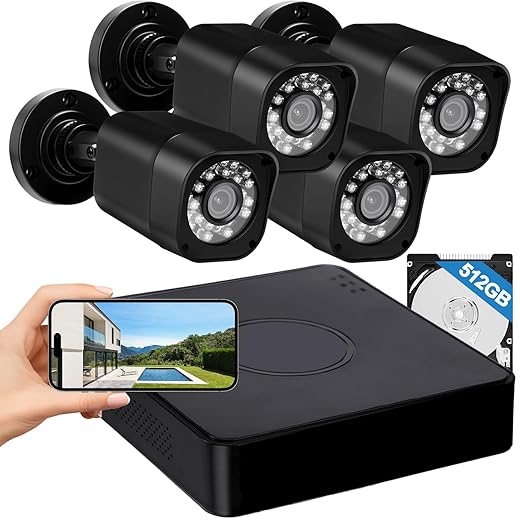
Best Value
AIWIXEN 4-Channel 1080P DVR with 512GB
Best for continuous local recording
We like that the AIWIXEN system ships with a preinstalled 512GB HDD for true 24/7 local recording and easy USB backup, which removes reliance on monthly cloud subscriptions. For users prioritizing durability and dependable wired footage—plus night vision and IP68 weatherproofing—this unit is a straightforward, cost-effective option compared with cloud-first competitors.
Amazon price updated April 4, 2026 1:21 pm
Prices and availability are accurate as of the last update but subject to change. I may earn a commission at no extra cost to you.

2

Pick the right local storage architecture

Local storage isn’t just privacy theater — it keeps us running when cloud services fail.

Compare options: on‑camera SD cards (simple, cheap, limited retention), an NVR/hub (polished UX, PoE support), a NAS (flexible, multi‑use, needs config), or hybrid cloud with local fallback. Each has tradeoffs for usability, cost, and privacy.

On‑camera SD: very simple, per‑camera limits.
NVR / hub: centralized UI, easier PoE and redundancy.
NAS: multi‑purpose, powerful but needs setup.
Hybrid: cloud convenience with local fallback.

Estimate capacity: multiply resolution × fps × hours × camera count; use vendor calculators and test clips. Example: 1080p@15fps often uses ~3–6 GB/day per camera (varies by codec).

Choose redundancy: RAID for drive failure, offsite backups for disasters, and enable disk encryption where possible.

Prefer open standards (ONVIF/RTSP) to avoid vendor lock‑in.

Decide local‑first to cut recurring cloud fees and survive outages or vendor shutdowns.

Editor's Choice
Hiseeu 16CH 4K NVR Kit with 3TB
Top choice for scalable 24/7 local recording
We value Hiseeu’s focus on high-resolution local storage and scalability: a 3TB drive, H.265+ compression, and AI human detection let us capture long continuous archives without ongoing fees. In a crowded market, that mix of 4K/5MP clarity, reliable wired power, and expandability to 16 channels means fewer compromises between image quality and storage cost.
Amazon price updated April 4, 2026 1:21 pm
Prices and availability are accurate as of the last update but subject to change. I may earn a commission at no extra cost to you.

3

Select cameras and sensors with the best UX and design fit

Does the device blend in or scream ‘camera’? Design and app experience matter more than specs on paper.

Choose cameras by testing real-world behavior, not megapixel counts. We look for wide field of view, strong dynamic range, and reliable low‑light imaging—those determine whether you actually see faces, license plates, or just blobs.

Prioritize these practical features:

Motion detection quality: adjustability, minimal false alarms, and per‑zone settings in the app.
Compression: H.265 saves space but check compatibility; fallback to H.264 if your NVR/NAS is older.
Mounting and form factor: pick visible units for deterrence or discrete models for aesthetics.
Power and audio: decide wired vs battery for uptime; enable two‑way audio only if you’ll use it.
Ecosystem compatibility: prefer HomeKit Secure Video, Google Home, or Home Assistant support for smoother local workflows.

Test the app: draw motion zones, trigger an alert with a walk‑by, and replay clips to judge day‑to‑day usability.

Best for HomeKit
Abode 8-Piece Smart Security Hub with HomeKit
Best for Apple HomeKit and smart home integration
We find Abode’s kit compelling because it’s one of the few DIY systems certified to work with Apple HomeKit while also supporting Z‑Wave and Zigbee, which makes it a true smart‑home hub rather than just an alarm. That interoperability matters for users who want to stitch security into a wider device ecosystem and keep the option of affordable professional monitoring.
Amazon price updated April 4, 2026 1:21 pm
Prices and availability are accurate as of the last update but subject to change. I may earn a commission at no extra cost to you.

4

Plan the network and power architecture

A strong network is the unsung hero — because even great cameras are useless on a flaky Wi‑Fi.

Map camera locations and note where Ethernet runs and power access will be needed; sketch cable routes so we can decide PoE, wired Ethernet, or Wi‑Fi per device.

Choose PoE for fixed cameras to combine power and data on one run—we prefer PoE for reliability and simpler installs; choose Wi‑Fi for flexible or temporary placements only when coverage is strong or you’ll use battery models.

Size uplink and switch bandwidth for simultaneous streams—estimate 4K at ~15–25 Mbps (H.264) or ~6–12 Mbps (H.265) per camera and multiply by worst‑case concurrent feeds.

Segment IoT onto a separate VLAN/SSID to limit blast radius and pick routers/managed switches that support VLANs and QoS, because many consumer routers lack those features.

Protect the NVR and router with a UPS and apply QoS rules to prioritize camera traffic for steady local recording.

Prefer PoE: fewer failure points, central power.
Use Wi‑Fi: easy install, needs good mesh coverage.
Create VLAN/SSID: contain compromises.
Set QoS & UPS: prioritize streams and avoid gaps.
Best for Solar
Solar-Powered 4MP Wireless PTZ Outdoor Camera Kit
Best for cable-free, color night vision coverage
We like this kit’s self-contained approach: solar power, 128GB local storage, and 360° PTZ control remove the need for trenching or subscription services while still delivering color night vision and AI human detection. For properties without easy power access or for installers who want quick, flexible placement, this is a practical alternative to wired systems and cloud‑locked cameras.
Amazon price updated April 4, 2026 1:21 pm
Prices and availability are accurate as of the last update but subject to change. I may earn a commission at no extra cost to you.

5

Evaluate integrations, software, and firmware policies

Open ecosystems usually beat closed silos — but only if vendors support reliable updates.

Test vendor software for local‑first features: enable RTSP/ONVIF, play streams in VLC, and confirm local playback without cloud relay. Try exporting a 30–60‑second clip to SD or USB and note how fast and usable the file is.

Check these specifics:

RTSP/ONVIF & local playback: confirm native streams and local timeline search.
Export & backups: verify easy, non‑proprietary export (MP4, MKV) and NVR/USB backups.
Integrations: test with Home Assistant, Alexa, or Google for automations and voice control.
Firmware cadence & security: read changelogs, confirm signed updates and a history of timely patches.
Alerts & features: measure push latency, test smart detections for false positives, and note which features require subscriptions.

Prioritize platforms that keep control and data exportable so we avoid endless fees.

Best for Integrations
EVERSECU 2K Dual-Band Indoor Wi‑Fi Camera Pack
Best for high-res indoor monitoring and RTSP
We appreciate the EVERSECU cameras for offering 2K detail plus dual‑band Wi‑Fi and ONVIF/RTSP support, which gives us flexibility to use them with third‑party NVRs and apps rather than being stuck in a single vendor ecosystem. For monitoring babies, pets, or elderly family members, the combination of clear video, local storage, and smart integration options makes these cameras a versatile, budget‑friendly pick.
Amazon price updated April 4, 2026 1:21 pm
Prices and availability are accurate as of the last update but subject to change. I may earn a commission at no extra cost to you.

6

Install, test, and set a maintenance routine

Install once, forget? Not quite — a little maintenance prevents big failures.

Create an installation checklist we actually use: camera placement (mount ~8–10 ft, tilt down 10–20°), lens angle to avoid glare, motion‑zone tuning to ignore streets/trees, and confirm each camera writes to local storage (NVR, SD, or NAS).

Run real‑world tests: perform daytime and dusk walk tests to verify detection and framing; run night tests to check IR bloom and exposure; simulate power loss and failover to UPS/SD to confirm recovery.

Set retention and backup policies: choose retention (eg, 14–30 days), schedule automated offsite copies for critical clips, and lock a firmware‑update cadence (weekly security checks, monthly feature reviews).

Document credentials and network settings; store encrypted backups and a paper copy in a safe. This pragmatic maintenance plan keeps our system reliable and avoids surprise subscription or hardware costs.

Reliable Choice
Hiseeu 4-Camera 3MP NVR System with 1TB
Top pick for plug-in reliability and long storage
We prefer this Hiseeu bundle for homeowners who want plug‑in reliability, a preinstalled 1TB drive for weeks of continuous recording, and room to expand to 16 channels without monthly fees. It strikes a good balance between ease of use and advanced features like AI human detection and robust weatherproofing, making it a pragmatic choice against cloud-only rivals.
Amazon price updated April 4, 2026 1:21 pm
Prices and availability are accurate as of the last update but subject to change. I may earn a commission at no extra cost to you.

Tradeoffs, not perfection

We choose a kit aligned with our threat model, local control, and ecosystem fit. Reliability—network, power, storage—and open software beat bells and whistles. Try a setup, iterate based on UX, then share your results so others can learn and improve.

Chris is the founder and lead editor of OptionCutter LLC, where he oversees in-depth buying guides, product reviews, and comparison content designed to help readers make informed purchasing decisions. His editorial approach centers on structured research, real-world use cases, performance benchmarks, and transparent evaluation criteria rather than surface-level summaries. Through OptionCutter’s blog content, he focuses on breaking down complex product categories into clear recommendations, practical advice, and decision frameworks that prioritize accuracy, usability, and long-term value for shoppers.


Newest Posts



