Polished and pocketable — a practical foldable, but not without trade-offs.
Foldables promised pocketable tablet power, but most have felt like prototypes you had to baby. The Pixel Fold — here tested as the 256GB renewed model (about $349) — is the first we’ve used that genuinely balances pocketability with a useful, large interior display and a camera system that aims higher than most foldables.
We care about how a device fits into our daily workflow, not just specs, and the Pixel Fold delivers there: bright, color-accurate 120Hz OLEDs, a well-engineered hinge, and Tensor G2 features that make multitasking feel natural. That matters because the foldable market is shifting from novelty to real-world utility; still, inner-screen fragility, repair costs, and battery life are meaningful trade-offs for anyone considering a long-term buy.
Google Pixel Fold Unlocked 256GB Obsidian

We think this is the most polished consumer foldable right now — it balances pocketability with a genuinely useful large interior display and a camera system that aims higher than most foldables. It’s not perfect: repair costs and inner-screen durability remain trade-offs, and heavy users may find battery endurance wanting.
Our take on the Pixel Fold (Renewed)
We spent time with the renewed Google Pixel Fold to understand what Google was trying to solve with its first in-house foldable. The company set out to make a phone that folds into a pocketable tablet without turning into a hulking device. In our testing we focused on everyday ergonomics, how the displays are integrated into typical workflows, camera performance in real-world lighting, and whether the Tensor G2 delivers meaningful benefits beyond benchmarks.
Design and build: a compact, considered foldable
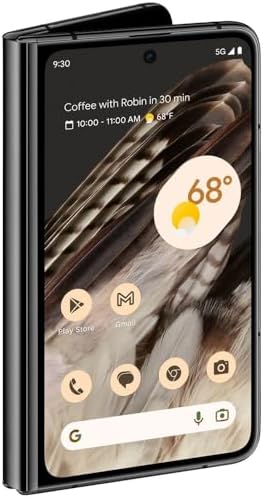
Google’s approach is measured: the Fold prefers width over height compared with some rival designs, which makes it feel less top-heavy and—critically—better to hold in one hand when open. The hinge is stiff in a reassuring way; opening and closing it feels deliberate rather than fragile. The materials, finish, and the Obsidian color give a premium impression you expect from flagship hardware, and despite its weight it never feels unbalanced.
These choices matter because they affect daily use more than raw specs: we found ourselves using the inner display for longer reading sessions and for two-pane productivity without feeling like we were carrying a tablet.

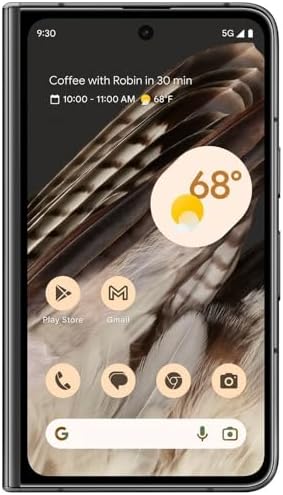
Displays: bright, smooth, and purposeful
Both the outer cover display and the interior 7.6″ OLED are high-caliber panels: 120Hz refresh, HDR support, and high peak brightness for outdoor visibility. The interior display gives apps room to breathe and converts common phone applications into something closer to a mini desktop for split-screen workflows. Color is accurate out of the box and Google’s software scaling helps many apps adapt to the larger canvas.
The only downside we repeatedly noticed is surface softness on the inner panel; it’s designed to resist shattering but can be softer and more prone to micro-scratches than regular glass. That means a good screen protector and a careful case strategy are worth the investment.


Performance and battery: practical, not headline-grabbing
Tensor G2 combined with 12GB of RAM handles everyday tasks, gaming, and multitasking capably. The Fold doesn’t chase raw CPU benchmarks so much as on-device AI features—image processing, speech recognition, and Assistant integration are where Google leans into the silicon. For users who value responsive UI and camera smarts, this is a net positive.
Battery life is good for normal mixed use: a typical full day with some streaming, messaging, and camera use will get you through. Heavy continuous use on the interior display (gaming or sustained video playback) reduces that headroom noticeably.
This balance matters: the Fold prioritizes experience and convenience (bigger screen, advanced cameras, software flexibility) over squeezing out record-breaking battery numbers.
Cameras: versatile and confidence-inspiring
Google’s camera tuning remains a highlight. The main 48MP sensor gives dependable results across lighting conditions with strong dynamic range and color balance. The 10.8MP telephoto offers real optical reach, and the ultrawide fills out everyday framing needs. Computational photography is a major part of the package—Night Sight, HDR processing, and subject detection are robust and consistent.
We appreciated the camera pipeline’s restraint: images generally look natural, and Google’s post-processing avoids oversaturation that some competitors favor.
Software, multitasking, and ecosystem fit
Software is where the Pixel Fold differentiates itself. Android’s multitasking features are more than cosmetic on a 7.6″ screen: split-screen, resizable windows, and app continuity (open on the cover, continue on the inner display) are polished. Google’s software-first approach — including exclusive Pixel features and faster OS updates — is a strong selling point for anyone invested in the Android ecosystem.
| Area | Why it matters |
|---|---|
| Multitasking | Real productivity gains on the 7.6″ canvas |
| Updates | Longer and faster OS/security updates from Google |
| AI features | On-device enhancements for photos and assistant tasks |
The Pixel Fold is particularly compelling for buyers who already use Gmail, Drive, Photos, and Google Workspace—those services scale well to the larger display and feel integrated.

Repairability and long-term ownership
Foldables still carry a repair-cost tax. Screen replacement and hinge repairs are more complex and pricier than traditional phones. Buying renewed can be an excellent value, but it introduces variability: battery health, prior repairs, and cosmetic condition all matter. If you plan to keep a Fold for the long term, factor in potential repair costs and consider a protection plan.
Who should consider the Pixel Fold?
If you mostly need a basic smartphone with the best possible battery life or plan to use your device for extreme gaming sessions, there are better single-screen alternatives. But for most people who want a versatile daily driver with a unique form factor, the Fold hits a sweet spot.
Final thoughts
We see the Pixel Fold as a thoughtful first-party entry into the foldable market: it’s balanced, polished in the details that matter for daily use, and clearly targeted at users who want the utility of a tablet without losing pocketability. The renewed pricing can make it a more accessible option, but buyer diligence on condition and warranty is essential. For those who prioritize camera quality, multitasking, and a compact design, this is one of the best foldables you can buy today.
FAQ
A renewed unit can offer meaningful savings and the same core experience if it’s in excellent condition. We recommend checking battery health, asking for photos of the actual device, and confirming any warranty. Repair history and the quality of refurbishment matter more with foldables than with standard phones.
The inner panel uses a foldable substrate designed to resist shattering but is softer than typical Gorilla Glass and more susceptible to micro-scratches. We advise installing a reputable inner-screen protector and using a well-fitting case to minimize edge impacts.
Yes. The device supports a Nano-SIM and eSIM, and being unlocked it works with major GSM and CDMA carriers. That makes it flexible for domestic carriers and international travel.
Google has optimized Android’s multitasking for the Fold’s proportions: app continuity, split-screen, and resizable windows feel integrated rather than tacked on. In practice, the combination of screen size and software polish gives it a productivity edge for email, browsing, and two-app workflows.
Moderate daily use typically gets you through a day. Heavy use—gaming, extended streaming, or long camera sessions on the inner display—will shorten that. We suggest carrying a charger or power bank for intensive days.
Ask about cosmetic grading, the battery health percentage, charge cycle count if available, return policy, and any refurbishment warranty. Verify the seller’s ratings and look for photos of the actual unit rather than stock images.

Chris is the founder and lead editor of OptionCutter LLC, where he oversees in-depth buying guides, product reviews, and comparison content designed to help readers make informed purchasing decisions. His editorial approach centers on structured research, real-world use cases, performance benchmarks, and transparent evaluation criteria rather than surface-level summaries. Through OptionCutter’s blog content, he focuses on breaking down complex product categories into clear recommendations, practical advice, and decision frameworks that prioritize accuracy, usability, and long-term value for shoppers.