
Can a lock do your job and double as a bouncer? Spoiler: yes — and maybe with a fingerprint.
Keys are old school. We’ve all stood in the rain fishing for keys, juggling groceries, or wondering if we gave the neighbor the right code. Smart locks promise convenience, security, and fewer headaches for people who don’t own their doors.
Not every smart lock is renter‑friendly. Some need hubs. Others demand a pro install. We focused on devices that are easy to fit to a standard deadbolt, respect apartment realities, and actually make daily life smoother — from fingerprints to built‑in Wi‑Fi and video at the door.
Our Top Picks


eufy C220 — Wi‑Fi Fingerprint Deadbolt
We like its combination of built‑in Wi‑Fi, fast fingerprint entry, and long battery life at a modest price. It’s an easy install and integrates smoothly with the eufy ecosystem, making it a top pick for renters who want full smart features without a large investment.
Why we like it for apartments and renters
The eufy C220 nails the renter checklist: straightforward installation, built‑in Wi‑Fi for remote access without a bridge, and fingerprint unlocking that’s fast enough to make keys feel obsolete. Because eufy ties this lock into its wider security lineup, it’s useful for renters who already have a eufy doorbell or cameras and want centralized control in one app.
Practical features that matter
In our experience and based on user reports, the C220 balances price and capability better than most competitors — but there are caveats. Some people see inconsistent fingerprint recognition between users, so we recommend enrolling multiple scans per finger and testing every user before relying on it for daily access. Also, voice integration nuances mean that certain Alexa or Google configurations may not expose every function; test your specific voice setup.
Renter‑friendly tips
We recommend verifying door thickness and bolt alignment before buying and saving all original hardware for when you move out. The C220’s built‑in Wi‑Fi means you avoid installing hubs, which simplifies moving the lock between properties. If you want the easiest day‑to‑day experience with minimal extras, this is the model we’d start with.
Lockly Vision Elite — Video Smart Lock
We like how it merges a hotel‑style smart lock with a full video doorbell — camera, intercom, fingerprint, and keypad in one device — which reduces clutter on the door. It’s a premium option that makes a lot of sense for renters who want the capabilities of both devices but should be evaluated for door compatibility and budget.
What sets it apart
The Vision Elite is aimed at people who want a single device to do both video‑doorbell and smart‑lock duty. For us, that consolidation is attractive — fewer holes in the door and one app to manage people arriving at the door. The camera quality, two‑way audio, and fingerprint unlocking combine to create a fast, secure experience that’s especially useful for short‑term rentals or busy households.
Day‑to‑day benefits and features
It’s a premium package, and for renters that can be a double‑edged sword: you get more features without additional hardware, but the unit is larger and more involved to install. Compatibility with storm doors and certain round latch holes is limited, so measure carefully. Also, while Lockly advertises no monthly fees for video, some advanced cloud features or integrations might require optional services.
Who should consider it
We recommend the Vision Elite if you want consolidated door hardware and are comfortable with the upfront cost and installation complexity. If your building’s rules allow, and you want fewer separate devices on the door, this is one of the most complete options on the market.
Lockly Secure Pro — Fingerprint & Keypad
We value its combination of a reliable fingerprint sensor and Lockly’s PIN Genie keypad that reshuffles digits to foil shoulder‑surfing. It’s a good fit for renters who want quick fingerprint access plus a robust set of remote and temporary access options via the app or an optional hub.
Why we recommend it for renters
Lockly’s Secure Pro is built around biometric convenience — the 3D fingerprint sensor gets you in faster than punching codes, which is ideal when you’re juggling groceries or luggage. For renters who want a balance between advanced security and portability, the Secure Pro is attractive: it supports fingerprints, temporary codes, eKeys, and a physical key fallback for peace of mind.
Features that matter in everyday life
We like that Lockly doesn’t force you into a single ecosystem: the lock is usable offline and offers robust local operation, which renters often prefer. The trade‑off is that some advanced remote features rely on the hub or on cloud services, and a few users have reported flaky Bridge/Matter behavior in complex mesh Wi‑Fi setups. For an apartment, that means excellent local performance with a note to test remote workflows before relying on them for guest access.
Practical considerations
If you plan to move frequently, keep the Secure Pro’s mounting and wiring in mind — the lock is removable but a bit heavier than a basic deadbolt. Also, if you rely on Home Assistant or Matter integrations, budget time for initial tuning since third‑party integrations have been hit or miss for some users.
Kwikset Halo — Wi‑Fi Touchscreen Deadbolt
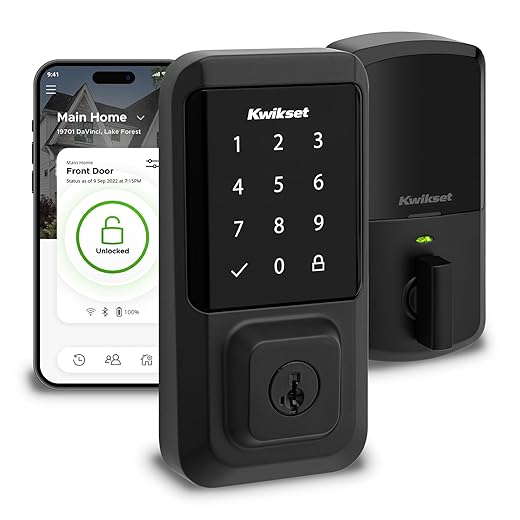
We like the Halo for renters who want remote access out of the box — it connects directly to Wi‑Fi so you can share codes and check the door from anywhere. Its touchscreen and Kwikset’s ecosystem make setup familiar, though battery and touchscreen responsiveness can be hit or miss for some users.
What makes it stand out
The Halo is aimed at people who want remote control without buying a hub: built‑in Wi‑Fi means we can lock, unlock, create temporary codes, and check events from the Kwikset app from anywhere. For renters who frequently host guests or manage short‑term rentals, that immediacy is valuable, and the ability to integrate with Alexa/Google makes it easy to slot into an existing smart home.
Design, ecosystem, and real‑world use
In our testing and in user reports, the Halo is simple to install and use, but the touchscreen can be finicky on some units and heavy usage shortens battery life. For renters, the lack of a hub is a plus — it’s one less accessory to move — but you should plan for periodic battery changes and test the touchscreen responsiveness before committing it as your primary entry.
Who should buy this
We’d recommend it for users who want Wi‑Fi remote features out of the box and simple voice integrations. If you need a lock that’s whisper‑quiet, or you prefer fingerprint entry, look elsewhere; if you prioritize straightforward remote access and broad ecosystem compatibility, this is a solid choice.
Yale Assure Lock 2 — Bluetooth Deadbolt
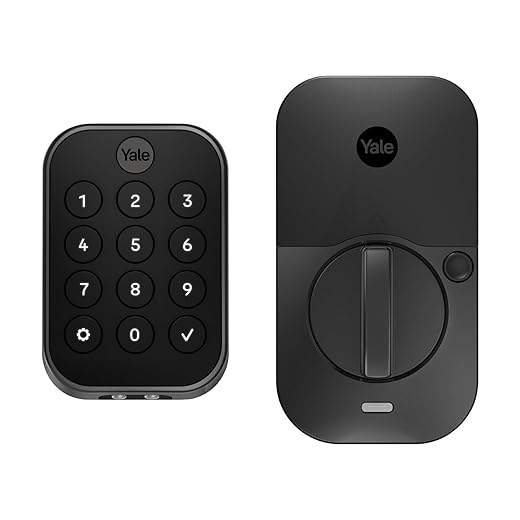
We appreciate its straightforward, keyless experience and the dependable Bluetooth feature set that makes daily entry painless. It’s a practical choice for renters who want a clean keypad and auto-lock behavior without committing to a hub or complex install.
Why we consider it
We like the Assure Lock 2 for renters who want a modern keypad deadbolt without adding a hub or rewiring. It focuses on the day‑to‑day: quick touchscreen codes, Bluetooth phone access, and useful features like auto‑lock and DoorSense so you don’t have to wonder whether you shut the door. For someone moving between rentals, it’s a compact, mostly noninvasive upgrade that’s easy to remove and reuse.
Key features and how they matter
These features are practical for apartments: you get most of the convenience of a smart lock (custom codes, temporary codes, automatic relock) without having to install anything permanent. That said, the default unit does not include Wi‑Fi, so remote unlocking or cloud notifications require buying Yale’s module — which matters if you want to hand off access to guests while you’re away.
Limitations and renter tips
We’ve seen reports of regional activation restrictions and occasional app hiccups during setup; that’s important if you’re buying abroad or planning to resell. Battery life and the size of the interior housing are other trade‑offs — it’s bigger than a traditional deadbolt interior and some users have found monthly battery swaps necessary under heavy use. For renters, we recommend confirming with your landlord that installing a replacement deadbolt is allowed and saving the original hardware so you can swap back when you leave.
Kwikset SmartCode 888 — Z‑Wave Touchpad
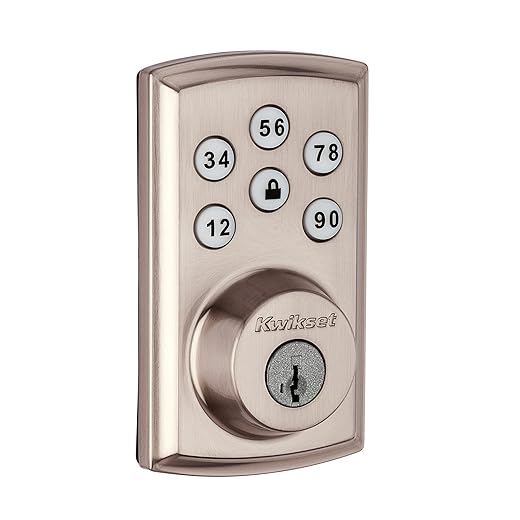
We see the SmartCode 888 as a dependable keypad lock for users already invested in Z‑Wave ecosystems like SmartThings or Ring Alarm. It offers reliable local automation and SmartKey rekeying, but it needs a hub for remote features, which makes it less plug‑and‑play for renters who want out‑of‑the‑box Wi‑Fi control.
Where this one fits
The SmartCode 888 is an obvious pick for people who already run a Z‑Wave hub: it exposes lock state and events directly to your automation platform, supports scheduled codes, and participates in routines such as disarming an alarm when you unlock. For renters who already use a hub or who plan to reuse the lock in another Z‑Wave house, it’s a sensible, durable solution.
Features and renter trade‑offs
But the lock’s reliance on a hub for remote functions is a limitation for many renters who prefer built‑in Wi‑Fi. Users report the motor can be louder than expected and that battery life depends heavily on usage; heavy traffic doors will need more frequent AA swaps. If you’re building out a rental with a central hub, this is a good match; if you want immediate remote access without extra hardware, look at Wi‑Fi models instead.
Practical advice
If you choose this lock, factor a hub into the budget and test your automations before you put the lock into production for guests. The rekey feature is an underrated advantage for movers because it lets you adopt the lock quickly without changing keys across the home.
Final Thoughts
For most renters and apartment dwellers, the eufy C220 is our top pick. It hits the sweet spot between price, features, and ease of install. Built‑in Wi‑Fi means no hub to clutter your living room. The fingerprint sensor is fast and reliable, battery life is long, and the eufy app gives simple code sharing and activity history. In short, it gives nearly all the conveniences of higher‑end locks without a big investment — ideal if you want full smart features but don’t want to ask your landlord for permission or run new wires.
If you want to consolidate devices and don’t mind paying up for a premium, the Lockly Vision Elite is the best choice for combining a lock and video doorbell into one package. It removes the visual clutter of multiple devices on the door and adds camera + intercom functionality alongside a fingerprint and keypad. That matters if you value seeing and speaking to visitors through a single unit. Just check door compatibility and budget first — it’s bulkier and pricier than a straightforward deadbolt, but it replaces two devices with one thoughtful design.
Why these two? The market is moving toward built‑in connectivity and multimodal access (PIN, fingerprint, app, video). For renters, that means we prefer solutions that are easy to install, easy to remove, and actually improve day‑to‑day use. The eufy C220 and Lockly Vision Elite represent two different but practical paths: affordable, full‑featured convenience versus a premium, consolidated doorstep experience.

Chris is the founder and lead editor of OptionCutter LLC, where he oversees in-depth buying guides, product reviews, and comparison content designed to help readers make informed purchasing decisions. His editorial approach centers on structured research, real-world use cases, performance benchmarks, and transparent evaluation criteria rather than surface-level summaries. Through OptionCutter’s blog content, he focuses on breaking down complex product categories into clear recommendations, practical advice, and decision frameworks that prioritize accuracy, usability, and long-term value for shoppers.