
Binge, sketch, multitask — which tablet can replace both your couch and your laptop?
Not all tablets are made equal. One might be a color-accurate canvas for a designer, another a smooth, fast screen for late-night gaming and streaming. We’ve found that the differences matter more than ever for people who want a single device to handle both media and real work.
We tested large OLEDs, high-refresh flagships, and solid midrange options to see how they feel as daily drivers. We focused on real-world things: screen quality for streaming, pen and keyboard use for productivity, battery life, and how well each tablet fits into its wider ecosystem.
Top Picks for Android Tablets





Galaxy Tab S9 Ultra 14.6-inch Pro
A massive, color-accurate OLED and low-latency pen input make this the most capable Android tablet for art, editing, and split-screen productivity. We found its performance and software polish to be class-leading, though the large format isn't for everyone.
Design and display
We think the Ultra is the statement piece of the Android tablet world: a 14.6-inch Super AMOLED that delivers exceptional contrast, deep blacks, and vivid colors that make streaming and creative work compelling. The large canvas is ideal for split-view productivity or laying out an artboard, and the 120Hz refresh rate keeps motion buttery smooth whether you're scrolling through timelines or sketching with the pen.
Performance and ecosystem
Under the hood the octa-core Snapdragon-based platform gives the device desktop-class responsiveness for multitasking, video editing, and demanding apps. We appreciated how Samsung leans into DeX and multi-window workflows — it's a tablet that can genuinely sit in for short laptop sessions when paired with a keyboard.
Battery, daily use, and trade-offs
Battery life is good in typical streaming and browsing scenarios, but sustained creative workloads (drawing at full brightness, long video exports) shorten endurance. The large screen and premium components are why this tablet skews toward pros and hobbyists who prioritize display and input over portability. In short, if you want the biggest, most capable Android canvas and are comfortable with its size, this is the best option we've used; if you need lighter day-to-day portability, consider smaller alternatives.
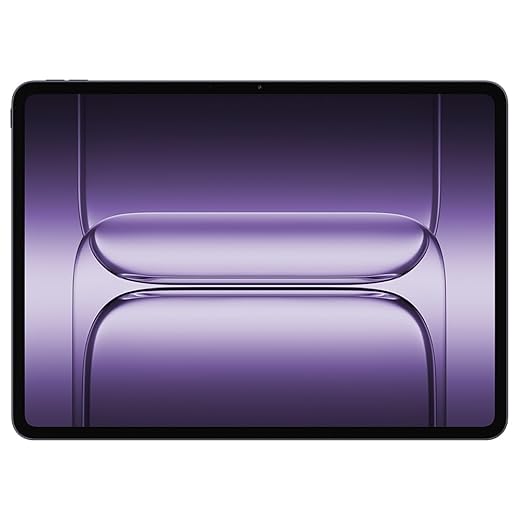
OnePlus Pad 3 13.2-inch Flagship
With a 3.4K 144Hz display, Snapdragon 8 Elite-class silicon, and a massive battery with 80W charging, this tablet targets users who want flagship speed and smoothness. We found it excellent for gaming, streaming, and heavy multitasking while remaining surprisingly slim.
Where it pushes the envelope
We see the OnePlus Pad 3 as a statement that Android tablets can match (and sometimes exceed) flagship phone hardware: a high-refresh, high-resolution panel paired with top-tier silicon and a huge battery. That combination makes the device feel instantaneous in daily use and reassuringly capable under load.
Performance and endurance
The Snapdragon 8 Elite-class SoC and up to 12GB of RAM make multitasking, emulation, and high-frame-rate gaming smooth and consistent. Meanwhile, the 12,140mAh battery plus 80W SUPERVOOC charging reduces range anxiety — long sessions are feasible and quick top-ups are practical.
Final assessment
We think this tablet is for power users who value display fluidity, raw performance, and fast charging in one package. It competes strongly against other premium Android slates and offers particular advantages for creative professionals, gamers, and anyone who wants a future-proofed, high-refresh tablet experience. The trade-offs are size and price — if you need extreme portability or on-the-cheap value, look elsewhere — but as a flagship Android slab, it’s among the best we’ve tested.
Galaxy Tab S8 Ultra 14.6-inch Workhorse
The S8 Ultra still holds up as a productivity-first tablet thanks to its expansive display and capable internals. We found it excellent for multitasking, creative work, and media consumption, though its size and age mean newer models outperform it in efficiency.
Why the Ultra still matters
We think the S8 Ultra is an important option if you want a laptop-like slate without paying flagship new-release prices. Its screen real estate is the core selling point: it changes how you use Android tablets by making multi-app workflows natural and comfortable.
Performance and daily impressions
Although it’s a 2022 design, the tablet’s octa-core Qualcomm hardware is still capable for streaming, web work, and creative apps. The sizeable battery and good speakers make it one of the better tablets for long video sessions and editing on the go. Refurbished units can be especially compelling if you want premium features at a discount.
Considerations before buying
Size is the trade-off: the Ultra is close to a small laptop in dimensions, which is great for a desk but less comfortable on planes or in bed. If portability is critical, the smaller S8+ or S9 FE+ variants might be better. For users who prioritize screen and multitasking above all, the Ultra remains a top pick.
Google Pixel Tablet 11-inch Hazel
The Pixel Tablet blends clean Android with Google AI features and solid hardware, making it a strong home-first tablet that doubles as a smart display. We liked its seamless integration with Pixel phones and the emphasis on AI-driven productivity tools.
A Google-first tablet for the home
We view the Pixel Tablet as Google’s attempt to create a seamless house-hold hub that’s also a capable tablet. The device plays nicely with Google services and Pixel phones, and its software includes AI tools that genuinely help with everyday tasks — from drafting notes to editing photos.
Performance and daily use
The Tensor G2-based platform is responsive for browsing, streaming, and multitasking on an 11-inch screen. Video calling benefits from the camera’s tracking and lighting adjustments, and the tablet feels especially at home in kitchens and living rooms where it can double as a smart display.
Considerations and why it matters
If your digital life is already tied to Google — Pixel phone, Nest devices, Google Photos — the tablet’s integrations translate to real convenience. However, some buyers ran into post-sale support issues in isolated cases; we advise checking warranty options at purchase. Overall, it’s our pick for users who want a smart, AI-capable Android tablet that feels like part of the Google ecosystem.
Galaxy Tab S9 FE+ 12.4-inch Performer
The FE+ hits a sweet spot for users who want a large, comfortable screen, long battery life, and an included S Pen without flagship pricing. We found it reliable for streaming, classroom work, and light creative tasks.
Where it sits in the lineup
We see the Tab S9 FE+ as a pragmatic alternative to Samsung's flagships: it keeps the key daily experiences — a big, sharp display, a responsive stylus, and smooth software — while dialing back some premium bits to hit a much friendlier price. For students, commuters, and anyone who wants an all-day tablet for media and notes, it’s an easy recommendation.
Real-world performance
Powered by a mid-to-upper-tier Exynos/processor configuration and paired with 8GB of RAM in many SKUs, the tablet handles multitasking and streaming without drama. The 12.4-inch WQXGA display is bright and detailed enough for shows and productivity, and the long 10,090mAh battery keeps us going through heavy days.
Why the compromises matter
The FE+ isn’t a device for photo professionals who need AMOLED contrast or for gamers chasing maximum frame rates, but that’s the point: it gives most people what matters (pen input, battery life, useful display area) without the flagship markup. For our use, that balance makes it one of the best value large tablets on Android.
Galaxy Tab S8+ 12.4-inch AMOLED Performer
The S8+ blends an excellent AMOLED display, fast Snapdragon silicon, and an included S Pen to deliver a well-rounded tablet. We liked it for everyday multimedia, note-taking, and moderate creative work.
A mature, reliable choice
We consider the S8+ a mature entry in Samsung’s lineup: it hits the core expectations for a modern tablet — color-accurate AMOLED, snappy chipset, and reliable stylus input. That combination makes it flexible enough for both entertainment and productivity.
Where it excels
The display and S Pen pairing is what stands out. Watching HDR content looks superb, and the pen’s low latency helps for annotating documents or sketching rough ideas. The Snapdragon chipset provides positive day-to-day responsiveness and smooth media playback.
Limitations and buyer tips
Because many S8+ units you’ll find are renewed, be mindful of software versions and included accessories. If you’re buying refurbished, check for official chargers and an original S Pen for the best experience. Otherwise, it remains one of the most versatile mid-sized Android tablets.
Galaxy Tab S9 FE+ 12.4-inch (128GB)
This iteration of the FE+ is a dependable, no-surprises tablet that covers the bases: good screen real estate, S Pen support, and long battery life. We found it especially useful for students and families who want a large device at a modest cost.
A straightforward, practical tablet
We think this international-version FE+ will appeal to anyone who needs a straightforward tablet for streaming, light productivity, and video calls. The combination of a large screen and a responsive S Pen makes it an easy substitute for paper notebooks during lectures or meetings.
Software and ecosystem
Running Samsung’s One UI on Android, the tablet benefits from feature parity with the rest of Samsung’s ecosystem: seamless note syncing, Samsung Kids modes, and DeX-like productivity features that make multi-window use more natural. For users already in Samsung’s world, integration adds measurable convenience.
Practical trade-offs
If you’re editing high-bitrate video or pushing many heavy apps simultaneously, you’ll notice the limits; for everyday tasks — reading, streaming, document editing, and light drawing — the experience is smooth. We’d recommend this model to buyers prioritizing value and functionality over absolute speed.
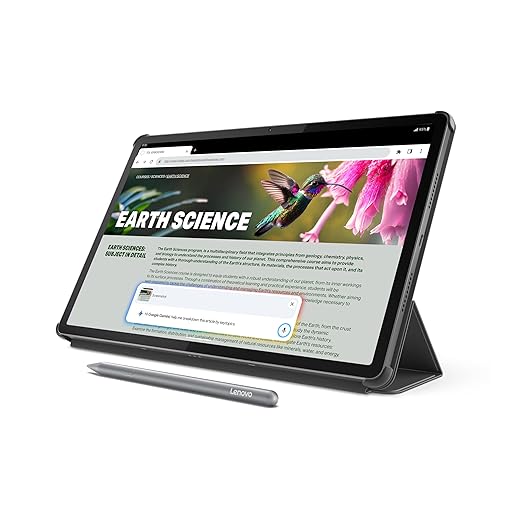
Lenovo Idea Tab Pro 12.7-inch Student
A bright 3K display, strong Dimensity silicon, and Google Gemini integration make this an attractive tablet for study and streaming. We liked the included pen and the tablet’s long battery life for campus days.
Designed for campus life and media consumption
We think Lenovo aimed the Idea Tab Pro at students and creators who want generous screen space without flagship prices. The 3K panel and four JBL speakers give media a satisfying polish, while the Tab Pen Plus adds utility for note-taking and on-the-fly annotations.
Performance, AI, and practicalities
The Dimensity 8300 chipset delivers snappy app performance and gaming capability that outpaces many budget alternatives. Lenovo’s inclusion of Google Gemini and Circle-to-Search features is especially useful for study workflows: highlight a passage and get instant context or translation.
What to watch for
We recommend using the Lenovo 65W charger for optimal fast-charge behavior since some non-Lenovo chargers don’t trigger the fastest charging mode. Also, Lenovo’s update cadence isn’t as long as some premium rivals; if multi-year OS support matters, factor that into your decision. Still, for price-to-performance and included accessories, it’s a compelling student tablet.
Galaxy Tab S7 FE 12.4-inch Affordable Tablet
The S7 FE is a capable large-screen device with a pleasant display and an included S Pen that makes note-taking simple. We found it a dependable all-rounder for reading, streaming, and casual productivity, though it shows its age under heavy workloads.
Who it's for
We recommend the S7 FE to students, light creatives, and buyers who want a large, pen-capable tablet without spending on newer flagships. It’s an approachable device for reading, video calls, and class notes, and the S Pen adds real value for handwriting workflows.
Practical usage notes
The tablet’s Qualcomm SM7225-based platform is adequate for everyday apps and streaming, though you’ll notice limits with demanding games or large multi-window editing tasks. The set of included accessories varies in refurbished listings, so check what’s included before you buy.
Final thoughts
If you want a big screen, reliable stylus support, and long battery life on a budget, the S7 FE still makes sense. For users who demand the highest performance or the latest software longevity, newer models are worth considering instead.
Galaxy Tab A8 10.5-inch Family Tablet
The Tab A8 is a sensible, inexpensive option for streaming, light browsing, and kids’ apps. We found it adequate for basic tasks but limited by modest RAM and storage in more intensive scenarios.
What it delivers
We think the Tab A8 is built around affordability and family-friendly features. Its 10.5-inch LCD and quad speakers provide a good watch-and-listen experience for shows and video calls, and Samsung Kids and parental controls are practical extras for households.
Real-world behavior
For everyday browsing, streaming, and kid-focused apps, the tablet performs adequately. The lower RAM/storage and older Android build mean it’s not a future-proof device for power users, and buyers should be careful to confirm LTE vs Wi‑Fi configuration in listings.
Who should buy it
If you want a secondary tablet for media, education, or light productivity and you’re on a tight budget, the A8 is a reasonable pick. If you anticipate heavier multitasking, gaming, or longevity, allocate funds toward a midrange or premium model instead.
Final Thoughts
In short: choose the S9 Ultra for maximum creative and productivity capability; choose the OnePlus Pad 3 if you prize smooth performance, high refresh streaming, and long battery life. If you want a third option for smart-home integration and a more casual family experience, the Pixel Tablet is the best Google-first pick, but it doesn’t replace the Ultra for pro work or the Pad 3 for raw speed.

Chris is the founder and lead editor of OptionCutter LLC, where he oversees in-depth buying guides, product reviews, and comparison content designed to help readers make informed purchasing decisions. His editorial approach centers on structured research, real-world use cases, performance benchmarks, and transparent evaluation criteria rather than surface-level summaries. Through OptionCutter’s blog content, he focuses on breaking down complex product categories into clear recommendations, practical advice, and decision frameworks that prioritize accuracy, usability, and long-term value for shoppers.