



Why a Portable Power Station Should Be Your Next Home Backup
We’ve watched portable power stations evolve from camping toys into serious home‑backup tools, and we want to help you choose one that fits your life, balances performance with ease, and actually keeps critical devices running when the grid fails reliably.
What you'll need
We’ll need
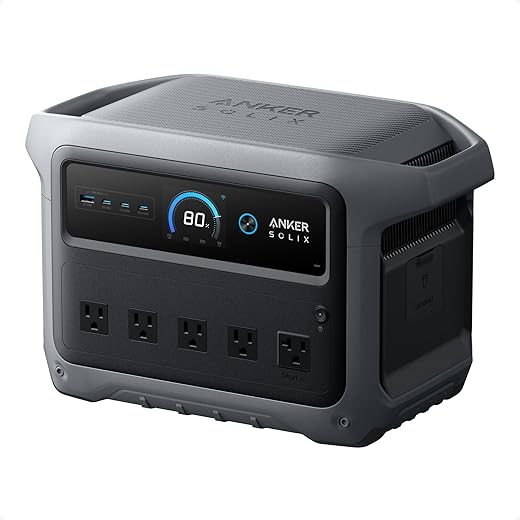
Step 1: Calculate Real-World Power Needs
How much capacity do we actually need — and which devices should we protect first?Map critical loads: refrigeration, medical devices, communications, lighting, and any essential cooking or heating gear. List each device, note its running watts, a realistic hours per day, then multiply to get watt‑hours (Wh). Add known startup surges for compressors/pumps.
For example
Decide whether you need a few hours, a full day, or multi‑day supply — that total Wh sets minimum battery size, while the largest surge dictates inverter capacity. We avoid guesswork because oversizing wastes portability and budget; undersizing leaves lifesaving gear silent.

Step 2: Choose Capacity and Output That Matches Your Lifelines
Want days off the grid or just enough to limp through a blackout? Pick intentionally.Match our Wh target to usable capacity: manufacturers quote nominal Wh, but battery usable Wh = nominal × allowable depth‑of‑discharge (DoD). Prioritize inverter ratings: continuous power must cover steady loads, peak/surge must cover compressor or motor startups without tripping.
Estimate runtime by dividing usable Wh by our real average load, then adjust for inverter efficiency (typically 85–95%) and derating at high loads. For example, if we need 2,000 Wh and expect 90% inverter efficiency, aim for ~2,200 Wh usable (≈2,500 Wh nominal at 88% DoD).
Weigh tradeoffs: larger batteries give longer runtime but add weight and cost; modular stacks let us scale later but often lock us into a vendor ecosystem. Favor scalable, high‑efficiency designs for better day‑to‑day convenience, upgrade paths, and long‑term value.
Check these key specs

Step 3: Evaluate Port Types, Inverter Quality, and Real-World Performance
Why the port mix and inverter brain often determine whether a station feels elegant or infuriating.Compare AC outlets, USB‑C PD, USB‑A, 12V DC, and RV/TT‑30 outputs and map them to our daily devices so we don’t buy sockets we won’t use.
Prioritize pure sine inverters so our sensitive electronics and smart home gear behave reliably and avoid humming or random shutdowns.
Test continuous versus surge ratings and verify how long a unit will sustain peak output — a fridge startup is a good real‑world stress test for us.
Watch for thermal throttling, fan noise, real charging times, and pass‑through performance under simultaneous charge/discharge to see which designs feel premium rather than merely powerful.
Step 4: Consider Battery Chemistry, Lifespan, and Replacement Ecosystems
Lithium iron phosphate isn't just hype — is it worth the premium for our use case?Compare LiFePO4, NMC, and lead‑acid for cycle life, calendar fade, temperature tolerance, and energy density. We want chemistry that matches how we’ll actually use the station.
Prioritize units with replaceable modules and clear parts ecosystems so we’re not locked to one vendor. Check warranties and ask for expected cycles to 80% capacity. If we’ll cycle daily, pick LiFePO4; for rare emergency use, NMC can be a pragmatic compromise.
Step 5: Integration, Charging Options, and Home Workflow
Solar, generators, and the simple charging workflow we think most buyers overlook.Assess charging paths: AC wall charging, solar (MPPT input and max wattage), DC fast inputs, and generator pass‑through so we map every inlet and peak rate.
Check UX elements like simultaneous charge/discharge, top‑up speed, smart MPPT performance under partial shading, and recovery time after heavy draw so we understand real‑life behavior.
Prefer models that maintain full output while charging — we need that if running a fridge while solar tops the pack. Test installation pain points by mapping cable runs, planning heavy‑gauge wiring, and choosing an automatic transfer switch (ATS) or breaker‑rated manual solution. Evaluate remote apps for timely alerts; we use them for scheduling but verify local overrides. Aim for a simple workflow: plug in on restoration, let solar top the bank by day, and let the station shed nonessential loads automatically.
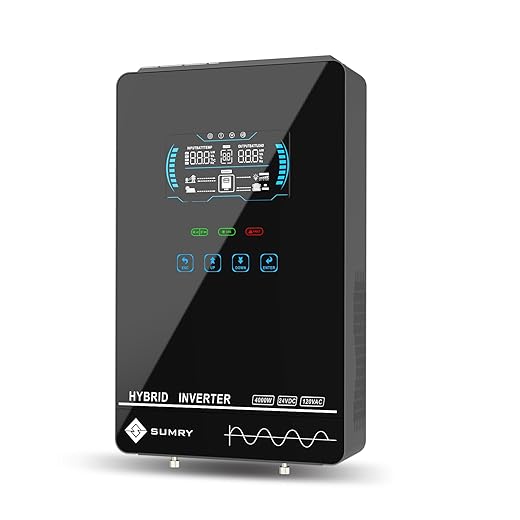
Step 6: Safety, Portability, and Long-Term Support
Safety features and timely firmware fixes can matter more than a few extra watt‑hours.Audit BMS features, thermal management, overcurrent protection, certifications, and documented safety incidents before you commit. We treat these as non‑negotiable engineering signals.
Check physical portability: weigh the unit, test the handle, and confirm stacking or cart compatibility. If we must move it up stairs, target lighter units or confirm a wheeled kit.
Require clear manufacturer support: firmware updates, spare parts, modular batteries, and a transparent replacement policy. Prioritize brands that invest in software and service — they turn a power station into a lasting platform, not disposable hardware.

Final pick: balancing specs with lived experience
We prioritize real uptime, usable outlets, intuitive UX, durable chemistry, and vendor support over headline numbers; that pragmatic mix reflects market maturity and design trade-offs, ensuring a station actually keeps our lights and devices running when it matters most. Ready?
Frequently asked questions
What should I prepare before I choose a portable power station for home backup?
Start with the checklist in the “What we’ll need” section above—measure your space, confirm compatibility with your gear, and read the full walkthrough once before you change settings or buy parts. Portable power station goes faster when prep is done upfront.
How long does it take to choose a portable power station for home backup?
Most readers finish in about 30–90 minutes if they already have the right parts, but budget extra time for measurements, firmware updates, or a second pass when something does not behave the way the manual suggests on the first try.
What is the hardest part when you choose a portable power station for home backup?
The step that trips people up is usually alignment or configuration—getting measurements, cable routing, or software settings right before you commit. If results still look off, re-check the basics in order instead of swapping hardware immediately.
What mistakes should I avoid when I choose a portable power station for home backup?
Skipping measurements, ignoring ventilation or port limits, and rushing the final test are the common failures. Photograph your starting setup, label cables, and verify the outcome with the same content or workflow you will use every day—not a one-off demo.
When should I call a pro instead of trying to choose a portable power station for home backup myself?
Bring in help when the job needs structural work, licensed wiring, or tools you do not own, or when repeated attempts still fail after you have followed the troubleshooting section. A short paid visit can cost less than replacing gear you damaged by forcing the install.

Princess Rioboca is the Lead Editorial Writer at Option Cutter, bringing over seven years of hands-on experience in consumer technology journalism. Specializing in home networking and smart home architecture, she transforms complex technical data into practical, real-world upgrades. Princess personally tests and audits every product she reviews—evaluating real-world Wi‑Fi throughput, cable management durability, and streaming ecosystem stability—to filter out spec-sheet noise. Her rigorous, field-tested insights are designed to give readers transparent, unbiased buying advice on what to purchase, what to skip, and exactly why.















