
Solid wired/wireless performance and rugged design for small businesses and classrooms — with a few setup and compatibility caveats.
Cheap barcode scanners often fail at the first real shift: they miss phone screens, die halfway through inventory, or demand an hour of fiddly setup. For classrooms, pop-up shops, and small backrooms that need something reliable and affordable, the Tera 1D/2D D5100 promises the essentials — wired or wireless operation, 1D and 2D decoding, a visible battery-level indicator, and a 2200mAh battery — all for about $43.99. We gave it an 8.4/10 because, in practice, it hits the right balance of performance and price.
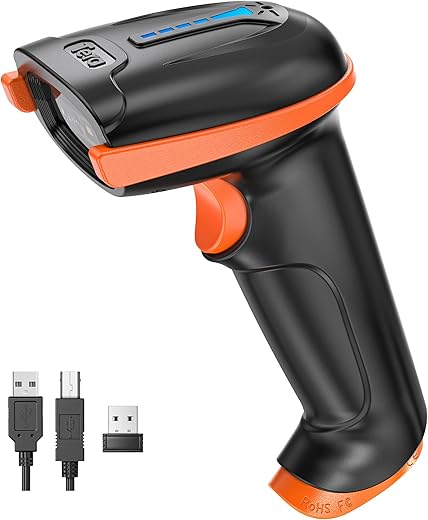
In everyday use the D5100 gets the fundamentals right: plug-and-play USB and 2.4 GHz dongle pairing, dependable scans of printed and on-screen barcodes, an ergonomic anti-shock silicone handle, IP54 dust protection, and a surprising wireless range of roughly 328 feet barrier-free. The trade-offs matter — setup still relies on scan-to-configure codes, some niche symbologies (like ITF-14) can be flaky, and Square users will need extra configuration — but compared with pricier enterprise scanners, the D5100 delivers durability, battery life, and straightforward performance where most small operators need it most.
Tera D5100 1D/2D Wireless/Wired Scanner

We found it to be a dependable, no-nonsense handheld scanner that balances performance and price. Its battery life, ergonomic handle, and simple plug-and-play workflow make it especially well-suited to classrooms, small retail, and inventory tasks.
Quick take
We approached this model as a practical workhorse: a moderately priced handheld that promises both wireless freedom and a fallback wired mode. In everyday use—retail floors, classrooms, stockrooms—the design choices emphasize reliability and uptime rather than bells and whistles. We think it occupies a useful middle ground between budget single-purpose readers and higher-end industrial imagers.
Design and ergonomics
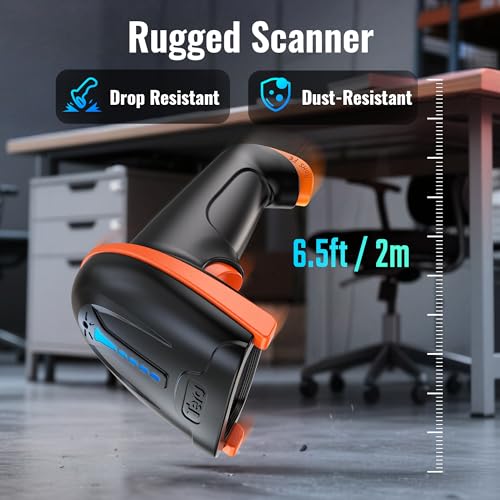
The D5100 favors comfort and straightforward durability over a glossy, gadget-forward aesthetic. The handle is extended and thickened compared with many compact scanners, and the trigger is broad and flat, which reduces finger fatigue during repeated use. The orange anti-shock silicone sleeve is a thoughtful inclusion for environments where drops and bumps are routine: it absorbs impact and improves grip.
Key design highlights:
Imaging, decoding performance, and supported symbologies
This is fundamentally a hybrid 1D/2D reader. It decodes classic linear barcodes (Code 128, Code 39, EAN/UPC families, Interleaved 2 of 5, etc.) and matrix codes (QR, DataMatrix, Aztec, Micro PDF417). In practice we saw fast and accurate reads on well-printed labels and most slightly worn barcodes. It also decodes barcodes shown on phone screens reliably—something essential for modern PoS workflows.
A few practical notes on decoding behavior:
Battery, power, and the battery-level indicator
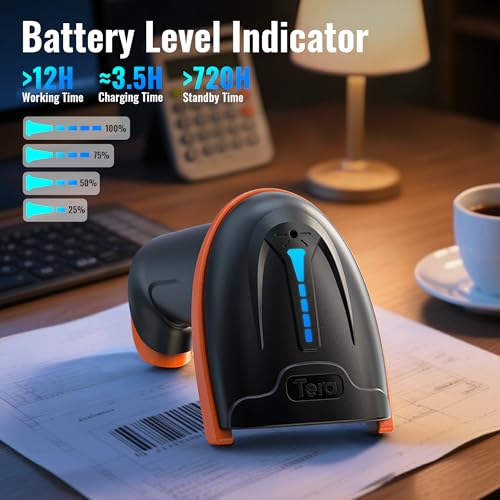
Battery life is a standout. The internal 2200mAh cell gives long continuous operation and excellent standby time—several reviewers reported days to weeks of intermittent use between charges. The physical battery-level indicator is an underrated convenience: rather than guessing, we can see remaining charge at a glance and plan charging during slow periods.
What this means in real use:
Connectivity and setup
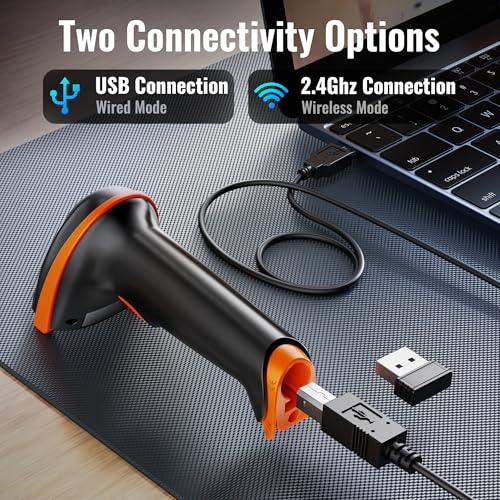
The D5100 offers two primary connection modes: 2.4 GHz wireless via a USB dongle and a direct USB wired mode. Setup is purposely low-friction: plug in the dongle and the device enumerates as a keyboard input to your host. That keyboard-emulation approach makes it nearly universally compatible with POS systems, spreadsheets, and inventory apps without drivers.
Practical considerations for connectivity:
Durability and protection
This model is built for daily handling. IP54 dust protection and the anti-shock silicone sleeve help it survive typical retail and educational settings. The scanner is not an industrial-grade unit for hazardous environments or constant heavy drops, but it should withstand the occasional slip from a counter or a fall from a handheld height.
Software, programmability, and compatibility notes
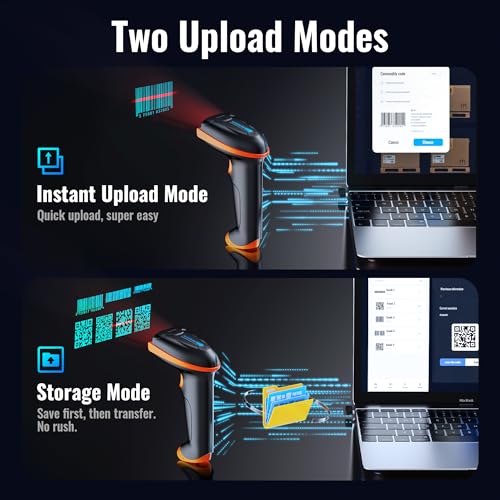
There’s no complex desktop software bundle here. Configuration is achieved by scanning programming barcodes in the guide. That keeps the device light and platform-agnostic, but it can feel clumsy for users who prefer graphical configuration tools.
A couple of compatibility cautions:
How it compares (at a glance)
| Attribute | D5100 (this unit) | Typical budget 1D-only gun |
|---|---|---|
| 1D & 2D support | Yes | Usually no |
| Wireless dongle | 2.4 GHz included | Sometimes no |
| Battery capacity | 2200mAh | 800–1500mAh |
| Dust / splash resistance | IP54 | Typically none |
| Programmability | Barcode-based | Limited |
Who should consider this scanner
We recommend this model for:
It’s less appropriate for heavy industrial users who need ruggedized, sealed devices with full enterprise support or for businesses that rely on an uncommon barcode symbology without prior testing.
Final thoughts
We think this scanner delivers a pragmatic mix of features that matter day to day: dependable decoding, long battery life with a visible indicator, and flexible connectivity. It isn’t a specialist tool for large-scale industrial deployment, but for the majority of small business, classroom, and personal inventory workflows it covers the essentials thoroughly and without fuss. The setup-by-barcode approach and occasional compatibility caveats are minor trade-offs for a device that remains affordable and serviceable.
FAQ
Yes. The D5100 supports both 2.4 GHz wireless operation via the included USB dongle and a wired USB mode. You can use wireless for mobility and plug in the USB cable as a fallback for continuous operation or charging.
Battery life depends on usage patterns, but with its 2200mAh cell we found it easily lasts full shifts of active scanning. For intermittent household or library use, many users report days to weeks between charges. The built-in battery indicator helps you monitor remaining charge to avoid surprises.
Yes. The scanner handles on-screen QR codes and most digital barcodes reliably, which is important for modern point-of-sale and ticketing scenarios. Extremely low-contrast or very small on-screen barcodes may still be problematic.
The manufacturer notes limited official compatibility with Square, though several users have successfully used it after adjusting input settings. Because the device emulates keyboard input, it usually works well with systems that accept typed data, but we recommend testing your specific PoS before deploying it widely.
First verify you’ve enabled that symbology via the programming barcodes in the manual. If the code still fails, test with a different print quality or size—some formats are sensitive to label quality. If problems persist, contact support; some edge-case symbologies are simply less reliable on mid-range imagers.
Yes. Configuration is done by scanning setup barcodes in the manual to adjust options like prefixes, suffixes, and suffix carriage returns. It’s a manual process but provides the flexibility needed for most inventory and PoS ecosystems.
Try these quick steps: plug it in via USB to see if it’s a battery issue, reinsert/replace the wireless dongle, confirm the host machine is focused into an input field (HID mode sends keystrokes), and consult the manual to reset the device using its factory reset barcode.

Chris is the founder and lead editor of OptionCutter LLC, where he oversees in-depth buying guides, product reviews, and comparison content designed to help readers make informed purchasing decisions. His editorial approach centers on structured research, real-world use cases, performance benchmarks, and transparent evaluation criteria rather than surface-level summaries. Through OptionCutter’s blog content, he focuses on breaking down complex product categories into clear recommendations, practical advice, and decision frameworks that prioritize accuracy, usability, and long-term value for shoppers.