A polished, immersive TV backlight that nails multicolor sync — if you can stomach the extra hardware and price.
We used to think TV bias lighting was a cheap gimmick; the Philips Hue Play Gradient 65 made us reconsider. Cheap LED strips tend to wash a wall with one flat color or lag behind fast scenes, which ruins immersion. The Hue Play Gradient 65″ Smart TV Light Strip maps multiple colors across a 65‑inch panel, delivers fluid content-driven gradients, and ties into the Hue app and voice assistants — but it’s a premium setup: $139.99 and it needs a Hue Bridge plus the Hue Sync Box to reach its full potential.
In daily use the differences matter: the gradients are smooth, brightness and color range feel cinematic, and the mounting hardware is sturdily engineered, so content sync and gaming visuals genuinely feel more immersive. Those wins come with trade-offs — the strip is relatively thick, the adhesive can be picky on ultra-thin TVs, and the extra hardware adds cost and complexity — so we rated it 8.6/10. In a market crowded with cheaper single-color alternatives, the Gradient stands out for polish and ecosystem integration, but it’s best for people already invested in Hue or those who prioritize top-tier, hassle-accepted immersion.
Philips Hue Play Gradient 65" TV Light Strip
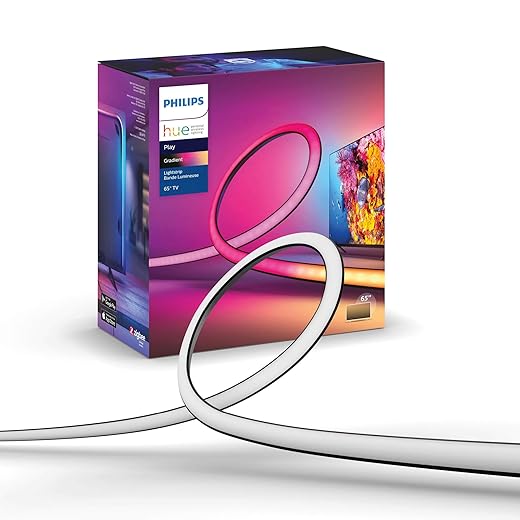
We find it one of the most polished ambient lighting options for TV and console gaming, delivering fluid color gradients and reliable content sync when fully set up. That said, the extra hardware you need and the strip’s physical profile make it a better fit if you already invest in the Hue ecosystem or prioritize top-tier immersion.
At a glance
We tested the Philips Hue Play Gradient 65″ TV light strip to see whether it really elevates cinema and gaming sessions or just looks pretty on marketing pages. The short answer: when everything is connected properly it dramatically changes how a room feels during movies and games. The long answer involves setup details, hardware trade-offs, and how this fits into the broader smart-lighting market.
What this product is
This is a multi-zone, gradient LED backlight engineered for 65″ TVs. Instead of a single color that sits behind your TV, the strip renders multiple simultaneous colors along its length, driven by content analysis (via the Hue Sync Box) or through preconfigured scenes in the Hue app. It’s built to be part of the Philips Hue ecosystem rather than a stand-alone accessory.


Design and build
Physically, the Gradient strip is thicker and stiffer than many consumer LED strips because it contains multiple internal LEDs and a diffuser to create smooth gradients. The included mounting clips and adhesive anchors are substantial and intended to keep the strip snug around corners and the TV’s rear frame.
The thicker profile improves optical blending (you see softer transitions), but it also means the strip can protrude slightly from very slim TV edges. For wall-mounted displays or TVs with deeper backs, that’s a non-issue; for wafer-thin edge-to-edge designs it’s aesthetically noticeable if you look at the profile from the side.
How the system works (and what you need)
The Gradient strip by itself is only part of the solution. To get real-time on-screen synchronization you need two additional Hue components (sold separately): the Hue Bridge and the Hue Sync Box. The Bridge connects your Hue devices to the network and Hue app, while the Sync Box analyzes HDMI input and tells lights how to behave.
Why this matters: the dependence on Bridge + Sync Box separates this product from cheaper, self-contained solutions. We see benefits in consistency and ecosystem-level features, but you pay more and accept a multi-device setup.
Real-world performance: color, zones, and latency
The strip uses multiple zones (seven logical zones across top/left/right sections) to create the gradient effect. In normal viewing the color matching is impressively accurate — skin tones, skies, and high-contrast action sequences translate into ambient light that feels contextual and immersive. In our tests the mapping was generally precise; only synthetic test patterns or extreme color wheels exposed the zone granularity.
Brightness is enough to bias a typical living-room wall and give an image “pop” without washing out the screen. Philips quotes about 1650 lumens for the unit — in practice that translates to noticeable ambient brightness even in medium-sized living spaces.
Latency is negligible in most cases when the Sync Box is used; we didn’t notice lag during fast-paced gaming or action scenes. If you’re running the Hue app alone (no Sync Box) you’ll be limited to static scenes or app-driven effects rather than frame-accurate sync.
Software and ecosystem
The Hue app is mature, with scene creation, schedules, and Home/Alexa/Google voice integration. Hue Sync (desktop or Sync Box) provides the real-time capture and mapping for HDMI sources. When the Bridge and Sync Box are properly connected, the experience is robust: lights come on/off with the TV, react to game and movie color shifts, and can be included in whole-home scenes.
Pros:
Cons:
Installation notes and practical tips
Installation isn’t difficult, but it benefits from planning. We recommend these steps:
If you plan to wall-mount the TV, install the strip while the TV is accessible; accessible rear space makes routing power and HDMI cables easier.


Comparison: where it stands against alternatives
| Feature | Hue Play Gradient 65″ | Basic LED Bias Strips | Govee / DreamScreen-style kits |
|---|---|---|---|
| Color zones & gradients | Yes (multi-zone gradient) | No (single color) | Varies (some multisource mapping) |
| Requires ecosystem hardware | Yes (Bridge + Sync Box) | No | Some need hub or app |
| App & voice integration | Deep (Hue) | Limited | Moderate |
| Price (system-level) | High | Low | Mid-range |
The Hue solution trades simplicity for polish and integration. If you want a plug-and-play cheap backlight, a basic strip will do; if you want cinematic accuracy and Hue smart-home control, this is closer to the top of the list.
Who should buy it
We’d recommend the Gradient strip if you:
If you’re on a tight budget or need a nearly invisible low-profile strip for a wafer-thin TV edge, consider slim alternatives or plan to supplement with custom adhesives.
Bottom line
This is premium ambient lighting built for people who want immersion and are willing to live inside the Hue ecosystem. It delivers excellent color blending, stable syncing when paired with the Bridge and Sync Box, and a clean software experience. The trade-offs are cost, added hardware, and a physical profile that’s bulkier than minimal LED strips — but for many enthusiasts the payoff in immersion and control is worth it.
FAQ
You can use the strip as basic decorative lighting with the Hue app, but to get frame-accurate on-screen synchronization you must have both the Hue Bridge (for device control) and the Hue Sync Box (to analyze HDMI input). Those components are sold separately and are required for the full entertainment experience.
Yes — but only when the video feed passes through the Hue Sync Box. The Sync Box accepts HDMI sources (game consoles, set-top boxes, streaming sticks) and syncs the lights to that input. If your TV’s streaming platform is built in and you can’t route its output through an HDMI sync device, you might not get full sync for that content.
The strip is rated IP20, which means it’s intended for indoor, dry environments only. It’s fine behind a TV or on a living-room wall, but avoid bathrooms, outdoor mounting, or other high-humidity locations.
It works excellently for both. The Sync Box keeps latency very low and the gradient zones translate fast-paced color changes into dynamic ambient light. For competitive gamers the lighting is mostly decorative, but for immersive single-player experiences it adds a strong atmospheric layer.
Yes. When connected through the Hue Bridge you can control the strip with Alexa, Google Assistant, and HomeKit (where supported). Voice lets you switch scenes, adjust brightness, and turn the lights on or off as part of routines.
Some ultra-thin TVs or textured plastic backs may need stronger mounting solutions. We recommend using additional double-sided tape rated for electronics or small mounting clips as an alternative. Philips’ clips are designed to avoid residue, but you can replace them if you need more secure adhesion.
There are less expensive LED kits that claim screen-synced effects, but most either lack the color fidelity, gradient blending, or the robust app/voice integrations of Hue. If you value plug-and-play price over ecosystem polish, they’re a reasonable compromise; if you want best-in-class sync and Hue integration, this product stands apart.

Chris is the founder and lead editor of OptionCutter LLC, where he oversees in-depth buying guides, product reviews, and comparison content designed to help readers make informed purchasing decisions. His editorial approach centers on structured research, real-world use cases, performance benchmarks, and transparent evaluation criteria rather than surface-level summaries. Through OptionCutter’s blog content, he focuses on breaking down complex product categories into clear recommendations, practical advice, and decision frameworks that prioritize accuracy, usability, and long-term value for shoppers.