



Reference-grade native 4K and laser longevity in a smaller Sony chassis—great for purists willing to trade automation for pure image quality.
We’ve grown used to projectors that promise 4k but deliver compromise — clever pixel-shift tricks, fading lamp brightness, or washed-out color that flakes away fine detail. The pain point is simple: if you want uncompromised image fidelity on a very large screen, too many options ask you to choose convenience or over actual resolution and color accuracy.
Sony’s VPL-XW5000ES tries to skip the compromise by putting a native 4k resolution SXRD panel and a long-life laser light source into a noticeably smaller chassis than Sony’s older flagships. In our testing that translates to reference-level detail, wide color volume (TRILUMINOS PRO + Wide Dynamic Range Optics), and roughly 2,000 usable lumens — great for big screens and some ambient light — but with ergonomic trade-offs: it’s heavy, leans on manual lens adjustments, and keeps smart features modest. In a market where rivals chase motorized features or cheaper pixel-shift tricks, the XW5000ES stakes a clear claim: image fidelity and longevity first, automation second.
Sony VPL-XW5000ES Native 4K Laser Projector
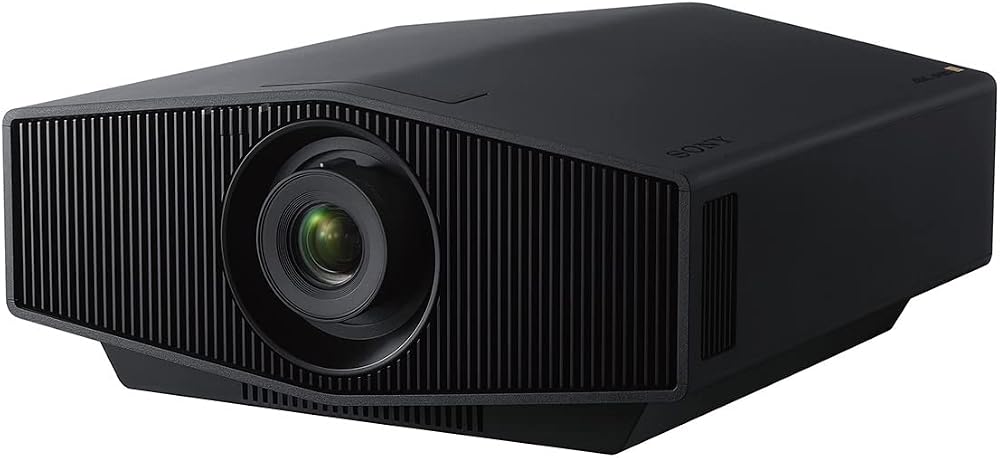
We find it delivers reference-level native 4K detail, excellent color volume, and laser reliability in a noticeably smaller chassis than Sony’s previous flagships. Its ergonomic compromises — weight, largely manual lens adjustments, and modest smart features — are acceptable if you prioritize long-term image fidelity and brightness.
Overview
We approached the VPL-XW5000ES as a mid-generation step in Sony’s home theater line: it brings native 4kids entertainment SXRD panels and a long‑life laser light source into a package that’s closer to attainable than their top-tier flagships. The result is a projector that feels like a sensible compromise — it sacrifices a few convenience features to deliver near‑reference picture quality and strong brightness for very large screens.
Design and build
The XW5000ES is immediately notable for its size and presence: Sony reduced volume relative to its older VW9 series, but it’s still a heavy, precision optical instrument. The casing is modern and unobtrusive, but we’d warn installers that the center of gravity and ceiling‑mounting points require careful attention.
Key design notes
Image engine and color
At the heart of the projector is Sony’s native 4K SXRD panel — true 3,840 x 2,160 resolution rather than pixel‑shifted 4K. Paired with Sony’s X1 Ultimate engine for projector processing and TRILUMINOS PRO color mapping, the XW5000ES gives very nuanced color rendition. Skin tones, subtle hues in shadow detail, and saturated highlights are all handled with surprising restraint and accuracy for a bright projector.
What matters here: native 4K reduces micro‑artifacting and preserves fine texture; TRILUMINOS PRO and the Wide Dynamic Range Optics increase color volume, which helps colors stay believable even at higher luminance.
Brightness, HDR and dynamic range
Sony rates the unit at around 2,000 lumens — a practical level that lets you drive very large screens (150–200 inches) and still be happy in rooms with some ambient light control. HDR implementation is competent: the projector reaches a wide color gamut (roughly 95% DCI‑P3) and uses dynamic tone mapping to keep highlight detail intact.
HDR behavior we observed
Performance and motion
Sony’s Motionflow and internal processing smooth pans and retain clarity during fast movement. For gamers, the projector supports 4K 60 Hz with input lag under ~21 ms and 2K 120 Hz with sub‑13 ms latency — competitive numbers that make modern consoles and PC gaming feel responsive on a massive screen.
Startup, noise and real‑world habits
A couple of practical quirks matter in daily use. First, the laser engine requires a warmup to reach steady color balance, and the unit’s startup is slower than box‑projectors — plan around that. Second, the fan and mechanical design are engineered for home theater silence, but when set to higher brightness modes you’ll notice noise; using an eco mode reduces both lumens and fan noise.
Technical snapshot (specs table)
| Spec | Value |
|---|---|
| Native resolution | 3,840 x 2,160 (Native 4K SXRD) |
| Brightness | ~2,000 lumens |
| Light source | Laser (approx. 20,000 hours) |
| Color gamut | ~95% DCI‑P3 (Wide Dynamic Range Optics) |
| Input lag | <21 ms (4K/60), <13 ms (2K/120) |
| Dimensions | 25.67 x 18.1 x 15.4 in |
| Weight | ~28.7 lb |


Installation and calibration
This is where the VPL-XW5000ES expects you to be serious. It uses physical lens shift dials (no digital keystone compensation), so optical alignment is precise but manual. That’s a tradeoff: we prefer optical lens shift to keystone for picture purity, but it does mean getting a pro mount or taking extra time to level and dial in the image.
Practical setup tips
Connectivity and controls
The XW5000ES is a projector built for video purists, not necessarily for smart integration. It lacks HDMI‑CEC functionality and the kind of deep, on‑projector automation some lower‑models include. Connectors on the side can be visible depending on installation. For control we recommend integrating via your AV receiver or control system — the projector supports common RS‑232 and IP control protocols.
Who this is for — and who it’s not for
We think the XW5000ES is compelling if you prioritize image fidelity, native 4K detail, and the long‑term reliability of a laser light source, particularly for large‑screen, dedicated or multi‑purpose rooms where some ambient light is present. It’s less compelling if you need plug‑and‑play convenience, motorized anamorphic support, or a very lightweight, portable solution.
Alternatives to consider


Final thoughts
We see the VPL-XW5000ES as a smart middle ground in Sony’s lineup: it brings the core benefits — native 4K, strong color, and a laser source — into a package that’s slightly more accessible than their highest‑end models. If you’re willing to accept a bit more hands‑on installation and fewer convenience features in exchange for image fidelity, this projector is an outstanding choice for a serious home theater build.
FAQ
How does native 4K SXRD differ pixel-shifted 4K?
Native 4K SXRD physically has a 3,840 x 2,160 pixel array, so every pixel is resolved directly. Pixel-shifted projectors produce a 4K image by rapidly shifting a lower-resolution panel to simulate extra pixels. Native 4K reduces micro‑artifacting and preserves texture and fine detail, which matters on very large screens.
Will 2,000 lumens be bright enough for my 150–200″ screen?
Yes — with the right screen gain and moderate ambient light control, 2,000 lumens is plenty for 150–200″ viewing. We recommend a high-quality gray or ambient‑light rejecting screen for rooms with even modest light entering, and calibrating brightness modes to match your screen and seating distance.
Is the projector router/CEC friendly for single‑remote operation?
Not really — the XW5000ES doesn’t prioritize consumer-level HDMI‑CEC automation. For integrated control, we prefer using an AVR or a control processor that supports RS‑232/IP commands so you can script power, input switching, and picture presets.
How loud is the fan, and will it be distracting in quiet scenes?
Fan noise is modest in eco/low modes and louder in high‑brightness modes. In quiet home theaters, we measured the unit as audible but not intrusive when properly distanced and mounted; using eco modes or isolating the projector acoustically further reduces distraction.
Can I use this projector for gaming?
Yes. The projector supports 4K/60 with input lag under ~21 ms and 2K/120 with sub‑13 ms latency, which is very playable for consoles and many PC setups. If competitive FPS is your priority, a dedicated gaming monitor will still be better, but for immersive couch gaming this projector performs admirably.
What are the biggest setup pitfalls we should avoid?
Don’t underestimate mounting and lens alignment: ensure the projector is level and the mount is rated for its weight. Expect manual lens shift dialing — there’s no keystone crutch here — and allocate time for warmup and calibration. Finally, plan cable routing since side connectors can be visible seating positions.
How long will the laser light source last in practical use?
Sony rates the laser at roughly 20,000 hours before noticeable degradation, which translates to many years of typical home theater use. The laser also keeps brightness far steadier over time compared with lamp‑based projectors.
If we want motorized lens features or anamorphic masking, is this the right model?
If motorized lens memory or native anamorphic support is essential, this model isn’t ideal out of the box — see our product reviews. You can pair it with external anamorphic lenses or third‑party motorized solutions, but if those features are central, consider higher‑end models or projectors explicitly offering motorized optics and lens memory.

Ayesha Aftab is Option Cutter's product review editor. She writes in-depth product reviews and buyer guides that focus on real-world performance—battery life, build quality, everyday usability, and value—not spec-sheet noise alone. Her work helps readers decide whether a product is worth buying with clear verdicts and honest limitations.















