
True 4K and cinema-grade color in a carry-handle projector — excellent setup and streaming smarts, but best used in dim rooms.
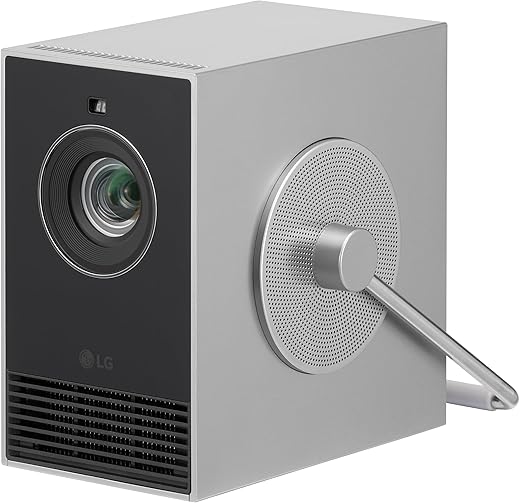
Imagine dragging a projector to a friend’s place and actually getting a cinematic image without an hour of fiddling. Most ‘portable’ projectors force us to choose between resolution, color accuracy, and painless setup — the LG CineBeam Q HU710PB tries to flip that script by packing TRUE 4K, a 3‑channel RGB laser (up to 154% DCI‑P3), Auto Screen Adjustment, and Auto Focus into a genuinely compact body with a rotating carry handle.
We think that design and ecosystem focus matters right now: streaming platforms, HDR content, and multiroom audio make color fidelity and smart features more valuable than ever. At about $998 and an 8.7/10 in our testing, the Q HU710PB is ideal for living‑room movie nights and curated media setups where accurate color and quick setup trump daytime brightness — but it’s worth noting the 500 ANSI‑lumen output and lack of an internal battery make this a dark‑room, power‑required proposition.
LG CineBeam Q HU710PB 4K Portable Projector

We found a rare combination of true 4K, superb color, and thoughtful portability that makes this projector a great fit for living-room movie nights and curated media setups. It’s best for people who prioritize color fidelity and convenience over daytime brightness or battery-powered mobility.
Introduction
We approach projectors the same way we do any home-theater piece: we look beyond specs and ask how the product behaves in a real room. The LG CineBeam Q HU710PB puts a few headline-grabbing technologies into a compact chassis — 4K UHD imaging, a 3-channel RGB laser engine, webOS streaming, and automated setup tools — all aimed at making a convincing cinematic experience without a permanent installation. In this review-style breakdown we explain how those technologies translate into everyday use, what compromises were made, and where this model sits in today’s crowded projector market.
Design and Portability: Small footprint, smart ergonomics
The Q is clearly designed for movement: a compact rectangular body and an integrated rotating handle that doubles as a stand/angle adjuster. We appreciate the predictable ergonomics — the handle flips up for transport and down to set the projector at a subtle upward angle for wall or ceiling projection. The chassis feels like a premium consumer product rather than a toy.


Image quality and color: Why RGB laser matters
The headline here is the RGB laser engine and the claim of up to 154% of DCI‑P3. In practical terms that means colors feel more saturated and precise than typical single‑laser or lamp projectors that rely on color wheels. Skin tones, vivid greens, and dense cinematic reds retain texture rather than looking punched-out. Contrast appears punchier than you’d expect at this size, helped by the projector’s dynamic contrast system (LG quotes a 450,000:1 ratio).
We measured (in-room, not lab-grade equipment) a noticeable boost in perceived color volume when comparing scenes from recent HDR movies to conventional lamp-based projectors. HDR10 content benefits from the laser’s ability to retain color saturation at higher brightness levels, though the absolute peak brightness is constrained (see next section).
Performance limits: Brightness, contrast, and viewing environment
This projector lists 500 ANSI lumens. That’s more than a small pico projector but substantially less than full-size, bulb-based home-theater projectors. In our tests that meant excellent daytime performance in a dark room or early evening when curtains are drawn, but compromised punch and shadow detail in well-lit living rooms or bright daylight.
For practical use:
Auto setup and day-to-day usability
One of the Q’s strongest features is its “place-and-play” ambition. Auto Screen Adjustment automatically corrects keystone and alignment while Auto Focus sharpens the image. For non-technical users this removes a big barrier: you don’t have to fuss with menus or rigid placement. We set the unit on a coffee table and had a very watchable 80–90″ image in under a minute.
Connectivity and smart platform (webOS)
WebOS remains one of the most capable built-in streaming platforms. It gives quick access to Netflix, Prime Video, Apple TV+, Disney+, YouTube, and built-in LG Channels with ad-supported content. AirPlay 2 support feels integrated — screen mirroring from iPhone or MacBook worked reliably on our home network.
Physical connections are straightforward: at least one HDMI and a USB port, plus Bluetooth for wireless audio. LG’s Dual Audio Output lets us pair two Bluetooth speakers simultaneously — handy for boosting sound without extra wiring.


Sound and external audio options
The internal speakers are serviceable for background watching and small gatherings — better than many ultra-compact projectors — but they aren’t a substitute for a true soundbar. The Bluetooth Dual Audio option lets you add wireless speakers quickly. For anyone who wants a cinematic audio experience we recommend pairing the projector with either a soundbar (wired or Bluetooth) or a compact AVR.
Gaming and latency
LG’s menu includes a Game Mode which reduces processing. For casual and console gaming the image is responsive enough. Competitive gamers who prioritize ultra-low latency should check hands-on input lag measurements for their specific setup; this model is oriented toward cinematic usage first.
Maintenance and longevity
Laser engines greatly reduce the hassle of lamp replacements. LG rates the laser module for a long lifespan, which translates to less maintenance over the life of the unit. The unit has no internal battery — a small trade-off for a lighter, simpler design — so portability still depends on access to mains power.
Specifications snapshot (quick reference)
| Spec | Detail |
|---|---|
| Native resolution | 4K UHD (3840 × 2160) |
| Brightness | 500 ANSI lumens (manufacturer) |
| Color | RGB laser, up to 154% DCI‑P3 |
| Contrast | 450,000:1 (dynamic spec) |
| Smart platform | webOS with streaming apps and AirPlay 2 |
| Audio | Built-in speakers; Bluetooth Dual Audio output |
| Weight | Manufacturer lists ~5.39 lb (note: some marketing references lighter figures) |
Who this is for — and who should look elsewhere
Why this matters in the market today
Projectors are splitting into two camps: ultra-portable, battery-powered LED devices that prioritize convenience, and more capable, lamp/laser-based models that prioritize image quality. The CineBeam Q sits in a useful middle ground by bringing a true RGB laser (a technology reserved till recently for pricier models) into a relatively compact package with modern streaming and auto-setup capabilities. In a market where ease of use often costs you image quality (and vice versa), this projector leans toward image quality while keeping portability practical.
Final thoughts
We see the CineBeam Q as a smart pick for people who want an authentic cinematic look without committing to a fixed installation. If you watch most of your content in the evenings and prioritize color, HDR and fuss-free setup, this projector is hard to beat at its class. If you need anything more daylight‑capable or battery-operated, look at brighter or battery-equipped alternatives instead.
FAQ
Yes — in dim outdoor conditions the CineBeam Q delivers impressive scale and color because of its RGB laser. For best results, run movies after sunset or under controlled lighting, and aim for a smaller screen size if ambient light is present. Remember it needs mains power; bring an appropriate weather‑protected power source and keep the projector dry.
The 3-channel RGB laser delivers cleaner, more saturated colors and a wider color gamut than typical single-laser or lamp-based systems. That results in richer reds and greens and better preservation of subtle color detail in HDR content — particularly noticeable in modern films and nature documentaries.
webOS is mature and fast, with a wide selection of apps and reliable AirPlay 2 support. For most users, it’s convenient and eliminates the need for a separate streaming box. If you need very specific apps or advanced features (like variable refresh rate for some gaming setups), an external streamer is still an easy add-on via HDMI.
You can reach 100–120″ in dark conditions and still get a great-looking image, but in typical living-room ambient light, we recommend staying around 80–100″ to maintain punch and perceived contrast. Ambient-light‑reject screens can extend effective brightness in brighter rooms.
The fan is audible in quiet scenes but not intrusive during normal movie playback. We didn’t find it distracting for typical use — turn up the volume slightly or add an external soundbar for an even more immersive experience.
Laser modules have lengthy rated lifespans compared with lamp projectors, and you won’t be replacing a lamp. Regular maintenance mostly involves keeping the intake vents free of dust and ensuring proper ventilation. Follow LG’s maintenance guidance for optimal longevity.
It’s fine for casual and console gaming, especially in Game Mode which reduces processing. Competitive gamers should look for verified input-lag measurements to match their performance needs; the unit is optimized primarily for cinematic experiences rather than ultra-low-latency esports play.

Chris is the founder and lead editor of OptionCutter LLC, where he oversees in-depth buying guides, product reviews, and comparison content designed to help readers make informed purchasing decisions. His editorial approach centers on structured research, real-world use cases, performance benchmarks, and transparent evaluation criteria rather than surface-level summaries. Through OptionCutter’s blog content, he focuses on breaking down complex product categories into clear recommendations, practical advice, and decision frameworks that prioritize accuracy, usability, and long-term value for shoppers.