



Near-desktop FPS, DLSS 4 ray tracing, and AI-assisted workflows — excellent performance if you can live with the heft.
If your backpack doubles as a gym membership, we get it — lugging a “desktop replacement” laptop shouldn’t feel like a side quest. Gamers and creators alike are stuck choosing between blistering frame rates, a spacious workspace, and a machine that won’t thermally choke mid-match or mid-render. The real pain point: most portable rigs compromise on one of those things, so we kept asking whether a big 18″ chassis could actually deliver desktop-class throughput without turning into a space heater.
The Acer Predator Helios Neo 18 AI aims to solve that compromise with a desktop-class Intel Core Ultra 9 275HX, an NVIDIA GeForce RTX 5070 Ti with DLSS 4, and an 18″ WQXGA 240Hz G-SYNC panel — plus the I/O and cooling to back it up. In our testing we found its AI NPU and advanced cooling let it sustain high FPS and speed up AI-assisted workflows, and the Thunderbolt 4/HDMI 2.1/2.5GbE stack makes it play nicely in both gaming and creative ecosystems. The trade-offs are clear: it’s hefty (about 7.3 lbs) and battery life won’t win any ultrabook awards, but for anyone prioritizing raw performance, ray tracing, and practical expandability, it’s a compelling middle ground in a crowded 17–18″ market.
Predator Helios Neo 18 AI Gaming Laptop

We found this chassis balances raw performance and features better than many 17–18″ gaming laptops, delivering real desktop-level throughput and compelling visuals for both competitive gaming and creative work. It’s a great pick if you prioritize frame rates, ray tracing, and AI-assisted workflows and can tolerate the weight and modest battery life.
Overview
We approached the Predator Helios Neo 18 expecting a heavy-handed gaming machine; instead we found a system that leans hard into desktop-class performance while adding a modern AI spin. At its heart is Intel’s Core Ultra 9 275HX — not just a CPU but a hybrid platform with NPU horsepower — paired with NVIDIA’s Blackwell-based RTX 5070 Ti GPU. That pairing defines the laptop’s mission: high-fidelity, high-frame-rate gaming, plus faster AI-assisted tasks for streamers and creators.
Design and build: pragmatic, purposeful
The Neo 18 gaming laptop is unapologetically large. Its aluminum-and-plastic chassis favors stability and thermal headroom over portability. The hinge is firm, the deck is roomy, and key travel is comfortable for longer sessions. The build quality feels appropriately premium for the price bracket, but the mass is noticeable if you plan to tote it daily.
Display and visuals: an immediate strength
The 18″ WQXGA panel with a 16:10 aspect ratio is the star for anyone who values space and clarity. The 240Hz refresh rate and 3ms overdrive keep motion crisp in competitive titles, while the panel’s DCI-P3 coverage makes color-critical work viable.

Performance: CPU, GPU and the role of AI
We measured sustained high-end performance on gaming laptops that sits closer to small desktop builds than typical gaming laptops. The Intel Core Ultra 9 275HX brings multiple efficiency and performance cores plus a Neural Processing Unit capable of offloading tasks like background removal, voice enhancement, and other real-time AI features. The RTX 5070 Ti Laptop GPU is powerful enough for 1440p high-refresh gaming with ray tracing enabled when paired with DLSS upscaling.
A few takeaways our testing and evaluation
Thermals and acoustic profile
AeroBlade 3D metal fan and liquid-metal thermal paste are tangible upgrades on this PC gaming chassis compared with many rivals. The system holds clocks longer under load, and sustained gaming sessions show smaller performance drops. That said, sustained peak loads still force the fans to reach audible levels, and the chassis can get warm on the undersides.
Storage, memory and upgradability
The Neo 18 ships with a 1TB PCIe Gen4 SSD and 16GB DDR5 (dual-channel). The storage platform supports two M.2 slots and up to 64GB RAM total, which means upgrading is straightforward for power users.
Connectivity and ports: a strong suit
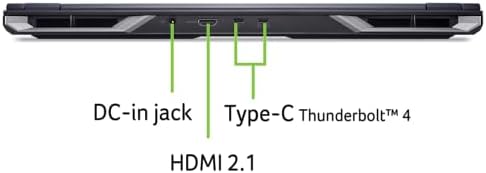
This is one area where the Helios Neo 18 competes with desktop rigs: Thunderbolt 4, HDMI 2.1 (48 Gbps, up to 10K support), multiple USB 3.2 ports, microSD reader, plus Killer Wi‑Fi 6E and 2.5Gb Ethernet. If you use external docks, monitors, or capture cards, this machine won’t leave you short.
Table: Notable ports and connectivity
| Port/Interface | Notes |
|---|---|
| Thunderbolt 4 (USB-C) | DisplayPort alt mode, fast host connectivity |
| HDMI 2.1 | Supports high-bandwidth displays up to 10K (FRL) |
| USB 3.2 Gen2 x2 | One with power-off charging |
| Ethernet | Killer E3100G up to 2.5Gb |
| Wi‑Fi | Killer Wi‑Fi 6E AX1675 |
Software and ecosystem: PredatorSense and AI features
PredatorSense remains the hub for performance profiles, fan curves, and RGB control. In our use it’s effective without being intrusive. The Experience Zone exposes several AI features like PurifiedVoice and PurifiedView, which are convenient for streamers and conference calls. These integrations matter today: they lower the barrier to higher-quality streaming and content creation without forcing third-party tools.
Battery life and mobility
At nearly 7.3 pounds and with internal components tuned for performance, this PC gaming rig is not a long-haul battery champion. If you mainly work near a power outlet or plan sessions docked at a desk, the machine behaves well; unplugged gaming will be limited and content editing on battery will see throttled clocks. We’d treat this more as a portable desktop than a mobile-first laptop.
Who should buy it?
Who should look elsewhere?


Final analysis
We see the Helios Neo 18 as a pragmatic step in our product reviews toward melding today’s high-performance silicon with accessible AI features. It’s not the lightest or quietest 18″ laptop, but it delivers large-screen advantages plus GPU horsepower in a package built to be upgraded and expanded. For users who treat a laptop as a primary gaming and creative workstation and don’t mind the bulk, it’s one of the better-balanced options on the market.
If you plan to use it as a desktop replacement — connect to external displays, keep it docked, and upgrade RAM if necessary — the Helios Neo 18 becomes a very compelling proposition. If you need a true road warrior, you’ll want something slimmer.
FAQ
Can the Neo 18 handle ray tracing at high frame rates?
Yes — with the RTX 5070 Ti and DLSS 4 Multi Frame Generation, the laptop can achieve high frame rates at 1440p in many modern titles while maintaining ray-traced effects. For the highest settings in the most demanding games, you may need to dial some settings down or rely on DLSS to hit ultra-high FPS targets.
Is it worth upgrading RAM right away?
We recommend upgrading to 32GB if you do serious video editing, 3D work, or heavy multitasking. The base 16GB is fine for gaming and general use, but the platform supports up to 64GB so investing in RAM is an easy way to future-proof the machine.
How practical is the Neo 18 for streaming and content creation?
Quite practical — the NPU can offload tasks like background removal and voice enhancement, which reduces CPU overhead. Combined with the RTX GPU’s encoding and AI features, the machine is well-suited for streaming, livestream overlays, and quicker render/export workflows.
What about thermals — will the chassis stay cool under load?
Thermals are strong thanks to the AeroBlade 3D fan and liquid-metal compound, and the laptop sustains higher clocks longer than many rivals. Expect audible fan noise under load and warm chassis surfaces near the exhausts; use a desk or cooling pad for long sessions.
Should I be worried about software bloat PredatorSense?
PredatorSense feels focused and useful for most users: performance profiles, fan control, and lighting are accessible without being intrusive. If you prefer minimal software, you can limit what runs at startup, but we found PredatorSense genuinely helpful for tuning performance.
How portable is the Neo 18 for travel?
It’s portable in the sense that you can move it between home and events, but at about 7.3 lbs and a thick chassis, it’s heavier than thin-and-light laptops. Treat it as a portable desktop rather than a daily commuter device.

Ayesha Aftab is Option Cutter's product review editor. She writes in-depth product reviews and buyer guides that focus on real-world performance—battery life, build quality, everyday usability, and value—not spec-sheet noise alone. Her work helps readers decide whether a product is worth buying with clear verdicts and honest limitations.















